As mentioned, only one supported initially is Cox. I know it's riddled with bugs so hoping someone had Cox to test and once it's ironed out, I'll work on adding more providers.
Bare with me!

As mentioned, only one supported initially is Cox. I know it's riddled with bugs so hoping someone had Cox to test and once it's ironed out, I'll work on adding more providers.
Bare with me!
Nice update!!!! Got question on FuboTV, a few of my channels are now DRM, are you able to run those through PrismCast?
Also, I noticed that in SlingTV using PrismCast, Vix Deportes 21, 22, 23 has wrong link. stream URL for 21 should be Stream Live TV Now | Get Started
vix 22 is Stream Live TV Now | Get Started
vix 23 is Stream Live TV Now | Get Started
Also on sling, I subscribe to VIX+ and the audit and scraper does not pick those channels up. I'm currently running them through PrismCast and not through FastChannels-PrismCast.
Again, very nice update with the TVE option!!!
yea that channel sucks.. good call out. it appears to be a rotating event channel. i'm going to exclude for now until i sort it out.
also, pls try 5.0.2 tomorrow. i removed the cascading sign in for all TVE sources and left it to one at a time until it's stable. seems to work much better now. hang in there, we'll get this dialed in for Cox
appreicate the many responses offering to help-- once i get Cox dialed in, i think adding other cable providers will go a lot smoother.
The Masked Singer channel at Fox One plays back-back previously aired episodes without commercials. I get the channel using EPlusTV. Each episode is on average 44 minutes ESPN+ & FOX Sports with Custom Channels via EPlusTV - #3136 by chDVRuser
Here's the channel logo for The Masked Singer channel
https://tmsimg.fancybits.co/assets/GNLZZGG0027SNRC.png?w=360&h=270
Here is a script someone here sent me. I am docker-illiterate, don't know how to use Compose, and tried, but gave up on, Portainer. This works for me (though I always do a backup within the app just to be sure because the first time I did this it installed a completely new container and all of my customizations were in the Portainer container. IIRC I found a way to use the restore file and get things back the way I wanted them (this was before the app itself made restorations much easier). Anyway, this is what I currently use when I want to run an update. It lives in a batch file.
docker container stop --timeout 30 fastchannels
docker container rm fastchannels
docker image rm ghcr.io/kineticman/fastchannels
docker run -d --name fastchannels --restart unless-stopped -p 5523:5523 -v fastchannels_data:/data ghcr.io/kineticman/fastchannels:latest
Never heard of Watchtower - is there a link somewhere? I searched for it within Docker and it came up with too many hits.
https://watchtower.nickfedor.com/v1.20.3/
Read the documentation before using it (I don't use it)
tnx, will add to the community gist.
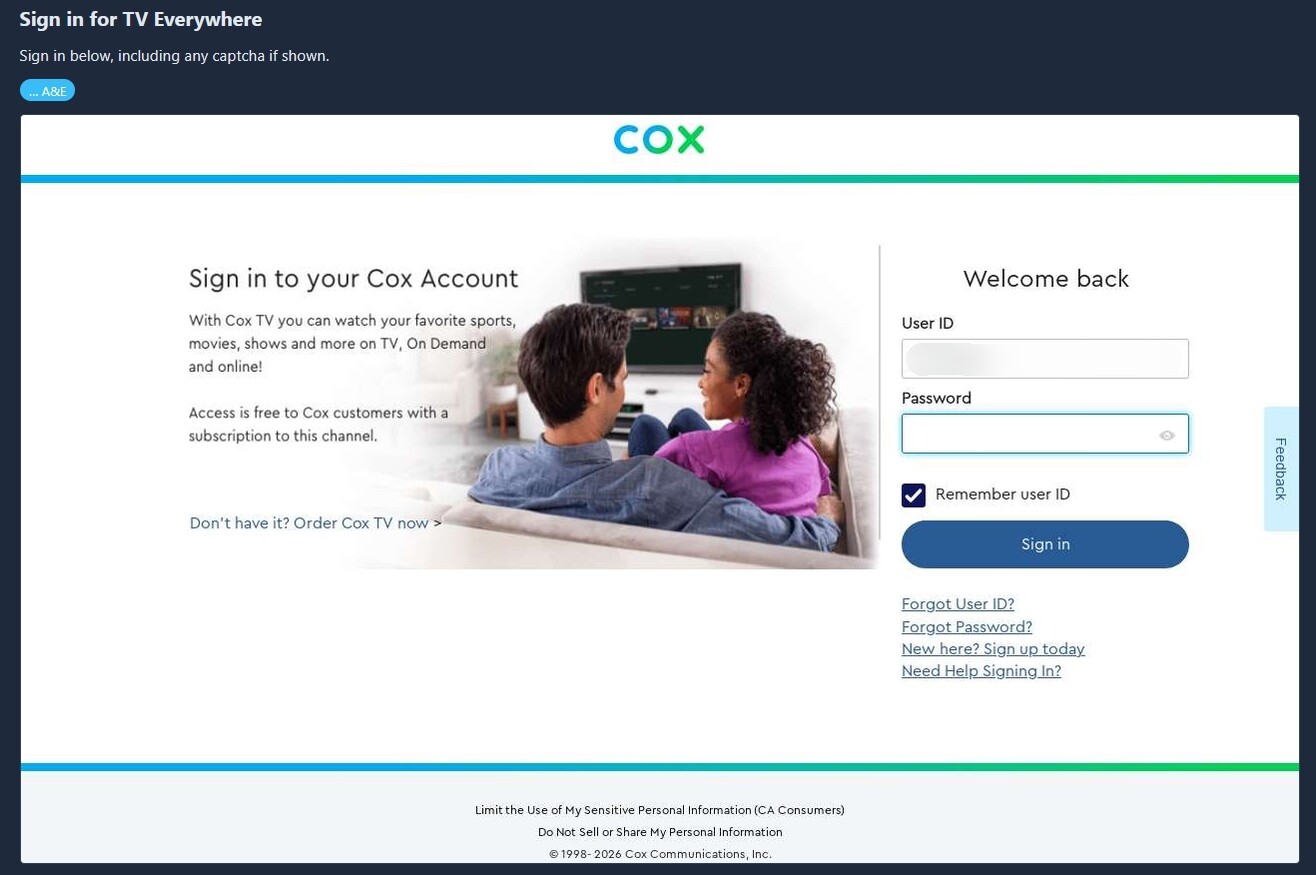
I just went straight to it with A&E and it ended up here:
From the logs:
2026-08-11 10:57:20,118 INFO app.routes.tasks: Enqueued MVPD browser login for requestor_id=AETV mso_id=Cox cascade=False
2026-08-11 10:57:20,223 INFO gunicorn.access: 172.24.0.1 "POST /api/settings/tve/browser-login/start HTTP/1.1" 200 21 2s
2026-08-11 10:58:09,878 INFO app.worker: [mvpd-login] autofill: no visible password field after 12.0s (SSO already past login, a captcha-first page, or an unrecognized form) url=https://www.cox.com/content/dam/cox/okta/loginwidget.html?fromURI=https%3A%2F%2Flogin.cox.com%2Fapp%2Fccires_tveverywhere_1%2Fexk1jha9awwp564kZ0h8%2Fsso%2Fsaml%3FSAMLRequest%3DhVNdc9owEPwrHr3bMo7BoMFkaEimzKQNBScPeckIc2AltuTqZD7%252BfWUDLm3S9FGnu92927vh9b7InS1oFErGpOP5xAGZqpWQm5g8Jndun1yPhsiLPCjZuDKZnMPPCtA4tlAiO%252F7EpNKSKY4CmeQFIDMpW4y%252F3bPA81mplVGpyokzRgRtLNWNklgVoBegtyKFx%252Fl9TDJjSmSUYulxS%252BTxlVqCl6rCRmjNQ2vEdxDEmVg5QnLTtHBGydVGSFu9bxB4WdI0FRrwxWzB9nvYZaDhpUNh%252F9Z5zfiA73Zltxe%252BPftZnyKqhpE4d0qn0PQdkzXPEYgzncSEh5EfXIUw2Ph88HrV7fIo8PtRGPFe1PftEKc444hiC7%252FLECuYSjRcmpgEftBz%252Fb7b6SSdkHUjFoZeLwifiTM7TeuLkEcXPhvt8piE7GuSzNzZwyIhztPZTZtATt6xhl1fmvY5MD%252BPmYxaX2yV986cIb0kaFfldm9A1jJwNDSZLs2BzQFLJVeJOqk4hv8t47w2DPbGJgu9ckuuzeH%252Fiv4mHJ1E%252FinrFPpuSaeTmcpFenDGea52Nxq4scYZXUGzAQU3n0%252BrjoiVu25SmdHccoA0xFnMavgfFc%252FFWoC%252BWPIPpVMl3SVkPF%252B7ak3Ht8kToa3QRapK63X7Ph0i6OlkVKe2TV5%252BtMG2mn5wzKNf%26RelayState%3Def98787c-2825-4db1-8e76-f70b2203db77%26SigAlg%3Dhttp%253A%252F%252Fwww.w3.org%252F2000%252F09%252Fxmldsig%2523rsa-sha1%26Signature%3Dk%252B2QzKgn%252FQLUqg4aVGq11SI77s0tIomXtMWzDcmSpgb%252FdrLUbknJAvPcPkX9yskEvW%252Fk2F37gnS7Ud6g8lhxuNiSgcc1TOz5hQq%252FDCHngedpNONkJqIdVS%252FZc%252BoFRZsNYVIKVzWoSENDsPC8AgB0l%252F7qPbd3YuuujVK%252BWb4t2CUK6Kl6NiQECML9PoHi4WBKKK5g2gfDomKfB2VvnKmMylkP19RJ1SWi8N6Y9cwnVKurpzvKzyZTxr%252FdNp%252BPWR0dA6Cn8zKtV8YGqqvVkxpVNZAxCAvuKpfovXCBqzlcwpfemRcQr2L%252BFnDTEx1i7FuTNpIzJ2VTInjb5RL15oBE4g%253D%253D&partner=aetv
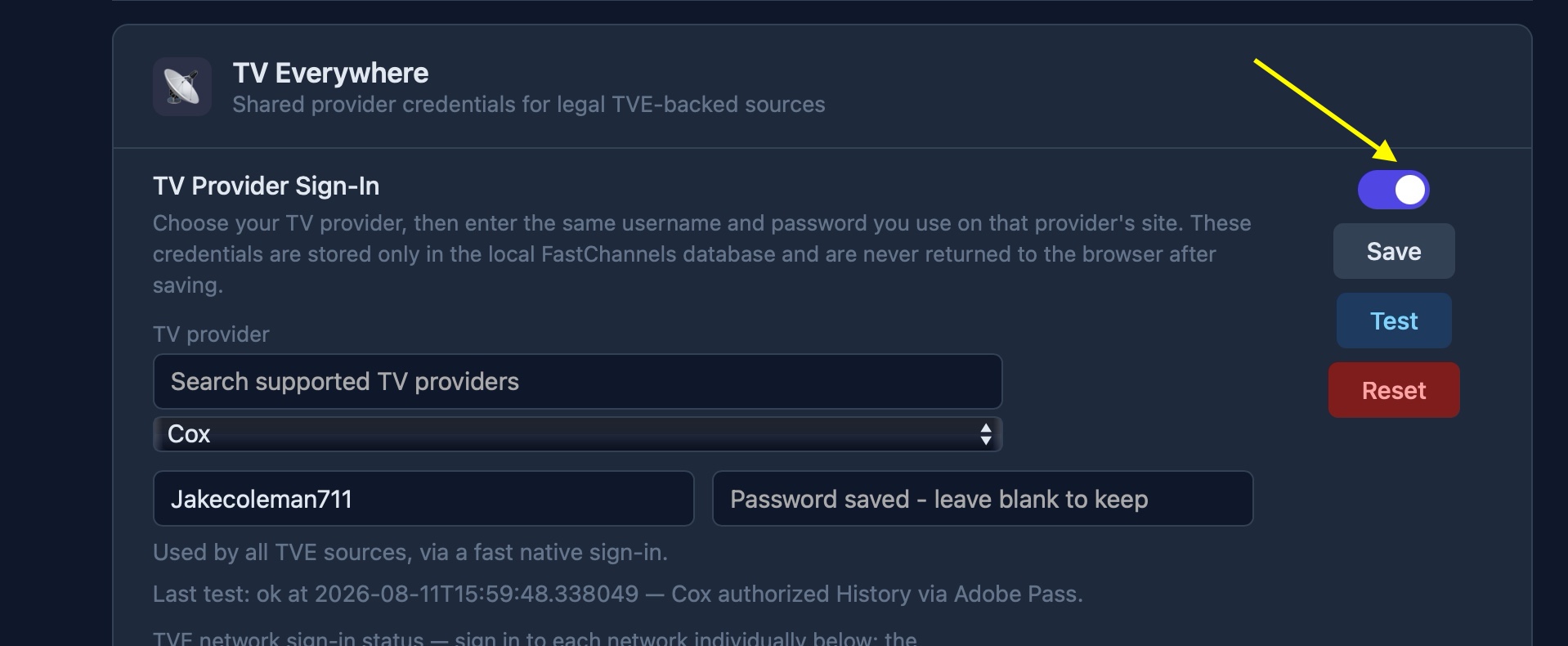
So I hit the Reset button and started over, added credentials, and tested to all checkmarks.
2026-08-11 11:06:23.293 | 2026-08-11 11:06:23,289 INFO     app.routes.api: [tve-reset] cleared TVE account, 7 source configs, browser profile removed=True
2026-08-11 11:06:23.335 | 2026-08-11 11:06:23,334 INFO     gunicorn.access: 172.24.0.1 "POST /api/settings/tve/reset HTTP/1.1" 200 61 1s
2026-08-11 11:06:31.626 | 2026-08-11 11:06:31,616 INFO     gunicorn.access: 172.24.0.1 "GET /api/settings/tve/status HTTP/1.1" 200 1289 7s
2026-08-11 11:07:00.660 | 2026-08-11 11:07:00,654 INFO     gunicorn.access: 172.24.0.1 "POST /api/settings/tve/cox HTTP/1.1" 200 323 2s
2026-08-11 11:07:07.310 | 2026-08-11 11:07:07,301 INFO     gunicorn.access: 172.24.0.1 "POST /api/settings/tve/cox HTTP/1.1" 200 323 2s
2026-08-11 11:07:10.468 | 2026-08-11 11:07:10,463 INFO     gunicorn.access: 172.24.0.1 "POST /api/settings/tve/cox/test HTTP/1.1" 200 514 2s
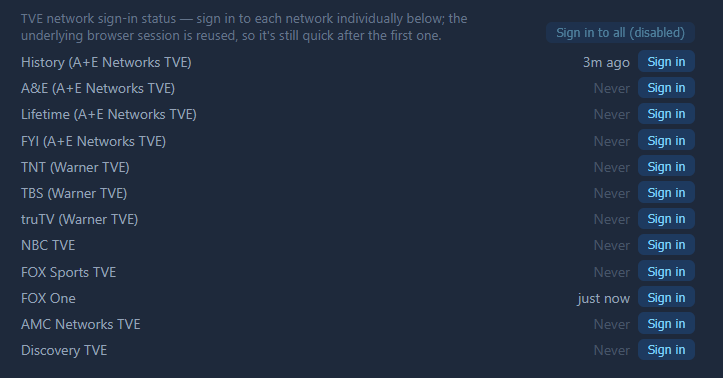
After that, I did the FoxOne signin, and that seemed to work, but for some reason History also started saying it was logged in.
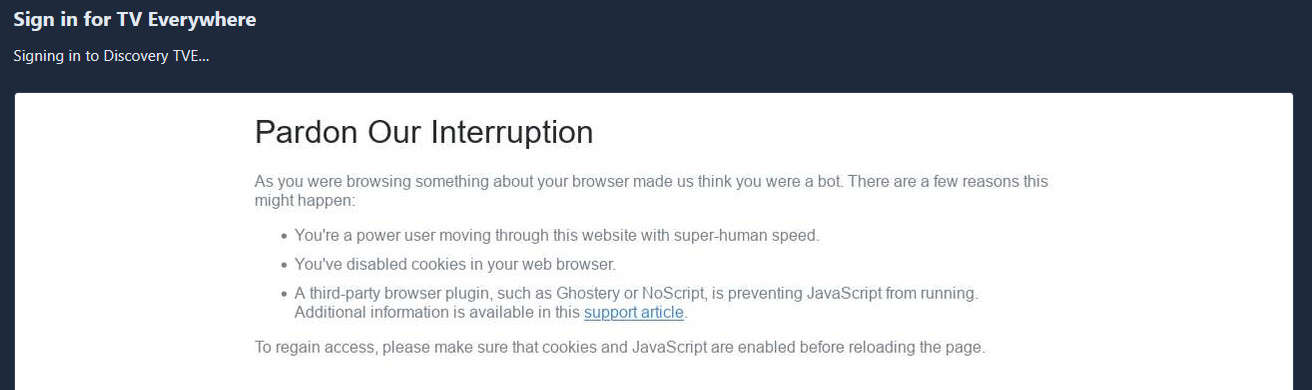
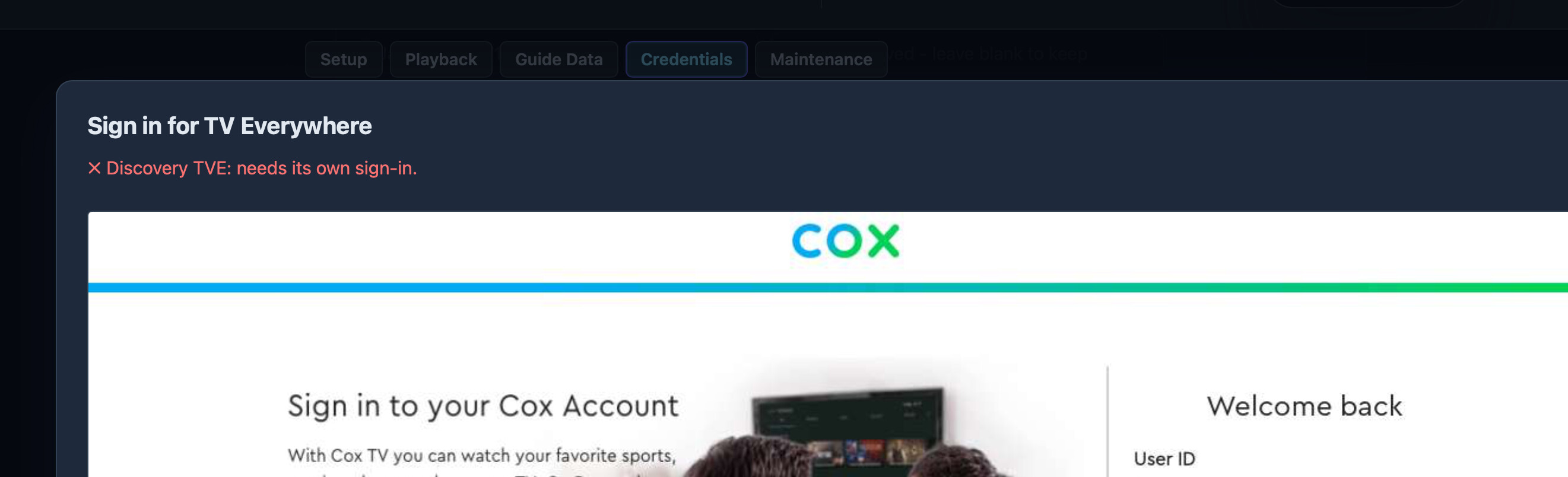
There was also no popup, it just went. In the next test, I went with Discovery, it showed a warning about it taking a while, then this...
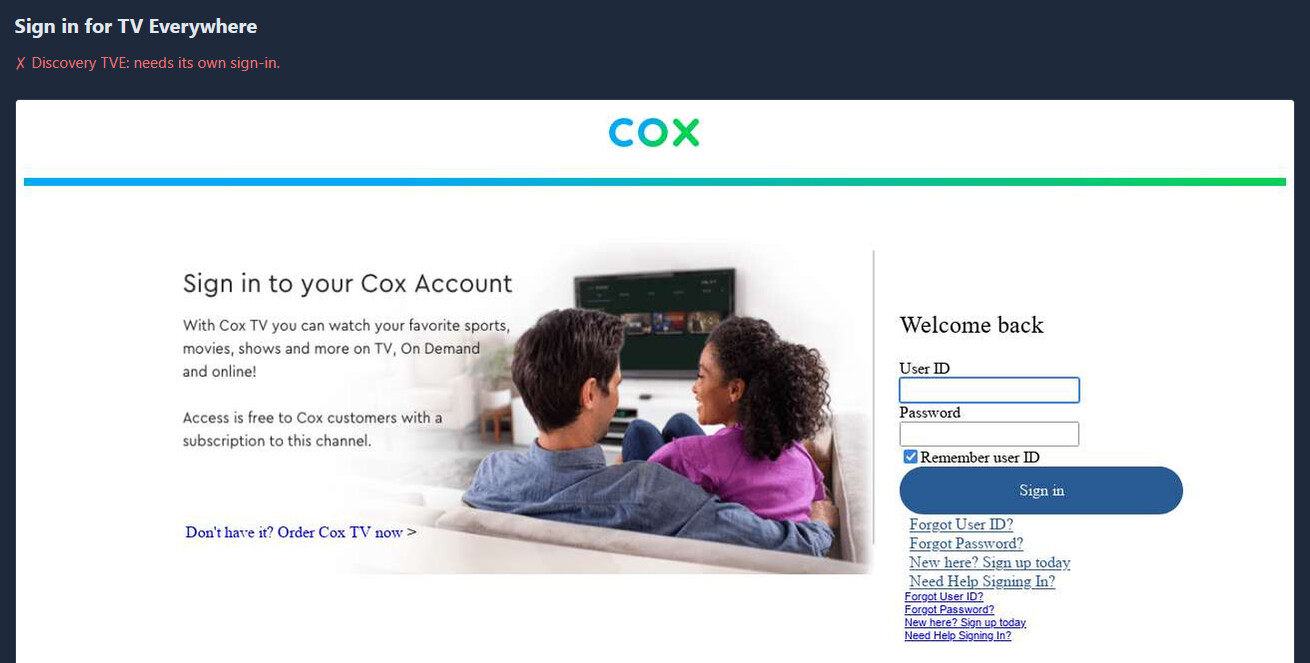
... and finally this...
Logs from all of that:
2026-08-11 11:10:24.260 | 2026-08-11 11:10:24,238 INFO     gunicorn.access: 172.24.0.1 "POST /api/settings/tve/foxone/signin HTTP/1.1" 200 12 5s
2026-08-11 11:10:25.849 | 2026-08-11 11:10:25,826 INFO     gunicorn.access: 172.24.0.1 "GET /api/settings/tve/status HTTP/1.1" 200 1301 1s
2026-08-11 11:11:55.645 | 2026-08-11 11:11:55,623 INFO     app.routes.tasks: Enqueued Discovery TVE browser login for mso_id=Cox
2026-08-11 11:11:55.675 | 2026-08-11 11:11:55,673 INFO     gunicorn.access: 172.24.0.1 "POST /api/settings/tve/discovery/browser-login/start HTTP/1.1" 200 21 0s
2026-08-11 11:12:52.860 | 2026-08-11 11:12:52,784 INFO     app.worker: [mvpd-login] autofill: no visible password field after 12.0s (SSO already past login, a captcha-first page, or an unrecognized form) url=https://www.cox.com/content/dam/cox/okta/loginwidget.html?fromURI=https%3A%2F%2Flogin.cox.com%2Fapp%2Fccires_tveverywhere_1%2Fexk1jha9awwp564kZ0h8%2Fsso%2Fsaml%3FSAMLRequest%3DhVNdc9owEPwrHr3bwuYjiQY7Q0MzZSZtXHD6kJeMkA%252BsxEiuTubj31cYcGmT0kef93b3bk%252FD2%252B2q9NZgUGoVkzDoEA%252BU0LlUy5g8Zff%252BNblNhshXZVSxUW0LNYWfNaD1XKNCdvgTk9oopjlKZIqvAJkVbDb6%252BsCioMMqo60WuiTeCBGMdVJ3WmG9AjMDs5YCnqYPMSmsrZBRilXAnVDAcz2HQOiVq9C9Dt0zvqMg3tjZkYrbZoQTS6mXUrnubcPAq4oKIQ3gi12Dm3e3KcDAS0hh%252Bxa%252BFvyGbzZVf9B7e%252B4U1xRRN4rEu9dGQDN3TBa8RCDeZBwTHolOGMmwu%252BhdXfEi7PYK3u3nr9F8ecO7woEw5YhyDb%252FbEGuYKLRc2ZhEnWjgd679MMzCPgsj1h0E%252Ff7gmXjpcVufpDqkcGm18wMI2ZcsS%252F30cZYR78cpTQcgx%252BxYo27OQ7tMzE9rJkmbi%252BsK3oUzpOcC7al83lpQexuYDG1hKrtjU8BKqzzTRxeH8r9tnM6GwdY6sDS5X3Fjd%252F939LdgcjT5p61j6ZsTnYxTXUqx80ZlqTd3Brh1wVlTQ3MBK24vb2tfkbm%252FaKDMGu40QFnizdI9%252Ffeal3IhwZwd%252BYfWqVb%252BHApeLny9oLlEofe3SmjrdiZ05QJvv4%252BvEcxknLT4dtzzv22xpaAfPOvkFw%253D%253D%26RelayState%3D859811e2-da74-4689-8149-c8a59be82e61%26SigAlg%3Dhttp%253A%252F%252Fwww.w3.org%252F2000%252F09%252Fxmldsig%2523rsa-sha1%26Signature%3DjV%252BU2U1FC%252F484ZZwjTTYnMrYXBSDeZqJdSZr9erQCskFplTTbl%252BjdtcD54UBSb%252BTye%252BEp%252FcZjzfj49gyuinV0W7vOtQUC0IOJwsDLMuIZL67Mw3vPQI8hLNoY1coKk1%252FPO1aKdihnVHEONnu2jPEUDOigJJ7oPsLtiEFMYRqU0tdAppyIn6E1BuqXNCUpwDGPukwAzkUq4GCKfUceoqaF4DMOtqfVR6z1SjkNoAlOfu%252FnpAcVIKiIwgYcmZimaK%252FIslNakGsGx7j0w%252Fe26YXtsHooOQrOIkrbI4OBB5VW2UBdHjGnCJiuRPDd3a6NHQ6qn%252FuhMjCP639gR%252BLiaQ5iA%253D%253D&partner=discovery
2026-08-11 11:13:26.879 | 2026-08-11 11:13:26,732 WARNING  app.worker: [discovery-mvpd-login] page CLOSE event fired
I went for NBC and that one worked!
2026-08-11 11:14:10.193 | 2026-08-11 11:14:10,184 INFO     app.worker: [worker] pruned 2335 expired EPG entries
2026-08-11 11:15:59.334 | 2026-08-11 11:15:59,315 INFO     app.routes.tasks: Enqueued NBC MVPD browser login for mso_id=Cox
2026-08-11 11:15:59.376 | 2026-08-11 11:15:59,365 INFO     gunicorn.access: 172.24.0.1 "POST /api/settings/tve/nbc/browser-login/start HTTP/1.1" 200 21 0s
2026-08-11 11:16:08.129 | 2026-08-11 11:16:08,098 INFO     gunicorn.error: Autorestarting worker after current request.
2026-08-11 11:16:08.523 | 2026-08-11 11:16:08,438 INFO     gunicorn.error: Worker exiting (pid: 565)
2026-08-11 11:16:21.497 | 2026-08-11 11:16:21,414 INFO     gunicorn.error: Booting worker with pid: 1131
2026-08-11 11:17:00.087 | 2026-08-11 11:16:59,939 INFO     app.worker: [mvpd-login] autofill: filled and submitted credentials for [REDACTED] (attempt 1)
2026-08-11 11:17:14.288 | 2026-08-11 11:17:14,261 INFO     app.worker: [nbc-mvpd-login] paired mso_id=Cox
2026-08-11 11:17:14.382 | 2026-08-11 11:17:14,381 WARNING  app.worker: [nbc-mvpd-login] page CLOSE event fired
2026-08-11 11:17:24.363 | 2026-08-11 11:17:24,358 INFO     gunicorn.access: 172.24.0.1 "GET /api/settings/tve/status HTTP/1.1" 200 1307 9s
And that seemed a good point to wrap up this test.
tnx... I'm stumped- it works fine for me when I spin up a test container and start fresh. So Gotta figure out what the difference is.
FWIW- I'm using Ubunutu. I know you're a Windows guy- but being inside container shouldn't matter.
Back at it....
Originally direct. Subsequently reinstalled (4.9.9) through portainer.
Installed Watchtower One Click
It runs once but nothing gets updated (no image/container.
time="2026-08-11T12:28:10Z" level=info msg="Update session completed" failed=0 notify=no scanned=9 updated=0
Watchrtower says 4.9.9 is latest. DockerDesktop (windows asking
Could you provide the exact image reference for FastChannels 5.0.0 from GitHub (e.g., ghcr.io/kineticman/fastchannels:v5.0.0 or a different registry)?
Not that anyone needs the play by play...
Gave registry tag Release v5.0.0 - TV Everywhere (TVE) Support · kineticman/FastChannels · GitHub and checking if Docker image is published.... Doing docker pull ghcr.io/kineticman/fastchannels:v5.0.0
Says The 5.0.0 tag doesn't exist in the GHCR registry yet.
I have cox, so when I saw your TVE offering in version 5 I couldn't resist. Just getting around to this.
I pulled the latest fast channels and have version 5.02 running.
I was able to add a&E History very quickly, and I was able to test in the built in guide. I haven't added to channels DVR yet, but I assume that would work. But I ran into a quirk or possible bug?
If I enabled the radio button to turn on provider sign on, when I added providers the system hung forever authenticating when I tried to add History A&E TVE. So I tried disabling that button first, and then added History A&E.
the authentication went lightning quick and I briefly saw the cox splash screen with my credentials. Then manually scraped the channel and A&E and History appear in fast channels guide as TVE channels. After going to the channels page to search for the new channels, I went back into settings and the radio button turned itself back on.
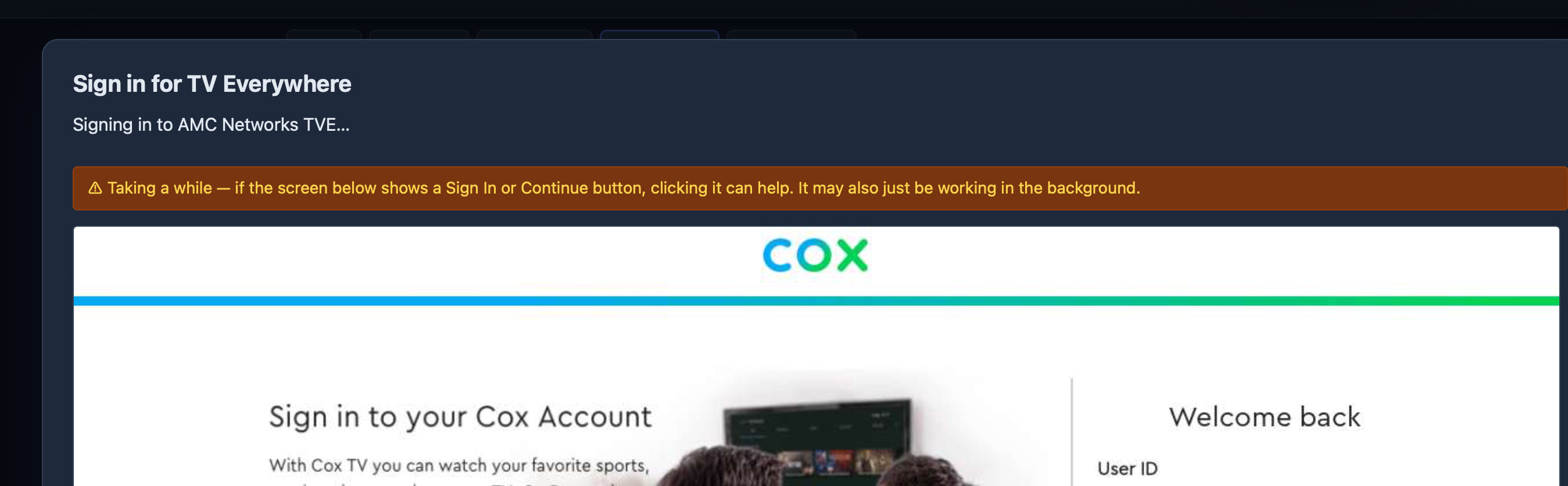
Next, I tried to add AMC and it was stuck here (see screenshot) for quite some time. After a long while as I was typing this I got a info prompt that said "AMC networks needs its own sign in"".
I tried authenticating with and without the TVE Provider sign in radio button selected.
I also tried Discovery networks and got the same popup after the "taking a while" notification, and then a relatively short time later the "needs its own sign in" message
@KineticMan Happy to keep testing if there is anything you would like me to try.
thanks @mnwxman132 and @babsonnexus ... My current attempt was to use a browser assisted signon, and it's apparent it's buggy as hell. I'm pivoting to direct HTTP requests and initial tests are wildly better.
tnx for patience
There must be a difference, but I don't know what it is. I have several services at work that run in containers and they specifically say NOT to run it on Docker in Windows. If I get a chance to ask the team that manages it, I'll see if they know why. I thought the whole purpose of Docker was to make it host OS agnostic, but that hasn't been my experience.
On a side note, I just finished migrating from the 6-core i5 Mac mini with 64gb RAM to an M4 Pro Mac mini with 24gb RAM literally just minutes ago. Holy sh*t! I can't believe the performance difference across the board. Tuning channels in FastChannels is nearly instantaneous. I knew the old machine was causing a bottleneck, but I had no idea it would be such a dramatic difference. And in case anyone is wondering, I bought the 64gb RAM from OWC 8/17/2024 and it was $160.03 shipped, including tax. Same kit now is $503.48 before taxes. Insanity.
5.0.0 finally pulled on DockerDesktop with the help of "GordonAI"
BTW I love FastChannels. Thank you.
Now testing the Cox provider with PrismCast bridge...
During a test with A&E, there was a hangup at one point, though I'm not sure what caused it, and then it recovered. PrismCast reported this:
[2026/08/11 11:32:06.894 AM] GET /hls/play-05825531/segment117.m4s from 10.255.1.144 responded 200 in 3.843 ms.
[2026/08/11 11:32:08.158 AM] GET /hls/play-05825531/stream.m3u8 from 10.255.1.144 responded 200 in 0.860 ms.
[2026/08/11 11:32:09.877 AM] e[33m[WARN] [0.1-bd5adw] No new segments produced for 20s - capture pipeline may have stalled.e[39m
[2026/08/11 11:32:12.176 AM] GET /hls/play-05825531/stream.m3u8 from 10.255.1.144 responded 200 in 0.797 ms.
[2026/08/11 11:32:16.188 AM] GET /hls/play-05825531/stream.m3u8 from 10.255.1.144 responded 200 in 0.380 ms.
[2026/08/11 11:32:20.213 AM] GET /hls/play-05825531/stream.m3u8 from 10.255.1.144 responded 200 in 0.492 ms.
[2026/08/11 11:32:25.621 AM] GET /hls/play-05825531/stream.m3u8 from 10.255.1.144 responded 200 in 57.630 ms.
[2026/08/11 11:32:29.635 AM] GET /hls/play-05825531/stream.m3u8 from 10.255.1.144 responded 200 in 8.056 ms.
[2026/08/11 11:32:33.658 AM] GET /hls/play-05825531/stream.m3u8 from 10.255.1.144 responded 200 in 7.053 ms.
[2026/08/11 11:32:35.387 AM] [0.1-bd5adw] Tab replacement complete. New capture started with segment continuity.
[2026/08/11 11:32:35.389 AM] [0.1-bd5adw] Recovered in 25.4s via tab replacement.
[2026/08/11 11:32:37.695 AM] GET /hls/play-05825531/stream.m3u8 from 10.255.1.144 responded 200 in 19.941 ms.
[2026/08/11 11:32:37.728 AM] GET /hls/play-05825531/segment118.m4s from 10.255.1.144 responded 200 in 0.609 ms.
Around the same time in FastChannels, I saw this:
2026-08-11 11:30:37.532 | 2026-08-11 11:30:37,486 INFO     gunicorn.access: 172.24.0.1 "GET /play/cox/5478419700860024104/dash.mpd HTTP/1.1" 200 43123 0s
2026-08-11 11:30:45.193 | 2026-08-11 11:30:45,156 INFO     gunicorn.access: 172.24.0.1 "GET /play/cox/5478419700860024104/dash.mpd HTTP/1.1" 200 43122 0s
2026-08-11 11:32:24.078 | 2026-08-11 11:32:24,040 INFO     gunicorn.access: 172.24.0.1 "POST /play/cox/license/5478419700860024104 HTTP/1.1" 200 708 1s
2026-08-11 11:32:34.474 | 2026-08-11 11:32:34,423 INFO     gunicorn.access: 172.24.0.1 "POST /play/cox/license/5478419700860024104 HTTP/1.1" 200 592 1s
2026-08-11 11:32:42.306 | 2026-08-11 11:32:42,302 INFO     gunicorn.access: 172.24.0.1 "GET /play/cox/5478419700860024104/dash.mpd HTTP/1.1" 200 22523 0s
2026-08-11 11:32:54.865 | 2026-08-11 11:32:54,864 INFO     gunicorn.access: 172.24.0.1 "GET /play/cox/5478419700860024104/dash.mpd HTTP/1.1" 200 22524 0s
So if I'm reading this right, it's almost like there was a posting login of credentials to keep it alive, and that caused a gap in playing?
Otherwise, that test ran for over 37 minutes without anything to notice outside normal PrismCast artifact'ing, although I did see this occasionally in the logs:
2026-08-11 11:53:56.722 | 2026-08-11 11:53:56,710 WARNING app.routes.play: [cox-dash] manifest fetch failed for 5478419700860024104: 500 Server Error: Internal Server Error for url: https://dukecdedge02.national-linear-ddtc-tve.tve.cox.net/AnEHD_HD_CX_DDTVE_51529_0_8291074403730624163.mpd?trred=false
I wasn't paying close attention to the playback, so I'm not sure if that cause hiccups.
It might be my imagination, but I think it loaded quicker and looked slightly better. I don't know if this means anything, but the logs show the dash.mpd like the the HLS, just not right away, but eventually at the regular intervals:
2026-08-11 12:08:13.488 | 2026-08-11 12:08:13,487 INFO     gunicorn.access: 172.24.0.1 "GET /play/prismcast/4793.ts HTTP/1.1" 302 277 33s
2026-08-11 12:10:07.986 | 2026-08-11 12:10:07,947 INFO     gunicorn.access: 172.24.0.1 "GET /play/cox/5478419700860024104/dash.mpd HTTP/1.1" 200 43028 0s
2026-08-11 12:10:09.648 | 2026-08-11 12:10:09,602 INFO     gunicorn.access: 172.24.0.1 "GET /play/cox/5478419700860024104/dash.mpd HTTP/1.1" 200 42886 0s
2026-08-11 12:12:15.057 | 2026-08-11 12:12:14,958 INFO     gunicorn.access: 172.24.0.1 "GET /play/cox/5478419700860024104/dash.mpd HTTP/1.1" 200 22568 0s
2026-08-11 12:12:16.931 | 2026-08-11 12:12:16,905 INFO     gunicorn.access: 172.24.0.1 "GET /play/cox/5478419700860024104/dash.mpd HTTP/1.1" 200 22568 0s
Weirdly enough, the PrismCast logs basically went silent
[2026/08/11 12:08:11.732 PM] [0.1-uky5vv] Streaming http://127.0.0.1:7969/watch/4793: 0.1, keyboardFullscreen, FFmpeg [⚡ HEVC]. Tuned in 30.9s (direct).
[2026/08/11 12:08:12.255 PM] GET /play?url=http%3A%2F%2F127.0.0.1%3A7969%2Fwatch%2F4793&profile=keyboardFullscreen from 10.255.1.144 responded 302 in 31180.401 ms.
[2026/08/11 12:08:13.678 PM] GET /hls/play-05825531/stream.m3u8 from 10.255.1.144 responded 200 in 176.785 ms.
[2026/08/11 12:09:17.606 PM] GET / from 127.0.0.1 responded 200 in 6036.834 ms.
[2026/08/11 12:09:17.678 PM] GET /logo.svg from 127.0.0.1 responded 200 in 0.251 ms.
[2026/08/11 12:09:18.628 PM] GET /logo.png from 127.0.0.1 responded 200 in 1.277 ms.
[2026/08/11 12:09:18.648 PM] GET /favicon.svg from 127.0.0.1 responded 200 in 0.148 ms.
[2026/08/11 12:11:11.856 PM] GET /streams/status from 127.0.0.1 responded 200 in 125.175 ms.
I'm wondering if the processing to HLS is actually causing performance issues? Well, that's a PrismCast question, not a FastChannels one.
Subsequent to that, I did an hour+ test on Comedy Central. Occasionally in the logs I saw stuff like this:
2026-08-11 13:52:38,985 INFO app.routes.play: [cox-dash] stripped 1 empty MPD period(s) for channel=5842307023678451104
Then, there was another drop and recovery at about 27.5 minutes. PrismCast shows:
[2026/08/11 01:43:35.749 PM] [0.1-wzv9ee] Streaming http://127.0.0.1:7969/watch/4798: 0.1, keyboardFullscreen, FFmpeg [⚡ HEVC]. Tuned in 31.2s (direct).
[2026/08/11 01:43:35.826 PM] GET /play?url=http%3A%2F%2F127.0.0.1%3A7969%2Fwatch%2F4798&profile=keyboardFullscreen from 10.255.1.144 responded 302 in 31391.480 ms.
[2026/08/11 01:43:35.844 PM] GET /hls/play-adbc1ac0/stream.m3u8 from 10.255.1.144 responded 200 in 11.050 ms.
[2026/08/11 01:43:53.509 PM] GET /streams/status from 127.0.0.1 responded 200 in 10.875 ms.
[2026/08/11 01:46:05.073 PM] GET /streams/status from 127.0.0.1 responded 200 in 0.177 ms.
[2026/08/11 02:06:35.762 PM] GET /streams/status from 127.0.0.1 responded 200 in 31.790 ms.
[2026/08/11 02:09:33.400 PM] GET /streams/status from 127.0.0.1 responded 200 in 1009.154 ms.
[2026/08/11 02:11:19.685 PM] GET /streams/status from 127.0.0.1 responded 200 in 11.389 ms.
[2026/08/11 02:12:40.162 PM] e[33m[WARN] [0.1-wzv9ee] Monitor check timed out (1 consecutive). Tab may be unresponsive.e[39m
[2026/08/11 02:12:43.899 PM] GET /streams/status from 127.0.0.1 responded 200 in 23.678 ms.
[2026/08/11 02:12:51.755 PM] e[33m[WARN] [0.1-wzv9ee] No new segments produced for 20s - capture pipeline may have stalled.e[39m
[2026/08/11 02:13:18.275 PM] [0.1-wzv9ee] Tab replacement complete. New capture started with segment continuity.
[2026/08/11 02:13:18.276 PM] [0.1-wzv9ee] Recovered in 26.5s via tab replacement.
Around the same time FastChannels had one of those empty MPD period(s), but it was hardly the only one, therefore not so sure it is directly connected or if there is some other hangup between the two:
2026-08-11 14:11:41,934 INFO gunicorn.access: 172.24.0.1 "GET /play/cox/5842307023678451104/dash.mpd HTTP/1.1" 200 14242 8s
2026-08-11 14:12:35,650 INFO app.routes.play: [cox-dash] stripped 1 empty MPD period(s) for channel=5842307023678451104
2026-08-11 14:13:08,131 INFO gunicorn.access: 172.24.0.1 "POST /play/cox/license/5842307023678451104 HTTP/1.1" 200 708 1s
Otherwise, no major issues I wouldn't write off as originating from PrismCast!

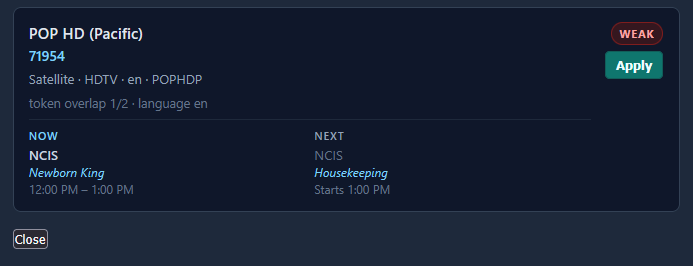
... so I'd think they could have an auto-assignment. Funny enough, when looking at suggestions, it thinks the correct one is the weakest option:
Also, I mentioned it before, but now I'm wondering if you are purposely excluding the Music Choice and the Xumo FAST stations that are included here?
Whaaaa! Thanks to this back-and-forth on Series ID, CDVR now wants to re-record all of the iZombie episodes that I recorded from Pluto instead of just the ones I needed to re-record.