
Thank you, I just want the Pluto channels. I would have stayed with pluto-for-channels, but it seems to be having issues pulling guide data recently. I'll manually change the channel numbers so they line up with the old method.
Antenna and TVE use gracenote SeriesID.
Fast Channels use the individual fast providers SeriesID.
If you want them all to match, use gracenote station ID's for your fast channels.
If you go this route, I would be interested to see if it is possible to extract the caption data from Kodi and remux it back into the stream. The major problem with these capture techniques is they do not support closed captions. Either you have captions on and they are burned into the video or you get no captions at all. It’s not great.
2 Likes
Remind me again how to update Fast Channels in Portainer. Thanks!
1 Like
Stop the fastchannels stack.
Go into the Stacks-Editor for fastchannels, and scroll down.
Click Update the stack, and enable the Re-pull and redeploy slider, followed by Update.
Interesting idea. I’ll look into it more. Tnx
Thank you!!! Everything seems to be working and playing live!!!
1 Like
So here's the strange thing. One of the Amazon channels I have enabled is ABC7 Los Angeles. If I play it from the Channels guide (identified by using select sources,), it opens a window in Chrome and plays, then plays in channels. If I do the same thing from FC guide, it complains about not having a secure context. (This is in Firefox).
Just for the heck of it, I tried the same thing in Chrome, and it worked fine! But Firefox works fine via Channels. However, when I try Chrome on my other PC (not the one where Channels, Prismcast, FastChannels are installed, but instead my "daily driver), I get the same errors in Chrome as I do in Firefox.
I did a quick check, and I do have the insecure flags set in Chrome on both PCs.
The PC on which all my servers are installed is Windows 11. My typical client machine is on Windows 10.
ETA: Although in Chrome, playing via Guide, the test-channel plays just fine, the PrismCast setup test returns complete failure:
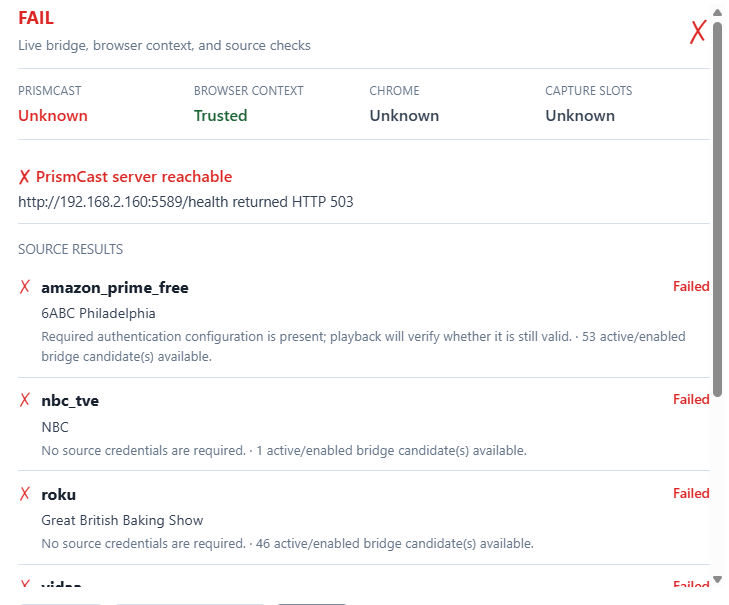
After the latest results (which were after I'd been away from my PC for a couple hours), although the ABC Los Angeles still played ok, everything else that needed Prismcast started failing also, and Prismcast decided that it had gone offline. That seems to happen often with Prismcast, which continues to be utterly flaky for me.

You may have seen my posts about difficulties on the Prismcast topic, but I haven't received any useful responses there.  Generally, if I force-kill the process I can get it back running at least some of the time, but not at all reliable.
I have my pc server scheduled to restart once per week. When it did this morning (first time since starting to use docker and FC) all my FC were gone. I had to manually start docker, load fast channels and then reload m3u in the sources setting of fhe server for the FCs to come back. I’m still missing the sources that gave gracenote in the name.
Is there a way to avoid having to manually do this weekly? Also how about the grace note sources?
We need a lot more information about your setup to help.
What OS?
Any virtualization?
How are you managing docker?
1 Like
I’m not sure my answers will be helpful as I’m totally new at this and trying to learn. It’s a windows pc. I have it scheduled to restart once a week overnight, so it doesn’t get sluggish.
I downloaded docker and followed the instructions to run fast channels on it. That’s the only thing I’ve done with it. I was able to curate the channel lists and then push the source from fast channels to the dvr.
Not sure if that description is of any help. Would be helpful to know what I should be doing that I am not.
Is this Docker for Windows or are you running a Linux VM with Docker installed on it?
Docker for Windows is a bit of a Rube Goldberg contraption. It can work yet can be problematic. My choice was to set up a Ubuntu Server running as a Windows Hyper-V VM. It's a few more things to set up yet once set up provides a native Docker stack. I also installed Portainer as a Docker container which makes managing and updating Docker containers easy.
So how did you install Docker on your Windows computer? We can take it from there.
Not sure either.. I'll dig into it.
Side note for those following my post about Kodi integration. I have a prototype setup and let me tell you all - it works fantastic.
I have it prototyped with a HDMI capture card ($20 on Amazon) and a $25 Firestick. The tune time is less than 2 seconds. All DRM streams play through it. Once I get this dialed in from a user perspective, you all should use this instead of Prismcast. Only negative is that it's a single stream at a time, but suspect this could easily scale to using a LinkPI multi-port encoder. But for a budget DRM-bridge, this is quite cool....
4 Likes
I downloaded docker from the windows App Store. I then enabled visualization in the bios OS menu and then I followed the instructions from the beginning of this thread to have docker run fast channels.
Thanks for the response and patience, as I'm a newbie to these technical matters.
I googled Docker for windows not starting on windows reboot. It seems the default setup requires a user to login for Docker to start. That's quite dumb.
I then googled make docker for windows start on restart and got these solutions. You want the second one.
https://share.google/aimode/n9thTBxHOAagWFBmw
You will also need to figure out how to do updates. Portainer is a very common way of managing Docker containers. It can be setup with Docker for windows though I did not follow the two cases that well in the description. Possibly the linked video helps with that.
https://share.google/aimode/xBHUiOzfLt8HsVljl
If you find you are going down an endless path to stabilize running Windows Docker ask about running the a Linux VM to host Docker. Once you have that working you will have a normal Docker environment and there is great information available and more people will be able to help you.
Good luck,
Morris
@KineticMan:
I haven't updated beyond 5.0.2. yet, waiting to finish my current pass through collecting iZombie episodes, but I noticed something I thought worth mentioning.
In the episode-num element of programme objects, there is an entry with system=fastchannels and GUIDy looking text. I'm wondering whether you changed this occurrence of fastchannels to the source slug, similar to what you did for series-id. If not, I'm also wondering if you should. 
1 Like
That sounds really cool. I was hesitating on the HDMI capture front because of the cost of the LinkPI and concern about the need for a lot of setup & maintenance. Once you have things working well enough, can you share links to budget HDMI capture cards you recommend? Are they literal cards that you have to open up your PC to install, or something that works via USB or just HDMI connection? I don't think I have extra HDMI ports on my PC but do have an HDMI to USB dongle that I've used. I also don't currently have a spare firestick. I used to have one but it died, so I'd need to buy a replacement. In that case, I assume I want a somewhat old one because I will be sideloading to it?
I've had no end of trouble with Prismcast, so something like this could be a good option. I just don't want to invest in a ton of tech unless I have high confidence that it will work well and not just gather dust.
Yes. So far results pretty good, lots of polishing to work on it but the concept is great.
You don't need a HDMI port on the PC - the HDMI plugs into the HDMI Encoder. This is the one that I bought for $22 on Amazon:
Is it side-load Kodi on a FireStick, then what? Is it FastChannels that handles tuning and the LinkPi or are there other programs needed? Does it have to be FireStick? Can it be anything else like a RPi for Kodi? If I never have to deal with FireSticks again, that would be fine with me. It’s FireSticks that drove me away from ADBTuner, even though I really liked ADBTuner.
I'm pretty sure it could run on any Kodi - I just happened to have it setup on Firestick. I don't have any other device to test it with tbh.
And yes, FC does all the tuning. There's a little "bridge" inside Kodi I'll share that is a helper, but it's completely hands off after the initial setup.