
to be honest @Apsattv, I'm still using your original lg.m3u since it is still working for me...and it also has all the autentic channels from the 8 countries.. I know you said it's not being maintained anymore... I just hope it won't be lost for a while...
I'm using the cherry picking method for the same reason. I want to choose the channel with the best data (S##:Ep##) and most days of guide information. My plan was to view the onscreen EPG and remove the channels via the FC Channels page. However, I don't see a 1:1 channel number match between the FC settings and the source. Perhaps I missed a setting.
There is one thing that doesn't seem to have anything to do with FASTChannels. Each time I create or recreate a collection, I pick up extra but unwanted channels that are not listed in the FASTChannels enabled channels list.
You can set both fastchannels and Channels DVR to use certain starting Channel numbers.
I have noticed, that if i create a feed, then remove channels from that feed in the channels tab, and then reload the m3u in Channels DVR, the numbering is reset. Seems FastChannels is re-numbering when you edit what channels are enabled/disabled in its own Channels tab.
One thing, that i have needed to do before when making a major chance in custom channel tuners in CDVR, is to use the option Delete & Recreate database for the Guide to clear up old data and channel numbers its may have saved.
Not sure if any of that is helpful to you exact setup...
And not really sure what you mean about "unwanted channels that are not listed in the FASTChannels enabled channels list". Unless you have some channels included the Feed you are not seeing. Or you have one of the filters set to hide something, or include something etc. Not really sure how to advice on that. I still am messing around in my test setup with this FASTChannels.
I'm getting channels from FASTChannels that I disabled. They do not appear in the "FastChannels Default" source but yet they are in the Collection I created when I add all channels. I don't understand how the channels appear in the collection but aren't in the source. It could be that I'm getting echoes of the past.
I don't have any scheduled recordings yet so I'll do as you mentioned and that I've done before which is delete and recreate the guide database.
hey - you are seeing channels leaking through into collections that are disabled? that's a concern. if you can give me some examples, i'll chase that down
1 Like
-
Plex was a real bug. Good catch - adding to next release.
-
Pluto - that airing date data was in the raw Pluto scrape, I just never added it. easy add - low risk. adding to next release.
2 Likes
So for the most part they do - for a show like top gear there are literally 7 sources that stream the same thing - pluto canada has a different one
1 Like
I deleted and recreated the guide data as @speedingcheetah mentioned. Apparently there were stale channels that were appearing in the collection but were not in the Channels source. So that's solved that mystery.
Something that would help me choose the channel with the best EPG info is having FastChannels #s map directly to the Channels source channel numbers. See below for two examples with tvg-chno starting at 50001.
Examples:
00s Replay
FastChannels # 51737
Channels source # 50201
Cartoon Classics
FastChannels # 50057
Channels source # 50005
Thanks for this app, it really helps! Also, thanks for responding to the posts here.
good idea on m3u #s in the admin/channels feed. I change that num to match the default feed m3u tvg-chno. Would be too hairy to add tvg-chno for other feeds.
1 Like
I don’t mean to be thick but I’m not sure what you’re telling me. Is there something I may have done or is there something I should or can be doing?
Thanks!
I mean I liked your idea -- right now, in the Channels page, there is a field that showed a number by the channel. It was essentially meaningless to end user..
I'm updating that field to show the expect TVG-CHNO so you can easily determine what channel it'd be on your Channels client.
1 Like
Love it! Thanks!
Update FastChannels 1.9.0
- Major stability and memory improvements
- Fixed the remaining big request-path memory spikes, especially around M3U output, admin channel browsing, and DVR push flows
- Improved queueing and scrape behavior so background work is more predictable and duplicate jobs are avoided
- Added per-source scrape interval controls and a global Force Complete Refresh action on the Sources page
- Improved guide metadata, including better episode numbering and air-date handling in XMLTV
- Improved Roku poster handling, scrape recovery, and logging around scraper failures
- Added better channel state tracking internally (last seen / missed scrapes) to reduce bad lineup collapses from one bad scrape
- Cleaned up the Channels admin page with better TVG-CHNO visibility and clearer filtering/debugging tools
- Added a version link/check in the admin UI and improved system memory stats display
1 Like
Thanks. Happy New Year 
lol
May be the time zone issue, but the times are incorrect on the Dashboard, even though it knows I'm in the PDT timezone (it's 2026-03-19 14:14 PDT now).
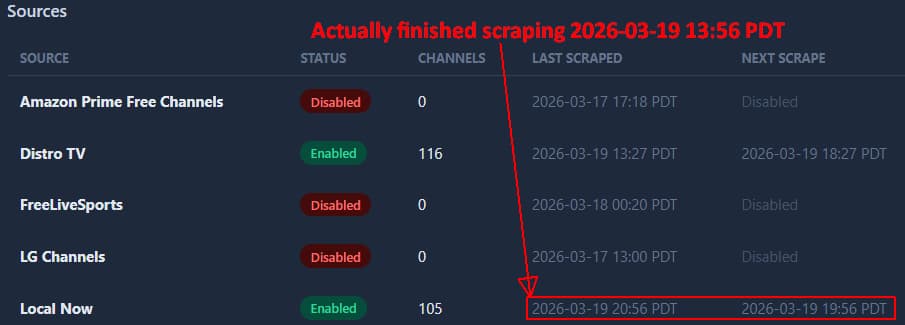

Samsung scrape just ran at 2026-03-19 15:02 PDT

It shows the next run scheduled for 9:02 PM tonight, which sounds correct.
From Sources tab Samsung TV Plus
Every 360min · 487 channels · Last scraped: 2026-03-19 22:02 PDT
Confirmed. 1.9.0 looks good so far for both Plex and Pluto guide data.
Just needs the Gracenote IDs scrapped, or what ever, that the jgomex docker has for PLex.
There is just one more thing that i am stuck on.
Could you add a way, maybe a column in the channels lists and feed channel list, to indicate what region the channel is from?
Cause, as it is, the same named channel appears as identical or as a duplicate, but it is not and different region of say Top Gear, airs different programs.
I really need to be able to see that, for example, Top Gear channels is either US, CA, UK, etc so that i can create a separate feed just for the other region version of certain channels.
Also, minor things, nitpicking...
a option to hide/disable Default Feed ( i don't use it).
a option to hide disabled sources on the sources page.
How do you set timezone? I do not see an option in settings. Still uses UTC.
that looks like custom code.
as this is what is in the instructions on github
services:
  fastchannels:
    image: ghcr.io/kineticman/fastchannels:latest
    container_name: fastchannels
    restart: unless-stopped
    ports:
      - "5523:5523"
    volumes:
      - db_data:/data

volumes:
  db_data:
Either way, would like to see a option in the GUI admin page to adjust timezone.