
I'll give that a go. Thanks
FastChannels Server URL updated. Thanks for the recommendation. The no logos thing on android/google tv is really kind of first world problem, so I take it in stride. The channels/guides work. That's what really counts.
I'll be on the lookout to see if there are any updates, or additional steps I need to take.
Thanks for FastChannels
i don't understand how to enable TVE for xfinity.
Good.
Once FastChannels scrapes all your sources and then Channels DVR refreshes the playlist URL's, the correct channel logo URL's using the IP address you entered should appear on your DVR server. Then it's a matter of getting the Channels clients to sync those from the DVR server.
Coming soon ™️
1 Like
Did I miss something, did Fubo just DRM almost everything? I have a subscription and was getting the Brewer games into Channels. But, looks like most channels are now DRM'd.

Looks like Fubo got their DRM licenses on the server.
I would have to setup an account but not with that DRM.
the new CEO probably pushed it becuase of upcoming footbazll season.
Sometimes you have to think like a server admin and not like a user.
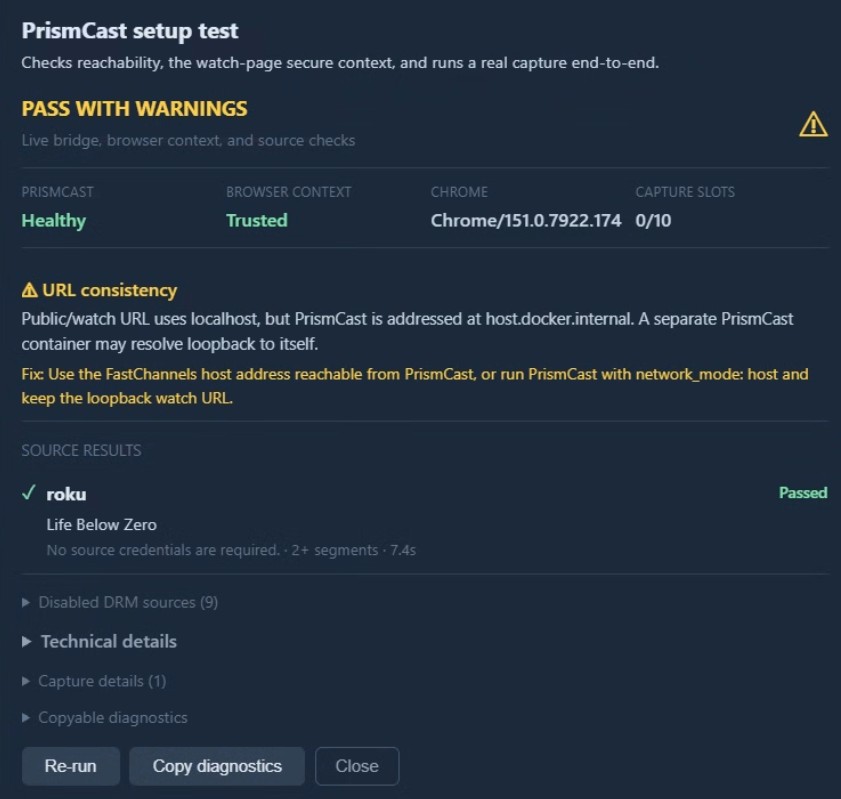
I was able to get the FastChannels 'bridge to Prismcast' setup and watch a Fubo DRM channel in Channels. It took a bit of trial and error, and FastChannels ultimately says "pass with warnings", but it does work with Fubo DRM. Trying to preview the DRM channel in FastChannels fails, but it will playback in the Channels app, just fine.
My install of Prismcast 1.12.0 is native in Windows (to take advantage of the nVidia GPU), so I installed Docker Desktop on that machine and moved FastChannels there.
I'm kind of excited to see the Kodi solution for DRM, especially if I can run it on RPi hardware instead of FireSticks. I already have a couple 4B boards not doing anything and am considering ordering the UCTRONICS Pi Rack Pro to get them racked.
Slight change in plans btw -- Kodi has a nasty bug where if you open a stream that is DRM, and if the stream changes to a clear-HLS stream in between such as an ad-break, the stream dies. It's a known bug in Kodi - I submitted a pull request to fix it, but not sure how long that'll take to get to their production code.
I've pivoted to using the built-in player inside Firesticks (with a custom bridge program). It's fantastic - you guys will love it. Tune time is wicked fast.
I'm still polishing it up and hope to get out this weekend. If anyone wants to beta test it, this is the HDMI encoder I purchased (Amazon.com: Hagibis USB3.0 Video Capture Card with 100W PD HDMI to USB/USB C 1080P HD 60fps Live and Record Video Audio Game MS2130 for Quest 3 2 Pro VR Switch2 PS4/5 Live Broadcast, Gaming, Streaming (UHC07P) : Electronics) for $21.99. I plan to add LinkPI support at some point, but for budget minded streamers, this is the solution... go ahead and order one!
2 Likes
Well, that's unfortunate. I was hoping to finally have a use for the Raspberry Pies (Pis, Pi's, bramble?) I have laying around 
But I also have FireSticks and a Link Pi ENC5-V2 doing nothing at the moment too.
Speed of tuning a station was the one of the things that I disliked when I was running the FireSticks and Link Pi, but you kind of get used to it after a while.
I'm seeing the same now... looks like they got rid of a bunch of FAST Channels, too.
I'm improving DRM-Bridge support for FUBO to keep this source going.
hoping you can do something with the on 4k boxes. i have a fire stick but i like onn 4k much better. Have two existing hdmi encoders.
It’s just an Android program so I assume it’d work on those sticks too. I don’t personally have one to test with
I'm thinking of ordering the recommended hdmi encoder but plan to put those onn boxes through the test.
Should prove to be interesting.
I was just working on an Amazon order, so added one of those encoders to my cart. 
1 Like
Does the particular hdmi encoder have advantages over others that show up on the search page? For example, I have a $10 one that I've had for a while. I noticed that it got real hot when I connected a fire stick, but was wondering if they all do that or if I should get the specific one recommended?
some of the encoders offer the ability to give you the higher resolution.
This specific encoder does 1080P 60FPS.
Firesticks tend to run a bit hot.
I've got two encoders that were bought off Amazon and they do a max of 720p 60FPS.
If you just watch classic tv and the basic channels, this works.
If you start watching sports, the higher bit rate is recommended.
I suggest picking one up and see what happens.
I would be careful and remember you often get what you pay for.
Fire it up and if it doesn't look good, just return the product.
That's helpful info, thanks. Once the update is ready to roll I can try the $10 HDMI stick I bought from Amazon some years ago (tool long ago to return) and if I don't like it or continue to be bothered by the overheating, I can order the one @KineticMan recommended. I don't watch sports and, since I do most of my watching on my PC, 720p is fine - and actually preferred since I prefer smaller files for any thing I want to keep long-term. I do a lot of file-conversions to shrink my keepers down.
Yea @Rice gave some me good tips on what to avoid. I’m not saying there’s other options out there but for $21 and this one is confirmed to work. It’s probably the one I would recommend.
1 Like