
Was the recording Interrupted?
Doesn't appear to have been. I don't recall if my earlier attempts were flagged as interrupted.
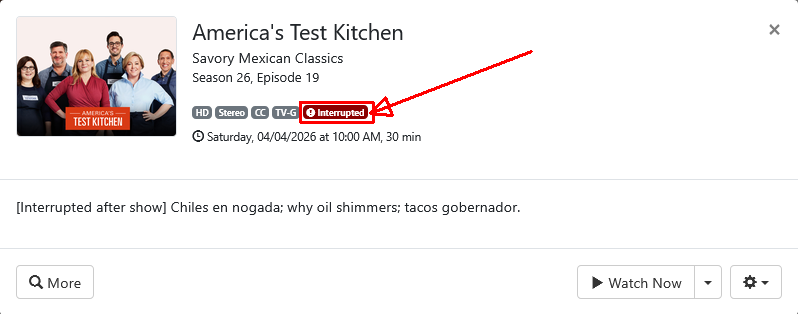
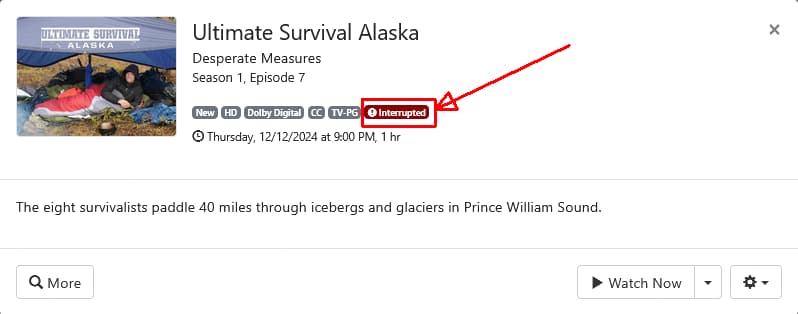
Yeah. That's what I meant by "flagged as interrupted".
I only know enough about ffmpeg to be dangerous. I have tried the following options in my attempt to fix the timestamps:
- -avoid_negative_ts make_zero
- -fflags +genpts
- -fflags +genpts+igndts+discardcorrupt
All produced essentially the same result. When I tried to trim using ffmpeg with the "fixed" file as input, I got a bajillion "Non-monotonic DPS" messages.
Any suggestions on ffmpeg options I should try to clean up the original CDVR recording?
I use Dockers for Windows and wrote 2 .bat files:
Update-FastChannels.bat
@echo off
docker stop fastchannels >nul 2>&1
docker rm fastchannels >nul 2>&1
docker pull ghcr.io/kineticman/fastchannels:latest
docker run -d --name fastchannels --restart always -p 5523:5523 -v C:\DockerData\FastChannels\data:/data ghcr.io/kineticman/fastchannels:latest
pause
Verify-FastChannels.bat
echo Verifying restart policy...
docker inspect -f "{{.HostConfig.RestartPolicy.Name}}" fastchannels
echo.
pause
So it wasn't interrupted?
This is what I use
ffmpeg -ignore_unknown -i "recorded_filename.mpg" -map 0 -acodec copy -vcodec copy -scodec copy "recorded_filename.ts"
I then rename the original recording "recorded_filename.mpg" to "recorded_filename.mpg.bak"
and rename the newly remuxed file "recorded_filename.ts" to "recorded_filename.mpg"
Then using the DVR web UI, I refresh the metadata for the recording.
I tried this command:
ffmpeg -ignore_unknown -i 'E:\ChannelsDVR\Movies\Bride of Frankenstein (1935) 2026-08-22-0529.mpg' -c copy bof-iu.mkv
The results are pretty much the same as the options I have tried before. The length is still reported as 09:23:24. When I try to load the file into VideoReDo, VRD just hangs. I'm able to scan the entire movie in VLC using the arrow keys and it looks like the actual recording may be OK. (But I seriously doubt that bit of success has anything to do with the rewrite option we are investigating.)
My goal with this exercise is to edit out the ads and see if the resulting movie is approximately the right length.
A recording of Boxcar Bertha completed a few minutes ago. It reports a reasonable length and loads into VRD with no problem. I'll examine it some more. But I didn't previously attempt to record it, so I have no idea if the "rewrite" option had anything to do with the apparent success.
Are you sure your recordings are using the rewrite option?
Did you look at the m3u's from FastChannels to make sure tvc-stream-timestamps="rewrite" is in them?
Did you reload your m3u's from FastChannels in CDVR after enabling the option?
That's not what I use. Not sure that would do the same as my command which remuxes an mpeg transport stream into an mpeg transport stream and rewrites timestamps.
I did check the m3u from FastChannels and the rewrite option was present. I didn't force a refresh of CDVR at the time, but I think FastChannels forces a refresh every hour, so the m3u should have refreshed several times before the recording began.
I think the ffmpeg command I tried is pretty equivalent to your command. "-c copy" is shorthand for "-vcodec copy -acodec copy". The only thing missing from my command was the "-map 0" option which resulted in a command failure when I tried it. I decided to go brute-force and try "-vcodec h264 -acodec aac". That resulted in a file with the right length that I was able to load into VRD. But while editing the ads out, I noticed some audio anomalies that made the recording not worth keeping.
Oh, I just looked at the ffmpeg -ignore_unknown option and I see it has nothing to do with rewriting the timestamps and everything to do with omitting unknown streams. All of the streams from the CDVR file are allowed in an .mkv file so the -map option is not necessary. I see nothing in your command that would rewrite the PTS unless it is the act of changing the container to .ts.
I also successfully edited the ads out of Boxcar Bertha. The resulting video was 1:26 where it is listed as 1:29 on IMDb. But a shorter video is not all that surprising given the nudity. So I'm going to guess that was a reasonably successful recording. But, as I mentioned before, I have no history of failure for Boxcar Bertha to compare against.
I think I will end this exercise for now. I will leave the rewrite option enabled in FC to see if it seems to cause any notable anomalies. Anyone know if there is significant processing cost at recording time in having this option enabled?
You asked
I answered
Works for me to rewrite the PTS. CDVR records to an MPEG TS container and my ffmpeg remux command remuxes it to the same container. Try it.
1 Like
I just had an 2 hour movie report just under 24 hours in length. It was recorded via my HDHomerun that is normally configured in Channels. This makes me think there is a Channels bug causing this. I then copied the movie file into my imports folder. Deleted the recording in channels and then imported the file. The length of the movie shoed 2:03 hours as it should.
2 Likes
Guide for Android/Google TV Clients won't sync/update:
(Not sure if this issue is a FastChannels thing or a Channels thing. Posting here just in case)
I set up Pluto as a source in FastChannels since I was already using it anyway in Docker Desktop. On my AppleTV4K, the guide, the logos, and channels all appear the way I set them up. Perfect.
It's my other clients (listed above) where I'm having difficulty figuring out the issue. My android and Google TV clients are missing the logos. Just seeing the FastChannel numbers.
I've pulled the latest FastChannels and cleared the app cache on my android & google tv clients. I've tried uninstalling/re-installing the apps, stopping & restarting Channels, as well as deleting/recreating the database. So far, none of it has worked & I'm out of ideas.
Just missing the logos?
Do they have the guide data?
In your FastChannel Settings. What is your FastChannels Server URL set to?
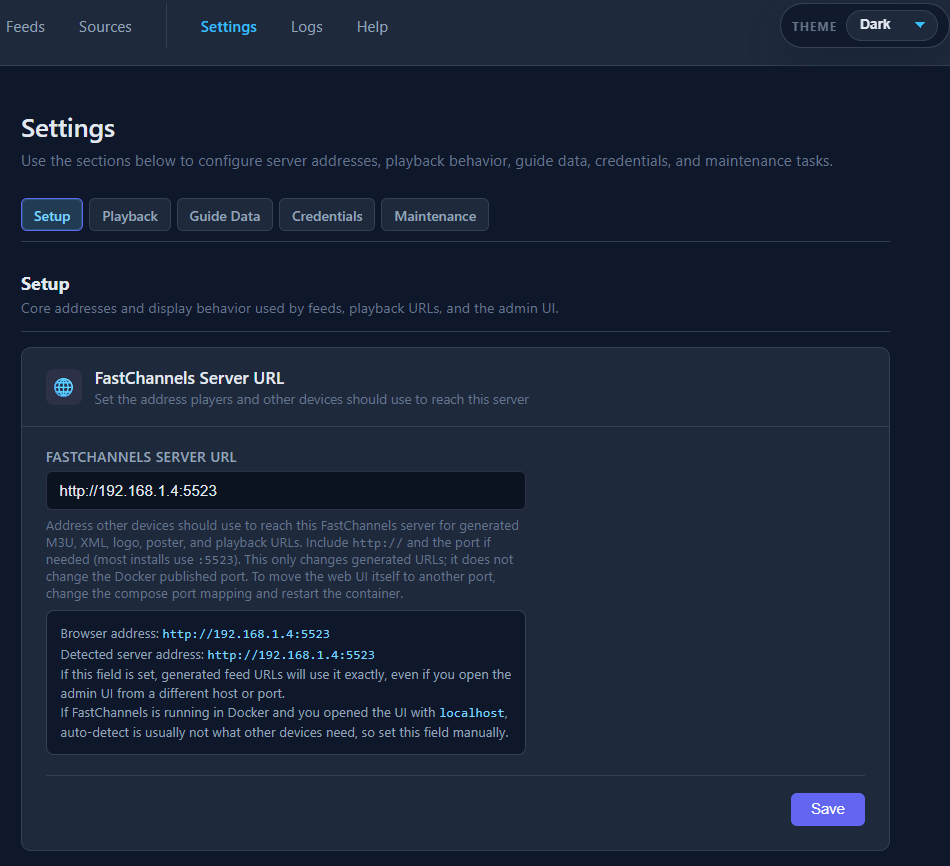
Was that recording Interrupted?
I don't know. My logs don't go back far enough. I don't recall an interruption as I'd re-record if I can.
Apologies. Should've clarified. Guide data is there. Randomly tested a few channels & they work. Just missing the logos. My FastChannels server is set to "localhost:5523"
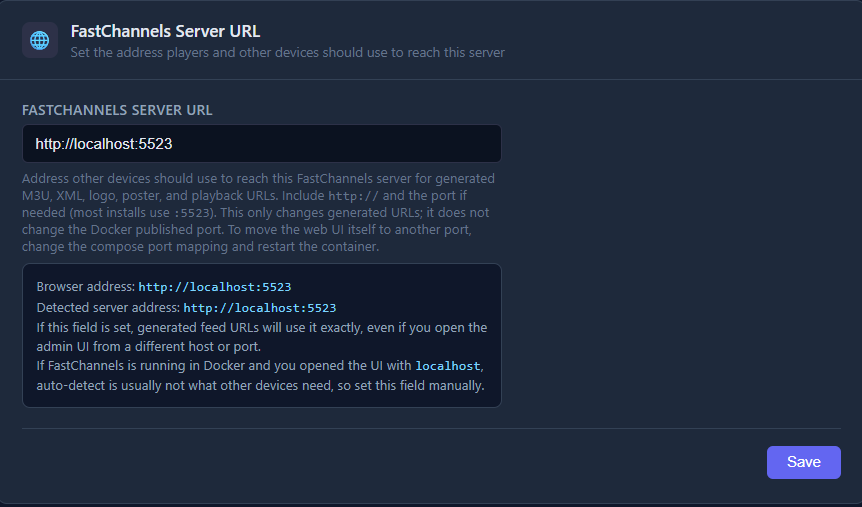
Remote or local? I don't get logos on the FastChannels channels when I'm remote which is expected. At least that's how it is using a browser on my laptop.
My Google TV client (onn pro 4k) is local 7 ethernet connected. Android client is my s23 Ultra - so it varies between local and remote. I guess I assumed/never considered that local vs remote would affect channel logos. Maybe I should try changing FastChannels Server URL (?)
BTW, thanks for the replies
I'd recommend not using "localhost" in that field. change it to your server's actual lan IP.
1 Like