
@alai The above script is working for me on an ONN 4K Plus, so I think we'll be good -- but do let me know. This bug would also affect other non-ah4c non-FireStick users, so I'll need to get with @KineticMan for a broader fix.
2 Likes
I've only tuned a few stations but so far the new script fixed the bmitune errors and the black screens. Thank you!!
Sorry for the accidental misdirect; I swore I was seeing the black screens in the old FastChannels build but maybe I was mistaken.
1 Like
You weren't mistaken. The same logic is present in the Python code for evaluating whether playback is active for single encoder/virtual encoder setups. So same bug, in 2+ different places, one in Bash and the other Python.
Thanks for confirming the fix.
1 Like
PR#49 submitted to address issues with playback detection in both ah4c and single encoder setups. In both Bash and Python, the string matching used didn't work for non-FireTV devices:
1 Like
I seem to be having the same problem, namely that I can see the tuning on the Fire Stick but not in Channels. The problem is only for the Amazon channels. The PBS ones seem to be working just fine. I haven't tried Roku channels via the Android bridge yet.
Amazon Prismcast also works (to the extent that Prismcast works).
I tried your recommendations to @sbuchart but it doesn't seem to be helping. Maybe I'm missing something?
Following your directions, I copied the M3U provided by Channels and got this string, which is different from yours.
I also tried saving the resulting .m3u and opened it with a text editor to find several entries that include some similar text, but instead of "ANY" I have what looks like the feed name:
I lopped off everything after "stream.mpg" and pasted it into the browser, which gave me a 503 error. It also failed when opened via VLC.
To try to see what relevant differences might explain why PBS works & Amazon doesn't, here are some URLS from Channels, under "manage" for the different sources:
FC PBS (non-bridged): http://192.168.2.160:5523/feeds/fc-pbs/m3u/gracenote
Works fine
FC PBS Bridged: http://192.168.2.160:5523/feeds/fc-pbs/m3u/fc-player/gracenote
Works fine
Amazon Bridged: http://192.168.2.160:5523/feeds/amazon/m3u/fc-player/gracenote
http://192.168.2.160:5523/feeds/amazon/m3u/fc-player
Fails (I can see the tune in the fire stick, which is opened on the server PC in PotPlayer, but it doesn't come through to channels; for the PBS channels, which work, I also see the tune via PotPlayer and it does come through).
Prismcast Amazon: http://192.168.2.160:5523/feeds/amazon/m3u/prismcast
works
(All of the PBS channels are Gracenote; only 1 of the Amazon channels is, just to explain why there are no non-Gracenote PBS channels listed).
The Android bridge channels are MPEG-TS, and the non-bridge channels are HLS. Otherwise they look the same.
Server: Windows 11. Fire Stick 3rd Gen, Generic HDMI-to-USB.
I just got a new Fire TV Stick, finally got it into dev mode (much different process than in the FC docs), and went to push FC Player to it. Got this:
Performing Streamed Install adb: failed to run abb_exec. Error: closed adb: retrieving the default device installation mode failed: closedadb: failed to run abb_exec. Error: closed adb: connect error for write: closed
Any thoughts?
1 Like
Never mind. It seems that the latest models run vega, and do not support side loading. I'll find one that does, and try again!
I am running on a Mac, so this might be a little different since you are running on Windows.
After configuring using the attached screen shots, the ONLY way I could get the video to come back to channels was by launching the Channels DVR via a command line instead of as a background service. That command was posted a while while back in this forum, and I am very thankful for that post because without it, I just could not get video to return. From what I understand, Apple locks down the camera feed from automatic background launches, thus I had to launch Channels DVR via a command line.
That command to launch Channels DVR on a Mac Mini is: ~/Library/Application\ Support/ChannelsDVR/uninstall.sh && ~/Library/Application\ Support/ChannelsDVR/install.sh —system
So I then used the Automator app that is part of the Mac OS to run that command as an app, and then put that app in my login items so that the Mac runs that "app" (which is just the command above) when rebooting the Mac. Perhaps you won't need to run Channels DVR with such a command on Windows, but that was the fix that works.
Here are the screenshots of my configuration:
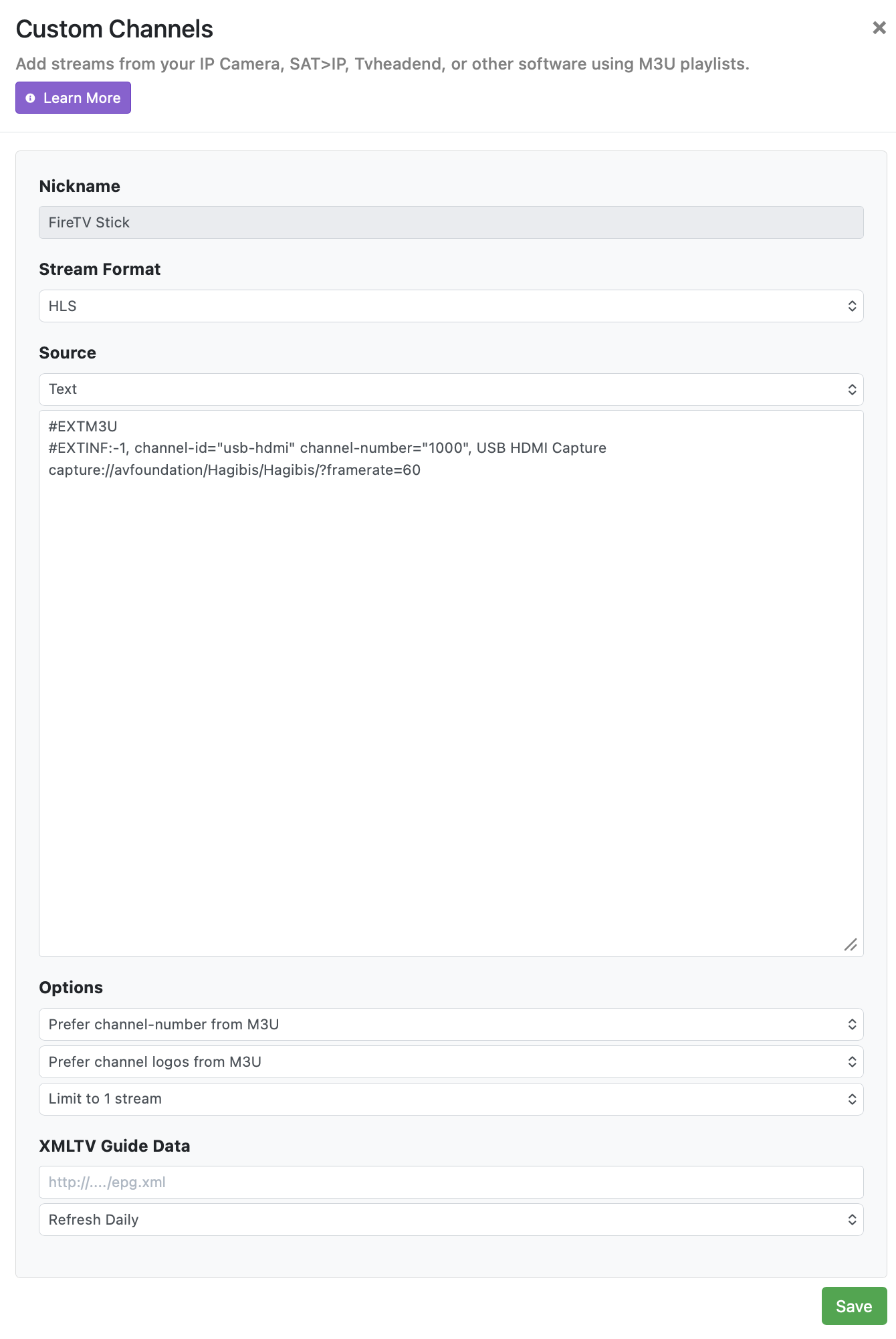
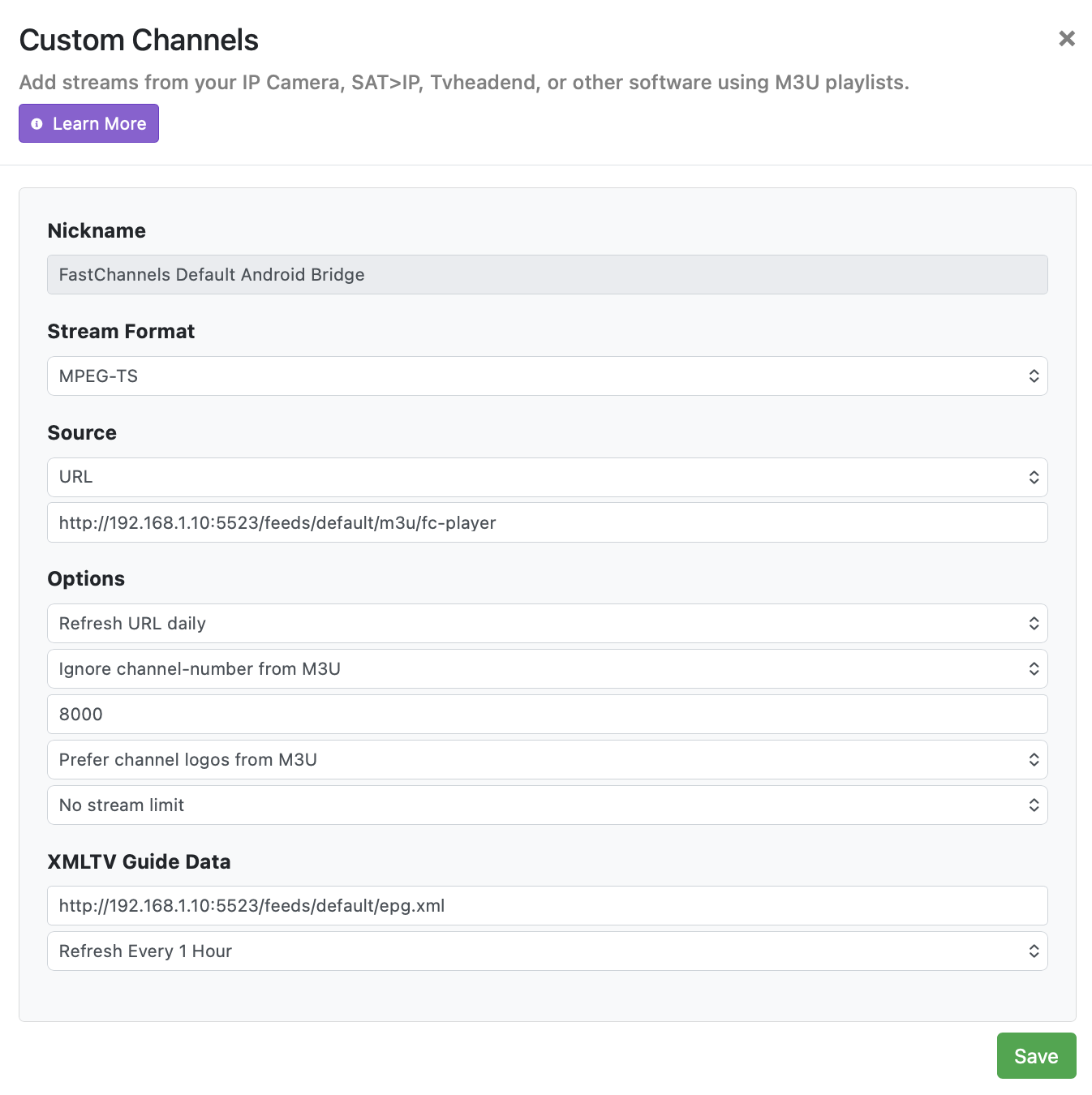
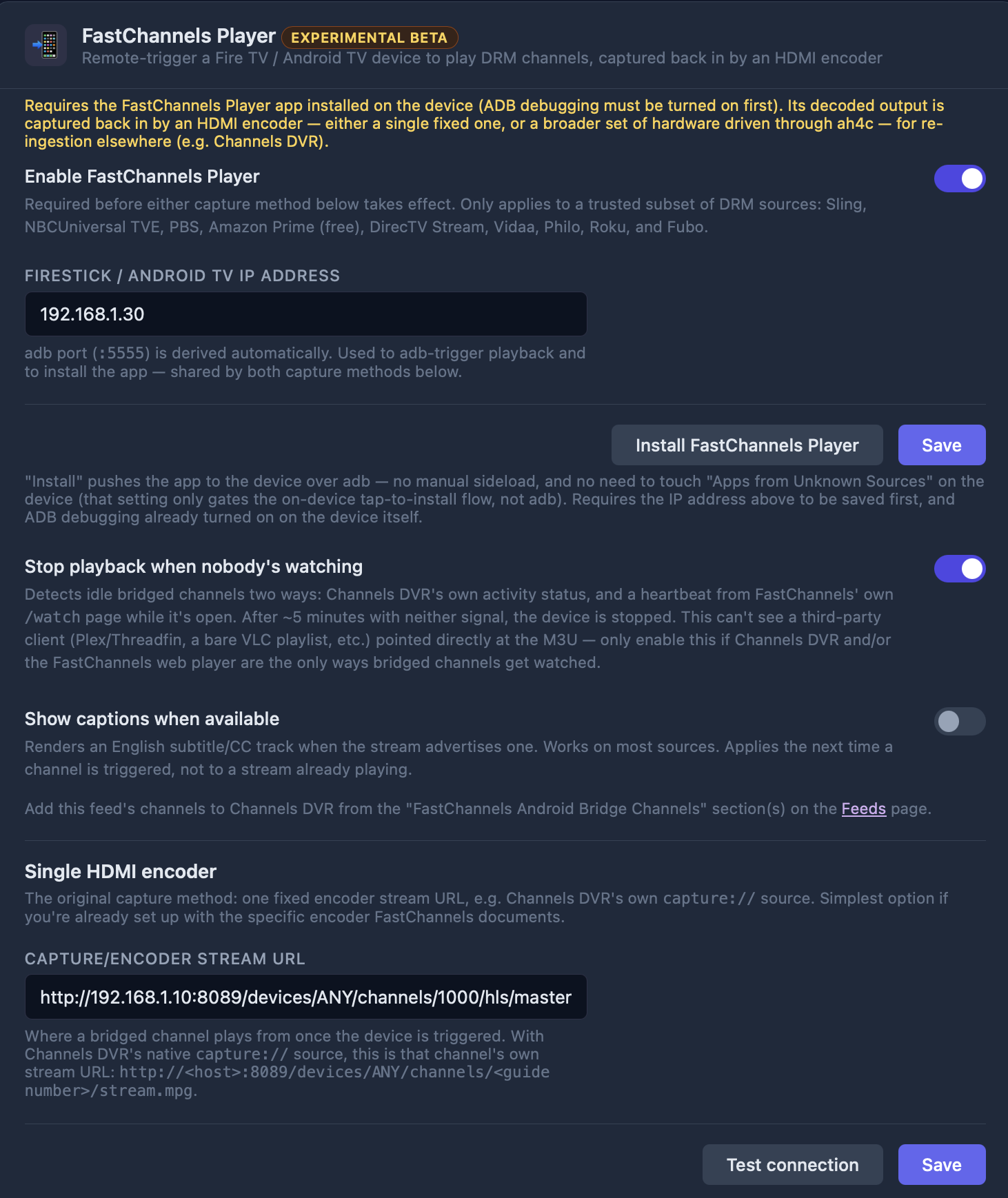
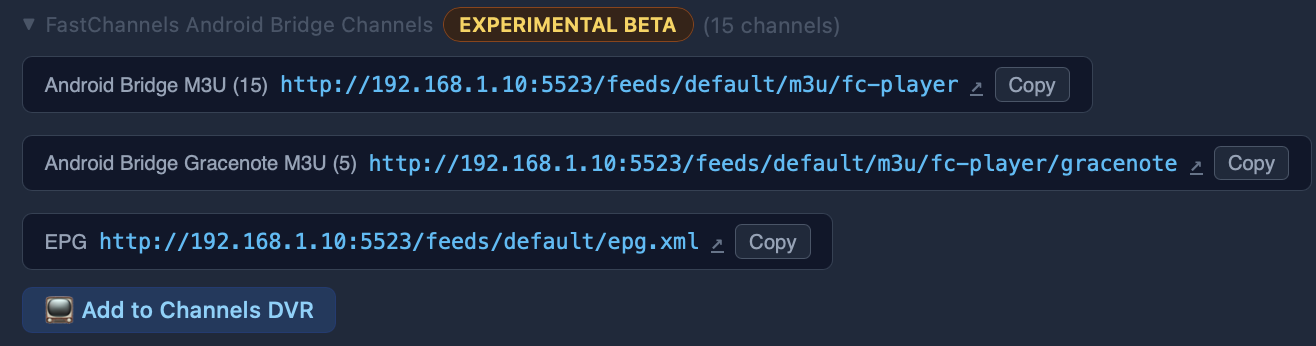

Are there a full set of scripts for onn/fastchannels? I know they haven’t made it into the repo, yet. I think I am ready to fire is all up, but just need the scripts to drive my onn
Use scripts/firetv/fastchannels for now. We'll, probably change it to scripts/all/fastchannels, once we know the scripts work across all devices. For now, FireSticks and ONN streaming sticks should work fine.
None of what you described that was required for Channels DVR on MacOS really applies to Windows -- so hopefully no Windows users will go down that rabbit hole. 
There's still an issue with the way you're formatting your "virtual encoder" URL:
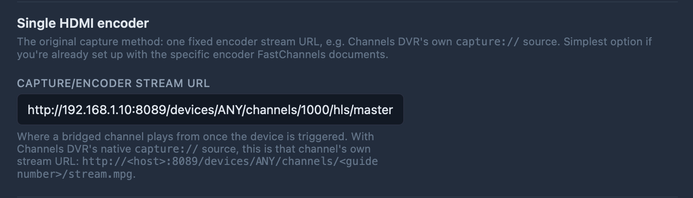
If you look just below the CAPTURE/ENCODER STREAM URL, you'll see there's even a description of what that URL is supposed to look like. So yours should be:
http://192.168.1.10:8089/devices/ANY/channels/1000/stream.mpg
Well, I’ve got great video from my onn -> Ip encoder, through ah4c. What’s NOT working is the adb channel control. I get a load of log statements, before the log shows it is giving up. The FC Player loaded with no errors. Any ideas what to check?
Thanks for the URL recommendation. Fortunately either format works, but I have switched to yours since that is the recommended format.
I began my comments with "I am running on a Mac, so this might be a little different since you are running on Windows." since I saw that others on a Mac are also struggling with some of this, and with your help and others, I was able to get it working very well, so hopefully this can provide some insight as needed.
Thanks for writing great software that is truly needed these days!
1 Like
I think that's a good call. I'm not surprised the other URL worked, but it's the kind of thing you'd have to mention if you needed support in the future -- as it's a deviation from the specified/tested approach.
Let me see if I can step through this with you, though if PBS works, that would suggest your basic virtual encoder configuration is correct.
Apologies if I'm repeating what you already know, but stage one of the HDMI Capture bridge is to setup your virtual encoder.
What you need for that is one CDVR Custom Channels Source to act as nothing but a way to encode what would otherwise be a very large capture stream. That's the whole capture://dshow part in Windows.
When you setup that source, there are two things you need, the first is what channel number is that single "virtual encoder" channel using? You can either assign it in that custom source (by stating a starting channel number for this single channel source), or you can simply use your EPG to go that source, and find the channel number there.
The EPG method is nice because, you can also tune to this channel, and see what your capture card is capturing at that moment. This tells you your virtual encoder is working. Now you need to know what the URL is to reach that encoder. There are are a number of formats that will work, but I suggest this:
http://channels:8089/devices/M3U-Capture/channels/90474/stream.mpg?format=ts&codec=copy
Where my "channels" value would be the IP (or resolvable hostname) of the Channels DVR server that hosts your virtual encoder.
The "M3U-Capture" value you can change to "ANY", or use the name you gave to your Virtual encoder's Custom Channel Source (with "M3U-" first and spaces removed).
"90474" would be replaced with channel number your virtual encoder uses, which you would have seen in the EPG when you did the test mentioned above.
Everything else should be left as-is. This is the URL for your virtual encoder.
Armed with that and the IP (or resolvable hostname) of your streaming stick, you have what you need to fill in the values for the HDMI Capture section of FastChannels.
Next, for Amazon, I'd start simple (and in fact I did to do a test), and just enable a single channel that has a Gracenote ID. Then grab the Gracenote compatible M3U, from the FastChannels Feeds section, and setup another Custom Channels Source along these lines:
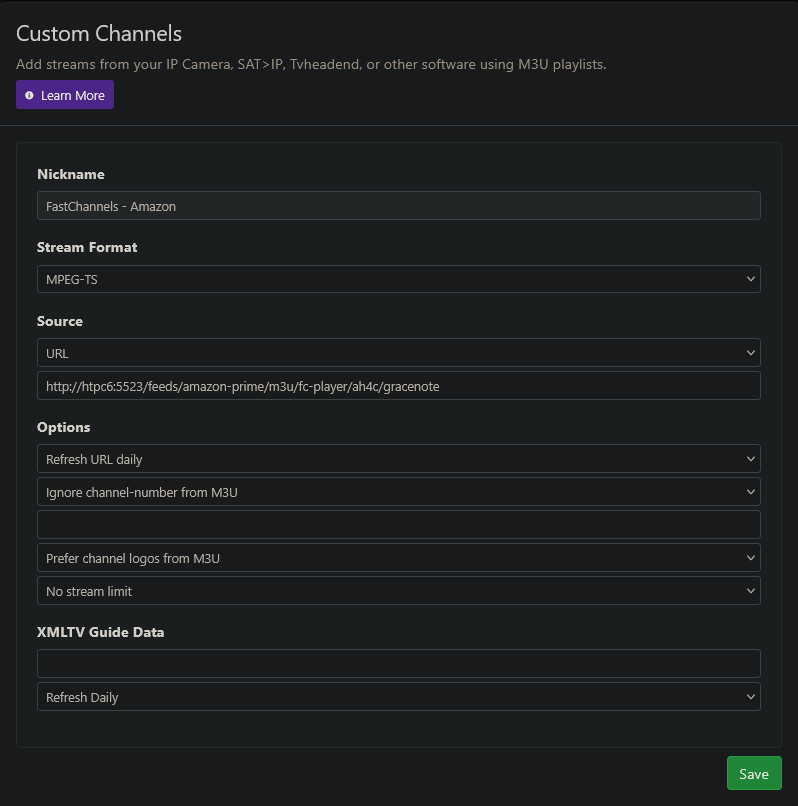
Once you've saved that, and guide data has been updated, go to the EPG for that source and try it out:
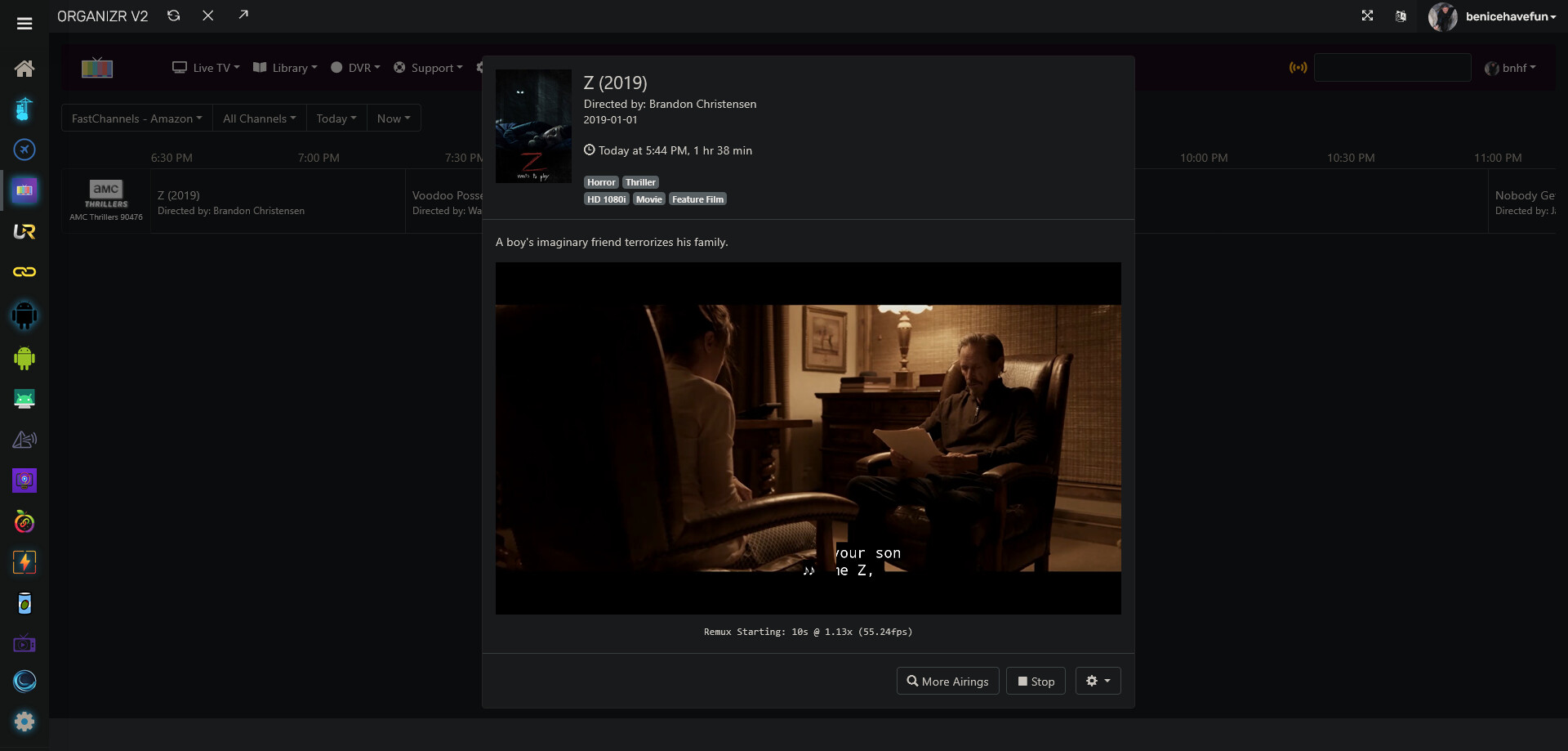
Circling back to the part of your post I quoted, if PBS works, and everything I described above is what you've already done, then an issue with your Amazon Source seems the most likely. We know this is unlikely to be an overall issue, since I set this up myself just a few minute ago with no drama.
UPDATED AFTER FURTHER TESTING
Now I suspect that PBS wasn't working at all! I think that my PBS Android Bridge source was sharing channel numbers with a different PBS source and what I thought was flawless tuning & playing was in fact the other source (the PBS VLC bridge) instead of the Android bridge. I changed channel numbers to make sure they were kept separate and now tuning the PBS channels through the Android bridge shows the exact same behavior as the Amazon ones, which is that the Fire Stick will tune but it won't pass results back to Channels.
Could this be related to my no-name HDMI-to-USB stick (which I'd had for several years - not something I bought just to try this out) and I should instead order the one originally recommended? If so, that may be my best next step.
Leaving the rest in for now in case it ends up still being relevant.
Sigh! I wish I understood better how all of this works. I'm not sure what resources I'd tap in order to try to learn more about it so I can troubleshoot more intelligently. 

Thanks for your help, but I'm not making any headway with it. Please see my notes on your steps below - I may have misunderstood some of them, though I did my best to follow:
[quote="bnhf, post:2867, topic:45986"]
The EPG method is nice because, you can also tune to this channel, and see what your capture card is capturing at that moment. This tells you your virtual encoder is working. Now you need to know what the URL is to reach that encoder. There are are a number of formats that will work, but I suggest this:
http://channels:8089/devices/M3U-Capture/channels/90474/stream.mpg?format=ts&codec=copyWhere my "channels" value would be the IP (or resolvable hostname) of the Channels DVR server that hosts your virtual encoder.
The "M3U-Capture" value you can change to "ANY", or use the name you gave to your Virtual encoder's Custom Channel Source (with "M3U-" first and spaces removed).
"90474" would be replaced with channel number your virtual encoder uses, which you would have seen in the EPG when you did the test mentioned above.
Everything else should be left as-is. This is the URL for your virtual encoder.
My Channels is at http://192.168.2.160:8089 and the channel number I assigned to the test-source was 9999. So my version should then be:
http://192.168.2.160:8089/devices/ANY/channels/9999/stream.mpg?format-ts&codec=copy

or
http://192.168.2.160:8089/devices/amazon-gracenote-for-tests/channels/9999/stream.mpg?format-ts&codec=copy
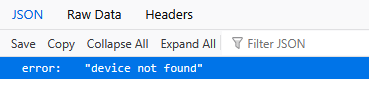
However, I wasn't sure what to do with those URLs. They do not match the format of what you showed in the screen shot where you set up a source, so I wasn't sure what role they were meant to play, compared with your example. Are they supposed to be pasted into a browser or VLC for testing? Neither of those worked either in my browser or VLC. The first gave me a 503 error and the second gave me this:
Armed with that and the IP (or resolvable hostname) of your streaming stick, you have what you need to fill in the values for the HDMI Capture section of FastChannels.
Next, for Amazon, I'd start simple (and in fact I did to do a test), and just enable a single channel that has a Gracenote ID. Then grab the Gracenote compatible M3U, from the FastChannels Feeds section, and setup another Custom Channels Source along these lines:
Once you've saved that, and guide data has been updated, go to the EPG for that source and try it out:
Circling back to the part of your post I quoted, if PBS works, and everything I described above is what you've already done, then an issue with your Amazon Source seems the most likely. We know this is unlikely to be an overall issue, since I set this up myself just a few minute ago with no drama.
[/quote]
I filled in a custom channel for testing based on your model:
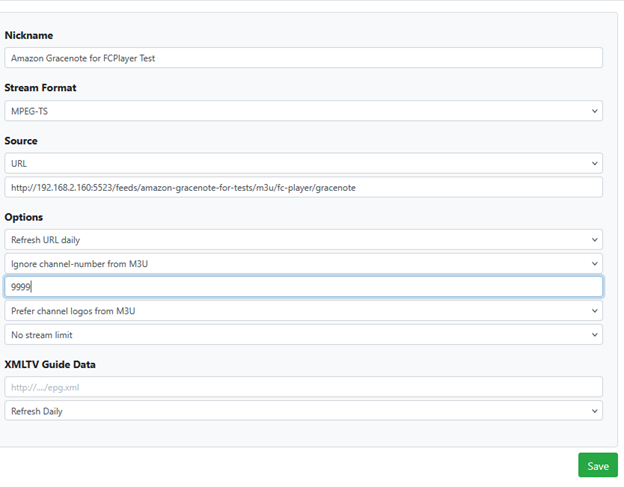
(Note: I'm not using ah4c as in your example - I've read about it but can't say I understand where to start with it. I am under the impression it requires something like a Link-Pi that sends out its own URL, and I don't have one of those. I'm using a single Fire Stick connected via HDMI-to-USB, so using the Android Bridge rather than the ah4c.)
Regarding "the IP of your streaming stick," the fire stick does have an IP address that is different from my server (192.168.2.140 vs. 192.168.2.160), but the general instructions say I'm supposed to use the Channels server (where FC lives) address. If I'm supposed to use the Firestick's address instead, where exactly does it go? I tried things like:
http://192.168.2.140:5523/feeds/amazon-gracenote-for-tests/m3u/fc-player/gracenote
But wasn't surprised that didn't work, since I have no idea what ports, if any, the firestick opens. Just giving it http://192.168.2.140 fared no better.
After setting up the source as shown in the screen shot I pasted above using the FastChannels Feeds Gracenotes M3U, I was able to see EPG for it in Channels. Selecting whatever's currently showing and clicking "watch" results in the Fire stick tuning and starting to play the show, while Channels just spins its wheel - so no different from what I'd posted earlier.
Since Amazon is working ok with the Prismcast bridge, what could be making the difference that causes it to fail for the Fire Stick when PBS succeeds with the fire stick? I'd suspect my Amazon login if it also failed with the Prismcast bridge, but since it succeeds there, that can't be the problem. I'd suspect the fire stick or how I have it connected if PBS also failed, but since it doesn't, I'm not sure where else to look.
One other thing that may or may not be relevant:
When I first try to tune something via the Android bridge and the FS has been asleep for a while, it still displays the sleep-screen rather than what I tuned. However if what I tuned is from the PBS bridge, it plays in Channels, while if it's from the Amazon bridge it does not. In either case, once I manually wake the stick whatever I asked for (PBS or Amazon) shows on the stick and continues to play until I tune something else or manually stop it via the stick's remote.
I tried your update and I cant tune into any channel as ah4c doesnt even try to tune into it. Its still on the home screen @bnhf
I'd like you to post a few additional screenshots for me. The first one I'd like to see is for the Custom Channels Source that represents your virtual encoder. This is the one that has the capture://dshow URL in it.
Next I'd like a screenshot of your HDMI CAPTURE settings in FastChannels. A bonus item on this screenshot would be if you can click the Install FastChannels Player button (which should just reinstall it on the FireStick at the IP address specified in HDMI CAPTURE DEVICE IP).
With those two things setup correctly you'll be able to view the feed from the capture device in the Channels WebUI. Let's get this part working correctly, and then we can move to the next.
Anything useful in the FastChannels logs? Or, the ah4c logs for that matter?
We'll do this a step at time, and I believe that may shed some light on the subject for you. Post the requested screenshots, and we'll go from there.