
Yeah...it is getting to a point of doing too much for no real reason or benefit there. A KISS method is all we need here and thats all
OK, I'll just change them to Outdoors.
Tubi is solid, but only 720p
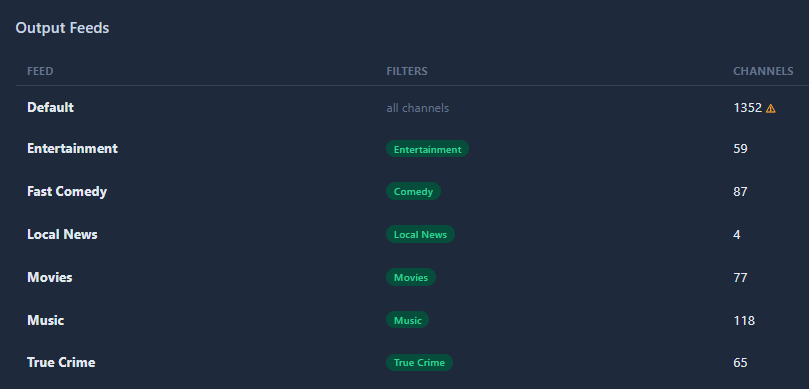
Alright let's try something fun -- let's see your Feeds. Anything creative? Mine is pretty boring right now. I do like setting up "Channel Collections" on CDVR with the Feed name as a "Category" and then using CDVR Guide to see what's on.
1 Like
I have fewer feeds for the moment and they just as boring as yours. I also set up a feed with just a single channel so I can see what it looks like when deployed. If any changes are required, I only have to mess around with the one single channel. Later, I plan on adding Mysteries and Documentaries.
It would be "nice" if a channels could have an additional category. Let's say a channel has a mix of movies and serials.
Currently I only have four feeds.
Default
Science Fiction
Movies
Kids and Family -- (mostly cartoons  )
)
Test
Question: What actions do you recommend when RE-deploying a feed? Before redeploying I've been removing the existing target source and collection then rebuilding the guide database. Am I overdoing it?
Thanks for all your hard work!
That's also what I do in CDVR.
Anytime I change things in a source setting, or remove/add a source, I delete and recreate the guide database and redo any related channel collections. And I have a list of my passes that use channel numbers in them, so I'll also update them.
3 Likes
I recently started receiving the "Pluto TV is no longer available on this device" message with my existing setup. While researching the issue, I stumbled across FastChannels and have been testing it the past couple of days. I really like it and am impressed with how far it has progressed in a seemingly short amount of time. A huge thank you to KineticMan and everyone else that has contributed!
I'm having an odd issue and I'm not sure if it is a FastChannels issue or a Channels DVR issue.
I setup FastChannels and it appears to be working fine. I created a feed, then clicked the Add to Channels DVR button. The feed was added to Channels DVR as expected. When I then go to Live TV > Guide (in the Channels DVR web UI) and select a source of FastChannels (feed name), it displays the channels as expected, except that none of the channel logos are displayed; they are broken-image icons. If I right-click on one of the broken-image icons and select Inspect, I see this:
<img src="//(FQDN of my FastChannels):5523/logos/9953a821f2b79534c7b512fcfe5fd231.png"...
This is in contrast to these:
from an HDHomeRun feed
<img src="https://(FQDN of Channels DVR):8089/tmsimg/assets/s53098_ll_h15_ac.png?w=360&h=270"...
from a TVE Sling TV feed
<img src="https://(FQDN of Channels DVR):8089/tmsimg/assets/s43309_ll_h3_aa.png"...
from a pluto-for-channels feed
<img src="https://images.pluto.tv/channels/58d947b9e420d8656ee101ab/colorLogoPNG.png"...
from a SamsungTVPlus-for-channels feed
<img src="https://tvpnlogopus.samsungcloud.tv/platform/image/sourcelogo/vc/00/02/34/USBA3800005NI_20260303T093848SQUARE.png"...
from a tubi-for-channels feed
<img src="https://canvas-lb.tubitv.com/opts/eRrzABhCqX5_Lw==/9f0a41fe-3e4d-44cf-ab49-e27914cdd8c1/CHgQeDoFMS4xLjlAAQ=="...
As you can see, the entry for the FastChannels feed is missing the "http:" at the beginning thus rendering the URL invalid and the logo doesn't get displayed.
I have downloaded the M3U file from Channels DVR using Settings > Sources > Manage > Copy M3U URL, then passing it to curl and the logo URL looks correct there:
#EXTINF:-1 channel-id="21000" tvg-id="21000" tvg-chno="21000" tvg-logo="http://(FQDN of my FastChannels):5523/logos/9953a821f2b79534c7b512fcfe5fd231.png" tvc-guide-stationid="distro.39730" tvg-name="24 Hour Free Movies" group-title="HD",24 Hour Free Movies
https://(FQDN of Channels DVR):8089/devices/M3U-FastChannelsDistroTV/channels/21000/stream.mpg?format=ts&codec=copy
The feed from FastChannels is the only one that is broken and none of the channel icons for the feed are displayed. I tried creating the feed manually in Channels DVR (vs using the Add to Channels DVR button in FastChannels) and the result is the same. The logos display correctly on my Android phone, my FireTV stick, and my Apple TV; it appears to only be broken with the Channels DVR web UI.
The one difference I see is that the FastChannels URL is http vs https for all of the other feeds; I don't know if that is of any significance or not.
I originally experienced this with FastChannels 2.4.0, but have since upgraded to 2.5.0, deleted the feed from Channels DVR and re-added it and I'm having the same issue.
Is this an issue with FastChannels or the Channels DVR web UI?
I'm not seeing that.
If I right click on a channel logo and open image in new tab in my browser I see this
http://192.168.1.4:5523/logos/7de18840c3961fbd94add0934d7c2cf9.png

Source Settings
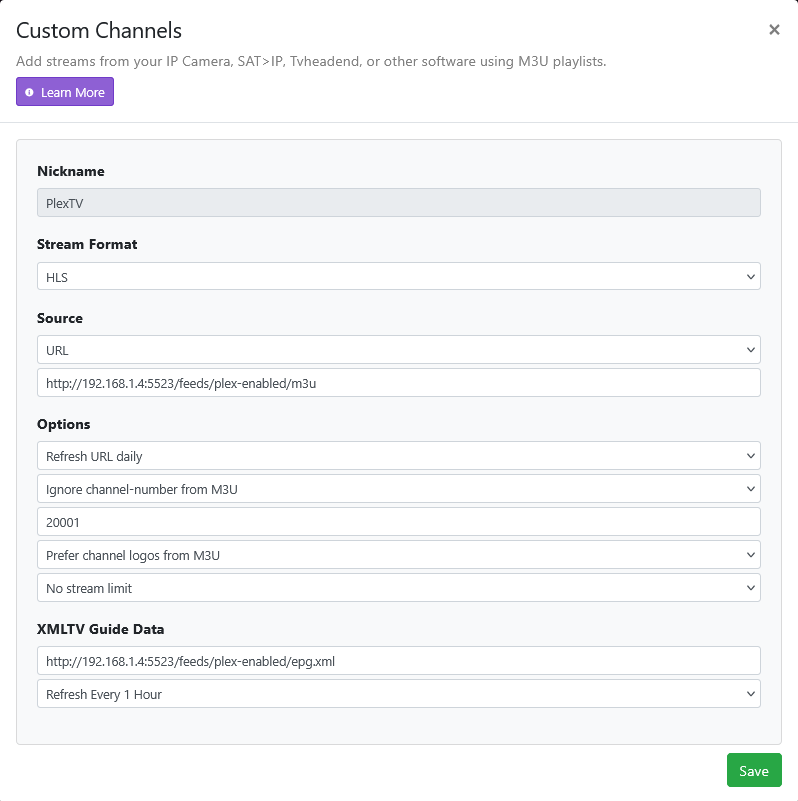
What is your
(FQDN of my FastChannels) and (FQDN of Channels DVR) ?
Are you viewing it remote?
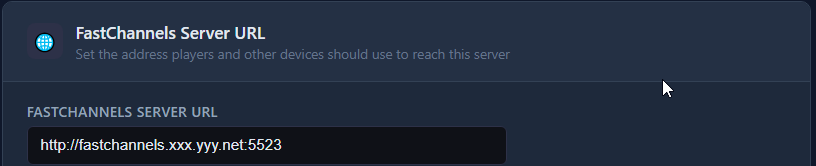
Also, what does your FastChannels Settings look like
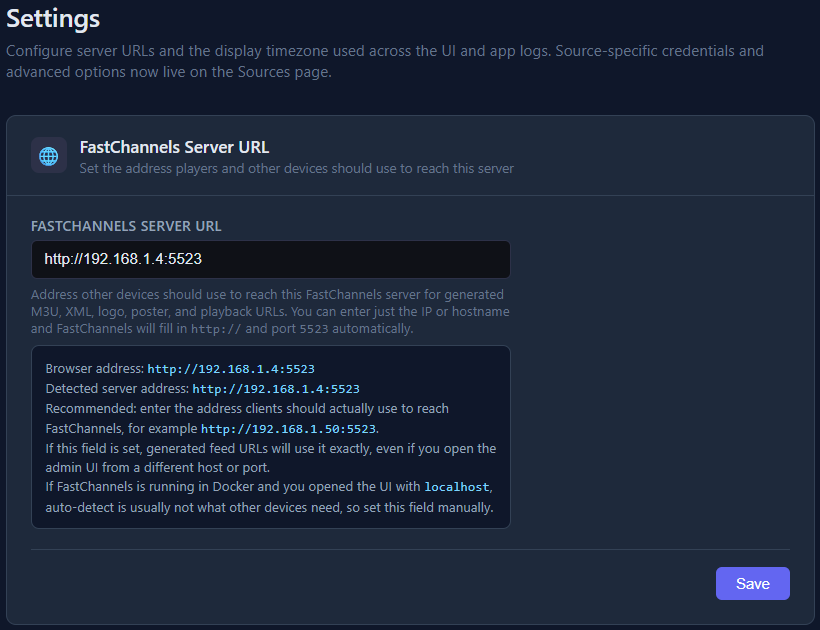
If I right-click on the channel logo and open in a new tab, I get this:
https://(FQDN of Channels DVR):8089/admin/guide/later/channels/21000
On any non-FastChannels feed, when I right-click on the channel logo I also have the option of Open image in a new tab, which has the same result as you:

but I don't have an Open image in a new tab option on the FastChannels feed because the link is missing the http: at the beginning.
The FQDNs are fastchannels.xxx.yyy.net and channelsdvr.xxx.yyy.net (they are publicly registered domains so I'm not posting them in their entirety), which point to the IPs of the respective containers, which are accessible. If I copy the broken link from Inspect, paste it into the address bar, and add the "http:" to the beginning, the browser displays the image fine.
I'm not remote; I'm sitting on the local network with Channels DVR and FastChannels, although I'm in a different subnet than they are (Channels DVR and FastChannels are in the same subnet).
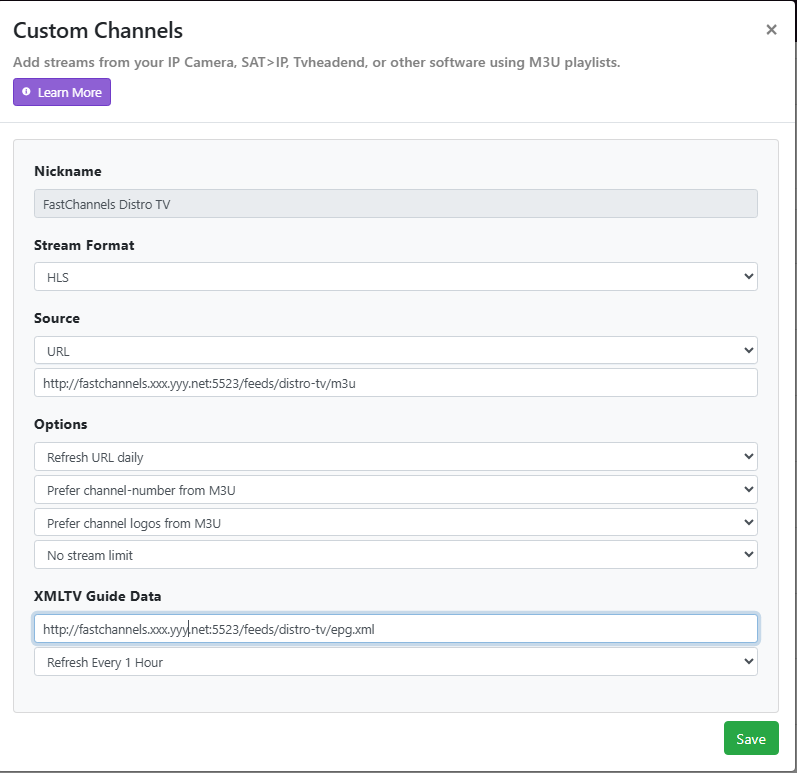

OK. I'm not sure why you have them using "publicly registered domains" unless you want remote access.
Anyway, it works for me locally using my reserved private IP address and I can remote into my LAN using Tailscale, so not sure I can help you.
1 Like
I've had registered domains for decades. I prefer using domain names because they are easier to remember than IP addresses, so I created a subdomain for my entire home network, but the network itself isn't publicly accessible (it uses private IP space and is behind a firewall). I'm not sure why any of that matters though. Everything works fine everywhere except in the Channels DVR web UI and it doesn't work there because the URL is incomplete. The question is why is the URL incomplete in that one place.
I was planning to delete the entire FastChannels installation and start over once I got done testing, but maybe now is a good time to try that as I can't think of anything other than corruption or residual data of some sort that might be causing it.
How do you access your CDVR web admin portal? Specifically, what is the URL?
I have this issue myself. If I access it via the my.channelsdvr.net url, that url cleverly proxy’s into admin via HTTPS. And the FastChannels server only support HTTP. So what happens is your browser (correctly) rejects HTTP links - which the cached images are. If you access the CDVR admin page via http://192.168.1.100 (whatever your local LAN IP is), it’ll work.
Just an annoyance.
I want to thank you for this! I built a small container for myself but yours is so much better and polished! Thank you!
1 Like
I'll chime in and say that both of these work for me. I'm quite used to using the 192...etc IP that I forgot about the HTTPS issue that Kineticman mentions. I've seen that just one time and it caused me to pause but using Chrome, I just clicked advanced and proceeded (Proceed to 192 168 xx xxx (unsafe)).
This may be getting way too nitpicky, but would you consider adding a settings option to assign channel numbers to the Gracenote channels before the XMLTV channels?
That's it. Thanks for the explanation, KineticMan. I use https://channelsdvr.xxx.yyy.net:8089/admin which results in the broken logo images for the FastChannels feeds. If I switch to http://channelsdvr.xxx.yyy.net:8089/admin, the logos display correctly. This also explains why the logos associated with non-FastChannels feeds work as they are all https links and so aren't affected. And you're correct; it's not so much an issue as an annoyance, however it is much easier/quicker to spot desired channels based on the logos than the text.
I don't access CDVR remotely. Since the apps are displaying the logos correctly (e.g., Android, Apple TV, FireTV stick, etc.) does that mean that they are using http instead of https for their connections?
i think? As far as I know, it's a security feature in modern browsers to not allow cross-mixing of HTTP and HTTPS in the same page. I can't for sure tell you how the clients work, but I'm guessing that's not really an issue for them. Just educated guessing there.
I think I've landed on what to do here. To maximize audience participation, I'm adding a "export gracenote" to the Community helper function next. It'll export a JSON file and also I added an internal tool that will audit the users submission and merge if approved. Then, I'll paste up an updated GIST to Github. Still thinking through rest of details.
1 Like
Well, I finally have weaned down my channel list and created feeds. So that I can compare them to my existing CDVR sources, I have simply made one feed for each source.
In adding these feeds to CDVR, I used the "Add to Channels DVR" buttons on the FastChannels feeds page. The first one went without issue.
However, each subsequent feed displayed the following pop up after a short while:
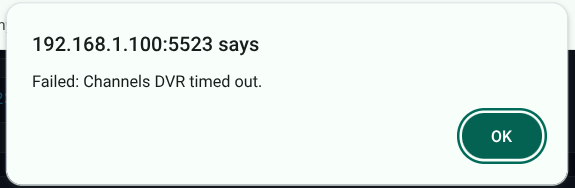
These all did successfully add to CDVR sources, in spite of the message displayed in the FastChannels GUI.
Then, there was this exception, while adding one of the feeds, for The Roku Channel, the GUI displayed this:
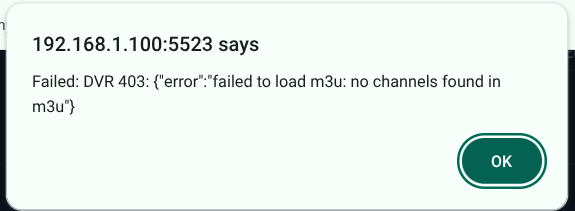
This one did not make it into CDVR. I had to add it manually.
by chance, did that feed NOT have any non-gracenote channels?