
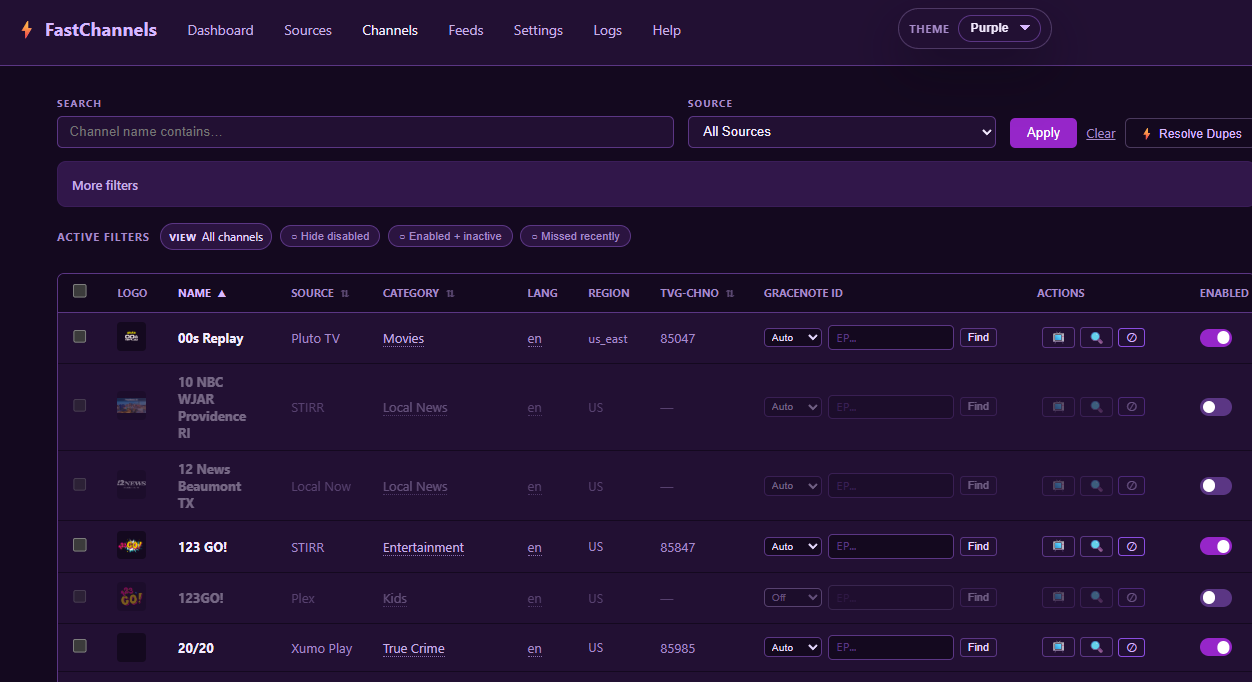
Well, this wouldn't be a Channels plug-in without this color scheme. For our fearless leader @maddox
3 Likes
Yeah, there are several examples where the differences are too much to be able to account with an algorithm, but the two patterns I mentioned should be easy enough. I want to minimize work done by my human brain. 
I will try to improve on fuzzy matches. I think it only looked at exact name matches. It’ll never be perfect.
And even in some cases where the channel name appears the same, the programming schedule is different.
1 Like
Another example of where the  may yield more accurate results than the
  .
.
1 Like
Yeap understood, but the more we can match the better.
1 Like
Yeap there are several instances where I have kept multiple channels that have the same name and are marked as duplicated even though the content is different. Mythbusters is one good example.
Below is something I overlooked and don't need help with. If this scenario has already been discussed or if I'm dropping into a thread in the middle, my apologies.
I set up a pass for a program that only airs periodically. I started playback of the newest recording and found that the wrong program was recorded even though the title was the same. The incorrect program that was recorded happened to be "The Librarians". As much as I like the show, it was not what I was expecting. It had the correct title of the desired program but further down, it did say "The Librarians". I found that the Plex TV source was still active -- jgomez177/plex-for-channels. I removed the collection and the source completely and stopped the docker instance.
Summary: Two channels with the same number resulted in the wrong program being recorded. The recording info had information from both channels.
I did have a bug where channel numbers weren’t being respected particularly on Gracenote channels. It is since been fixed, but I’m not positive that is what caused your issue. Keep me posted. .
Thank you.
Not 100% sure but I think this was mea culpa. The post was mostly a public service announcement. I should have totally removed the plex source and the container that fed it.
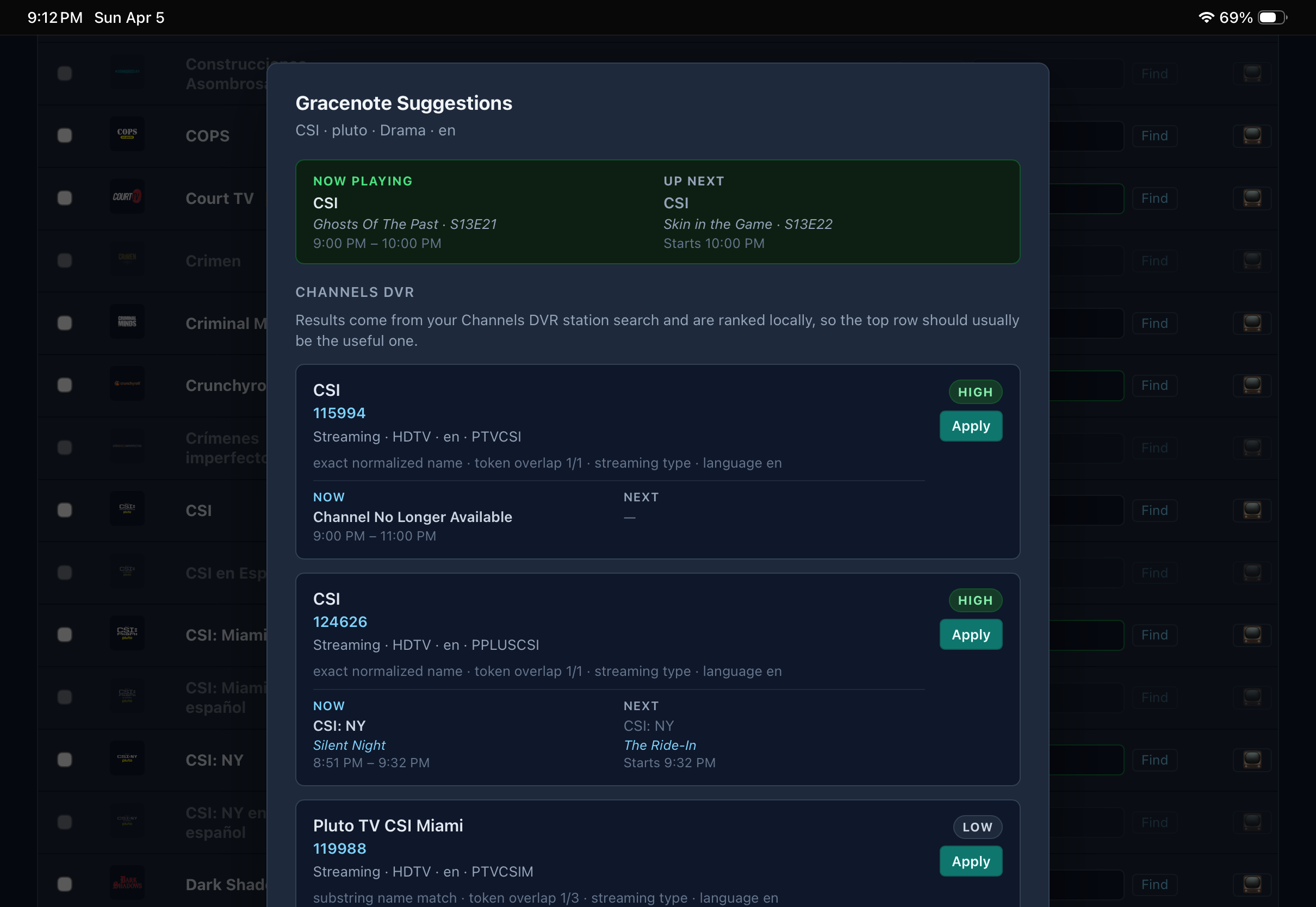
Trying this out on my test server; mainly interested in Pluto. I’ve got a Pluto TV feed and it’s working in Channels ok. When I go into the channels page and select find GN id, it sometimes finds the correct id, but says the channel is no longer available. I know it’s available because I’m recording it on my primary server.
If I select the correct GN, I get no guide data.
You need to be more specific.
My car won't start.
My other car starts but can't complete the designated trip. My horse did.
Any ideas?
1 Like
Gracenote ID is 115994 for CSI on Pluto TV per Olive Tin on Production server. Why does it say Channel No Longer Avaiable.?
This looks like a great project. Is the Docker image available in the Docker Hub registry? I’m using the Container manager on Synology and cannot find it. Thanks.
The Gracenote helper doesn't get program data from Channels DVR (just not available with their APIs). I get from another source, and it's not perfect. Results may vary-- so if you think that Gracenote ID is right, you can still try it and CDVR might pull different results.
If its not there through docker, you have to SSH into your synology to add it.
- Allow ssh into your synology
- Use putty (windows) to ssh into your synology
3 run this command to add to your images: sudo docker pull Package fastchannels · GitHub
1 Like
On the feeds page (Gracenote section)(PlutoTV only)
The choices are auto, manual, & off. On channels that have the GN ID that give me incorrect guide data or no guide date in Channels, I have cleared the GN ID to revert to your guide selection which then gives me the correct episode in Channels. I have left the choice as auto. Should I leave that as auto or turn it off for those channels.
I’m primarily interested only in Pluto at this time but may want to add some FAST Channels in the future.
AUTO means it uses the Gracenote ID from the upstream data ie Pluto (if it exists). If you select OFF/Manual, it just uses whatever you type in there (or leave blank if you want to use scraper EPG). There is a Community Map that is somewhat vetted that will give you a few more Gracenote IDs. It's a work in progress....
● v2.9.0
- Admin themes — choose between Dark (new default), Light, or
 in the admin panel
 - Duplicate channel resolution — new tools to review and resolve soft duplicate channels, with smarter matching rules that factor in EPG coverage when picking the winner
- EPG coverage filter — filter channels in admin by how much guide data they have
- Channel age filter — filter admin channels by how recently they were added
- Gracenote channel numbers are now sticky — Gracenote-backed channels hold their assigned numbers just like standard channels
- Distro TV multi-region support — picks up channels across all available Distro regions
Bug fixes:
- Stream audit now correctly skips inactive channels (but still catches them recovering)
- Gracenote ID column tightened up in the community map
3 Likes
@KineticMan Thanks for the speed of development on this project.. I'm finding that with the built-in player, I can basically use the web page for most of my daily viewing...
With this said, I'm not sure how you set up the player, I see hls.js when a channel plays... but I have a few that are not capable of being played via the built-in, but they do play in VLC...
Notably the channels with 4k in their names...
I was wondering if you could try to see if the shaka player (GitHub - shaka-project/shaka-player: JavaScript player library / DASH & HLS client / MSE-EME player · GitHub) could be an option for the built-in player? Maybe in a separate dev release so it doesn't affect the main release?
Who knows, you may have already tried it and it doesn't work, but I just thought I would put it out there...
2 of the channels are Clarity 4k and Love Nature 4K