
yea sorry - side effect of adding region support.
FYI - Distro is a hot mess right now. They’ve changed something and I’m chasing it all day. So some of their streams are up and down. I’ll figure it out.
2 Likes
Thanks! FWIW, Kaloopy's still up.

1 Like
Of course that's my favorite channel for ummmm... testing.......
I got this figured out. Distro has a few different CDN's for their streams and some require special handling. I'll get update out tonight.
Don't forget region "QQ" is of interest
FastChannels v3.0 — What's New
-
Distro TV fix — Most Distro channels were silently failing on IPTV clients because the CDN requires special headers that clients don't send. FastChannels now proxies the stream manifest server-side and rewrites it so your client connects directly — no video traffic goes through FastChannels, just the handshake.
-
Distro multi-region — Distro TV now pulls channels from all available regions (US, Worldwide, etc.) instead of just one. More channels, configurable per your preference.
-
Sticky channel numbers for feeds — If you have a custom feed with a channel number range, disabling a channel no longer reshuffles all the numbers above it. Each channel keeps its assigned number permanently; new channels fill the gaps.
-
Delete Inactive button — Each source in admin now has a "Delete Inactive" link that cleans out channels that have been gone for 7+ days in one click, instead of having to manage them manually.
-
Smarter stream health detection — Stream audit was incorrectly flagging some live FAST channels as dead (VOD). The check now requires two markers to confirm a stream is truly finished, reducing false positives.
-
Open in VLC — Channel preview now has an "Open in VLC" button for quick testing outside the browser.
-
More improvements to built in stream preview. Almost all channels should play in there (short of a few HEVC/4K streams due to browser limitations)
5 Likes
@KineticMan Just got the new release..
Checked out most of the in-app player...
Could you look in STIRR?
It's the only one that pretty much will not play anything in-app...
All are coming back with the dreaded
Browser preview unavailable for this source (CORS restriction on stream CDN). Use "Open Externally" to play outside the browser preview.
I've tried channels from all the other groups and with a few exceptions, they all played using the in-app.
Note: the 4K channels I asked about all play in-app, with the exception of the one from the STIRR source.
With this said, is there any way to add a stat for nerd setting, or maybe just a show current channel resolution? This way we know if we're getting 4k, 1080p, 720p or worse?
Thanks for the update...
@KineticMan Follow-up to resolution...
How does the search work on this?
I'm on the Channels, tab, "All Sources" is selected.. and the only other thing is, for example, HD (>= 720p), but when I click Apply, the list is empty...
In fact not of the selection works, except for the All...
Is this a feature not yet implemented?
Thanks for the new version!
I'm in need of a channel filter.
Right now for DUPLICATES we have Normal list and Duplicates only.
Since there are so many duplicates it would be nice to have Not duplicate.
Would have made it easy figuring out what the new unique (non duplicate) channels are in Distro QQ
you found it already huh 
run stream audit on your sources then come back and look- it'll populate.
sounds easy enough - just add to that filter like "unique only" ?
1 Like
STIRR has header requirements like Distro. I'll route it through the proxy. Will add to next version.
@KineticMan one suggestion to help with false positives of duplicate channels: look at the language and/or region differences.
For example:
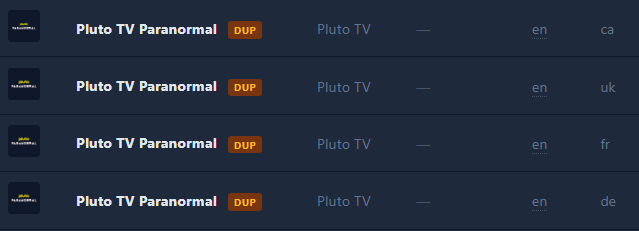
They are all from different countries so it is more than likely that they don't have the same content.
By the way, the language information is incorrect for the fr and de regions. I just checked by watching briefly and it's French for fr, and German for de as you would expect.
Nice touch with the internal player.  Very convenient!
1 Like
@KineticMan When I click the "Add to ChannelsDVR" button for my source, it added two different sources, one for Grace Note and one without. I would prefer all of these to be in one source. What is the best way to do that?
Also, is there any way to order my channels in a specific order?
That is because the format for Gracenote guide data and normal EPG data is different, so it has to be two different sources.
2 Likes
Pluto doesn't report language in their API response, so I'd have to infer it from the region code. I can do that, but no promises it'll be 100% accurate.
Correct.
@NetworkGuy if you truly prefer one source, you'd have to remove the Gracenote ID and use only the scraper EPG data. I wouldn't recommend that, but you do you.
1 Like
If a channel has been missing in a scrape for 3+ scrapes, it stops outputting to your M3U. Basically, the stream is likely dead/gone and no reason to continue to keep sending to CDVR.
1 Like