
Again, try the actual URL inside the M3U. Grab it and type it into Chrome and see if an image comes back.. Debug from there. It’s not on my end at all.
1 Like
Yep. I would have to change my configs since it's showing my local private LAN IP address for the container.
tvg-logo="http://192.168.1.4:5523/logos/e9ad952fd1c274a272c9eb523d4a5888.png"
When I set up FastChannels, I used the local LAN IP address for my NAS/CDVR server. FastChannels also runs on the same device. It looks as if it would be better to use my Tailscale Magic DNS address for the NAS instead.
Where would be the correct place to make the change? In the FastChannels Stack Evvironment Variables? Perhaps, change the FastChannels server URL? (as in the bold italics below?)
FASTCHANNELS_SERVER_URL=http://192.168.1.100:5523
CHANNELS_DVR_SERVER_URL=http://192.168.1.100:8089
FASTCHANNELS_SERVER_URL=http://nas-home:5523
CHANNELS_DVR_SERVER_URL=http://192.168.1.100:8089
I'd recommend using whatever IP/DNS name is accessible on all your devices (at home/remote). If it's 192.168.1.100, use that.. If Tailscale IP/DNS name is accessible everywhere (at home/remote), then use those.
And yes, change in admin/settings both FastChannels Server IP (most important) and Channels DVR (less important as I assume you'd be making admin changes at home anyway). If you make a change, make sure you re-scrape to generate new XML/M3u files.
Nope - do as I told ChDvruser -- grab a M3U and sample an image link .. then plug that image URL into your device there. If it doesn't load, then you have a network issue.
I'll give it a try. Thanks! 
Do you have a subnet router set up on your Tailnet? With one established, LAN IP addresses should resolve even remotely.
No.
I just renamed my NAS hostname the same as my tailscale hostname for it and will use that hostname instead of IP address.
Rescraped all enabled sources in FastChannels then delete & recreate guide database in CDVR and it's working fine w/Tailscale now.
Thanks @KineticMan for pointing me in the right direction.
http://192.168.1.180:5523/feeds/default/m3u
That's my m3u from fastchannels. how do i sample an image link? the images are all there in the fastchannels web ui.
EDIT: THINK I FIGURED IT OUT THANKS
OOPS spoke too soon. They work when on LAN but not when away. Need to read more posts above...
That's a good solution too. As described here:
Be aware that all of your clients need to be running Tailscale going that route. Alternatively, on your LAN, be sure that your server's hostname is set up to resolve to its LAN IP, and that all clients use that LAN DNS resolver.
1 Like
Anyone headed in this direction would benefit from using an auto-start app to automatically launch Tailscale upon booting your client device. Especially if the loved one who uses the device is less than tech-savvy.
This didn't seem to work for me. I'll be changing my subnet at my second location and use the Tailscale Subnet router/exit node option when I have plenty of time to update all of my devices.
@KineticMan - not a huge issue, but the contrast colour on the "Open Externally" button is the same as the button background colour. I've done a hard refresh in case it was a caching issue, but the problem persists.
Any idea what that could be? I see in screenshots that others have posted that it looks fine. I'm currently on version 3.3.0, however this issue has been there for me from the start.
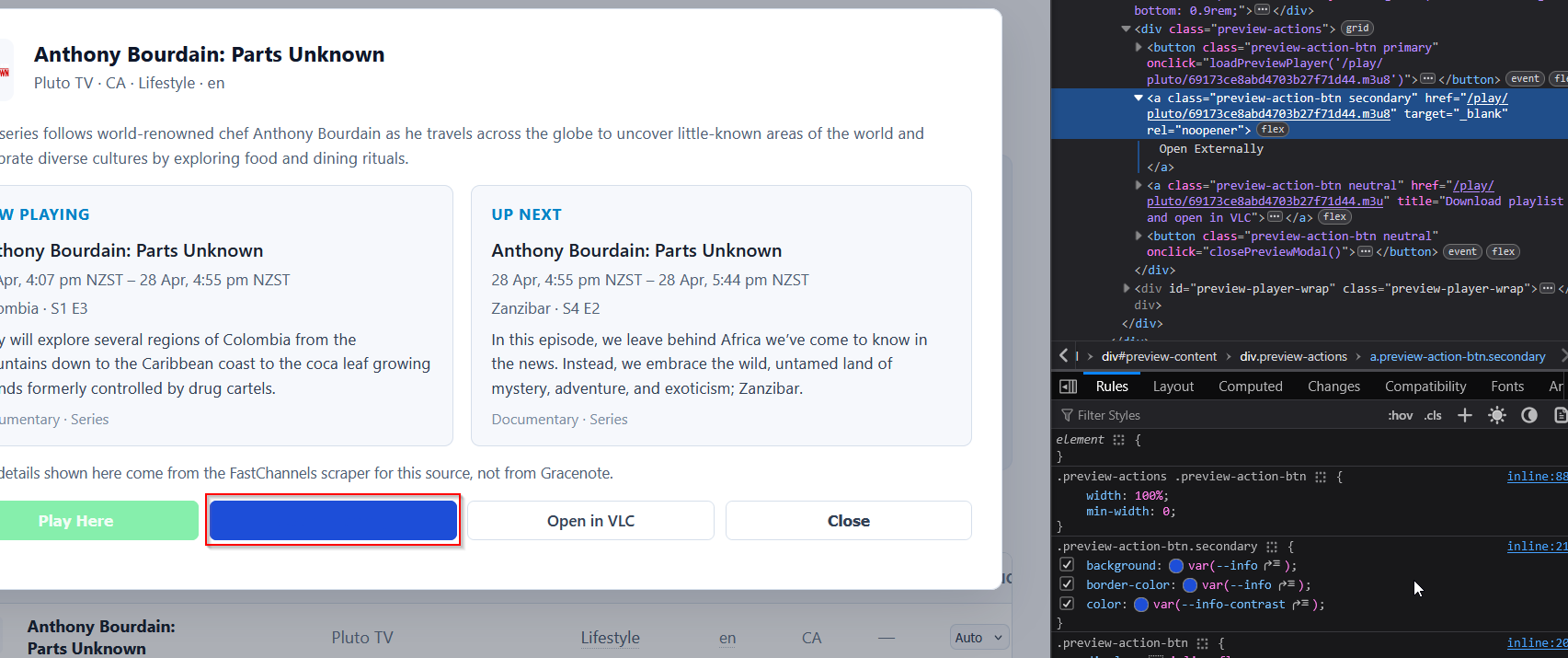

Seems to be an issue only in Light Mode.
easy fix tnx
2 Likes
It seems to choke and stop during Audit when it encounters multiple 403s. I have a Samsung tv plus with around a thousand channels, us, ca, gb. I have a docker set up on a VPS in Germany and many of those channels aren't available. I'm trying to weed out non working ones using Audit but it seems impossible:
2026-04-28 13:01:34,437 INFO     app.routes.tasks: Enqueued stream audit for samsung (include_inactive=True)
2026-04-28 13:01:34,607 INFO     app.worker: [audit] samsung: checking 998 channels…
2026-04-28 13:01:43,984 WARNING  app.worker: [audit] samsung rate-limited (403), backing off 30s…
2026-04-28 13:01:58,007 INFO     app.worker: [artifacts] refreshed 2 XML artifact(s) and 4 M3U artifact(s)
2026-04-28 13:02:13,989 INFO     app.worker: [audit] ABC News Live still rate-limited (403) after backoff, skipping
2026-04-28 13:02:15,254 WARNING  app.worker: [audit] samsung rate-limited (403), backing off 35s…
2026-04-28 13:02:50,260 INFO     app.worker: [audit] NBC News NOW still rate-limited (403) after backoff, skipping
2026-04-28 13:02:51,237 WARNING  app.worker: [audit] samsung rate-limited (403), backing off 40s…
2026-04-28 13:03:31,242 INFO     app.worker: [audit] LiveNOW from FOX still rate-limited (403) after backoff, skipping
2026-04-28 13:03:31,785 WARNING  app.worker: [audit] samsung rate-limited (403), backing off 45s…
2026-04-28 13:04:16,790 INFO     app.worker: [audit] Scripps News still rate-limited (403) after backoff, skipping
2026-04-28 13:04:24,586 WARNING  app.worker: [audit] samsung rate-limited (403), backing off 50s…
2026-04-28 13:05:14,590 INFO     app.worker: [audit] FOX Weather still rate-limited (403) after backoff, skipping
2026-04-28 13:05:20,271 WARNING  app.worker: [audit] samsung rate-limited (403), backing off 55s…
2026-04-28 13:06:15,276 INFO     app.worker: [audit] BBC News still rate-limited (403) after backoff, skipping
2026-04-28 13:06:16,297 WARNING  app.worker: [audit] samsung rate-limited (403), backing off 60s…
out of my control.. 403 is their website telling us we're hammering it too much -- like a speed bump if you will. not sure what else I could do short of you auditing each channel manually sorry.
Guess that means your app is too popular 
1 Like
I think in this case it's that those channels are geoblocked so when I try to connect from Germany they give 403. I'm looking for a way to sort them out automatically but Audit doesn't work.
New version 3.4.0 pushed
Channels DVR Integration
- Hourly auto-refresh of Channels DVR guide lineups created from FastChannels, with opt-out toggle in Settings
- M3U/XMLTV output overhaul: disabled conditional caching so DVR always gets fresh artifacts; serve stale XML instead of 503 while rebuilding
EPG & Metadata
- Episodic metadata parsing (season/episode/subtitle) across Local Now, Distro, FreeLiveSports, Xumo, and Samsung scrapers
- XMLTV category normalization to Channels DVR-recognized values (Movie, Children, News, Sports, Drama)
- XMLTV date attribute added to root element
Channel Management
- Feed channel number management UI: set start number, reset, display numbers in channel feed menu
- "Not in any feed" filter option on channels page
- VIDAA multi-region support (configurable geo feeds), logo-cache progress indicator, category fixes
Content & Categories
- Category audit: fixed 89+ miscategorized channels, cleared 7 NULL categories, moved Sports/Nature/True Crime/etc. channels out of incorrect buckets
- Spanish language audit: corrected Latino vs. genre categories, fixed language='en' tags on clearly Spanish channels
Admin & UX
- EPG coverage summary (hours/program count) in channel preview modal
- Image proxy toggle in Settings (disable to serve upstream CDN URLs directly in M3U/XMLTV)
- Audit All Sources button on admin/sources page
- First-run setup checklist on dashboard with missing-config warnings
- Refined source config badges (configured/required/optional)
- Fixed unreadable "Open Externally" button in light mode
Scrapers
- Distro: only proxy segments on restricted CDN hosts (reduces unnecessary proxy overhead)
- Pluto TV: Improved movie vs. TV poster art selection
6 Likes