FastChannels - FAST Channels aggregator/manager

Guessing something in your browser config. I don’t know honestly. Works fine on Chrome on windows and iOS mobile on Safari for me.

Regarding Distro- I’m seeing the same thing yall seeing. I didn’t change anything so either they pulled a bunch of streams, or something in API changed. I’ll look into it further.

The Adult Swim Shaka player issue must be in newer versions of Chrome (the error I posted before was also from Chrome on Win 11). The Web Crypto problem comes from trying to connect to an http address instead of an https address.

So as a test, I vnc'd into the server running FastChannels, opened Chrome, and connected to localhost:5523 and tried the Black Jesus channel. It worked fine, so then I typed in the local network address:5523 (which is http), tried the same channel and it failed with the Web Crypto error.

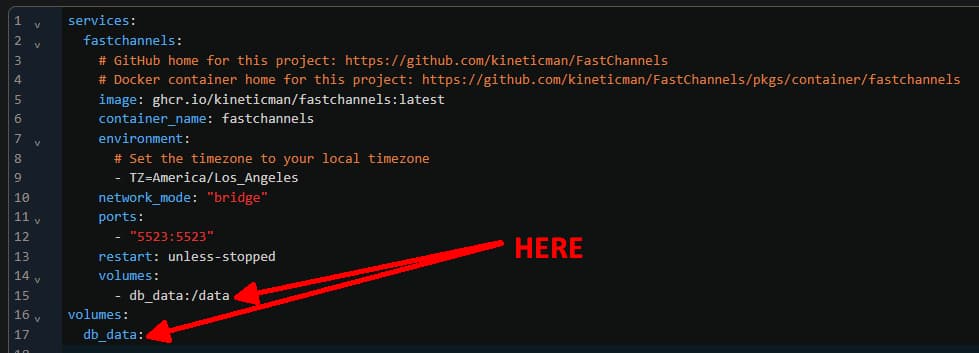
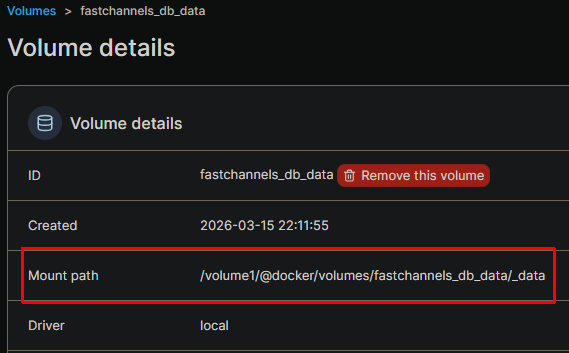
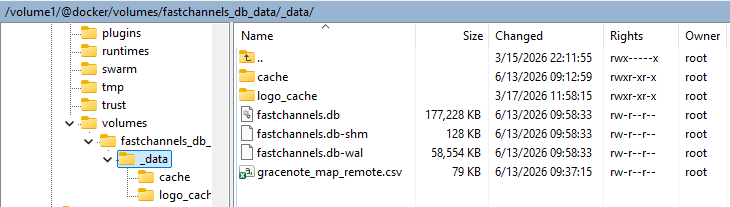
Where is the database stored? It would be great if this could be a specified location including a SMB share

Thanks for the update.
There's now an issue with YouTube Live feeds no longer working.
They still work in SLM.

This is my go to YT test site
Should look like this

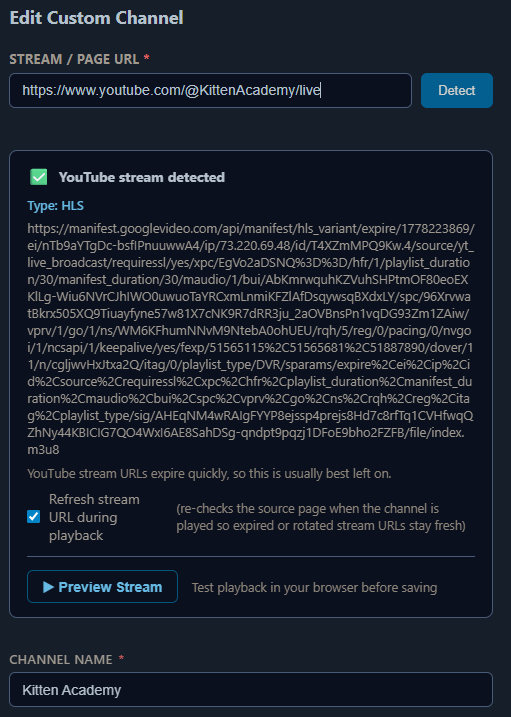
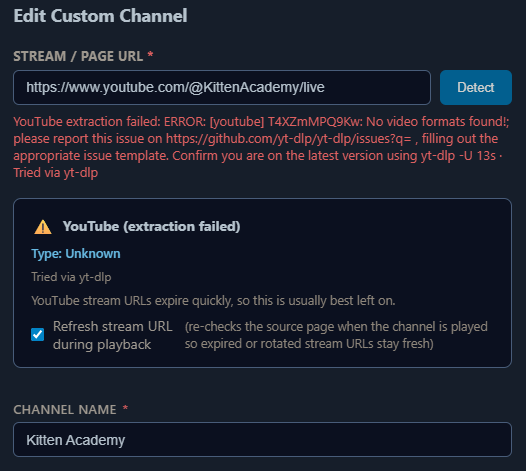
But now it fails like this
brave_screenshot (2)

Where you told it to in /data

brave_screenshot (4)

Try the direct link instead of the share link. Works for me that way. Grab the url from chrome

https://www.youtube.com/live/T4XZmMPQ9Kw?is=FWHmMU743kd6I_HX

I don't have Chrome. Would Brave or Edge work?
Not sure how to get that for all my YT Live sites.

And what do you do when T4XZmMPQ9Kw changes.
That's why I use /@KittenAcademy/live, it will always redirect to the latest /watch?v= and it's working in SLM.

I think it’d work? Just open a tab with that link and grab the url it changes to - see if it’s different.

Unsure what’d happen if link changes to be honest. I’ll take a look and see if it can support those share links.

If this is what you're calling a share link
https://www.youtube.com/@KittenAcademy/live

It was working in FC before

But not now

In fact, all 3 YT Live sites I put in FC to test are now failing, but still work in SLM.

@chDVRuser Tracking this as I have Youtube issues too...
Anyway, I'm using Brave and this is how you get the "share" link:
While the youtube page is open to the KittenAcademy, click the Share icon just below the video, on the Subscribe line...

When you click the Share icon, the share windows will open...

image

Just to add... even though I did the above, my FC custom youtube link still doesn't play...

Thanks, but I know the video_id (T4XZmMPQ9Kw) occasionally changes.
That's why I use /@KittenAcademy/live. So I don't have to keep up with the changes in the video_id.
If KineticMan can't fix it, no worry as I'm using SLM for those, just won't replace SLM with FC.

I'm pretty sure it's something with yt-dlp or it's supporting software because the links work in SLM still.

I understand and agree with you, as my YT live channels also work via PLM...
I'm just tracking this with you, as since the custom channels was added, I could never get YT live channels to work in FC, so I'm like you, still using PLM (which feeds VLC and my other iptv player).

@KineticMan Does the following provide any clues to you:

# yt-dlp --version
2026.06.09
# yt-dlp https://www.youtube.com/@KittenAcademy/live
[youtube:tab] Extracting URL: https://www.youtube.com/@KittenAcademy/live
[youtube:tab] @KittenAcademy/live: Downloading webpage
[youtube] Extracting URL: https://www.youtube.com/watch?v=T4XZmMPQ9Kw
[youtube] T4XZmMPQ9Kw: Downloading webpage
WARNING: [youtube] No supported JavaScript runtime could be found. Only deno is enabled by default; to use another runtime add  --js-runtimes RUNTIME[:PATH]  to your command/config. YouTube extraction without a JS runtime has been deprecated, and some formats may be missing. See  https://github.com/yt-dlp/yt-dlp/wiki/EJS  for details on installing one
[youtube] T4XZmMPQ9Kw: Downloading android vr player API JSON
[youtube] T4XZmMPQ9Kw: Downloading m3u8 information
[info] T4XZmMPQ9Kw: Downloading 1 format(s): 96
[download] Destination: Kitten Academy Live Stream 2026-06-13 08_16 [T4XZmMPQ9Kw].mp4
ERROR: m3u8 download detected but ffmpeg could not be found. Please install
ERROR: Unable to download video: [Errno 2] No such file or directory: 'Kitten Academy Live Stream 2026-06-13 08_16 [T4XZmMPQ9Kw].mp4.part'
#

I'm not a dev, so I have no clues if it's important...

I had 3 YT Live channels working and did recordings from all 3.

That's why I didn't push it, I saw other folks had it working, so I figured it was something on my end...Plus I had my workaround in PLM

1 Like

Thank you

Here's mine for comparison

root@c7d72d55d4ec:/app# which yt-dlp
/usr/local/bin/yt-dlp

root@c7d72d55d4ec:/app# yt-dlp --version
2026.06.09

root@c7d72d55d4ec:/app# yt-dlp -U
Latest version: [email protected] from yt-dlp/yt-dlp
yt-dlp is up to date ([email protected] from yt-dlp/yt-dlp)

root@c7d72d55d4ec:/app# yt-dlp -F https://www.youtube.com/@KittenAcademy/live
[youtube:tab] Extracting URL: https://www.youtube.com/@KittenAcademy/live
[youtube:tab] @KittenAcademy/live: Downloading webpage
[youtube] Extracting URL: https://www.youtube.com/watch?v=T4XZmMPQ9Kw
[youtube] T4XZmMPQ9Kw: Downloading webpage
WARNING: [youtube] No supported JavaScript runtime could be found. Only deno is enabled by default; to use another runtime add  --js-runtimes RUNTIME[:PATH]  to your command/config. YouTube extraction without a JS runtime has been deprecated, and some formats may be missing. See  https://github.com/yt-dlp/yt-dlp/wiki/EJS  for details on installing one
[youtube] T4XZmMPQ9Kw: Downloading android vr player API JSON
[youtube] T4XZmMPQ9Kw: Downloading m3u8 information
[info] Available formats for T4XZmMPQ9Kw:
ID EXT RESOLUTION FPS ¦   TBR PROTO ¦ VCODEC      ACODEC
-----------------------------------------------------------
91 mp4 256x144     15 ¦  290k m3u8  ¦ avc1.42C00B mp4a.40.5
92 mp4 426x240     30 ¦  546k m3u8  ¦ avc1.4D4015 mp4a.40.5
93 mp4 640x360     30 ¦ 1210k m3u8  ¦ avc1.4D401E mp4a.40.2
94 mp4 854x480     30 ¦ 1569k m3u8  ¦ avc1.4D401F mp4a.40.2
95 mp4 1280x720    30 ¦ 2969k m3u8  ¦ avc1.4D401F mp4a.40.2
96 mp4 1920x1080   30 ¦ 5421k m3u8  ¦ avc1.640028 mp4a.40.2

Looks like SLM is using an older yt-dlp

root@84221e15c7fb:/app# which yt-dlp
/usr/local/bin/yt-dlp

root@84221e15c7fb:/app# yt-dlp --version
2026.03.17

root@84221e15c7fb:/app# yt-dlp -U
Current version: [email protected] from yt-dlp/yt-dlp
Latest version: [email protected] from yt-dlp/yt-dlp
ERROR: You installed yt-dlp from a manual build or with a package manager; Use that to update

root@84221e15c7fb:/app# yt-dlp -F https://www.youtube.com/@KittenAcademy/live
[youtube:tab] Extracting URL: https://www.youtube.com/@KittenAcademy/live
[youtube:tab] @KittenAcademy/live: Downloading webpage
[youtube] Extracting URL: https://www.youtube.com/watch?v=T4XZmMPQ9Kw
[youtube] T4XZmMPQ9Kw: Downloading webpage
WARNING: [youtube] No supported JavaScript runtime could be found. Only deno is enabled by default; to use another runtime add  --js-runtimes RUNTIME[:PATH]  to your command/config. YouTube extraction without a JS runtime has been deprecated, and some formats may be missing. See  https://github.com/yt-dlp/yt-dlp/wiki/EJS  for details on installing one
[youtube] T4XZmMPQ9Kw: Downloading android vr player API JSON
[youtube] T4XZmMPQ9Kw: Downloading m3u8 information
[info] Available formats for T4XZmMPQ9Kw:
ID EXT RESOLUTION FPS ¦   TBR PROTO ¦ VCODEC      ACODEC
-----------------------------------------------------------
91 mp4 256x144     15 ¦  290k m3u8  ¦ avc1.42C00B mp4a.40.5
92 mp4 426x240     30 ¦  546k m3u8  ¦ avc1.4D4015 mp4a.40.5
93 mp4 640x360     30 ¦ 1210k m3u8  ¦ avc1.4D401E mp4a.40.2
94 mp4 854x480     30 ¦ 1569k m3u8  ¦ avc1.4D401F mp4a.40.2
95 mp4 1280x720    30 ¦ 2969k m3u8  ¦ avc1.4D401F mp4a.40.2
96 mp4 1920x1080   30 ¦ 5421k m3u8  ¦ avc1.640028 mp4a.40.2
Unfortunately, I'm out of my depths here...Hopefully KineticMan sees something useful.

1 Like

I just tested the share link and it detected fine for me. Possible you have some ad block on network? Just guessing.