root@nas-1019:~# docker exec fastchannels yt-dlp -v -F --extractor-args "youtube:player_client=web_safari" "https://www.youtube.com/@KittenAcademy/live" 2>&1 | grep -iE "pot|sign in|bot|403|throttl|JS runtime"
[debug] JS runtimes: none
[debug] [youtube] [pot] PO Token Providers: none
[debug] [youtube] [pot] PO Token Cache Providers: memory
[debug] [youtube] [pot] PO Token Cache Spec Providers: webpo
FULL OUTPUT from inside container
# yt-dlp -v -F --extractor-args "youtube:player_client=web_safari" "https://www.youtube.com/@KittenAcademy/live"
[debug] Command-line config: ['-v', '-F', '--extractor-args', 'youtube:player_client=web_safari', 'https://www.youtube.com/@KittenAcademy/live']
[debug] Encodings: locale UTF-8, fs utf-8, pref UTF-8, out utf-8, error utf-8, screen utf-8
[debug] yt-dlp version [email protected] from yt-dlp/yt-dlp [821bef0f0]
[debug] Lazy loading extractors is disabled
[debug] Python 3.12.13 (CPython x86_64 64bit) - Linux-4.4.302+-x86_64-with-glibc2.41 (OpenSSL 3.5.6 7 Apr 2026, glibc 2.41)
[debug] exe versions: none
[debug] Optional libraries: Cryptodome-3.23.0, brotli-1.2.0, certifi-2026.05.20, curl_cffi-0.15.0, mutagen-1.47.0, requests-2.34.2, sqlite3-3.46.1, urllib3-2.7.0, websockets-16.0, yt_dlp_ejs-0.8.0
[debug] JS runtimes: none
[debug] Proxy map: {}
[debug] Request Handlers: urllib, requests, websockets, curl_cffi
[debug] Plugin directories: none
[debug] Loaded 1739 extractors
[youtube:tab] Extracting URL: https://www.youtube.com/@KittenAcademy/live
[youtube:tab] @KittenAcademy/live: Downloading webpage
[debug] [youtube] [pot] PO Token Providers: none
[debug] [youtube] [pot] PO Token Cache Providers: memory
[debug] [youtube] [pot] PO Token Cache Spec Providers: webpo
[debug] [youtube] [jsc] JS Challenge Providers: bun (unavailable), deno (unavailable), node (unavailable), quickjs (unavailable)
[youtube] Extracting URL: https://www.youtube.com/watch?v=T4XZmMPQ9Kw
[youtube] T4XZmMPQ9Kw: Downloading webpage
[debug] [youtube] Forcing "main" player JS variant for player 445213fb
        original url = /s/player/445213fb/player_es6.vflset/en_US/base.js
WARNING: [youtube] T4XZmMPQ9Kw: n challenge solving failed: Some formats may be missing. Ensure you have a supported JavaScript runtime and challenge solver script distribution installed. Review any warnings presented before this message. For more details, refer to  https://github.com/yt-dlp/yt-dlp/wiki/EJS
[debug] [youtube] T4XZmMPQ9Kw: Detected experiment to bind GVS PO Token to video ID for web_safari client
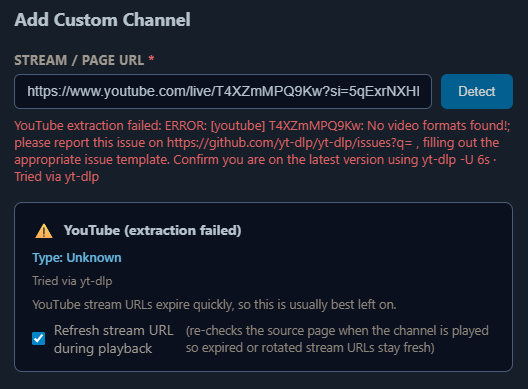
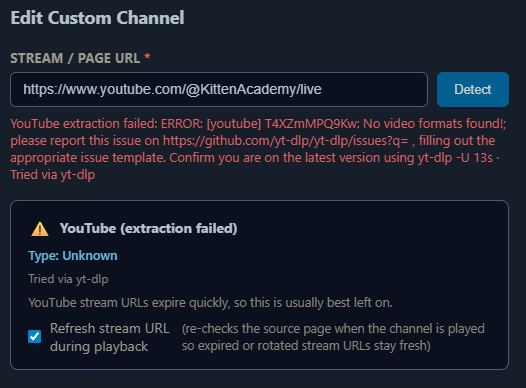
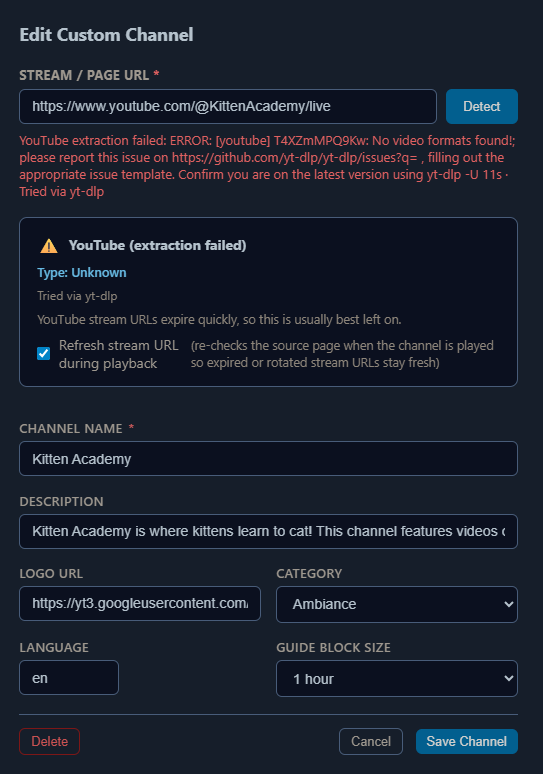
ERROR: [youtube] T4XZmMPQ9Kw: No video formats found!; please report this issue on  https://github.com/yt-dlp/yt-dlp/issues?q= , filling out the appropriate issue template. Confirm you are on the latest version using  yt-dlp -U
Traceback (most recent call last):
  File "/usr/local/lib/python3.12/site-packages/yt_dlp/YoutubeDL.py", line 1726, in wrapper
    return func(self, *args, **kwargs)
           ^^^^^^^^^^^^^^^^^^^^^^^^^^^
  File "/usr/local/lib/python3.12/site-packages/yt_dlp/YoutubeDL.py", line 1882, in __extract_info
    return self.process_ie_result(ie_result, download, extra_info)
           ^^^^^^^^^^^^^^^^^^^^^^^^^^^^^^^^^^^^^^^^^^^^^^^^^^^^^^^
  File "/usr/local/lib/python3.12/site-packages/yt_dlp/YoutubeDL.py", line 1941, in process_ie_result
    ie_result = self.process_video_result(ie_result, download=download)
                ^^^^^^^^^^^^^^^^^^^^^^^^^^^^^^^^^^^^^^^^^^^^^^^^^^^^^^^
  File "/usr/local/lib/python3.12/site-packages/yt_dlp/YoutubeDL.py", line 2954, in process_video_result
    self.raise_no_formats(info_dict)
  File "/usr/local/lib/python3.12/site-packages/yt_dlp/YoutubeDL.py", line 1191, in raise_no_formats
    raise ExtractorError(msg, video_id=info['id'], ie=info['extractor'],
yt_dlp.utils.ExtractorError: [youtube] T4XZmMPQ9Kw: No video formats found!; please report this issue on  https://github.com/yt-dlp/yt-dlp/issues?q= , filling out the appropriate issue template. Confirm you are on the latest version using  yt-dlp -U



 ...
...