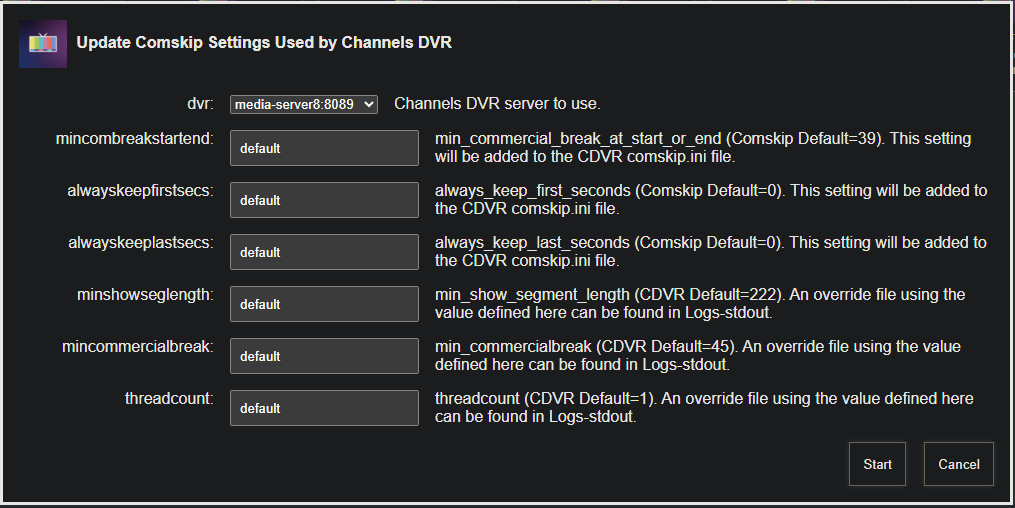
I setup an OliveTin-for-Channels Action to make it easier to adjust a subset of Comskip settings, and the basics (as I recall) are these:
The general Comskip settings used by Channels are not stored in a file, but rather are part of the API. These can be adjusted using OliveTin. Any other settings you want tweak require you to create a comskip.ini override file, and place it in C:\ProgramData\ChannelsDVR\data in the case of Windows.
Here's what the Olive Action looks like:
And the Action's output:
Current CDVR Comskip status:
{"available":true,"customized":false,"enabled":true,"ini":{"thread_count":"2"},"queued":0}

Settings as used in the most recent Comskip run. Assumes no override file in use:

Current compskip.ini:
----------------------------------------

verbose=10
detect_method=123 ;; everything but scenechange
punish_no_logo=0
cc_correct_type_modifier=1
length_nonstrict_modifier=1.5 ;; required before below due to comskip.ini parsing bug
combined_length_nonstrict_modifier=1
min_show_segment_length=222
min_commercialbreak=45
use_existing_logo_file=0
logo_fraction=0.39
delete_logo_file=1
output_vdr=1
output_edl=1
output_ffmeta=1
output_ffsplit=1
thread_count=2
----------------------------------------

If you need to use an override file it should be placed in this directory on your CDVR server:
C:\ProgramData\ChannelsDVR\data

Save this text as compskip.ini in the location referenced above:
----------------------------------------

verbose=10
detect_method=123 ;; everything but scenechange
punish_no_logo=0
cc_correct_type_modifier=1
length_nonstrict_modifier=1.5 ;; required before below due to comskip.ini parsing bug
combined_length_nonstrict_modifier=1
min_show_segment_length=222
min_commercialbreak=45
use_existing_logo_file=0
logo_fraction=0.39
delete_logo_file=1
output_vdr=1
output_edl=1
output_ffmeta=1
output_ffsplit=1
thread_count=2
----------------------------------------
The actual settings used for any given recording are stored in the dvr\logs\comskip directory by File ID. So, if you're messing with settings you can go back and look at what settings were used when processing a given recording.
I can always add additional options to the OliveTin Action, if there are others you'd like to tweak. The nice thing about the Action is that it adjusts settings through the API when possible, and produces an override file when a setting isn't available via the API.