
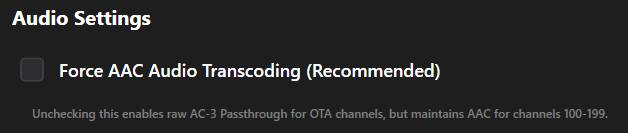
Do you still recommend having Force AAC Audio Transcoding on?
I assume it's making Channels DVR transcode the audio before Feral HTPC gets it?
The description in unclear, referencing channels 100-199.
i just assumed channels 100+ are for ATSC3 which i dont get in my market.
My HDHR Prime also provides some AC-3 audio channels.
So wasn't sure if it transcodes all my cable channels above channel 99.
how are you determining a channel is AC-3?
technically, ATSC1 can do AC-3 but i dont think may do. only ATSC3
Ive got one channel under 100 thats says its AVC on the HDHR webpage, but it has no video or sound.
You're thinking AC-4.
i think your right....lol
im fairly new to OTA, ive been on MOCUR cable card since the XP days...
Since its days are numbered, i need to get up to speed on OTA and virtual feeds.
AVC means video codec H.264
i knew that, but it usually implies its ATSC3 from what ive read.
That would be HEVC (H.265)
good to know.
ive got exactly zero channels that show HEVC.
lol
A little longer. I had another bug I was chasing.
Download the 1.0.7 release again and install it. See if that fixed the issue. I have also found another issue. Tuner sharing can cause a stream to freeze if it is shared.
There are many ways. The simplest shown here is playing my HDHR Prime channel 706 (local PBS) in VLC.
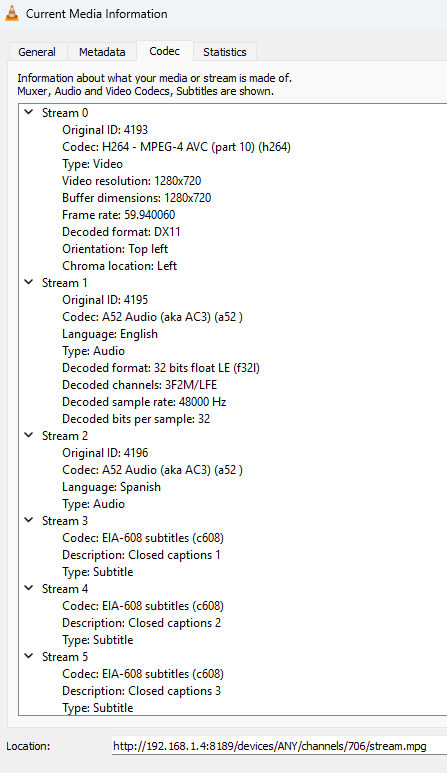
was hoping for a quick way to check them all at a glance...aparently not...
I will remove the recommended from it in future releases and set it to false on default. I was using CDVR to force a transcode with the vcodec=copy&acodec=aac command to fix some audio issues with AC-3 that has been fixed. It is not needed in most cases, unless it helps.
Using a web browser you can get a json or xml listing from your HDHR tuner.
This is from my HDHR Prime at http://192.168.1.7/lineup.json?show=all&tuning
[
  {
    "GuideNumber": "2",
    "GuideName": "HSN",
    "Modulation": "auto",
    "Frequency": 231000000,
    "ProgramNumber": 4130,
    "VideoCodec": "MPEG2",
    "AudioCodec": "AC3",
    "Enabled": 0,
    "URL": "http://192.168.1.7:5004/auto/v2"
  },
  {
    "GuideNumber": "3",
    "GuideName": "KCRA",
    "Modulation": "auto",
    "Frequency": 213000000,
    "ProgramNumber": 1,
    "VideoCodec": "MPEG2",
    "AudioCodec": "AC3",
    "Enabled": 0,
    "URL": "http://192.168.1.7:5004/auto/v3"
  },
  {
    "GuideNumber": "4",
    "GuideName": "KQCA",
    "Modulation": "auto",
    "Frequency": 213000000,
    "ProgramNumber": 2,
    "VideoCodec": "MPEG2",
    "AudioCodec": "AC3",
    "Enabled": 0,
    "URL": "http://192.168.1.7:5004/auto/v4"
  },
  {
    "GuideNumber": "5",
    "GuideName": "KUVS",
    "Modulation": "auto",
    "Frequency": 213000000,
    "ProgramNumber": 3,
    "VideoCodec": "MPEG2",
    "AudioCodec": "AC3",
    "Enabled": 0,
    "URL": "http://192.168.1.7:5004/auto/v5"
  },
  {
    "GuideNumber": "6",
    "GuideName": "KVIE",
    "Modulation": "auto",
    "Frequency": 213000000,
    "ProgramNumber": 389,
    "VideoCodec": "MPEG2",
    "AudioCodec": "AC3",
    "Enabled": 0,
    "URL": "http://192.168.1.7:5004/auto/v6"
  },
http://192.168.1.7/lineup.xml?show=all&tuning
<Lineup>
    <Program>
        <GuideNumber>2</GuideNumber>
        <GuideName>HSN</GuideName>
        <Modulation>auto</Modulation>
        <Frequency>231000000</Frequency>
        <ProgramNumber>4130</ProgramNumber>
        <VideoCodec>MPEG2</VideoCodec>
        <AudioCodec>AC3</AudioCodec>
        <Enabled>0</Enabled>
        <URL>http://192.168.1.7:5004/auto/v2</URL>
    </Program>
    <Program>
        <GuideNumber>3</GuideNumber>
        <GuideName>KCRA</GuideName>
        <Modulation>auto</Modulation>
        <Frequency>213000000</Frequency>
        <ProgramNumber>1</ProgramNumber>
        <VideoCodec>MPEG2</VideoCodec>
        <AudioCodec>AC3</AudioCodec>
        <Enabled>0</Enabled>
        <URL>http://192.168.1.7:5004/auto/v3</URL>
    </Program>
    <Program>
        <GuideNumber>4</GuideNumber>
        <GuideName>KQCA</GuideName>
        <Modulation>auto</Modulation>
        <Frequency>213000000</Frequency>
        <ProgramNumber>2</ProgramNumber>
        <VideoCodec>MPEG2</VideoCodec>
        <AudioCodec>AC3</AudioCodec>
        <Enabled>0</Enabled>
        <URL>http://192.168.1.7:5004/auto/v4</URL>
    </Program>
    <Program>
        <GuideNumber>5</GuideNumber>
        <GuideName>KUVS</GuideName>
        <Modulation>auto</Modulation>
        <Frequency>213000000</Frequency>
        <ProgramNumber>3</ProgramNumber>
        <VideoCodec>MPEG2</VideoCodec>
        <AudioCodec>AC3</AudioCodec>
        <Enabled>0</Enabled>
        <URL>http://192.168.1.7:5004/auto/v5</URL>
    </Program>
    <Program>
        <GuideNumber>6</GuideNumber>
        <GuideName>KVIE</GuideName>
        <Modulation>auto</Modulation>
        <Frequency>213000000</Frequency>
        <ProgramNumber>389</ProgramNumber>
        <VideoCodec>MPEG2</VideoCodec>
        <AudioCodec>AC3</AudioCodec>
        <Enabled>0</Enabled>
        <URL>http://192.168.1.7:5004/auto/v6</URL>
    </Program>
I just found this tonight. Its great! I love it! Thank you!
no more jerkyness with timeshift enabled
pause doesnt work though
perfect, exactly what i was looking for.
never knew all that was in the html code.
well, since literally every channel is AC3 i guess that answers my question...lol..
other than that AVC channel which just says mpeg.
booo....my ceton/prime proxy doesnt supply all that tasty data...
ill have to play with my Boss' physical prime tomorrow...
1 Like