
I'll work on that for the next release.
Possible when they muxed the video and audio into the transport stream at the source that the container is specifying an audio Delay relative to video that's too big. So a player will play video without audio until it reaches the delay point.
Delay relative to video in a transport stream refers to the time difference between the start of the audio and video streams. This delay can be crucial for maintaining synchronization during playback, especially in formats like MPEG-TS, which are designed for broadcasting
certainly plausible.
Seems odd that they haven't corrected it though.
Also doesn't cause anomalies with VLC itself, MPC-HD (my preferred player), channels android clients, or the channels web player
I thought about getting the stream directly from the HDHR, but that would interfere with the recording priority CDVR has and could lead to recording issues if the tuner is occupied when CDVR wants it. The stream coming from the DVR is what it is. I tried the HLS stream from CDVR but it was constantly stuttering. Now that we know the reencoding will give you audio, I will attempt to improve the video.
Remuxing will fix it. Also, most players will ignore a large delay value (like minutes, hours, days)
that being the case, why does the VLC API not do so, but the program itself does?
remuxing takes compute cycles id rather not give up.
Can't answer that as I'm not a developer.
Remuxing takes very little resources.
You're probably thinking about video transcoding.
this is going to eventually live on a very low power machine.
I just enabled my Ceton Cablecard on channels.
Xfinity rebroadcast of that station does not contain the audio anomaly.
no errors at all (other than the colorspace thing)
[2026-04-06 19:51:40.188] PlayCurrentChannel: Method invoked.
[2026-04-06 19:51:40.189] PlayCurrentChannel: Final Stream URL: http://192.168.37.57:8089/devices/ANY/channels/806/stream.mpg?format=ts&vcodec=copy&acodec=aac
[2026-04-06 19:51:40.189] PlayCurrentChannel: Streaming directly.
[2026-04-06 19:51:47.723] VLC CALLBACK: MediaPlayer_Playing Fired!
[2026-04-06 19:51:47.779] [VLC ENGINE] [Warning] direct3d11: Can't handle conversion to screen format RGB Rec.2020 gamma:2084 range:FULL
[2026-04-06 19:51:47.842] [VLC ENGINE] [Warning] direct3d11: Can't handle conversion to screen format RGB Rec.2020 gamma:2084 range:FULL
[2026-04-06 19:51:47.910] [VLC ENGINE] [Warning] direct3d11: Can't handle conversion to screen format RGB Rec.2020 gamma:2084 range:FULL
[2026-04-06 19:52:17.459] PlayerWindow_Closed: Cleaning up resources.
[2026-04-06 19:52:17.478] PlayerWindow_Closed: Stopping _mediaPlayer.
[2026-04-06 19:52:22.294] PlayerWindow_Closed: Safely disposing _mediaPlayer in background.
This app uses LibVLCSharp. The VLC app has a configuration file called vlcrc that contains hundreds of pre-configured tweaks. LibVLCSharp follows international broadcast standards and is strict. I have to tweak it to find the sweet spot. VLC is incredibly lenient with broken internet streams where LibVLCSharp is not.
makes sense. just annoying...lol
Xfinity/Comcast creates their own mux of channels to fit into a cable channel bandwidth, so they are not only transcoding the source feeds they get, but muxing them into a new transport stream for delivery over a cable channel.
1 Like
i already knew that, as the cable rebroadcast is lower quality than OTA.
i was just curious considering im running the Ceton through a proxy layer that spoofs a HDHR Prime.
Seems it doesnt introduce any additional errors.
But boy is it slow tuning...lol
any chance you can include the number of audio channels in stream in the stats for nerds?
It sucks trying to figure out what streams are 5.1 vs stereo.
If you can look at a CDVR recording of that problem channel using mediainfo, check the delay value.
This is using the command line version of mediainfo for one of my CDVR recordings.
Video
Delay, origin           : Container
Delay                   : 03:20:55.923 (03:20:55;52)
Audio
Delay, origin           : Container
Delay                   : 03:20:53.872
Delay relative to video : -00:00:02.051
That's a 2.051 second delay
sure one sec, i use the mediainfo GUI, not sure if its in there...ill check.
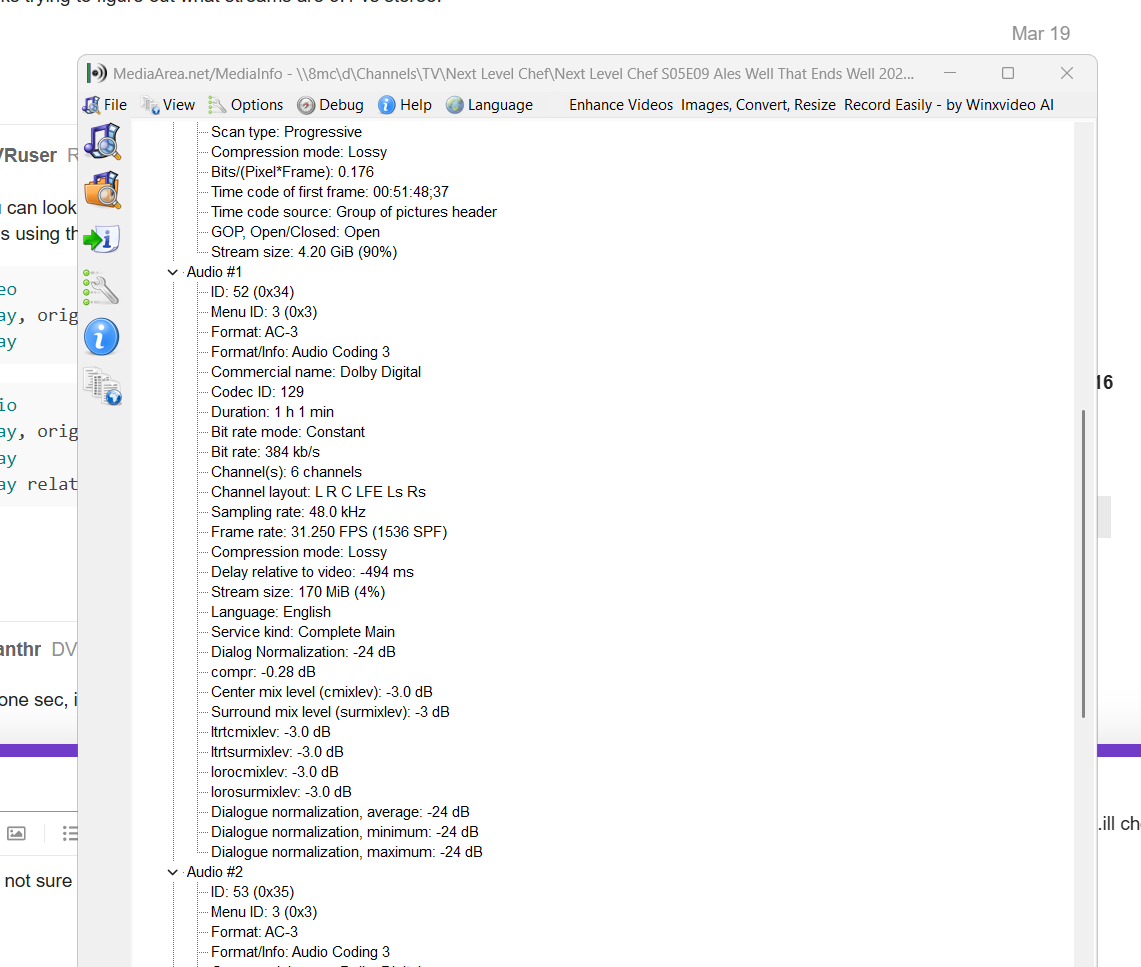
delay relative to stream is all i see.
I use a Windows command file and drop my recording on it.
Here the command being used
mediainfo --Full --LogFile="media_info_log.txt" recorded_filename.mpg
hang on, ill have to install the CLI version...