
Hello- Can someone show me the correct folder/file structure on Docker? I moved my server from native Synology DSM to Container Manager. Some errant commands (my fault) have made a mess. Now Channels doesn't see anything of the content on the volume. Any help would be appreciated!
I've migrated my DVR servers from Synology package to docker container and back many times.
Here's an example docker compose I'm using for one of my servers running in a docker container.
My DVR recording directory (Synology Shared Folder) is /volume1/ChDVR8089
Just change this volumes line to match where you have yours
- "/volume1/ChDVR8089:/volume1/ChDVR8089" # MODIFY Channels DVR recording directory
The directory containing Channels DVR executables is /volume1/docker/channels-dvr-8089
That directory /volume1/docker/channels-dvr-8089 must be created in File Station before you run the container. Synology Container Manager will not create the directory. Best to use this directory I posted unless you know what you're doing.
services:
  # Docker container home: https://hub.docker.com/r/fancybits/channels-dvr
  # image uses host mode networking and port is specified by env variable CHANNELS_PORT
  channels-dvr-8089:
    image: fancybits/channels-dvr:tve                        # use :tve tag, not :latest
    container_name: channels-dvr-8089
    network_mode: "host"                                     # must run in host, not bridge mode
    devices:
      - "/dev/dri:/dev/dri"                                  # to enable hardware transcoding
    environment:
      - CHANNELS_PORT=8089                                   # MODIFY the host port number to use
      - TZ=America/Los_Angeles                               # MODIFY your local timezone in standard linux format
    volumes:
      - "/volume1/ChDVR8089:/volume1/ChDVR8089"              # MODIFY Channels DVR recording directory
      - "/volume1/docker/channels-dvr-8089:/channels-dvr"    # Channels DVR executables and log directory
    restart: unless-stopped
Hope that helps
Of course, once you get it running in the container you'll want to restore the lastest backup you made before you stopped the Synology Package install.
Verify the user that's running Channels DVR in the container has RW access to folders.
Channels DVR runs as root in a docker container, but that has nothing to do with the docker host Synology OS user. Synology uses ACL's for permissions.
When running the Channels DVR container on a Synology, you should map the container
/channels-dvr directory into the Synology host OS directory /volume1/docker/...
He may also have mis-mapped the DVR recording directory, so it's not pointing to his old one.
When running in the Synology Package you pick the native Synology directory.
When running in a container you pick the container directory that's mapped to the Synology directory.
Hence, my suggestion
That creates the directory /volume1/ChDVR8089 in the container that is mapped
to the Synology directory /volume1/ChDVR8089
So you can do this in Channels DVR Setup
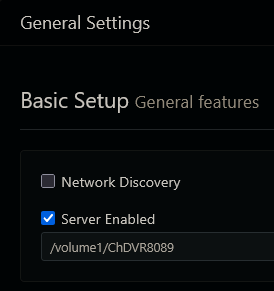
Even though it's running in a container.
This topic was automatically closed 30 days after the last reply. New replies are no longer allowed.