FreeNAS Configuration Process

I am having challenges getting the DVR plugin for FreeNAS to work. I have been running the DVR on a Windows 7 box for several weeks without any problems. I had an issue on Thursday on my laptop that required me to reboot, which I did and luckily just managed to avoid impacting the recording of one of my wife’s favorite shows.

I then decided that running this from FreeNAS might make it easier to avoid unexpected issues from my desktop.

I started with the latest version 11.1 install and was never able to get the service to start-up. I am running VMWare and can spin up a VM pretty quickly.

Install FreeNAS from ISO
100 GB / file system with 2TB /mnt/data partition setup
Configure FreeNAS - network, DNS, ...
Configure a share on FreeNAS and mount it up on a Windows box
Install the plugin from the plug-in page
Plugin won't start

I was able to get FreeNAS to provide storage that I could mount

I then installed the 9.10 version as it seemed to be supported perhaps more easily.

My process is:

Install FreeNAS from ISO
100 GB / file system with 2TB /mnt/data partition setup
Configure FreeNAS - network, DNS, ...
Configure a share on FreeNAS and mount it up on a Windows box
Install the plugin from the plug-in page
Plugin won't start

Redid the setup with a specific eye to creating a new Jail specifically for the DVR

Still no love.

Is there a detailed how to guide of the steps I need to take to get the DVR plugin working for either FreeNAS 9.10 or 11.1? I did see the details on the iocage problems which is one of the reasons I did a 9.10 install of FreeNAS.

Thanks - Using the Channels App on our Apple TVs with the DVR on my Windows 7 box has been working very well - the spousal acceptance and satisfaction factor is high.

Also, would there be any special that I would need to do to migrate recordings from the Windows 7 DVR to the FreeNAS DVR space? It looked like I should just be able to copy the .mpg files over, but do I need to do anything to force a DB update?

Thanks to everyone in advance -

Charley
Hmm @JMcGuire has some ideas.

When you say “plugin won’t start”, what exactly is happening?

You would copy over the entire DVR folder (with all its subdirectories), then visit http://x.x.x.x:8089/restore to import it into the new installation.

You’re running Freenas in a VM on your windows machine? I don’t know if that will affect anything as opposed to having a dedicated freenas server but I’m running on 11.1 and haven’t had any issues…

iocage activate ‹specify the dataset if you want›
iocage fetch

After that just follow my Freenas 11.1 manual install guide in posted last here last week.

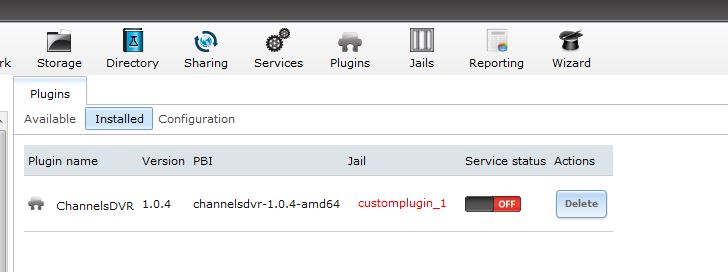
In FreeNAS v9.1 there will be a message at the top of the screen "Some error occurred" when I click the On/Off button below the service status in FreeNAS to turn on the ChannelsDVR 1.0.4 services in the customplugin_1 Jail.

I don't see anything in /mnt/data/customplugin_1/var/log/

I am sure I am missing something obvious.

The FreeNAS plugin is kind of a rube-goldberg machine, and can be real finicky. They’ve decided to dump it in the upcoming FreeNAS 11.2 which I’m very happy to hear.

I think if you click on the Jails tab, you can connect into the customplugin jail and take a look at the logs there. See what this file says:

cat /usr/pbi/channels-dvr-amd64/channels-dvr/data/channels-dvr.log

Or I think you can do the same thing from outside the jail, looking at:

cat /mnt/data/jails/customplugin_1/usr/pbi/channels-dvr-amd64/channels-dvr/data/channels-dvr.log

I am running the FreeNAS on a separate VMWare server not from inside of Windows. I will take a look at your install guide and try that.

Thank you,

Charley

I don’t see a channels-dvr directory -

[root@freenas] /mnt/data/customplugin_1/usr/pbi/channels-dvr-amd64# ls -Flat
total 3370
-rw-r--r--  1 root  staff          30 Mar 17 15:26 control.conf
drwxrwxr-x  6 root  operator        6 Mar 17 15:15 ../
drwxr-xr-x  3 501   staff          11 Mar 17 15:04 ./
-rw-------  1 root  staff         181 Mar 17 15:04 .oauth
-rw-r--r--  1 root  staff           0 Mar 17 15:04 setup.sh
-rwxr-xr-x  1 501   staff     6158528 Dec  6  2016 control.fcgi*
-rwxr-xr-x  1 501   staff         456 Dec  5  2016 control*
-rw-r--r--  1 501   staff         779 Dec  3  2016 default.png
drwxr-xr-x  3 501   staff           3 Dec  2  2016 etc/
-rwxr-xr-x  1 501   staff         222 Dec  2  2016 tweak-rcconf*
-rw-r--r--  1 501   staff          15 Dec  2  2016 freenas

Looks like the setup.sh is 0 bytes, which means the install basically failed to download it. Is the network connectivity working in the VM correctly?

Yes - it seems to be there are steps where the plug-in / Jail sets up another IP address - let me confirm that that’s working as expected.

I am currently trying the path of following @JMcGuire’s instructions on a fresh 11.1 build

Charley

You may need to add some tunables for iocage networking. Let me find those real quick.

https://s17.postimg.org/4d6reugzz/Tunables.png

@JMcGuire

You note that I need to:

iocage activate 
iocage fetch

What dataset would/should I specify?

Charley

Never mind - i figured it out - my ZFS volume is storage - so

iocage activate storage

worked

ZFS pool 'storage' successfully activated.

Did you get it up and running?

Not yet - I can’t get “out of jail” most of the time - something funky with the networking.

My default interface is em0 so I have adjusted for that, but I am missing some configuration for setup of the jail.

Charley

I have gotten much further than earlier - however I had to disable vnet functionality

the following command worked to setup the jail

iocage create -n "channels" -p /tmp/pkg.json -r 11.1-RELEASE ip4_addr="em0|192.168.202.220/24" defaultrouter="192.168.202.1" allow_raw_sockets="1" boot="on"

Charley

Last step is to get the mount working for the storage - but the mount is failing

error message is:

/mnt/storage # iocage console channels
mount_nullfs: /mnt/iocage/jails/channels/root/dvr: Resource deadlock avoided
jail: /sbin/mount -t nullfs -o rw /mnt/storage/dvr /mnt/iocage/jails/channels/root/dvr: failed

/mnt/storage/dvr is owned by channels and group dvr and is group writable. channels is uid 820

fstab entry

iocage fstab -a channels /mnt/storage/dvr /dvr nullfs rw 0 0

Stupid user error had two identical lines in my fstab - running now

To summarize what I had to change from @JMcGuire’s setup:

Disable/do not use vnet
use the interface seen when you login to freenas (in this case it’s em0)
do not run

iocage exec channels 'sysrc ifconfig_epair0_name="epair0b"'

since I am not user epair0 or any similar interface

I also did not any of the suggested tunables since did not use vnet

It’s running, but I haven’t rebooted it yet

I don’t believe you had to change anything, vnet is usable and works fine except for one small bug… many programs like Plex and possibly Channels will ignore interface names that start with a “v”, to account for that Freenas automatically renames the interface when a user creates a jail using vnet. A change was made between 11.1 U1 and U2 that broke this, thus requiring the interface to be renamed with the command…
iocage exec channels 'sysrc ifconfig_epair0_name="epair0b"'

This will be corrected in 11.2, its something that happens behind the scenes no matter what your “user” or “interface” is. Here is a link to the change (it also mentions adding the interface the the bridge by default without the need for the tunables) take a look for yourself…

https://github.com/iocage/iocage/commit/fc7995cd327968e077b99c4a1458ae20a2eb98f8