
Any chance your password has weird characters?
No. Upper an lower alpha, $, and 3 numbers
If '$' is bad is there a good special character, as one is required.
are you doing this on Windows, or Linux? I'm just speculating here that Powershell could misinterept that $ as a variable.
i know i'm beating a deadhorse, but you're typing this exactly?
docker run -d --restart unless-stopped --env "USERNAME=MY_EMAIL" --env "PASSWORD=MY_PASSWORD" --name frndlytv-for-channels -p 8183:80 matthuisman/frndlytv-for-channels
so yours would be:
docker run -d --restart unless-stopped --env "[email protected]" --env "PASSWORD=Poop123$" --name frndlytv-for-channels -p 8183:80 matthuisman/frndlytv-for-channels
replace Poop123$ with your password...
i just signed up for a trial and it worked on first try. and you're 100% sure password is right? account not locked out?
You nailed it. Replaced '$' with '_' character and all good. Thank you!!!!!
3 Likes
Restarted machine and now have this error:
(HTTP code 500) server error - ports are not available: exposing port TCP 0.0.0.0:8183 -> 127.0.0.1:0: listen tcp 0.0.0.0:8183: bind: An attempt was made to access a socket in a way forbidden by its access permissions.
Admit I'm not a docker person but getting similar blowback from phython version.
Running on Windows?
I only see these ports on my Win 11, but I'm not running docker on it.
C:\>netsh interface ipv4 show excludedportrange protocol=tcp

Protocol tcp Port Exclusion Ranges

Start Port    End Port
----------    --------
      5357        5357
     28385       28385
     28390       28390

* - Administered port exclusions.
I really appreciate the feedback.
I tried this
net stop hns
net start hns
and restarting "docker run -d --restart unless-stopped --env "USERNAME..." command and it appears to be working.
???
Now the Frndly channels using WebVTT for captions (like Hallmark) should display them in a Channels client
Hi -- I am not sure if this is an issue I am having that is solely Frndly TV for Channels-related, as I have also experienced it when I had to create a new source for Pluto since they now require a username/password, but I thought I would ask it here; sorry if it should belong somewhere else.
Anyway, I followed all he steps for adding Frndly TV for Channels, created a new source, copied all the urls that were generated, and added them as directed. In theory, it is working... except that I am not getting any guide information; my channels show up and while I can watch something on each channel, I get no info as to what is currently playing, nor what will be playing in the future.
How do I fix this?
I am sure it is something obvious that I am missing, so please be kind with your possible solutions. Thanks 

Thanks for the response...
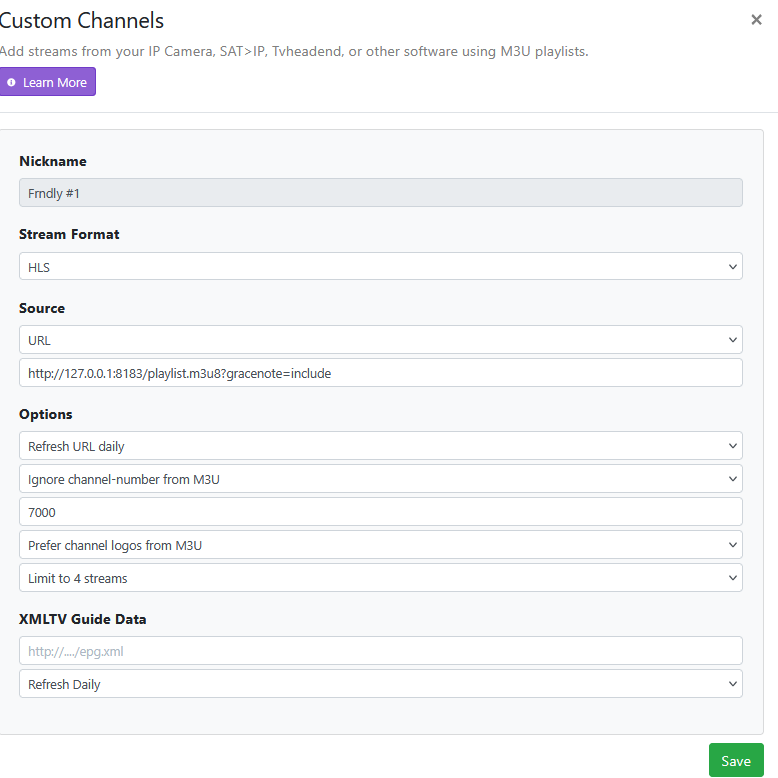
I have the Fndly#1 source set up pretty much the same way (though I am not entirely sure about the "limit to 4 streams" part, and need to check on that when I get home and in front of my computer to check), and have the Fndly#2 source pretty much the same as well, with the exception of adding the xmltv guide data url to that field, as instructed.
Getting no guide data from either source.
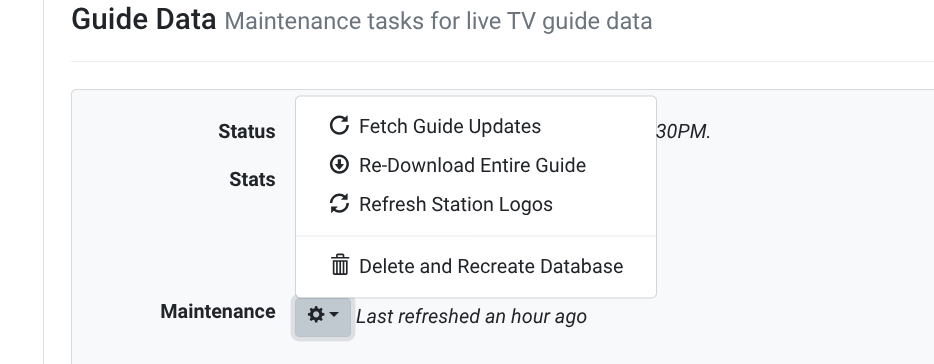
Try running the Delete and Recreate Database option on the Live TV and DVR page of the CDVR server GUI.
I'll try that; thanks
Just for my knowledge - is that typically the fix here?
It's not a "cure all".
You should verify CDVR is getting the playlists and xmltv epg from the FrndlyTV docker container first.
Look at them and check the DVR log.
If not, then check the FrndlyTV docker container log.
1 Like
I have gotten in the habit of running the Delete and Recreate Database each time I add, remove or update channels and/or sources. If your sources are set up correctly, it will completely refresh your guide data, and confirm that scheduled recordings for your passes are updated, especially if any of your channel numbers have changed.
As @chDVRuser has mentioned, it won't help if there's a problem with one of your sources. That's when you'll need to do a little more investigating into your DVR and container logs. 
2 Likes
I recently lost the "Great American Family" channel via Frndlytv-for-channels. I updated my docker image to see if that might help, but it still isn't seen. I can see the channel via the Frndly app, and I can see the "Great American Faith and Living" channel via Frndlytv-for-channels. The channel number (on my system) should be 9202, but it is missing from the Settings -> Sources -> Frndly -> Manage -> Manage Lineup listing. The channel was there a few days ago, but I noticed that a couple of recordings I set up didn't come in. The error states that channel 9202 wasn't available, and when I checked, it was gone. Anyone have a similar situation, or solution? Thanks!
Still working for me.
Working for me as well.
@matthuisman I lost Great American Family as well several days ago.
All other channels are working for me.
EDIT Likely a problem with Portianer / Docker on PR2100. Moved this to Mac mini and working fine now.
Streaming to the tuner failed. Press play to try again.
M3U: GET: http://127.0.0.1:8089/devices/ANY/channels/9013/stream.mpg:
404 Not Found
It's definitely missing from here for me
http://10.0.1.190:8183/playlist.m3u8?gracenote=include