
You need to do an initial scrape, using the "Full Refresh" button in the FDL WebUI.
1 Like
Was looking at this morning's scrape and noticed MLB At Bat was added to list (from the Fruit company scraper).
they were historically non-DRM, but we'll see if that changes this year. Good to have another option for everyone at least.
3 Likes
I'm struggling installing FruitDeepLinks on my Synology NAS. For those that have successfully installed it, can you help me out?
I'm trying to create a Stack like KineticMan indicates in Portainer. I add the Repository URL and ENV variables, but when I go to deploy I get:
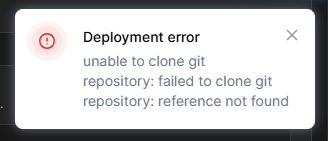
I'm definitely doing something wrong. If you successfully installed on a Synology, send me a note!
It looks like you're trying to use a local build stack. You want a Docker Compose that'll pull the pre-built image for you:
services:
  fruitdeeplinks:
    # 2025.12.22
    # GitHub home for this project with setup instructions: https://github.com/kineticman/FruitDeepLinks
    # Docker container home for this project: https://github.com/kineticman/FruitDeepLinks/pkgs/container/fruitdeeplinks
    image: ghcr.io/kineticman/fruitdeeplinks:${TAG:-latest}
    container_name: fruitdeeplinks
    hostname: fruitdeeplinks
    shm_size: '2gb'
    ports:
      - ${FRUIT_HOST_PORT:-6655}:6655
    environment:
      - TZ=${TZ:-America/New_York}
      - SERVER_URL=${SERVER_URL:-http://localhost:6655}
      - FRUIT_HOST_PORT=${FRUIT_HOST_PORT:-6655}
      - CC_SERVER=${CC_SERVER:-localhost}
      - CC_PORT=${CC_PORT:-8080}
      - CHANNELS_DVR_IP=${CHANNELS_DVR_IP:-}
      - CHANNELS_SOURCE_NAME=${CHANNELS_SOURCE_NAME:-fruitdeeplinks}
      - FRUIT_DB_PATH=${FRUIT_DB_PATH:-/app/data/fruit_events.db}
      - OUT_DIR=${OUT_DIR:-/app/out}
      - LOG_DIR=${LOG_DIR:-/app/logs}
      - LOG_LEVEL=${LOG_LEVEL:-INFO}
      - FRUIT_LANES=${FRUIT_LANES:-50}
      - FRUIT_LANE_START_CH=${FRUIT_LANE_START_CH:-9000}
      - FRUIT_DAYS_AHEAD=${FRUIT_DAYS_AHEAD:-7}
      - FRUIT_PADDING_MINUTES=${FRUIT_PADDING_MINUTES:-45}
      - FRUIT_PLACEHOLDER_BLOCK_MINUTES=${FRUIT_PLACEHOLDER_BLOCK_MINUTES:-60}
      - FRUIT_PLACEHOLDER_EXTRA_DAYS=${FRUIT_PLACEHOLDER_EXTRA_DAYS:-5}
      - CDVR_DVR_PATH=${CDVR_DVR_PATH:-}
      - CDVR_SERVER_PORT=${CDVR_SERVER_PORT:-8089}
      - CDVR_API_PORT=${CDVR_API_PORT:-57000}
      - HEADLESS=${HEADLESS:-true}
      - NO_NETWORK=${NO_NETWORK:-false}
      - AUTO_REFRESH_ENABLED=${AUTO_REFRESH_ENABLED:-true}
      - AUTO_REFRESH_TIME=${AUTO_REFRESH_TIME:-02:30}
    volumes:
      - ${HOST_DIR:-.}/FruitDeepLinks/data:/app/data
      - ${HOST_DIR:-.}/FruitDeepLinks/out:/app/out
      - ${HOST_DIR:-.}/FruitDeepLinks/logs:/app/logs
      - ${CDVR_DVR_PATH:-/tmp/fruitdeeplinks-novol}:/mnt/dvr
    restart: unless-stopped
    logging:
      driver: json-file
      options:
        max-size: 10m
        max-file: 3
With env var overrides like this in Portainer:
FRUIT_HOST_PORT=6655
TZ=US/Mountain
SERVER_URL=http://htpc6:6655
CC_SERVER=cc4c2
CC_PORT=5589
CHANNELS_DVR_IP=media-server8
CHANNELS_SOURCE_NAME=FruitDeepLinks
FRUIT_LANE_START_CH=14001
FRUIT_LANES=100
CDVR_DVR_PATH=
CDVR_SERVER_PORT=8089
CDVR_API_PORT=57000
AUTO_REFRESH_ENABLED=true
AUTO_REFRESH_TIME=02:30
HOST_DIR=/data
1 Like
@KineticMan Question for you, I know you said as part of the daily refresh, stale events are supposed to be purged from the database. Just wondering, what constitutes a stale event? I still have events in my database back to February 6th, which was around the last time I tested the Wipe Events function. Should those older events have been purged as part of the daily refresh?
I see the following in the log, but I'm not sure how to interpret this whether it is actually deleting old events successfully or not.
[db-maint] fruit_events.db: size=46956544 journal=delete pages=11464 freelist=0 ratio=0.00
Realized I posted this over in the Prismcast thread not in FDL:
It's supposed to delete events older than 2 days. Looks like I've got a bug in the cleanup portion. thanks - i'll dig into it.
1 Like
sure. Jean asked me too.
what you guys thinking? have one m3u (like direct/lanes) that also exports that format for ALL enabled services? or have it configurable by service like ADB outputs?
either option easy to add
It could be one M3U, but we need to make sure that every streaming service is recognized by PrismCast. In other words, each service FDL supports needs to have a known working PrismCast Profile and that Profile needs to be registered in the PrismCast code.
I can take care of the PRs to handle that registration, but FDL users need to figure the correct Profiles. When PrismCast gets redirected to an event by FDL, it needs to recognize that site and use the correct Profile.
I'm only using Peacock, Max, and ESPN FDL service filters. So modifying the multisourcelanes_chome.3mu to use the prismcast "/play" endpoint without adding FDL "channels" into prismcast worked easily. No need to add each lane into prismcast for it to work. Maybe my use case is simpler than others...
do you see a need for another ENV Variable for the Streamcast server IP/Port? similar to the CC4C / AH4C env variable
and just so i'm following completly what you guys want.
current export:
chrome://cc_server:8080/stream?url={encoded}
http://ch4c_server:8080/stream?url={encoded}
prismcast proposed output:
http://pcast_server:5589/play?url={encoded}
That part actually makes no difference. Whether you use the /play endpoint, or add them to PrismCast -- the issues are the same. The streaming site that FDL redirects PrismCast to needs to be recognized by PrismCast. The three services you're using already fall into that category, but others supported by FDL are not yet supported "natively" by PrismCast.
This one, but don't URL encode -- it's not needed, and makes it less readable.
Just to emphasize though, anyone using streaming sites not known to PrismCast will experience failures on those sites at this point. We need FDL users to determine which PrismCast Profiles are needed for each streaming service.
Yes.
Got it installed. I was able to pull the container within Portainer from the image link.
Now I need to tinker to figure out how to use it.
I have a direc m3u and xml files imported into Channels DVR as streamlinks, but I have no idea how to use them.
as expected?
#EXTM3U

#EXTINF:-1 tvg-id="lane.1" tvg-name="Fruit Lane 1" tvg-chno="9000" group-title="Sports Lanes",Fruit Lane 1
http://192.168.86.72:5589/play?url=http://192.168.86.80:6655/api/lane/1/launch?deeplink_format=http

#EXTINF:-1 tvg-id="lane.2" tvg-name="Fruit Lane 2" tvg-chno="9001" group-title="Sports Lanes",Fruit Lane 2
http://192.168.86.72:5589/play?url=http://192.168.86.80:6655/api/lane/2/launch?deeplink_format=http

#EXTINF:-1 tvg-id="lane.3" tvg-name="Fruit Lane 3" tvg-chno="9002" group-title="Sports Lanes",Fruit Lane 3
http://192.168.86.72:5589/play?url=http://192.168.86.80:6655/api/lane/3/launch?deeplink_format=http
[11/13] Exporting Virtual Lanes
============================================================
Using DB: /app/data/fruit_events.db
Lanes outputs: /app/out/multisource_lanes.xml, /app/out/multisource_lanes.m3u, /app/out/multisource_lanes_chrome.m3u, /app/out/multisource_lanes_ch4c.m3u, /app/out/multisource_lanes_prismcast.m3u
Server URL: http://192.168.86.80:6655
Chrome Capture: 192.168.86.72:8080
Channels4Chrome: 192.168.86.72:8080
PrismCast: 192.168.86.72:5589
Lanes XMLTV: 50 virtual channels
Lanes XMLTV: 14420 programmes scheduled
Wrote Lanes XMLTV: /app/out/multisource_lanes.xml
Lanes M3U: 50 virtual channels
Wrote Lanes M3U: /app/out/multisource_lanes.m3u
Chrome M3U: 50 virtual channels
Wrote Chrome M3U: /app/out/multisource_lanes_chrome.m3u
CH4C M3U: 50 virtual channels
Wrote CH4C M3U: /app/out/multisource_lanes_ch4c.m3u
PrismCast M3U: 50 virtual channels
Wrote PrismCast M3U: /app/out/multisource_lanes_prismcast.m3u
Lanes export complete!
[OK] Step 11 complete
M3U would tie into multisource_lanes.xml
Looks good!
Update pushed:
-
PrismCast output added. Just add to your environment variables PCAST_SERVER and PCAST_PORT and new M3U will be exported during refresh. Multisource_lanes_prismcast.m3u will share the same XML multisource_lanes.xml
-
Fixed importers to stop importing events older than 2> days. Some APIs return old events for some reason.
-
Misc bug fixes (admin page locking up with large logs, improved Amazon scraper)
-
Added experimental support for NESN.
-
Still need feedback on experimental scrapers - Victory+, Fanatiz, beIN Sports, and Gotham. If anyone subscribes to any of those services and interested, shoot me a note.
4 Likes
Pulled latest update, did a full refresh and perhaps the Amazon part may be broken again? On the filters page, it is back to showing the majority of the events under "Amazon - Unknown".
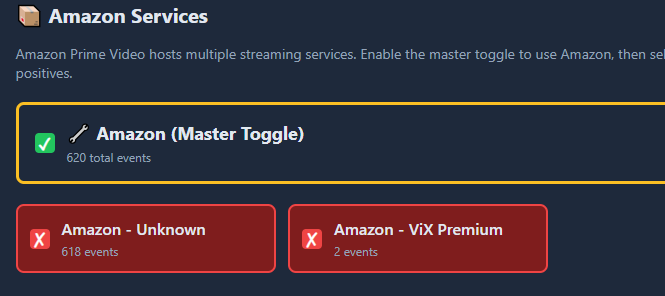
I don't see any errors in the step in the log, everything seems ok there:
aiv_aggregator 713 playables
aiv_nba_league_pass 279 playables
aiv_prime 160 playables
aiv_tennis_channel 122 playables
aiv_vix_premium 30 playables
aiv_peacock 26 playables
aiv_willow 19 playables
aiv_fox_one 19 playables
aiv_fanduel 12 playables
aiv_amazon_error 7 playables
aiv_max 5 playables
aiv_vix 1 playables
================================================================================
MIGRATION COMPLETE
================================================================================
[OK] Step 7e-migrate complete
1 Like