
With the help of ChatGPT, we found that FruitDeepLinks was finding the ESPN+ games, but only adding them to my guide if Apple TV also listed them.
We added a fix that imports the missing ESPN+ college football events and their playback links , skips duplicates, and runs automatically with future refreshes.
Everything seems to be working properly now. Thanks!!
I’m showing plenty of ESPN+ games today. I’ve got 350 ADBTuner lanes.
If you reloaded the m3u to Channels, try a Delete & Recreate Database..
Is there a specific game you’re looking for.
Are you saying you needed to make a code modification?
I don't understand, I have ESPN+ enabled and I got all of the games yesterday.
Prime Video deep links lost after profile picker on TS4K (multiple household profiles)
Setup: TiVo Stream 4K (Android TV), ADBTuner dev build, FDL 2.0.3, aiv lanes built via OliveTin using the FruitDeepLinks Prime Video v3.0 config.
Issue: Our account has two adult profiles (Amazon Household), so Prime shows “Who’s watching?” on every deep link launch. The v3.0 match text never fires on the picker, so it sits there. When I add a timed DPAD_CENTER to select the profile, Prime lands on its home screen and the deep link is gone.
What I’ve tried:
- Matching on “watching” instead of “who’s watching,” in case of a curly apostrophe
- Timed profile select, then resending the deep link with
am start -n. The picker comes back, then home. - Launching Prime normally, selecting the profile, then sending an implicit VIEW intent with FLAG_ACTIVITY_SINGLE_TOP. Still lands on home.
- Link formats:
app.primevideo.com/detail?asin=,amazon.com/gp/video/detail/, andprimevideo.com/detail/. All behave the same.
Removing the second adult isn’t an option. Has anyone gotten Prime deep links working on Android TV or Google TV with multiple household profiles? Is there a launch method or activity that keeps the link through profile selection?
Could you post ADBTuner logs from a complete failed tune cycle (without any of your changes to the config please)? I'd like to see what tesseract is identifying on the profile selection page.
FWIW- I did a little prototype with FC Player (using existing Amazon Free framework) playing the Amazon sports channels -- and it works.
Quite a bit of groundwork to implement Apple/Amazon events into FastChannels, but it's my end goal. Should eliminate this clicking stuff you guys go through.
2 Likes
Nice to see you took up the challenge I gave you lol. 
ADBTuner logs below after tuning to a test channel that got stuck on the login page:
Prime Test on TS4K at Oct 23, 2026, 6:16 PM
   +0.00s  192.168.68.124:5592 | channels-dvr/2026.10.21.2302 Go-http-client/1.1 (linux-x86_64)
   +0.00s  No active tuners found for Prime Test. Reserving a new tuner.
   +0.00s  Attempting to reserve tuner for: ['com.amazon.firebat', 'com.amazon.amazonvideo.livingroom'].
   +0.01s  Available Tuners:
   +0.01s  Name: TS4K Priority: 0
   +0.01s  Using first available tuner (by priority).
   +0.01s  Reserved Tuner: Name: TS4K Priority: 0
   +0.01s  Tuning to Prime Test on TS4K
   +0.01s  Using channel configuration: FruitDeepLinks - Prime Video v3.0 (FireTV and AndroidTV) (bnhf) (a176643f-b3b6-47fb-8527-47908d089695)
   +0.04s  MPEG null packets mode: Redirecting immediately to /proxy/1?requestKey=9q48DGf2R56XaaEjXfzV7a
   +0.45s  ADB: 192.168.68.109 - pidof com.amazon.amazonvideo.livingroom
   +0.62s  Using https://www.amazon.com/gp/video/detail/0O328G1XZMK9IFMCB7EMGCQGFZ to load channel.
   +0.62s  Executing pre-tune commands: [{'type': 'ADB', 'command': 'input keyevent KEYCODE_MEDIA_STOP'}, {'type': 'ADB', 'command': 'input keyevent KEYCODE_HOME'}]
   +0.62s  ADB: 192.168.68.109 - input keyevent KEYCODE_MEDIA_STOP
   +0.83s  ADB: 192.168.68.109 - input keyevent KEYCODE_HOME
   +1.05s  Executing tune commands: [{'type': 'ADB', 'command': "am start -n $(dumpsys package 'com.amazon.amazonvideo.livingroom' 2>/dev/null | awk '/https:/{getline; print $2; exit}') -d 'https://www.amazon.com/gp/video/detail/0O328G1XZMK9IFMCB7EMGCQGFZ'"}]
   +1.05s  ADB: 192.168.68.109 - am start -n $(dumpsys package 'com.amazon.amazonvideo.livingroom' 2>/dev/null | awk '/https:/{getline; print $2; exit}') -d 'https://www.amazon.com/gp/video/detail/0O328G1XZMK9IFMCB7EMGCQGFZ'
   +1.43s  Starting tune match text monitoring. Match commands: [{'match_text': ["who's watching", 'watch live', 'new', 'guest'], 'commands': [{'type': 'ADB', 'command': 'input keyevent KEYCODE_DPAD_CENTER'}], 'check_after_seconds': 5}]
   +5.00s  Fixed delay (5s) elapsed; starting real stream.
   +6.43s  Tuning completed after 6.43 seconds. Display was on, application (com.amazon.amazonvideo.livingroom) was closed.
   +6.43s  Initializing keep active command schedule for tuner TS4K (1).
   +7.68s  On screen text: '& search home shop apps $3 @ 6:16  favorite apps  peacock tv: featured content'
   +7.68s  Text match result: Text to match: ["who's watching", 'watch live', 'new', 'guest']. Matches found: None.
  +10.25s  On screen text: '& search home shop apps  tenzing  new movie based on true events a himalayan climber leads a summit to mount everest to achieve his dream and secure a place in history  favorite apps 4 a . etv an @youtubety peacock: prime video play next free movies and shows top selling movies  peacock tv: featured content  ~~ a ttét  popular movies and shows  3 @ 6:16  +  trending on google'
  +10.25s  Text match result: Text to match: ["who's watching", 'watch live', 'new', 'guest']. Matches found: ['new'].
  +10.25s  ADB: 192.168.68.109 - input keyevent KEYCODE_DPAD_CENTER
  +14.89s  Text match result: Text to match: ["who's watching", 'watch live', 'new', 'guest']. Matches found: None.
  +17.36s  Detected 100.0% black pixels. Assuming HDCP is active and video is playing.
  +17.36s  Media playback detected. Stopping tuning text match process.
This part here tells us the profile screen was identified (the profile screen has user's names, guest and new on it as I recall), and the select key was sent (which would have selected the top profile).
So at least in this example, if you'd been monitoring, you should have gotten past the profile.
Here is another log that clearly showins the issue
BLUF:
Tuner reserved: TS4K (192.168.68.109), with no issues.
Config: FruitDeepLinks - Prime Video v3.0 (bnhf).
Link used: Watch The Monster Squad | Prime Video
Launch: am start -n with the activity taken from dumpsys package com.amazon.amazonvideo.livingroom.
At 5.95s: “Tuning completed ... application (com.amazon.amazonvideo.livingroom) was running.” Prime opened.
At 7.04s and 9.08s: text match checks returned “Matches found: None,” and no “On screen text” was logged for either check.
On screen: the Prime profile picker, which the config never got past.
The point to make: once Prime is open, ADBTuner logs no on-screen text at all while the profile picker is showing, so the match list has nothing to match against. Prime’s screens may be capture-protected on Android TV.
LOG:
Prime Test on TS4K at Oct 24, 2026, 10:31 AM
   +0.00s  192.168.68.124:5592 | channels-dvr/2026.10.21.2302 Go-http-client/1.1 (linux-x86_64)
   +0.00s  No active tuners found for Prime Test. Reserving a new tuner.
   +0.00s  Attempting to reserve tuner for: ['com.amazon.firebat', 'com.amazon.amazonvideo.livingroom'].
   +0.01s  Available Tuners:
   +0.01s  Name: TS4K Priority: 0
   +0.01s  Using first available tuner (by priority).
   +0.01s  Reserved Tuner: Name: TS4K Priority: 0
   +0.01s  Tuning to Prime Test on TS4K
   +0.01s  Using channel configuration: FruitDeepLinks - Prime Video v3.0 (FireTV and AndroidTV) (bnhf) (a176643f-b3b6-47fb-8527-47908d089695)
   +0.04s  MPEG null packets mode: Redirecting immediately to /proxy/1?requestKey=XUx2TJCSRA6MNFr6iaiduN
   +0.28s  ADB: 192.168.68.109 - pidof com.amazon.amazonvideo.livingroom
   +0.40s  Using https://www.amazon.com/gp/video/detail/0O328G1XZMK9IFMCB7EMGCQGFZ to load channel.
   +0.40s  Executing pre-tune commands: [{'type': 'ADB', 'command': 'input keyevent KEYCODE_MEDIA_STOP'}, {'type': 'ADB', 'command': 'input keyevent KEYCODE_HOME'}]
   +0.40s  ADB: 192.168.68.109 - input keyevent KEYCODE_MEDIA_STOP
   +0.49s  ADB: 192.168.68.109 - input keyevent KEYCODE_HOME
   +0.61s  Executing tune commands: [{'type': 'ADB', 'command': "am start -n $(dumpsys package 'com.amazon.amazonvideo.livingroom' 2>/dev/null | awk '/https:/{getline; print $2; exit}') -d 'https://www.amazon.com/gp/video/detail/0O328G1XZMK9IFMCB7EMGCQGFZ'"}]
   +0.61s  ADB: 192.168.68.109 - am start -n $(dumpsys package 'com.amazon.amazonvideo.livingroom' 2>/dev/null | awk '/https:/{getline; print $2; exit}') -d 'https://www.amazon.com/gp/video/detail/0O328G1XZMK9IFMCB7EMGCQGFZ'
   +0.95s  Starting tune match text monitoring. Match commands: [{'match_text': ["who's watching", 'watch live', 'new', 'guest'], 'commands': [{'type': 'ADB', 'command': 'input keyevent KEYCODE_DPAD_CENTER'}], 'check_after_seconds': 5}]
   +5.00s  Fixed delay (5s) elapsed; starting real stream.
   +5.95s  Tuning completed after 5.95 seconds. Display was on, application (com.amazon.amazonvideo.livingroom) was running.
   +5.95s  Initializing keep active command schedule for tuner TS4K (1).
   +7.04s  Text match result: Text to match: ["who's watching", 'watch live', 'new', 'guest']. Matches found: None.
   +9.08s  Text match result: Text to match: ["who's watching", 'watch live', 'new', 'guest']. Matches found: None.
  +12.24s  Text match result: Text to match: ["who's watching", 'watch live', 'new', 'guest']. Matches found: None.
  +15.20s  Text match result: Text to match: ["who's watching", 'watch live', 'new', 'guest']. Matches found: None.
  +18.13s  Text match result: Text to match: ["who's watching", 'watch live', 'new', 'guest']. Matches found: None.
  +21.13s  Text match result: Text to match: ["who's watching", 'watch live', 'new', 'guest']. Matches found: None.
  +24.15s  Text match result: Text to match: ["who's watching", 'watch live', 'new', 'guest']. Matches found: None.
  +27.29s  Text match result: Text to match: ["who's watching", 'watch live', 'new', 'guest']. Matches found: None.
  +30.16s  Text match result: Text to match: ["who's watching", 'watch live', 'new', 'guest']. Matches found: None.
  +32.46s  Possible video playback failure (type 1)
  +33.20s  Text match result: Text to match: ["who's watching", 'watch live', 'new', 'guest']. Matches found: None.
  +36.20s  Text match result: Text to match: ["who's watching", 'watch live', 'new', 'guest']. Matches found: None.
  +39.20s  Text match result: Text to match: ["who's watching", 'watch live', 'new', 'guest']. Matches found: None.
  +42.31s  Text match result: Text to match: ["who's watching", 'watch live', 'new', 'guest']. Matches found: None.
  +45.27s  Text match result: Text to match: ["who's watching", 'watch live', 'new', 'guest']. Matches found: None.
  +48.23s  Text match result: Text to match: ["who's watching", 'watch live', 'new', 'guest']. Matches found: None.
  +51.25s  Text match result: Text to match: ["who's watching", 'watch live', 'new', 'guest']. Matches found: None.
  +54.28s  Text match result: Text to match: ["who's watching", 'watch live', 'new', 'guest']. Matches found: None.
  +57.29s  Text match result: Text to match: ["who's watching", 'watch live', 'new', 'guest']. Matches found: None.
    +1:00  Text match result: Text to match: ["who's watching", 'watch live', 'new', 'guest']. Matches found: None.
    +1:03  Text match result: Text to match: ["who's watching", 'watch live', 'new', 'guest']. Matches found: None.
    +1:06  Text match result: Text to match: ["who's watching", 'watch live', 'new', 'guest']. Matches found: None.
    +1:09  Text match result: Text to match: ["who's watching", 'watch live', 'new', 'guest']. Matches found: None.
    +1:12  Text match result: Text to match: ["who's watching", 'watch live', 'new', 'guest']. Matches found: None.
    +1:14  Releasing tuner 1 as it has been inactive for 10 seconds.
    +1:14  Releasing tuner: {'lock_obtained': 1792852275, 'tuner_name': 'TS4K', 'name': 'Prime Test', 'number': 9599, 'provider_name': '', 'tuner_id': 1, 'channel_id': 150, 'url_or_identifier': 'https://www.amazon.com/gp/video/detail/0O328G1XZMK9IFMCB7EMGCQGFZ', 'tuning_status': 'tuned', 'request_key': 'XUx2TJCSRA6MNFr6iaiduN', 'target_package': 'com.amazon.amazonvideo.livingroom', 'playback_monitor': {'last': 3550593149683312, 'stalled_since': 1792852289.498362, 'reported': True}}
Two NBA questions on the Prime Video ADB lanes.
I'm running 6 Prime lanes (aiv01 to aiv06) and only want the NBA games included with Prime.
- League Pass games are mixed in with Prime's free games
- In Filters > Amazon Services, both kinds appear to fall under Amazon - Unknown (provider aiv_aggregator). The only other sub-services listed are Prime Exclusive, ViX Premium and FOX One.
- In adb_lanes.xml, both use the same title format ("NBA: Team at Team"), the same categories, and the same "Available on Prime Video" description, so there's nothing to filter on downstream.
- Example: Brooklyn Nets at Cleveland Cavaliers (Oct 24) is League Pass, while the other NBA games on my lanes this week are Prime's free national games.
Is there a current way to exclude League Pass? If not, would either of these be possible:
- Split League Pass into its own sub-service under Amazon Services (for example, aiv_nba_league_pass) so it can be toggled off.
- Tag entitlement in the lanes XMLTV, such as a category or desc marker for add-on channel content, so it can be filtered downstream.
- Emirates NBA Cup games aren't showing at all
Prime has the Cup Group Play doubleheaders every Friday starting Oct 30, but none of them appear on my lanes. adb_lanes.xml runs into early November, and the only event in the Oct 30 evening window is an MLB game. Regular NBA and League Pass games come through fine, so it looks like the Cup games either aren't being scraped or aren't being assigned to the Prime lanes. Is that a known issue, or is there a setting I'm missing?
Thanks for all the work on this.
1 Like
When I tested with the link you posted here, I too saw the profile screen, but even after I selected my profile manually the link went nowhere.
However, when I went to the FDL Event Inspector, and grabbed the "HTTP Deeplink" for the Rockets/Spurs game last night -- I went directly to the splash page for this event, with no profile page involved.
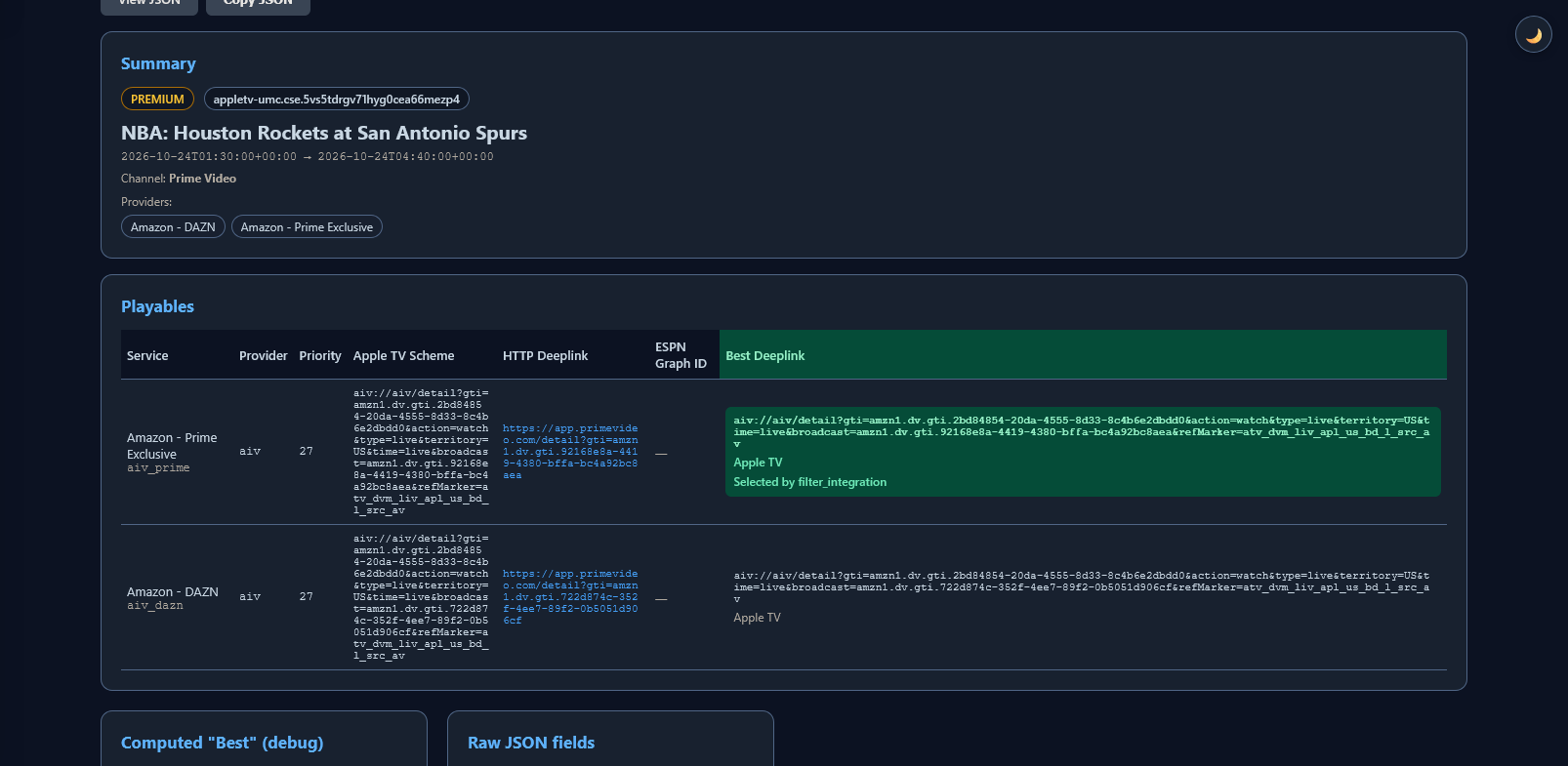
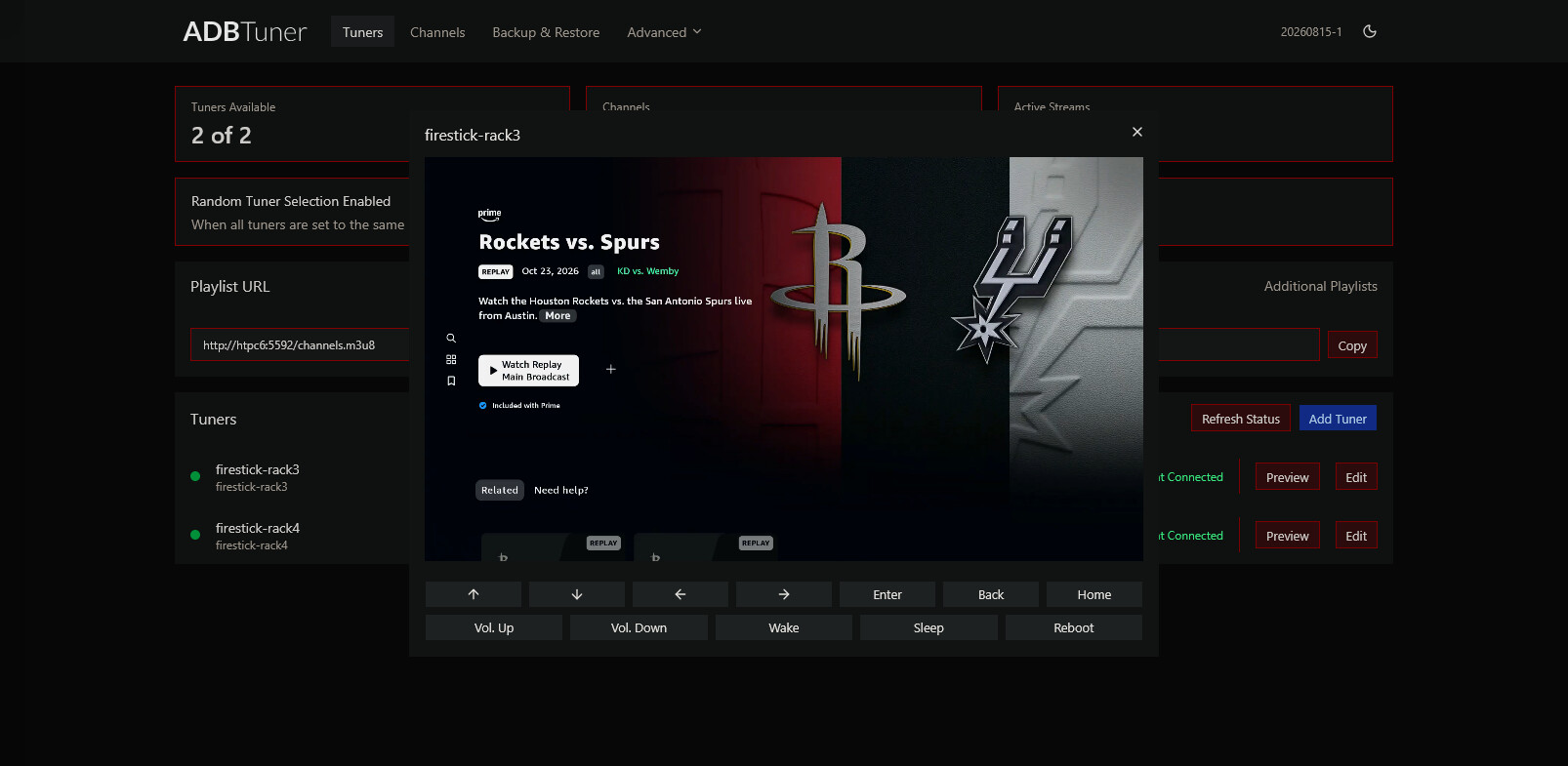
Which makes me wonder if the link that's being used in your case is valid? Let's get more specific about what event you're actually trying to view.
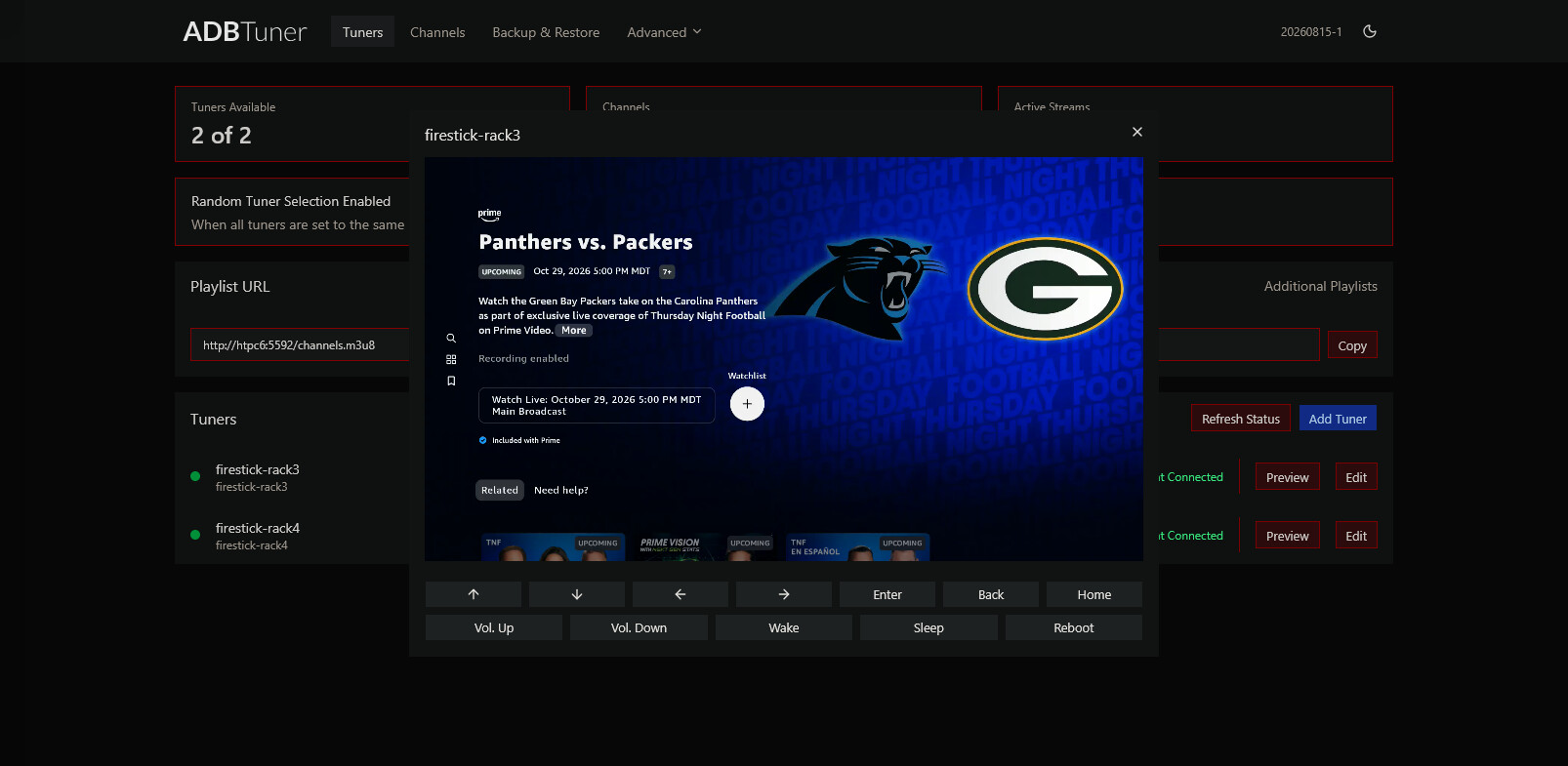
EDIT: Same result when tuning a future event. No profile screen in the mix, and it went right to the splash page for the next Thursday Night Football game:
EDIT2: I don't understand where this deeplink is coming from. What does "The Monster Squad" have to do with FDL, which is a sports event aggregator?
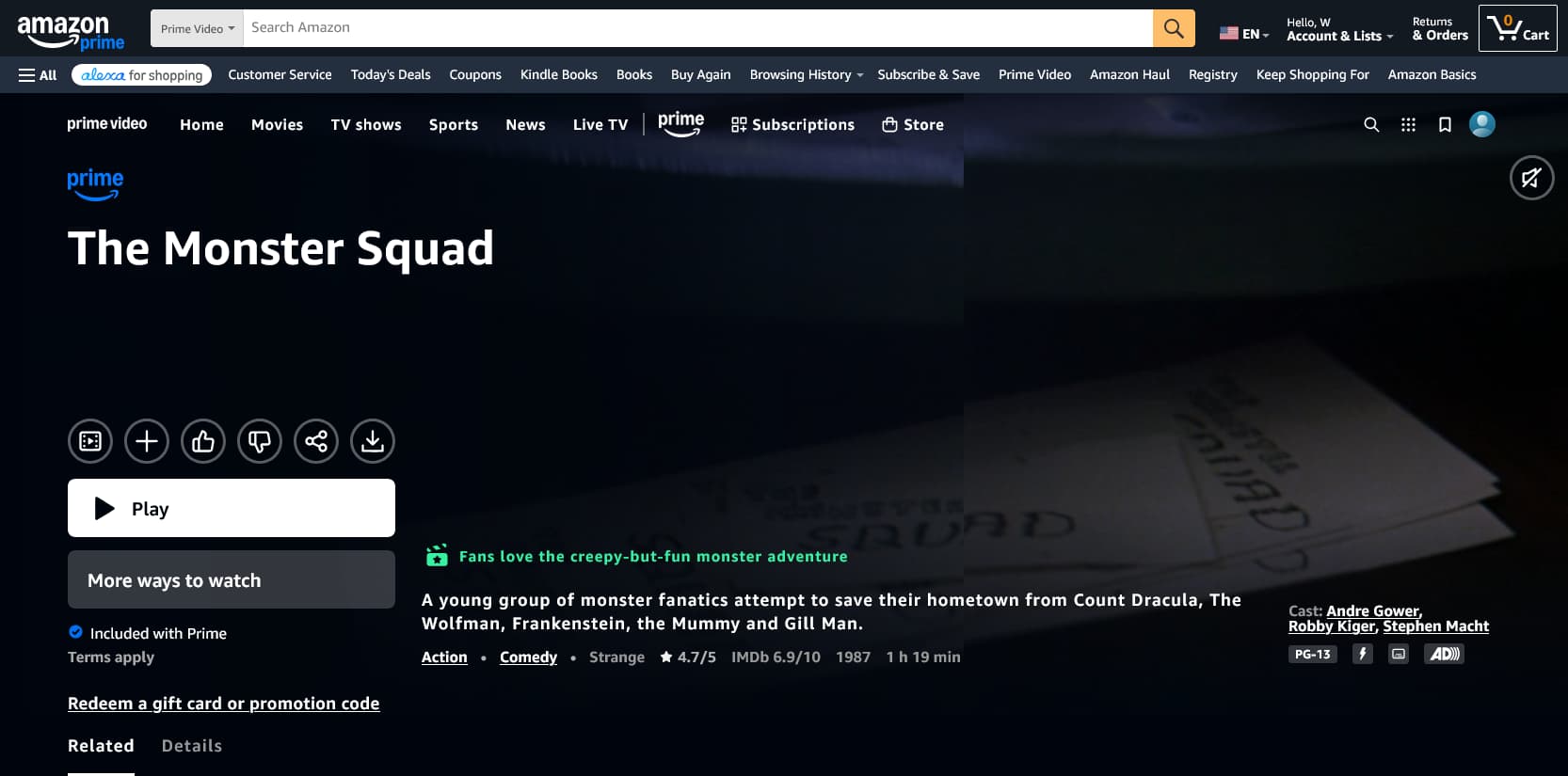
Thanks, that's helpful. You're right that the link I tested wasn't an FDL event link.
Some background: tuning my Prime lanes with FDL links through ADBTuner, I couldn't get past the profile picker. To rule FDL out, I grabbed the link for a movie on Prime Video, The Monster Squad, and tuned that through ADBTuner instead. It hit the same profile picker, and selecting a profile manually didn't get it any further.
Your result is different: the Event Inspector's HTTP Deeplink went straight to the splash page with no picker. So the difference may be the link format my lanes are sending. I'll check which URL ADBTuner is actually receiving on my lane tunes, retest with the HTTP Deeplink for an upcoming event, and confirm whether it lands on the splash page without the picker.
If you used the Create Fruit ADBTuner Lanes + CDVR Custom Channels Action in OliveTin-for-Channels, that shouldn't be an issue. If you set them up manually (not recommended), then what you're describing could definitely be the problem.
If you could give me a specific event you want to tune, or record, I can check it now.
In both of your posts on this subject, you were trying to tune to the same event just above.
The point I was trying to make, is that I saw the same failure you saw with that link. However, when I used multiple different links from the Event Inspector (so I know they're valid), everything worked as expected.
I have no reason to believe that a random movie URL from Amazon works with this event-based method -- in fact, I think you've likely proven they do not.
Here is the same error with an event pulled out of event inspector as you suggested. And it results in the same picker issue.
Prime Test on TS4K at Oct 24, 2026, 1:19 PM
   +0.00s  192.168.68.124:5592 | channels-dvr/2026.10.21.2302 Go-http-client/1.1 (linux-x86_64)
   +0.00s  No active tuners found for Prime Test. Reserving a new tuner.
   +0.00s  Attempting to reserve tuner for: ['com.amazon.firebat', 'com.amazon.amazonvideo.livingroom'].
   +0.50s  Attempting to reserve tuner for: ['com.amazon.firebat', 'com.amazon.amazonvideo.livingroom'].
   +1.01s  Attempting to reserve tuner for: ['com.amazon.firebat', 'com.amazon.amazonvideo.livingroom'].
   +1.51s  Attempting to reserve tuner for: ['com.amazon.firebat', 'com.amazon.amazonvideo.livingroom'].
   +2.02s  Attempting to reserve tuner for: ['com.amazon.firebat', 'com.amazon.amazonvideo.livingroom'].
   +2.52s  Attempting to reserve tuner for: ['com.amazon.firebat', 'com.amazon.amazonvideo.livingroom'].
   +3.03s  Attempting to reserve tuner for: ['com.amazon.firebat', 'com.amazon.amazonvideo.livingroom'].
   +3.53s  Attempting to reserve tuner for: ['com.amazon.firebat', 'com.amazon.amazonvideo.livingroom'].
   +3.53s  Available Tuners:
   +3.54s  Name: TS4K Priority: 0
   +3.54s  Using first available tuner (by priority).
   +3.54s  Reserved Tuner: Name: TS4K Priority: 0
   +3.54s  Tuning to Prime Test on TS4K
   +3.54s  Using channel configuration: FruitDeepLinks - Prime Video v3.0 (FireTV and AndroidTV) (bnhf) (a176643f-b3b6-47fb-8527-47908d089695)
   +3.58s  MPEG null packets mode: Redirecting immediately to /proxy/1?requestKey=E6PG5dUCEDuNuAYKZnBTBJ
   +3.84s  ADB: 192.168.68.109 - pidof com.amazon.amazonvideo.livingroom
   +3.93s  Using https://app.primevideo.com/detail?gti=amzn1.dv.gti.2ca173b4-1d07-4930-bcee-32452c49c0ff to load channel.
   +3.93s  Executing pre-tune commands: [{'type': 'ADB', 'command': 'input keyevent KEYCODE_MEDIA_STOP'}, {'type': 'ADB', 'command': 'input keyevent KEYCODE_HOME'}]
   +3.93s  ADB: 192.168.68.109 - input keyevent KEYCODE_MEDIA_STOP
   +3.99s  ADB: 192.168.68.109 - input keyevent KEYCODE_HOME
   +4.10s  Executing tune commands: [{'type': 'ADB', 'command': "am start -n $(dumpsys package 'com.amazon.amazonvideo.livingroom' 2>/dev/null | awk '/https:/{getline; print $2; exit}') -d 'https://app.primevideo.com/detail?gti=amzn1.dv.gti.2ca173b4-1d07-4930-bcee-32452c49c0ff'"}]
   +4.10s  ADB: 192.168.68.109 - am start -n $(dumpsys package 'com.amazon.amazonvideo.livingroom' 2>/dev/null | awk '/https:/{getline; print $2; exit}') -d 'https://app.primevideo.com/detail?gti=amzn1.dv.gti.2ca173b4-1d07-4930-bcee-32452c49c0ff'
   +4.43s  Starting tune match text monitoring. Match commands: [{'match_text': ["who's watching", 'watch live', 'new', 'guest'], 'commands': [{'type': 'ADB', 'command': 'input keyevent KEYCODE_DPAD_CENTER'}], 'check_after_seconds': 5}]
   +5.00s  Fixed delay (5s) elapsed; starting real stream.
   +9.43s  Tuning completed after 9.43 seconds. Display was on, application (com.amazon.amazonvideo.livingroom) was running.
   +9.43s  Initializing keep active command schedule for tuner TS4K (1).
  +10.46s  Text match result: Text to match: ["who's watching", 'watch live', 'new', 'guest']. Matches found: None.
  +12.47s  Text match result: Text to match: ["who's watching", 'watch live', 'new', 'guest']. Matches found: None.
  +15.35s  Text match result: Text to match: ["who's watching", 'watch live', 'new', 'guest']. Matches found: None.
  +18.15s  Text match result: Text to match: ["who's watching", 'watch live', 'new', 'guest']. Matches found: None.
  +21.14s  Text match result: Text to match: ["who's watching", 'watch live', 'new', 'guest']. Matches found: None.
  +24.20s  Text match result: Text to match: ["who's watching", 'watch live', 'new', 'guest']. Matches found: None.
  +27.17s  Text match result: Text to match: ["who's watching", 'watch live', 'new', 'guest']. Matches found: None.
  +30.21s  Text match result: Text to match: ["who's watching", 'watch live', 'new', 'guest']. Matches found: None.
  +32.49s  Possible video playback failure (type 1)
  +33.26s  Text match result: Text to match: ["who's watching", 'watch live', 'new', 'guest']. Matches found: None.
  +36.25s  Text match result: Text to match: ["who's watching", 'watch live', 'new', 'guest']. Matches found: None.
  +39.23s  Text match result: Text to match: ["who's watching", 'watch live', 'new', 'guest']. Matches found: None.
  +42.42s  Text match result: Text to match: ["who's watching", 'watch live', 'new', 'guest']. Matches found: None.
  +45.25s  Text match result: Text to match: ["who's watching", 'watch live', 'new', 'guest']. Matches found: None.
  +48.33s  Text match result: Text to match: ["who's watching", 'watch live', 'new', 'guest']. Matches found: None.
  +51.30s  Text match result: Text to match: ["who's watching", 'watch live', 'new', 'guest']. Matches found: None.
  +54.30s  Text match result: Text to match: ["who's watching", 'watch live', 'new', 'guest']. Matches found: None.
  +57.34s  Text match result: Text to match: ["who's watching", 'watch live', 'new', 'guest']. Matches found: None.
    +1:00  Text match result: Text to match: ["who's watching", 'watch live', 'new', 'guest']. Matches found: None.
    +1:03  Text match result: Text to match: ["who's watching", 'watch live', 'new', 'guest']. Matches found: None.
    +1:06  Text match result: Text to match: ["who's watching", 'watch live', 'new', 'guest']. Matches found: None.
    +1:10  Text match result: Text to match: ["who's watching", 'watch live', 'new', 'guest']. Matches found: None.
    +1:12  Text match result: Text to match: ["who's watching", 'watch live', 'new', 'guest']. Matches found: None.
    +1:15  Text match result: Text to match: ["who's watching", 'watch live', 'new', 'guest']. Matches found: None.
    +1:18  Text match result: Text to match: ["who's watching", 'watch live', 'new', 'guest']. Matches found: None.
    +1:21  Text match result: Text to match: ["who's watching", 'watch live', 'new', 'guest']. Matches found: None.
What is worth the channels were not created manually but created using `Create Fruit ADBTuner Lanes + CDVR Custom Channels.'
OK, so on the FireStick I was testing with, tuning worked as expected with no profile selection required:
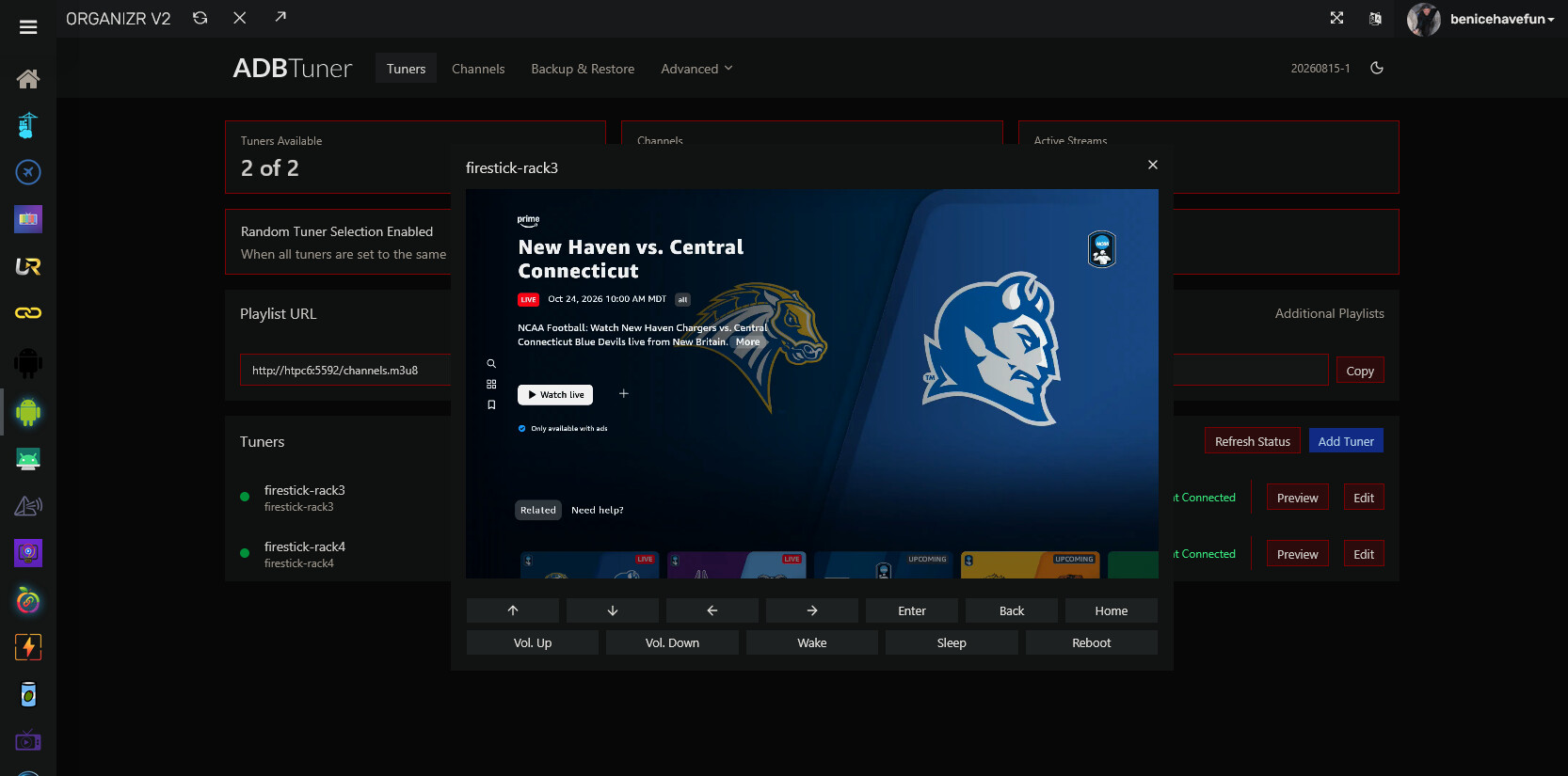
However, when I tried the same on an ONN 4K Stick, I got the profile screen -- so it looks like we're dealing with a difference in the way the FireOS and generic Android apps work. However the profile selection should be working:

In fact, I ran this exact screen capture through tesseract (default values), and it returned Scott, Guest and New with 96% confidence in each. Normally, I would take a shot a fixing whatever is going on here myself, but unfortunately ADBTuner is not open source -- so that's not an option. tesseract is the OCR software used in ADBTuner.
Another user recently ran into a similar tesseract-related issue, and he reported it to the project's author in the ADBTuner thread, though to my knowledge it hasn't been resolved. I'd suggest you do the same, with logs and screenshots is best. The custom config we're using is setup to handle this, but for some reason the OCR software is failing. Hopefully you can get some action on this, as well as for the other user.
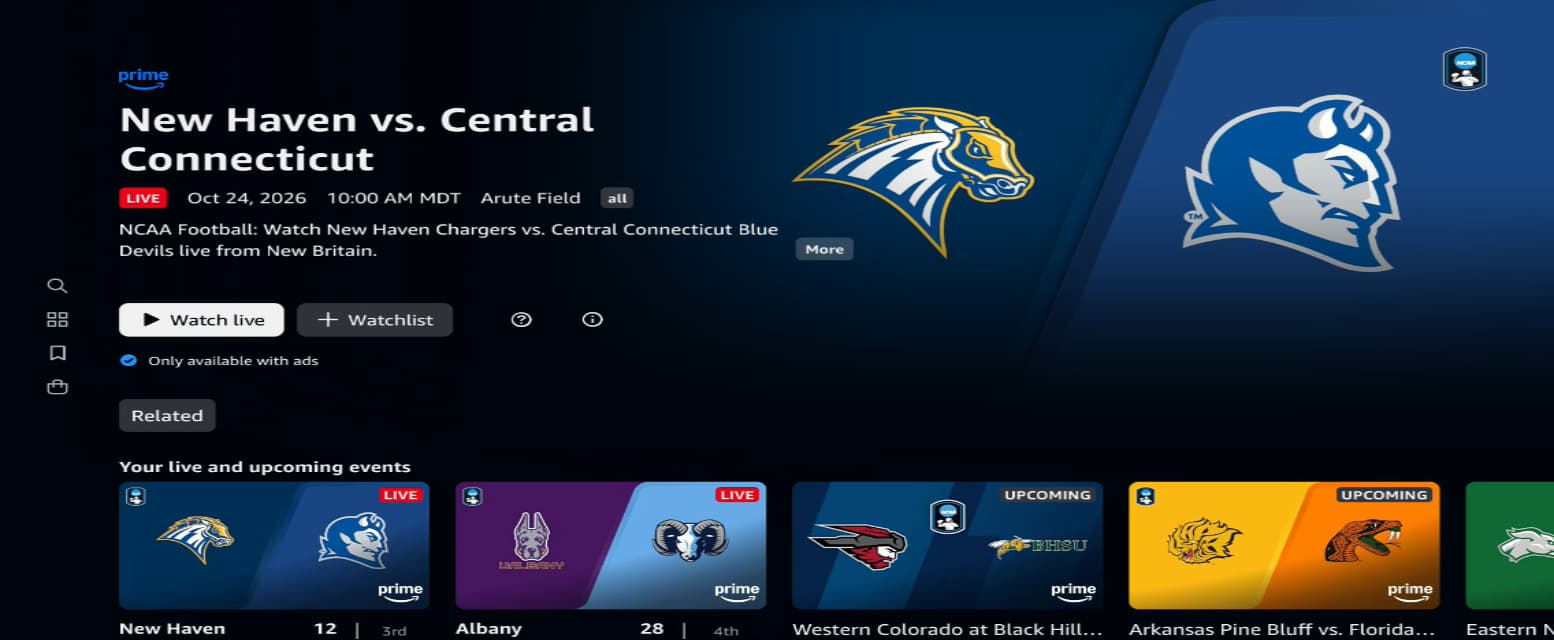
BTW, when I selected my profile manually, the next screen was the correct splash screen for the event. And, the screenshots confirm we should be matching guest, new and watch live:
2 Likes