FruitDeepLinks — Universal Sports Aggregator for Channels DVR

fantastic detective work. here's what i think is happening-- the apple scrape (that runs at 230am)-- every event has a playable link, but it seems to prefer Amazon / ESPN above others for the deeplink. When event goes live, maybe API provides other providers deeplinks. I'm not sure if the API endpoint (that we can currently publically access) would show those alternatives. I see what your saying- if on my AppleTV i go to appleTV schedule and click on an event, it does give multiple options to watch the show.

what nhl game are u using for reference right now? i'm going to try to grab a live scrape of that game

oh and I figured out the api for the hbomax schedule and deeplinks ... i'll just add it to project, but i'd love to figure this out too!

Has anybody got the CC4C integration working? Looking at the playlist, the urls don't even look right

#EXTM3U

#EXTINF:-1 tvg-id="lane.1" tvg-name="Multi-Source Sports 1" tvg-chno="14001" group-title="Sports Lanes",Multi-Source Sports 1
chrome://http://192.168.1.74:6655/api/lane/1/deeplink?format=text

Sorry, just saw this. it is an Utah vs Detroit game, in the third period, about over. There is a New Jersey vs Las Vegas game starting at 10 pm eastern. There is also an AEW Dynamite event that is live that started at 8 pm eastern. Seems like there are Apple TV deep links out there is it does the continue watching connectivity thing.

ignore CC4C for now... i just put in as a placeholder. once we learn good HTTP links, i'll turn that on.

1 Like

well nateg, we all owe you a cold drink. :beers: :beer:

you inspired me to take a fresh look at the scrape. The way their website is structured (and scrape), when you open an Event (call it main) and at the bottom, there is a shelf of events. The scraper seeds itself with a list of main events, and scrapes the shelves at bottom for other events. The API for the shelf events only returned one deeplink (usually amazon and/or espn), but the Main API returns all the deep links. hope that makes sense!

if I update scraper to get a list of all events, then hit the "main" page for each event, then i get all the deeplinks for ALL providers!!!

this will take a little work to implement, but you just made a huge difference. great work.

once i figure out scrape, i'll have to rethink filtering too.

I actually know that there are deep links out there for sports events for hbo max. I was able to figure it out about a year and a half ago. Was able to put it into adbtuner once derived manually. Pain about it was is that they were unique for each event. Your tool that would be able to find them automatically would make things much easier.

Happy to help in the tiniest of ways. Have taken a lot from others fine work in this community. I’m already using your ESPN4CC4C utility, so that I can get access to now DRM’ed ESPN+. Getting linked access to other things is going to be a very big deal.

Thanks again mate, absolute legend.

Got kayo working with cc4c but this is a much needed addition as the live channels will never be in 4K, so if there’s a kayo event in the guide I can launch straight to the 4K stream.

Very much appreciated.

coming soon.... this will be a big deal for ADB

3 Likes

As promised, I've pushed bnhf/olivetin:latest (aka bnhf/olivetin:2025.12.19), that adds support for creating ADBTuner lanes, and CDVR Custom Channels Sources for apps with deeplinks supported by FruitDeepLinks. I'll add more with participation from interested users here.

For the moment, you can try out ESPN, Prime Video and Paramount+ -- and I'm happy to add others, for anyone willing to test them. There are enough apps, including package variations between FireTV and generic Android, plus subscriptions required -- to make this very difficult for any one person to test them all. This will be a team effort!

The first step is to get FruitDeepLinks installed, and there's now a Project One-Click Action for that:
screenshot-htpc6-2025_12_19-00_33_43

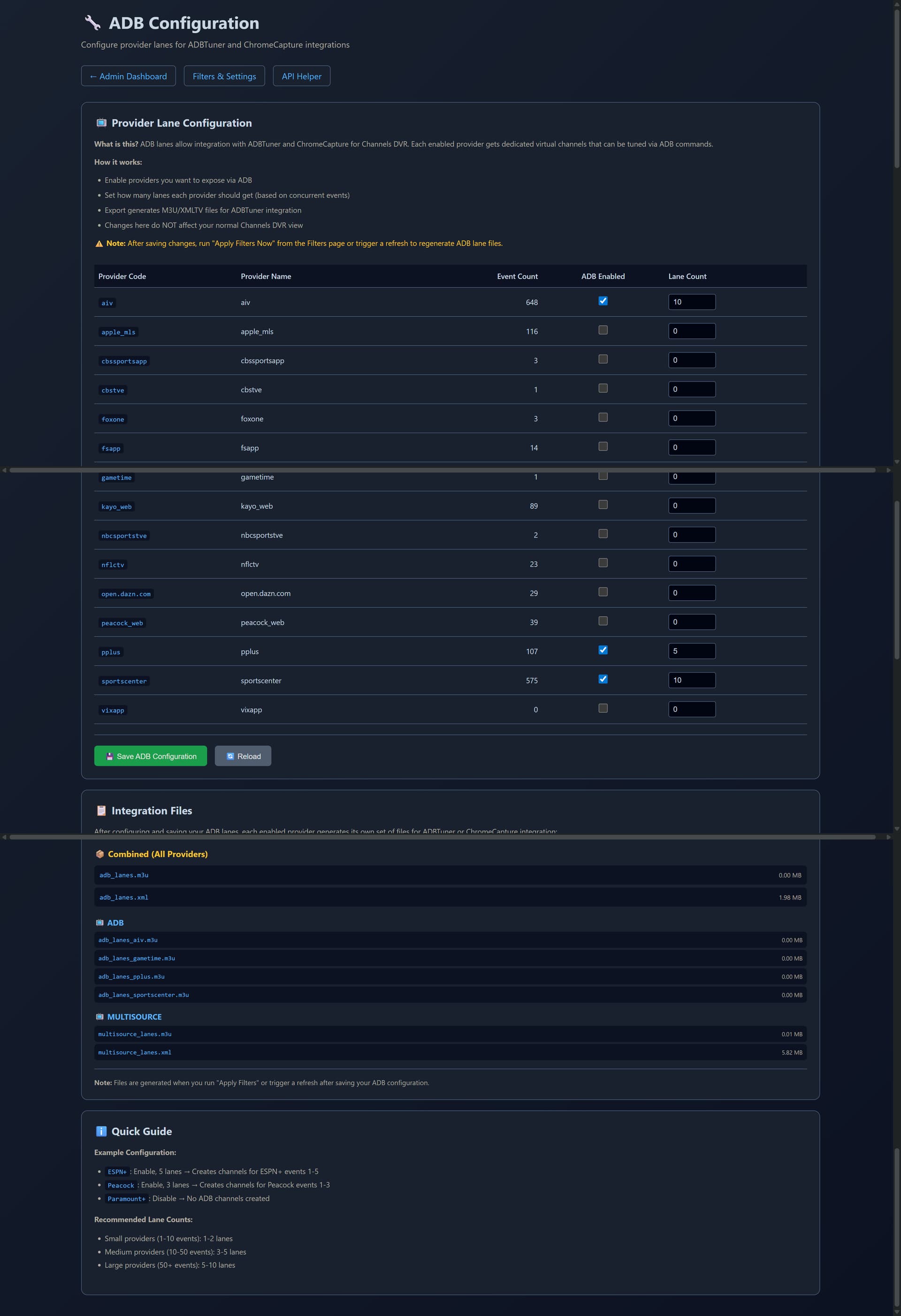
Next you'll need to do your initial scrape in FruitDeepLinks to build the database, followed by configuring ADB support. Save that, and do a Skip Scrape to update the M3Us and XMLs without doing another full scrape:

From there you're ready to add your virtual channels to ADBTuner, which will also automatically create your CDVR Custom Channels Source:
screenshot-htpc6-2025_12_19-00_51_41

With ESPN, you'll need to use a Custom ADBTuner Configuration. Even if this, or another config has been previously added, you'll need to paste it in again, so that the UUID can be extracted. Here's my current recommendation for ESPN:

{
    "name": "ESPN+ Deep Links - Show Tuning Process",
    "author": "bnhf",
    "version": "1.0",
    "description": "Load content via ESPN+ deep link URLs (where supported). Show tuning process.",
    "uuid": "51af5028-092f-4ddc-b4ea-d5e5fca58cac",
    "global_options": {
        "wait_for_video_playback_detection": false,
        "use_fixed_delay": true,
        "fixed_delay_seconds": 5,
        "check_for_and_clear_whos_watching_prompts": false,
        "wait_after_post_playback_start_commands_seconds": 0
    },
    "pre_tune_commands": [
        "input keyevent KEYCODE_MEDIA_STOP"
    ],
    "tune_commands": [
        "am start -n '||TARGET_PACKAGE_NAME||'/com.espn.startup.presentation.StartupActivity -d '||TARGET_URL_OR_IDENTIFIER||'"
    ],
    "post_playback_start_commands": [
        "sleep 20",
        "input keyevent KEYCODE_DPAD_DOWN",
        "input keyevent KEYCODE_DPAD_DOWN",
        "input keyevent KEYCODE_DPAD_RIGHT",
        "input keyevent KEYCODE_DPAD_CENTER"
    ],
    "post_tune_commands": [
        "input keyevent KEYCODE_MEDIA_STOP",
        "input keyevent KEYCODE_MEDIA_PAUSE",
        "input keyevent KEYCODE_HOME"
    ],
    "source_file": "/app/.config/user_configurations/51af5028-092f-4ddc-b4ea-d5e5fca58cac.json"
}

With Prime Video, you'll also need a custom config:

{
    "name": "Prime Video",
    "author": "bnhf",
    "version": "1.0",
    "description": "Launch Prime Video Deep Links",
    "uuid": "a176643f-b3b6-47fb-8527-47908d089695",
    "global_options": {
        "wait_for_video_playback_detection": false,
        "use_fixed_delay": false,
        "fixed_delay_seconds": 0,
        "check_for_and_clear_whos_watching_prompts": false,
        "wait_after_post_playback_start_commands_seconds": 0
    },
    "pre_tune_commands": [
        "input keyevent KEYCODE_MEDIA_STOP"
    ],
    "tune_commands": [
        "am start -n com.amazon.firebat/com.amazon.firebatcore.deeplink.DeepLinkRoutingActivity -a android.intent.action.VIEW -d '||TARGET_URL_OR_IDENTIFIER||'"
    ],
    "post_playback_start_commands": [],
    "post_tune_commands": [
        "input keyevent KEYCODE_MEDIA_STOP",
        "input keyevent KEYCODE_MEDIA_PAUSE",
        "input keyevent KEYCODE_HOME"
    ],
    "timed_keep_active_commands": []
}

For Paramount+, you should be able to use the recommended, standard deeplinks config in the dropdown -- no custom config required thus far.

As I said, for anyone with the interest and the ability to test other deeplinks supported by FruitDeepLinks, call it out. They should be easy enough to add, it's the testing that's trickier.

1 Like

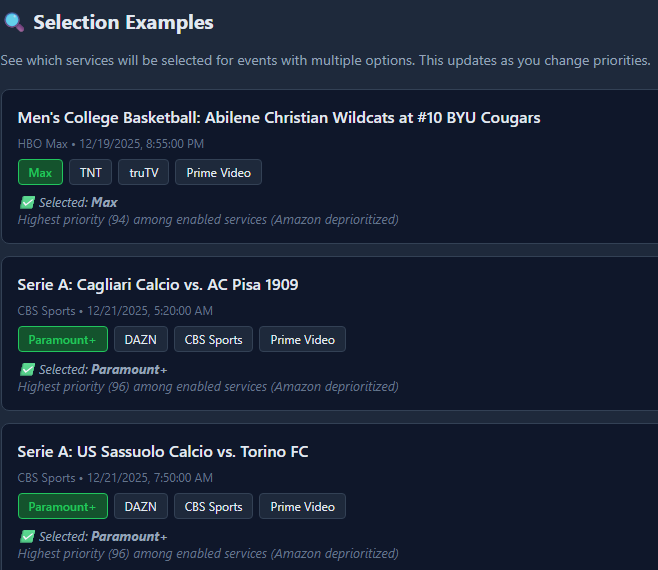
Great stuff @bnhf .. i'm also pushing a big update right now that should big huge boost to future ADB efforts. This may be DB breaking, but at minimum will require a full rescrape. It will take a little longer to scrape than in the past, but maybe ~15-20 minutes first run, then a little faster after that. I changed some logic that grabs a ton more deeplinks (not necessarily more events). Biggest impact is go to your filters page and adjust the priorities of your enabled services to take full advantage of this!

FruitDeepLinks — Enhanced Scrape / DeepLink Expansion (recent updates)

Biggest change: Apple scrape now captures more playable/deeplink options per event, and we carry that richer service info deeper into the pipeline so lane exports make smarter choices.

What’s new / improved

  • Enhanced Apple scrape (more deeplinks + better service metadata)
    • Preserves service_name + logical_service so downstream exports can label/choose correctly.
  • User-adjustable service priority (better filtering + selection)
    • Service/provider selection is now more consistent and easier to tune based on what you prefer (ESPN+ vs Prime vs Paramount+, etc.).
  • Multi-service selection helper
    • Added a helper to quickly identify events that have multiple available services, which makes testing/priority tuning way easier.
  • Better ADB compatibility
    • Improved handling for Android/Fire workflows so deeplinks (and fallbacks) behave more predictably.
  • Improved HTTP “best guess” outputs
    • Better conversion logic for producing usable HTTP fallbacks when a native scheme deeplink isn’t viable (common on Android/Fire).
  • Labeling / metadata fixes
    • Export now avoids weird duplicate provider strings (ex: “Available on NBA - Available on Prime Video” → “Available on Prime Video”).
    • CBS Sports events correctly show Paramount+ consistently in both description and category.

Recent commits that reflect this stretch

  • Enhanced scrape + preservation of service fields
  • Hybrid export + daily refresh improvements
  • HTTP deeplink conversion improvements (incl ESPN playChannel prefill)
  • Provider labeling fixes + expanded logical service mapping

Any advantages for those not running ADBTuner in this new version? Or might it cause any issues for us running it without ADBT? Thanks.

i would recommend upgrading as it'll give you more direct deeplinks -- big example is Amazon for some reason was the preferred deeplnk that scraper grabbed. and Amazon seems to be a aggregator that just links to other services. you can now change priority too.

Great, thanks!

@bnhf,

I get the following error message when trying to install in Docker Desktop. Was there something I needed to download beforehand?

exit status 127

sh: 1: /config/fruitdeeplinks.sh: not found

No, that's a result of a drag-and-drop fail on my part -- the scripts ended up in the wrong location. Should be fixed now though, so re-pull and let me know.

New error when performing initial refresh.

2025-12-19 21:12:24,268 - INFO - ====== WebDriver manager ======

2025-12-19 21:12:24,349 - INFO - Get LATEST chromedriver version for google-chrome

2025-12-19 21:12:24,463 - INFO - Get LATEST chromedriver version for google-chrome

2025-12-19 21:12:24,526 - INFO - There is no [linux64] chromedriver "143.0.7499.169" for browser google-chrome "143.0.7499" in cache

2025-12-19 21:12:24,527 - INFO - Get LATEST chromedriver version for google-chrome

2025-12-19 21:12:24,778 - INFO - WebDriver version 143.0.7499.169 selected

2025-12-19 21:12:24,781 - INFO - Modern chrome version https://storage.googleapis.com/chrome-for-testing-public/143.0.7499.169/linux64/chromedriver-linux64.zip

2025-12-19 21:12:24,781 - INFO - About to download new driver from https://storage.googleapis.com/chrome-for-testing-public/143.0.7499.169/linux64/chromedriver-linux64.zip

2025-12-19 21:12:24,857 - INFO - Driver downloading response is 200

2025-12-19 21:12:24,171 - INFO - Get LATEST chromedriver version for google-chrome

2025-12-19 21:12:24,331 - INFO - Driver has been saved in cache [/root/.wdm/drivers/chromedriver/linux64/143.0.7499.169]

ERROR: No cached auth tokens found

Run multi_scraper.py once to capture tokens, or manually save to:

/app/data/apple_uts_auth.json

:heavy_multiplication_x: Step 1 FAILED with exit code 1

[2025-12-19 21:12:27] [ERROR] Manual refresh failed with code 1

[2025-12-19 21:12:55] [INFO] Manual refresh triggered (skip_scrape=False)

1 Like

I'm getting the same error. I'm not sure how or where to run "multi_scraper.py"

1 Like

what did you guys break? lol -- not sure what is happening. of course, worked fine for me in dev and test, but maybe i missed a migration step in upgrading since i kept running it fresh.

give me a few hours and ill solve. sorry

2 Likes

@nschaffner @daldana7296 basically, i didn't ship the repo with the auth_tokens file and script failed. i need to ship the repo with a blank file, or add a defensive step to create a blank file upon install.

quick fix for you guys in the short term- run this from cmd prompt:

docker exec -it fruitdeeplinks python3 /app/bin/multi_scraper.py --headless

1 Like