FruitDeepLinks — Universal Sports Aggregator for Channels DVR

Still looking for a good config for the nba app. I may have to make my own.

I had to modify @bnhf config for Prime in order to get that to work BTW

Here's my edit

{
    "name": "FruitDeepLinks - Prime Video v2.0 (FireTV and AndroidTV)",
    "author": "bnhf",
    "version": "2.0",
    "description": "Prime Video for FruitDeepLinks with select for User and tuning to the Live feed. Compatible with FireTV and AndroidTV devices.",
    "uuid": "a176643f-b3b6-47fb-8527-47908d089695",
    "global_options": {
        "wait_for_video_playback_detection": false,
        "use_fixed_delay": true,
        "fixed_delay_seconds": 8,
        "check_for_and_clear_whos_watching_prompts": false,
        "wait_after_post_playback_start_commands_seconds": 0
    },
    "pre_tune_commands": [
        "input keyevent KEYCODE_MEDIA_STOP",
        "input keyevent KEYCODE_HOME"
    ],
    "tune_commands": [
        "am start -n $(dumpsys package '||TARGET_PACKAGE_NAME||' 2>/dev/null | awk '/https:/{getline; print $2; exit}') -d '||TARGET_URL_OR_IDENTIFIER||'"
    ],
    "post_playback_start_commands": [
        "test -z '$(getprop ro.build.version.fireos)' && ( input keyevent KEYCODE_DPAD_CENTER; sleep 3 )",
        "input keyevent KEYCODE_DPAD_CENTER",
        "input keyevent KEYCODE_DPAD_CENTER"
    ],
    "post_tune_commands": [
        "input keyevent KEYCODE_MEDIA_STOP",
        "input keyevent KEYCODE_HOME"
    ],
    "timed_keep_active_commands": []
}

Thought I’d try this today for fun. Doing the docker compose way and this is on the Full Refresh:

============================================================

[5c/13] Cleaning up old events

============================================================

:warning: Step 5c failed (non-fatal): no such table: events

============================================================

[5d/13] Ensuring locale column and populating ESPN locales

============================================================

:white_check_mark: locale column already exists

Traceback (most recent call last):

File "/app/bin/migrate_add_locale.py", line 133, in

exit(main())

^^^^^^

File "/app/bin/migrate_add_locale.py", line 120, in main

updated_count = populate_locale_for_espn(conn)

^^^^^^^^^^^^^^^^^^^^^^^^^^^^^^

File "/app/bin/migrate_add_locale.py", line 58, in populate_locale_for_espn

cur.execute("""

sqlite3.OperationalError: no such column: service_name

:heavy_multiplication_x: Step 5d FAILED with exit code 1

[2026-01-01 10:07:44] [ERROR] Manual refresh failed with code 1

whoops-- thanks for heads up. that step was brand new last night and i didnt consider fresh installs.

pushed hotfix- please reinstall and let me know!

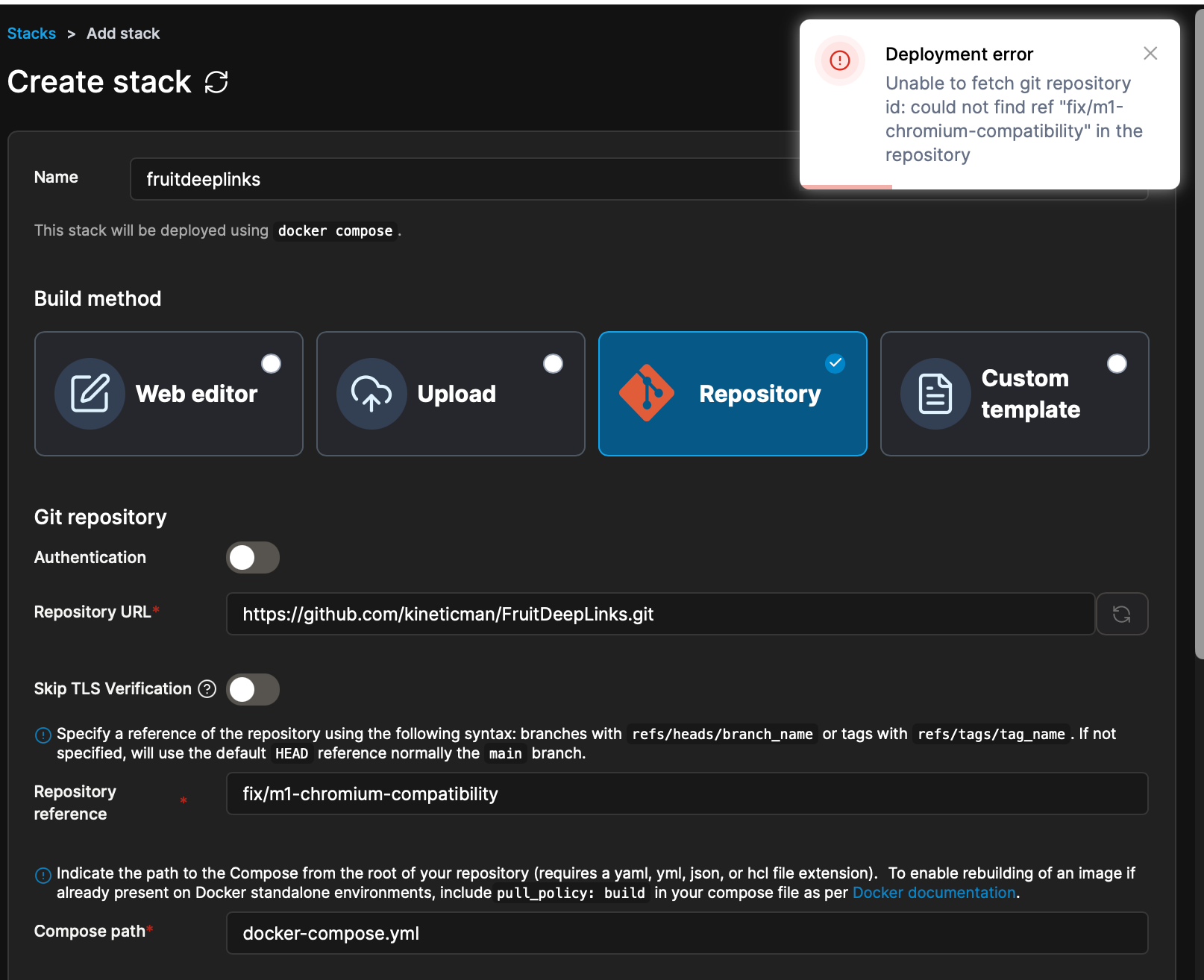
hey @Fofer -- i have a test branch out there that i'd like you to test on mac please! it's a little behind yesterdays updates but first step is just getting it to work on mac then i'll merge. try this branch pls-
fix/m1-chromium-compatibility

Thanks that worked. On to playing!

Thanks! I just tried but got an error... can't figure out what I'm doing wrong here:

1 Like

In Repository reference, use:

refs/heads/fix/m1-chromium-compatibility

Thanks! I tried deploying now and got further along. This is the next error:

Deployment error

Failed to deploy a stack: compose up operation failed: Error response from daemon: mounts denied: The path /data/compose/55/logs is not shared from the host and is not known to Docker. You can configure shared paths from Docker -> Preferences... -> Resources -> File Sharing. 
See https://docs.docker.com/go/mac-file-sharing/ for more info.

I can follow the instructions to add and mount a share but what should I name that directory and where should it be saved?

looks like a problem with absolute paths that docker/porttainer cant access. try this docker-compose.yml (make sure u edit your username!)

version: '3.8'

# =============================================================================
# FruitDeepLinks - Mac/Portainer Deployment Configuration
# =============================================================================
# IMPORTANT FOR MAC USERS:
# 1. Replace <YOUR_USERNAME> with your actual Mac username (e.g., johnsmith)
# 2. The paths below use /Users/<YOUR_USERNAME>/fruitdeeplinks as the base
# 3. Create these directories BEFORE deploying:
#    mkdir -p ~/fruitdeeplinks/data ~/fruitdeeplinks/out ~/fruitdeeplinks/logs
# 4. If using CDVR Detector, update CDVR_DVR_PATH to your actual DVR path
# =============================================================================

services:
  fruitdeeplinks:
    build: .
    container_name: fruitdeeplinks
    hostname: fruitdeeplinks
    shm_size: '2gb'
    environment:
      # Timezone
      - TZ=${TZ:-America/New_York}
      # Core URLs and ports
      - SERVER_URL=${SERVER_URL:-http://localhost:6655}
      - FRUIT_HOST_PORT=${FRUIT_HOST_PORT:-6655}
      # Chrome Capture (BETA)
      # CC_SERVER = host/IP where Chrome Capture is running
      # CC_PORT   = port Chrome Capture listens on (often 8080)
      - CC_SERVER=${CC_SERVER:-localhost}
      - CC_PORT=${CC_PORT:-8080}
      # Channels DVR integration (optional)
      - CHANNELS_DVR_IP=${CHANNELS_DVR_IP:-}
      - CHANNELS_SOURCE_NAME=${CHANNELS_SOURCE_NAME:-fruitdeeplinks}
      # Database and output paths (inside container)
      - FRUIT_DB_PATH=${FRUIT_DB_PATH:-/app/data/fruit_events.db}
      - OUT_DIR=${OUT_DIR:-/app/out}
      - LOG_DIR=${LOG_DIR:-/app/logs}
      - LOG_LEVEL=${LOG_LEVEL:-INFO}
      # Lane configuration (BETA)
      - FRUIT_LANES=${FRUIT_LANES:-50}
      - FRUIT_LANE_START_CH=${FRUIT_LANE_START_CH:-9000}
      - FRUIT_DIRECT_START_CH=${FRUIT_DIRECT_START_CH:-5000}
      - FRUIT_DAYS_AHEAD=${FRUIT_DAYS_AHEAD:-7}
      - FRUIT_PADDING_MINUTES=${FRUIT_PADDING_MINUTES:-45}
      - FRUIT_PLACEHOLDER_BLOCK_MINUTES=${FRUIT_PLACEHOLDER_BLOCK_MINUTES:-60}
      - FRUIT_PLACEHOLDER_EXTRA_DAYS=${FRUIT_PLACEHOLDER_EXTRA_DAYS:-5}
      # CDVR Detector (BETA) - Auto-launch streaming apps
      # Set CDVR_DVR_PATH to your HOST DVR path to enable
      # Uses CHANNELS_DVR_IP for server communication
      - CDVR_DVR_PATH=${CDVR_DVR_PATH:-}
      - CDVR_SERVER_PORT=${CDVR_SERVER_PORT:-8089}
      - CDVR_API_PORT=${CDVR_API_PORT:-57000}
      # Scraper behavior
      - HEADLESS=${HEADLESS:-true}
      - NO_NETWORK=${NO_NETWORK:-false}
      # Auto-refresh
      - AUTO_REFRESH_ENABLED=${AUTO_REFRESH_ENABLED:-true}
      - AUTO_REFRESH_TIME=${AUTO_REFRESH_TIME:-02:30}
    volumes:
      # MAC USERS: Replace <YOUR_USERNAME> with your actual username!
      # Example: /Users/johnsmith/fruitdeeplinks/data:/app/data
      - /Users/<YOUR_USERNAME>/fruitdeeplinks/data:/app/data
      - /Users/<YOUR_USERNAME>/fruitdeeplinks/out:/app/out
      - /Users/<YOUR_USERNAME>/fruitdeeplinks/logs:/app/logs
      # Mount DVR path for CDVR detector (optional - only if using detector feature)
      # Update this path if you're using the CDVR Detector feature
      - ${CDVR_DVR_PATH:-/tmp/fruitdeeplinks-novol}:/mnt/dvr
    restart: unless-stopped
    ports:
      - "${FRUIT_HOST_PORT:-6655}:6655"
    logging:
      driver: "json-file"
      options:
        max-size: "10m"
        max-file: "3"

if that doesnt work, try cloning it until we sort out porttainer issues

# Navigate to the repo directory
cd ~/fruitdeeplinks  # or wherever they cloned it

# Create the data directories first
mkdir -p data out logs

# Deploy with docker-compose directly
docker-compose up -d

# View logs
docker-compose logs -f

OK, I'm one step closer. I first created those directories, Then tried deployment again with your new compose YAML. Here's the error I got next:

Deployment error

Failed to deploy a stack: compose build operation failed: failed to solve: dockerfile line greater than max allowed size of 65535

This is my edited YAML, that got me this far:

version: '3.8'

# =============================================================================
# FruitDeepLinks - Mac/Portainer Deployment Configuration
# =============================================================================
# IMPORTANT FOR MAC USERS:
# 1. Replace <YOUR_USERNAME> with your actual Mac username (e.g., johnsmith)
# 2. The paths below use /Users/<YOUR_USERNAME>/fruitdeeplinks as the base
# 3. Create these directories BEFORE deploying:
#    mkdir -p ~/fruitdeeplinks/data ~/fruitdeeplinks/out ~/fruitdeeplinks/logs
# 4. If using CDVR Detector, update CDVR_DVR_PATH to your actual DVR path
# =============================================================================

services:
  fruitdeeplinks:
    build: https://github.com/kineticman/FruitDeepLinks/tree/fix/m1-chromium-compatibility
    container_name: fruitdeeplinks
    hostname: fruitdeeplinks
    
    shm_size: '2gb'
    
    environment:
      # Timezone
      - TZ=${TZ:-America/Los_Angeles}
      # Core URLs and ports
      - SERVER_URL=${SERVER_URL:-http://localhost:6655}
      - FRUIT_HOST_PORT=${FRUIT_HOST_PORT:-6655}
      # Chrome Capture (BETA)
      # CC_SERVER = host/IP where Chrome Capture is running
      # CC_PORT   = port Chrome Capture listens on (often 8080)
      - CC_SERVER=${CC_SERVER:-localhost}
      - CC_PORT=${CC_PORT:-8080}
      # Channels DVR integration (optional)
      - CHANNELS_DVR_IP=${CHANNELS_DVR_IP:-}
      - CHANNELS_SOURCE_NAME=${CHANNELS_SOURCE_NAME:-fruitdeeplinks}
      # Database and output paths (inside container)
      - FRUIT_DB_PATH=${FRUIT_DB_PATH:-/app/data/fruit_events.db}
      - OUT_DIR=${OUT_DIR:-/app/out}
      - LOG_DIR=${LOG_DIR:-/app/logs}
      - LOG_LEVEL=${LOG_LEVEL:-INFO}
      # Lane configuration (BETA)
      - FRUIT_LANES=${FRUIT_LANES:-50}
      - FRUIT_LANE_START_CH=${FRUIT_LANE_START_CH:-9000}
      - FRUIT_DIRECT_START_CH=${FRUIT_DIRECT_START_CH:-99000}
      - FRUIT_DAYS_AHEAD=${FRUIT_DAYS_AHEAD:-7}
      - FRUIT_PADDING_MINUTES=${FRUIT_PADDING_MINUTES:-45}
      - FRUIT_PLACEHOLDER_BLOCK_MINUTES=${FRUIT_PLACEHOLDER_BLOCK_MINUTES:-60}
      - FRUIT_PLACEHOLDER_EXTRA_DAYS=${FRUIT_PLACEHOLDER_EXTRA_DAYS:-5}
      # CDVR Detector (BETA) - Auto-launch streaming apps
      # Set CDVR_DVR_PATH to your HOST DVR path to enable
      # Uses CHANNELS_DVR_IP for server communication
      - CDVR_DVR_PATH=${CDVR_DVR_PATH:-}
      - CDVR_SERVER_PORT=${CDVR_SERVER_PORT:-8089}
      - CDVR_API_PORT=${CDVR_API_PORT:-57000}
      # Scraper behavior
      - HEADLESS=${HEADLESS:-true}
      - NO_NETWORK=${NO_NETWORK:-false}
      # Auto-refresh
      - AUTO_REFRESH_ENABLED=${AUTO_REFRESH_ENABLED:-true}
      - AUTO_REFRESH_TIME=${AUTO_REFRESH_TIME:-02:30}
    volumes:
      # MAC USERS: Replace <YOUR_USERNAME> with your actual username!
      # Example: /Users/johnsmith/fruitdeeplinks/data:/app/data
      - /Users/fofer/fruitdeeplinks/data:/app/data
      - /Users/fofer/fruitdeeplinks/out:/app/out
      - /Users/fofer/fruitdeeplinks/logs:/app/logs
      # Mount DVR path for CDVR detector (optional - only if using detector feature)
      # Update this path if you're using the CDVR Detector feature
      - ${CDVR_DVR_PATH:-/tmp/fruitdeeplinks-novol}:/mnt/dvr
    restart: unless-stopped
    ports:
      - "${FRUIT_HOST_PORT:-6655}:6655"
    logging:
      driver: "json-file"
      options:
        max-size: "10m"
        max-file: "3"```

some weird porttainer error.... seriously for now, just test this pls

cd ~
git clone https://github.com/kineticman/FruitDeepLinks.git fruitdeeplinks
cd fruitdeeplinks
git checkout fix/m1-chromium-compatibility
mkdir -p data out logs
docker-compose build --no-cache
docker-compose up -d
docker-compose logs -f
1 Like

fyi i took an inital look at Gotham. looks like it should be possible to add this. looks like their streamlink/deeplink schema is one of these (for tvOS at least). I borrowed some code from EPlus and grabbed the schedule/images. Just need to find out exactly what the schema is to open an event.

https://gothamsports.com/watch/{ex_id}
https://gothamsports.com/watch?event={ex_id}
https://gothamsports.com/watch?id={ex_id}
1 Like

Don’t know if it helps but I ran these commands on my M4 Mac Mini and it seems to work. I am only using the direct link output files.

2 Likes

Yes, I followed those steps and ran the same commands and got the container up and running. I changed the time zone to Los_Angeles and am now running the first refresh. Looking great so far!

1 Like

One observation I noticed regarding the NBA games tonight (Friday 1/2/2026). Could just be an issue where Apple has the wrong info, not sure.
There are 10 games tonight and 2 of them are Prime Video exclusive, while the other 8 are available via League Pass which means they are available through Prime Video and NBA app (gametime) with the add on subscription. The 2 games that are Prime Video exclusive are Nuggets / Cavaliers and Thunder / Warriors and should only be available with Prime Video (aiv).
The results of todays scrape has Thunder / Warriors showing Prime Video (aiv) as the only provider which is correct. But Nuggets / Cavaliers is showing with both aiv and gametime which is not correct, and Hawks / Knicks with aiv only.
Nuggets / Cavaliers should be aiv only, while Hawks / Knicks should be both aiv and gametime.

I suspect maybe Apple just has the wrong Prime Video exclusive game chosen for the early game. Not a big deal, but I figured it was worth mentioning in case there something else that needs fixing.

I just checked Nuggets at Cavs in Event Inspector and only see AIV playables, and Hawks/Knicks has NBA & AIV.

just to track this down- where did you see Cavs/Nugs having NBA playables?

I am looking in event inspector and mine is showing Nugs/Cavs has having aiv and gametime and Hawks/Knicks has aiv only. Here are screen prints, not sure if they will come through.
Maybe my database is screwed up, I can try a wipe and start from scratch.


thats odd.... i just double checked mine and i dont see that.

hate to tell you to wipe and start over, but for debugging - that'd be a big help!

No worries... I deleted the db and started from scratch now those 2 games are showing correctly. Strange indeed, perhaps there was a recent change to the Prime exclusive games for today and the daily refresh wasn't picking it up for some reason. Thanks!

1 Like

@KineticMan,

I had to restart my server and when I tried to do a full refresh, it showed "Fail". So I restarted the container, same failure. Stopped the stack, then restarted it, same failure. Just to make sure, I restarted Docker and still got the same failure. Error message from log below.

:warning: Step 5c failed (non-fatal): no such table: events

============================================================

[5d/13] Ensuring locale column and populating ESPN locales

============================================================

Adding locale column to playables table...

:white_check_mark: locale column added successfully

Traceback (most recent call last):

File "/app/bin/migrate_add_locale.py", line 133, in

exit(main())

^^^^^^

File "/app/bin/migrate_add_locale.py", line 120, in main

updated_count = populate_locale_for_espn(conn)

^^^^^^^^^^^^^^^^^^^^^^^^^^^^^^

File "/app/bin/migrate_add_locale.py", line 58, in populate_locale_for_espn

cur.execute("""

sqlite3.OperationalError: no such column: service_name

:heavy_multiplication_x: Step 5d FAILED with exit code 1

[2026-01-02 19:17:13] [ERROR] Manual refresh failed with code 1