Good point on the enabled in filters under streaming services. That was operator error on my part, I had the regular prime disabled. I now have both.
Agreed, the downside of limiting results make testing more restrictive too...

Good point on the enabled in filters under streaming services. That was operator error on my part, I had the regular prime disabled. I now have both.
Agreed, the downside of limiting results make testing more restrictive too...
got a live event right now.... i think Fruitdeeplinks is returning everything properly for tvOS. i assume this schema returned doesn't work for Firestick/Android. I think @bnhf was messing with the Amazon schema, but I don't recall what the final answer was. It's easy for me to return an alternative schema if we figure out what it should look like.
appletv-umc.cse.gewn2qf3h05dmmkoepi14cdy is the live event. It's airing (on mine at least) on lane 2. the m3u returns below and here's the test:
curl http://192.168.86.72:6655/api/adb/lanes/aiv_exclusive/2/deeplink?format=text
returns
aiv://aiv/detail?gti=amzn1.dv.gti.2a07880d-cb02-4097-a4ed-82c531e56df3&action=watch&type=live&territory=US&time=live&broadcast=amzn1.dv.gti.eea937db-02f5-41e7-a609-08931b59fd3f&refMarker=atv_dvm_liv_apl_us_bd_l_src_av
Yeah, I don't think the aiv deeplinks were working for ADBTuner in that format. I think he was using the http:// format because of that. I think that is why he was using something like this for query:
/api/adb/lanes/aiv_exclusive/1/deeplink?format=json&deeplink_format=http&dynamic_url_json_key=deeplink
I strangely got it to work a little bit today when trying the link I had available to me. Only thing I did different from yesterday is to do the things you suggested to get regular aiv lanes going again. Turned on regular prime video filter, setup aiv add lanes, did skip scrape. I saw it trying to pull the link in fruit live logs, this time, and saw it go to the splash page for the link as well.
Was not really a free prime video link, was a link to try to get me to subscribe to fox one. Saw several of those in the amazon exclusives guide as is. Was a bit scary trying to play around with it, because didn't want to end up subscribing. Was curious if some of my changes since yesterday made a difference, so tried to experiment with isolating it, did a little deductive testing and I think I may have found the glitch.
If the main Prime Video box is disabled in the streaming services section, fruit won't seem to service the request for an Amazon Exclusive request, even though Amazon Exclusives is its own box in the streaming services section. That's what I perceive to be the problem. If so, seems like an easy software fix, most likely. In the meantime, I can just leave the Prime Video box on, and play around with the Amazon Exclusives stuff more, when I get some more live feeds that I can try (and not accidentally subscribe to).
Edit: 4 Fox One events are leaking through into Amazon Exclusives currently.
pushed update to return proper HTML style API (had a bug there).
in regards to the Fox One leak..... So, here's the current limitation. Apple doesn't return what the "sub-subscription" of Amazon is. I can only deduce right now if it's Amazon Exclusive IF the ONLY playable the scrape returns is Amazon, then I deemed it to be Amazon Exclusive. However, I have no way to know if it's Fox One, Vix, etc. I have looked over the raw data many times and there just isn't anything in there. Only workaround would be to add a Amazon website scrape to see if we can find that data, but i have attempted it with little success - but that hasn't stopped me before!
No worries, I appreciate the reduced data set, even if imperfect. I know you only can work with the information you have available. My personal motivation is to scoop up exclusive NBA games this year, and be able to record TNF games next season, so can probably make the leaked ones disappear when I just go fully operational, and tighten up my filters.
Looks like there is an Air Force basketball game in about an hour that is an actual Prime broadcast. Will try to check that out then.
I revisited my Amazon scrape that I started on last month. I think I can get it to work as a secondary pass on Amazon playables (after Apple scrape) to then take those Amazon events and hit their API to determine the sub-subscription. i'm already doing something simliar with upgrading ESPN events found in Apple to generate better playables.
give me some time but i think this will be cool.
Pulled latest update. Tried it against Air Force game that wasn't a subscription. Worked! Woot! Also, never seemed to ask me for user name screen with many tries. Fixed with your update, possibly? Dunno, but love it if it did. Easier to tune with out it, less KEYCODE_DPAD_CENTERs, potentially keeping you out of trouble. I have a config file I made that seems to work, and won't get you subscribed if a deeplink ends up being a subscription one, with limited testing so far, of course.
Also, tried disabling Prime Video, while leaving Amazon Exclusives on in Streaming Services category, does indeed still seem to break things.
I have been tinkering with some new config files for ADBTuner for lots of apps, BTW, which I will get around to sharing sometime soon.
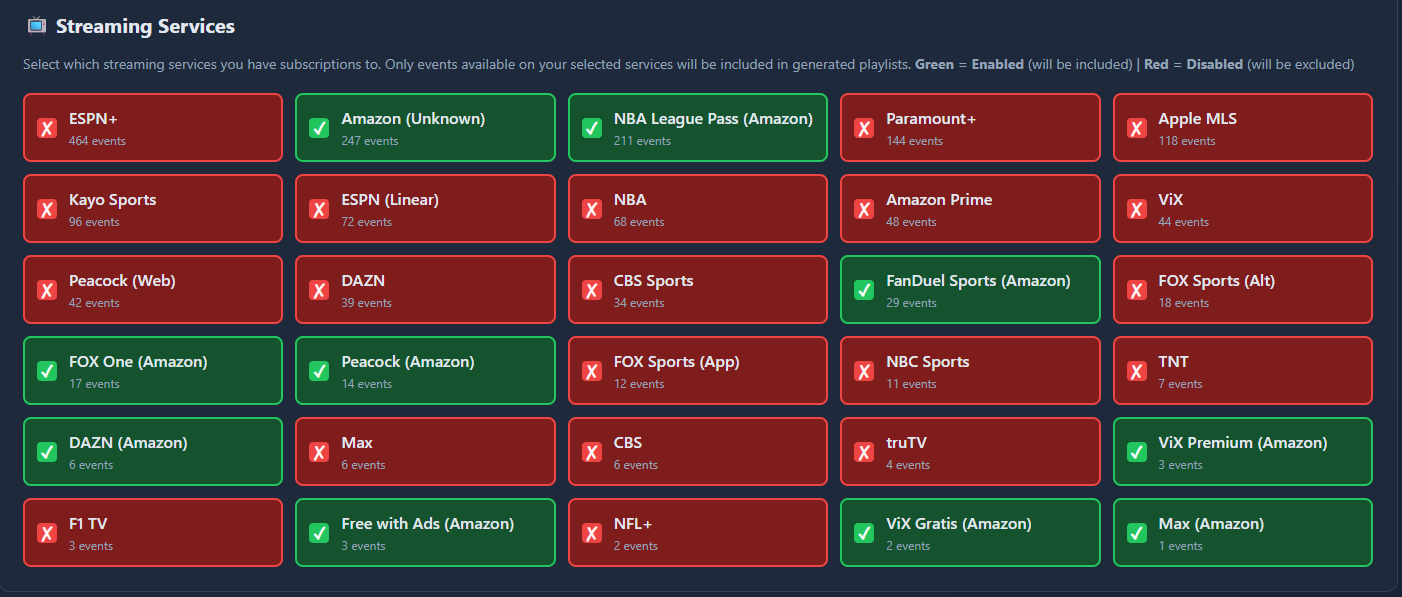
coming soon..... i figured out how to see the sub-subscription from Amazon. Plan is to add to filtering (like picture for each sub-service) and leave ADB output to one for all Amazon. Side effect- I am removing the "Amazon Exclusives" code I just build since this will be better.
Amazon (Unknown) 247 ( 41.4%) | ** work in progress*
NBA League Pass (Amazon) 211 ( 35.3%) |
Amazon Prime 48 ( 8.0%) |
FanDuel Sports (Amazon) 29 ( 4.9%) |
FOX One (Amazon) 17 ( 2.8%) |
Amazon Exclusives 16 ( 2.7%) |
Peacock (Amazon) 14 ( 2.3%) |
DAZN (Amazon) 6 ( 1.0%) |
ViX Premium (Amazon) 3 ( 0.5%) |
Free with Ads (Amazon) 3 ( 0.5%) |
ViX Gratis (Amazon) 2 ( 0.3%) |
Max (Amazon) 1 ( 0.2%) |
Got this working today!!! Thank you!!!! What is the possibility of getting beIN Sports Connect App and/or Fanatiz App???
I'm assuming Willow TV App is working thru Amazon, I just need to change my subscription for it.
Again, thank you!!!
glad you like it!
Willow TV -> I haven't seen it just yet in Amazon scrape, but doesn't mean it's not in here. I'm going to watch the amazon output over next week to see if I captured all their services before releasing. testing filtering and adb output too.
beIN / Fanatiz -- i'll add to list.
All the cricket matches open up amazon prime.
Seems my inital attempt at generating ADB output is not working here (no problem with direct). I set up ESPN and Peacock as the ADB-enabled providers and get this output in the logs (running latest image):
2026-01-24 09:34:50,816 [INFO] Loaded 2 ADB-enabled provider(s): peacock_web (20 lanes), sportscenter (20 lanes)
2026-01-24 09:34:50,816 [INFO] Cleared adb_lanes for provider peacock_web
2026-01-24 09:34:50,820 [WARNING] Provider peacock_web: filtered out 10 events with null timestamps (keeping 0 valid events)
2026-01-24 09:34:50,820 [INFO] Provider peacock_web: no events after filtering; nothing to insert.
2026-01-24 09:34:50,820 [INFO] Cleared adb_lanes for provider sportscenter
2026-01-24 09:34:50,860 [WARNING] Provider sportscenter: filtered out 189 events with null timestamps (keeping 0 valid events)
2026-01-24 09:34:50,860 [INFO] Provider sportscenter: no events after filtering; nothing to insert.
2026-01-24 09:34:50,860 [INFO] ADB lane build complete. Total adb_lanes rows inserted: 0
[OK] Step 12 complete
Thanks for your help!
Yeah...that'll be really useful as the only Prime Channel I got is Vix Gratis and NBA.
very bizarre... run a full refresh and see if u get same results. also see if anything looks off in your filters page.
basically, it's saying all the events have no end time and thus filtered out. but why yours is doing that is wild. it's built in there as a safety net if an event didn't get an end time somehow. fwiw- I just checked my DB and it looks fine.
also, send me output from these
docker exec fruitdeeplinks sqlite3 /app/data/fruit_events.db "SELECT COUNT(*) FROM events;"
docker exec fruitdeeplinks sqlite3 /app/data/fruit_events.db "SELECT COUNT(*) FROM playables WHERE provider IN ('peacock_web', 'sportscenter');"
docker exec fruitdeeplinks sqlite3 /app/data/fruit_events.db "SELECT COUNT() FROM events;" 2147
docker exec fruitdeeplinks sqlite3 /app/data/fruit_events.db "SELECT COUNT() FROM playables WHERE provider IN ('peacock_web', 'sportscenter');" 4171
I was able to generate ADB output after removing all filters (sports & leagues). Not sure why the previously chosen filters only impacted ADB and not direct output?
I will run a full refresh and start introducing filters back in to see what happens.
Thanks!
found the issue! your adb export was using more aggressive filtering than the direct output - it was doing substring matching on the raw json, so if you had "basketball" in your disabled sports, it would filter out anything with "basketball" anywhere in the data (like "basketball association" in league names).
the direct output only does exact matches on the structured fields, which is why it worked fine there.
i've fixed the adb filtering to match the direct output behavior. the fix will be in the main branch push coming later this week. in the meantime, keeping your filters cleared should work fine for adb output.
Update pushed!
Over the last few days this branch turned into a pretty substantial cleanup and stabilization pass across the system. A lot of rough edges were smoothed out: daily_refresh is more self-maintaining, the admin UI and logs are easier to work with during debugging, provider and filter logic is more consistent, and long-running containers are more stable thanks to better process cleanup and smarter database maintenance. Overall, things should behave more predictably, especially for anyone running this continuously instead of treating it like a one-off tool.
The biggest and most impactful change is the Amazon scraper, and it’s worth being very clear about what it does and does not do. This is not an Amazon schedule scraper. It does not crawl Prime Video to discover new events. Instead, it takes events that already exist in the database (primarily those discovered via Apple’s sports feeds) and upgrades them by visiting the corresponding Amazon pages to determine what service they actually belong to. In practice, this means an event that was previously just “Amazon” can now be correctly categorized as Prime Video, Peacock, Paramount+, etc., based on real entitlement and offer data. That upgraded classification then flows through filters, provider lanes, ADB output, and the UI, making Amazon-backed events much more useful and accurate without inventing new ones.
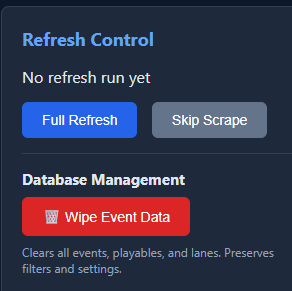
Because this work involved a lot of migrations, mapping changes, and logic shifts—especially around Amazon services—it’s strongly recommended that users run the database wipe after updating. It'sa a new function in admin webpage. Older installs may have orphaned events, stale playables, or legacy logical_service rows from earlier experiments and partial implementations. The wipe preserves settings and preferences but forces a clean rebuild of events and playables using the new rules. Even if things look “mostly fine,” doing a wipe now will avoid subtle inconsistencies later and give you a clean baseline going forward.
Right now, Amazon scraper is looking out 48 hours - I will probably increase that as I get feedback on how it's behaving. It's still pretty "beta" as I had to move to Playwright to get it to work consistently - so let me know if this part works with our MAC friends!
Hi. I’m running from the source directory and did a git pull and then restarted with compose. Everything started fine but not seeing a “Wipe” button or function. Should I be?
hey - on the admin page, u don't see this?