FruitDeepLinks — Universal Sports Aggregator for Channels DVR

The program simply scrapes the fruit company's public website/api and grabs the associated deeplinks/scheduling data. For those with tvOS device, the information is right on their TV app already. This simply grabs all that and puts it nicely into Channels. You don't even need to subscribe to all these services to see the schedule, but obviously to view their stream, you would. And yes, if you setup the Custom Source as STRMLINK, once you click the event, it'll then open the corresponding app/stream.

I despise having to look in other apps for sporting events. This puts it all in Channels for using their beautiful guide. It does not use Gracenote, so the XML isn't as rich, but I pulled as many categories and images in as possible so it should be a close enough experience for most.

Long term goal - keep adding more providers as I/we find out there, get their associated deeplinks, and tie into ADBTuner/Chrome Capture so you never have to leave Channels app. But, first step is just testing what we have now and getting to work with as many devices as possible. Then the fun stuff next!

1 Like

@KineticMan

Having some issues trying to get the stack deployed.

Getting the following error:
Failed to deploy a stack: compose up operation failed: Error response from daemon: Bind mount failed: '/data/compose/33/out' does not exist

Synology NAS using Portainer (Repository)

Env Variables:
SERVER_URL=http://10.0.1.65:6655
FRUIT_HOST_PORT=6655
TZ=America/Chicago
CHANNELS_DVR_IP=10.0.1.65
HOST_DIR=/volume1/data

Got any recommendations on what I need to fix that

On a Synology NAS, any volumes mapped in docker have to already exists on the Synology.
The Synology docker daemon will NOT create host directories on the Synology.
Recommendation is to use HOST_DIR=/volume1/docker
That avoids any permission issues on a Synology.

Ive been trying different things but its the same result. Im going to try with host_dir and see if it helps

Failed to deploy a stack: compose up operation failed: Error response from daemon: Bind mount failed: '/data/compose/37/data' does not exist

Tried without Host_Dir and get the same error. I have both docker and data folders already. I just dont know what else I should add

Failed to deploy a stack: compose up operation failed: Error response from daemon: Bind mount failed: '/data/compose/38/data' does not exist

1 Like

I've installed it in Windows Docker using Portainer in repository method; it failed to install the1st time because it couldn't find the "main" reference. If I leave that field blank, it installed fine.

Quick observations, Peacock and Paramount opened up on my Android phone without a problem. It hasn't been able to open the ESPN app though.

Edit: Two other things, I had to use /out/direct.m3u and /out/direct.xml in Channels source. Also, the app didn't honor my start channel preference ( I entered 900 as start channel, but most channels are in 1000 or over).

Sorry I’m not familiar with NAS setups. I tested it with Ubuntu and Windows.

I did punch your question into ChatGPT and it said essentially what @chDVRuser said. See attached.

Fixing Portainer/Synology “Bind mount failed: '/data/compose/33/out' does not exist”

This is a host path does not exist error.

On Synology + Portainer, /data/compose/33/... is Portainer’s internal stack working directory.
It usually appears when your compose file uses relative mounts like ./out:/app/out. Portainer resolves ./out to something like /data/compose/33/out, which doesn’t exist.


Recommended fix (use absolute Synology paths)

1) Create the folders on the NAS (SSH or File Station)

mkdir -p /volume1/data/FruitDeepLinks/{out,data,logs,config}

2) Update your stack’s volumes: to mount those absolute paths

Using your env var HOST_DIR=/volume1/data:

services:
  fruitdeeplinks:
    volumes:
      - ${HOST_DIR}/FruitDeepLinks/out:/app/out
      - ${HOST_DIR}/FruitDeepLinks/data:/app/data
      - ${HOST_DIR}/FruitDeepLinks/logs:/app/logs
      - ${HOST_DIR}/FruitDeepLinks/config:/app/config

This avoids Portainer’s /data/compose/... paths entirely.


Alternative (not recommended): keep relative paths

If you keep ./out:/app/out, you must ensure out/ exists inside Portainer’s stack context (often /data/compose/<stack-id>/out). With “Repository” stacks, this is typically confusing, so absolute NAS paths are better.


Common Synology gotchas

  • Permissions: Docker must be able to read/write the mounted folder.
  • Exact paths: /volume1/data must match the real share path and casing.
  • SERVER_URL: should match how clients reach the container (your http://10.0.1.65:6655 is fine if that port is published).

Quick checklist

  1. Create: /volume1/data/FruitDeepLinks/out
  2. Create: /volume1/data/FruitDeepLinks/data
  3. Create: /volume1/data/FruitDeepLinks/logs
  4. Create: /volume1/data/FruitDeepLinks/config
  5. Update compose mounts to ${HOST_DIR}/FruitDeepLinks/...
  6. Redeploy stack

FruitDeepLinks – Synology / Portainer Deployment Fix

Problem

When deploying FruitDeepLinks on Synology NAS using Portainer (Repository stack), you may see:

Bind mount failed: '/data/compose/<id>/out' does not exist

This happens because Portainer resolves relative bind mounts like:

./out:/app/out

to its internal working directory (/data/compose/<stack-id>/out), not your NAS volume.


:white_check_mark: Solution (Recommended)

Use absolute Synology paths and pre-create the folders.


Step 1 – Create folders on Synology

SSH into your Synology NAS (or use File Station) and run:

mkdir -p /volume1/data/FruitDeepLinks/{data,out,logs}

Adjust /volume1/data if your shared folder lives elsewhere.


Step 2 – Set environment variable in Portainer

In Portainer → Stacks → fruitdeeplinks → Environment variables, add:

HOST_DIR=/volume1/data

Step 3 – Update docker-compose.yml

Replace this (relative paths :x:):

volumes:
  - ./data:/app/data
  - ./out:/app/out
  - ./logs:/app/logs

With this (absolute paths :white_check_mark:):

volumes:
  - ${HOST_DIR}/FruitDeepLinks/data:/app/data
  - ${HOST_DIR}/FruitDeepLinks/out:/app/out
  - ${HOST_DIR}/FruitDeepLinks/logs:/app/logs

Step 4 – Redeploy the stack

  1. Click Update the stack
  2. Enable Re-pull image and redeploy
  3. Deploy

The container should now start cleanly.


Common Gotchas

  • Permissions: The Docker service must have read/write access to
    /volume1/data/FruitDeepLinks/*
  • Path casing matters (/volume1/data/volume1/Data)
  • Do not use ./out with Portainer Repository stacks

Why this happens

Portainer Repository stacks do not run from your Git repo directory.
Relative paths (./) resolve inside Portainer’s internal filesystem,
not your NAS.

Using absolute paths avoids this entirely.


Need Help?

If deployment still fails, capture:

  • Portainer stack logs
  • The resolved mount paths
  • Your HOST_DIR value

…and share them for quick diagnosis.


FruitDeepLinks
One EPG. All your sports. All your services.

Thanks for bug note. Will look into it!

I recommend and use /volume1/docker not /volume1/data as a host directory because of permission issues on Synology.
Synology uses Synology ACL's for permissions
/volume1/docker already exists (created when you install the docker/container manager package)

If /volume1/data works for you, that's great.

Not sure how to update this. Getting closer I think

This is the error I am getting trying to deploy. I'm using the web editor and deploying the stack. Is that the right place? Should I put it in a different place?

Failed to deploy a stack: failed to load the compose file: service "fruitdeeplinks" refers to undefined volume volume1/docker/FruitDeepLinks/data: invalid compose project

I've tried it both with volume1/data & with volume1/docker with same result.

Here's my docker-compose.yml

version: '3.8'

services:
  fruitdeeplinks:
    build: .
    container_name: fruitdeeplinks
    hostname: fruitdeeplinks
    shm_size: '2gb'

    environment:
      # Timezone
      - TZ=${TZ:-America/Chicago}

      # Core URLs and ports
      - SERVER_URL=${SERVER_URL:-http://10.0.1.65:6655}
      - FRUIT_HOST_PORT=${FRUIT_HOST_PORT:-6655}

      # Channels DVR integration (optional)
      - CHANNELS_DVR_IP=${CHANNELS_DVR_IP:-10.0.1.65}
      - CHANNELS_SOURCE_NAME=${CHANNELS_SOURCE_NAME:-fruitdeeplinks}

      # Database and output paths (inside container)
      - FRUIT_DB_PATH=${FRUIT_DB_PATH:-/app/data/fruit_events.db}
      - OUT_DIR=${OUT_DIR:-/app/out}
      - LOG_DIR=${LOG_DIR:-/app/logs}
      - LOG_LEVEL=${LOG_LEVEL:-INFO}

      # Lane configuration (BETA)
      - FRUIT_LANES=${FRUIT_LANES:-50}
      - FRUIT_LANE_START_CH=${FRUIT_LANE_START_CH:-9000}
      - FRUIT_DAYS_AHEAD=${FRUIT_DAYS_AHEAD:-7}
      - FRUIT_PADDING_MINUTES=${FRUIT_PADDING_MINUTES:-45}
      - FRUIT_PLACEHOLDER_BLOCK_MINUTES=${FRUIT_PLACEHOLDER_BLOCK_MINUTES:-60}
      - FRUIT_PLACEHOLDER_EXTRA_DAYS=${FRUIT_PLACEHOLDER_EXTRA_DAYS:-5}

      # Scraper behavior
      - HEADLESS=${HEADLESS:-true}
      - NO_NETWORK=${NO_NETWORK:-false}

      # Auto-refresh
      - AUTO_REFRESH_ENABLED=${AUTO_REFRESH_ENABLED:-true}
      - AUTO_REFRESH_TIME=${AUTO_REFRESH_TIME:-02:30}

    volumes:
      - ${HOST_DIR}/FruitDeepLinks/data:/app/data
      - ${HOST_DIR}/FruitDeepLinks/out:/app/out
      - ${HOST_DIR}/FruitDeepLinks/logs:/app/logs
      # templates are baked into the image via Dockerfile (COPY templates ./templates)
      # so we don't need a bind mount here

    restart: unless-stopped

    ports:
      # host:container
      # FRUIT_HOST_PORT controls the HOST port; default 6655.
      # Inside the container we always listen on 6655.
      - "${FRUIT_HOST_PORT:-6655}:6655"

    logging:
      driver: "json-file"
      options:
        max-size: "10m"
        max-file: "3"

You’re correct on that. I checked the files thru File Station and all of the docker-compose.ylm files for my containers are there.

Create the following directory using File Station
/volume1/docker/FruitDeepLinks

Set the environment variable HOST_DIR=/volume1/docker

That should work.

Nope that doesn't work. Gonna have to think about it overnight.

Here's my recommendation for a stack, along with the minimum env var overrides for Portainer:

services:
  fruitdeeplinks:
    image: ghcr.io/kineticman/fruitdeeplinks:${TAG:-latest}
    container_name: fruitdeeplinks
    hostname: fruitdeeplinks
    shm_size: '2gb'
    ports:
      - ${FRUIT_HOST_PORT:-6655}:6655
    environment:
      - TZ=${TZ:-America/Chicago}
      - SERVER_URL=${SERVER_URL:-http://10.0.1.65:6655}
      - FRUIT_HOST_PORT=${FRUIT_HOST_PORT:-6655}
      - CHANNELS_DVR_IP=${CHANNELS_DVR_IP:-10.0.1.65}
      - CHANNELS_SOURCE_NAME=${CHANNELS_SOURCE_NAME:-fruitdeeplinks}
      - FRUIT_DB_PATH=${FRUIT_DB_PATH:-/app/data/fruit_events.db}
      - OUT_DIR=${OUT_DIR:-/app/out}
      - LOG_DIR=${LOG_DIR:-/app/logs}
      - LOG_LEVEL=${LOG_LEVEL:-INFO}
      - FRUIT_LANES=${FRUIT_LANES:-50}
      - FRUIT_LANE_START_CH=${FRUIT_LANE_START_CH:-9000}
      - FRUIT_DAYS_AHEAD=${FRUIT_DAYS_AHEAD:-7}
      - FRUIT_PADDING_MINUTES=${FRUIT_PADDING_MINUTES:-45}
      - FRUIT_PLACEHOLDER_BLOCK_MINUTES=${FRUIT_PLACEHOLDER_BLOCK_MINUTES:-60}
      - FRUIT_PLACEHOLDER_EXTRA_DAYS=${FRUIT_PLACEHOLDER_EXTRA_DAYS:-5}
      - HEADLESS=${HEADLESS:-true}
      - NO_NETWORK=${NO_NETWORK:-false}
      - AUTO_REFRESH_ENABLED=${AUTO_REFRESH_ENABLED:-true}
      - AUTO_REFRESH_TIME=${AUTO_REFRESH_TIME:-02:30}
    volumes:
      - ${HOST_DIR:-.}/FruitDeepLinks/data:/app/data
      - ${HOST_DIR:-.}/FruitDeepLinks/out:/app/out
      - ${HOST_DIR:-.}/FruitDeepLinks/logs:/app/logs
    restart: unless-stopped
    logging:
      driver: json-file
      options:
        max-size: 10m
        max-file: 3

Sample env var overrides (everything else will use the compose-specified defaults):

TZ=US/Mountain
SERVER_URL=http://htpc6:6655
CHANNELS_DVR_IP=media-server8
CHANNELS_SOURCE_NAME=FruitDeepLinks
FRUIT_LANE_START_CH=14001
HOST_DIR=/data

Synology users should specify HOST_DIR=/volume1/docker, and the following directories need to be created BEFORE spinning up the container for the first time:

/volume1/docker/FruitDeepLinks/data
/volume1/docker/FruitDeepLinks/out
/volume1/docker/FruitDeepLinks/logs
1 Like

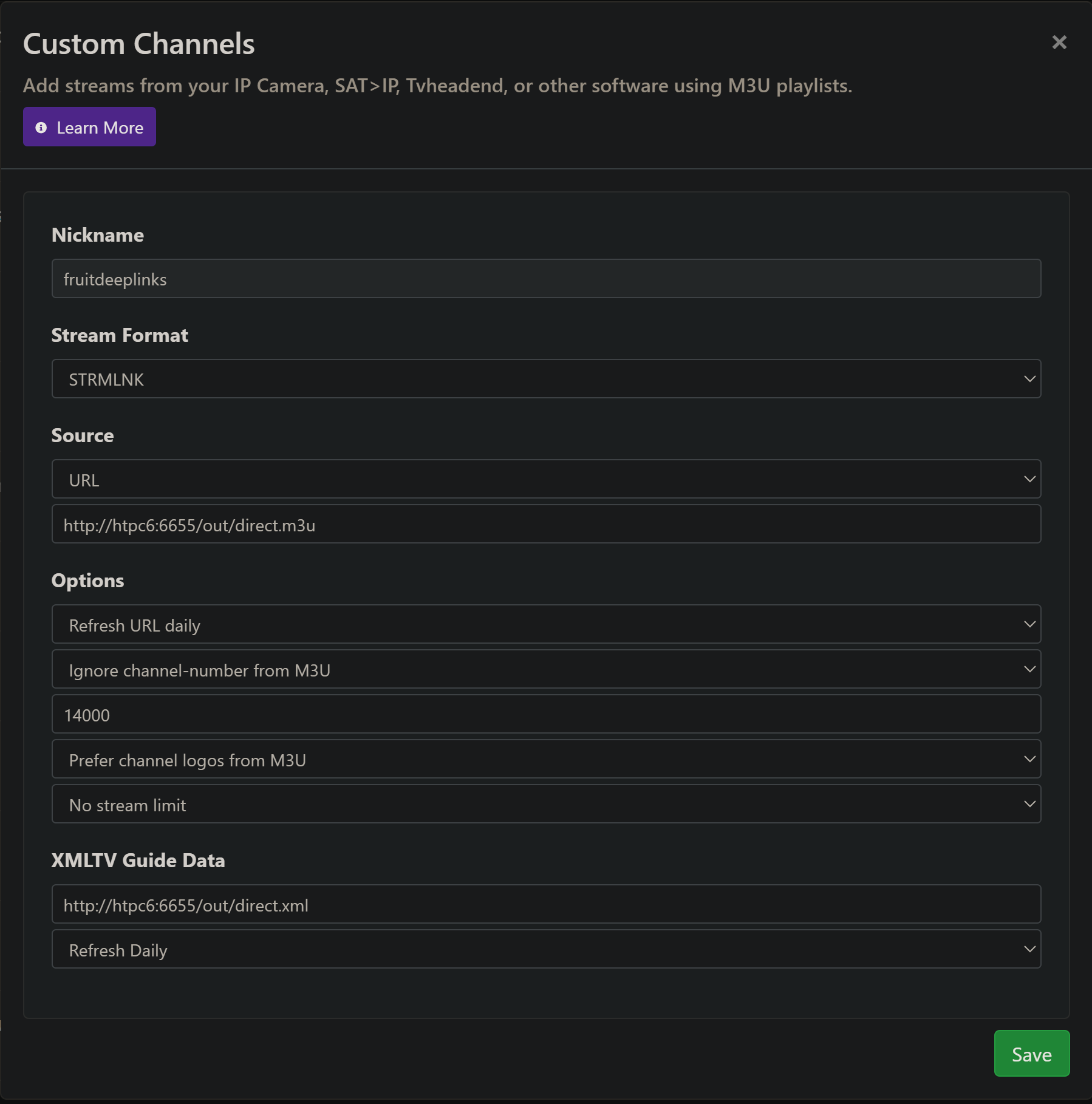
I set this up using the above compose, and this CDVR Custom Channels setup:

Only one live event atm, but it worked on a FireStick! It was an ESPN event, so it didn't jump to live (as we've seen before) -- but given it's a streamlink, one can choose to watch from start or jump to live with the remote.

I'll start the process of getting this working with ADBTuner...

EDIT: A second event is live now, and that worked too. Brilliant work @KineticMan!

2 Likes

@KineticMan

I'm working on the ADBTuner integration, and I'm not getting a response from the adb endpoints:

[13/Dec/2025 10:27:27] "GET /api/adb/lanes/sportscenter/1/deeplink?format=text HTTP/1.1" 404 -

Even though the API is responding otherwise:

Lane Schedule:

{"lane_id":1,"schedule":[{"channel_name":null,"chosen_deeplink":null,"chosen_logical_service":null,"chosen_playable_id":null,"chosen_provider":null,"end_utc":"2025-12-13T10:40:00+00:00","event_id":"placeholder-1-2025-12-13T10:00:00+00:00","is_placeholder":1,"lane_id":1,"start_utc":"2025-12-13T10:00:00+00:00","synopsis":null,"title":"Nothing Scheduled"},{"channel_name":"ESPN","chosen_deeplink":"sportscenter://x-callback-url/showWatchStream?playID=e1282492-9f76-406e-a1c3-ad420cd5a4da&x-source=AppleUMC","chosen_logical_service":"sportscenter","chosen_playable_id":"tvs.sbd.30061:e2ccc613-7bb0-465b-9d66-d196509d1f39:8f9005cf","chosen_provider":"sportscenter","end_utc":"2025-12-13T13:35:00+00:00","event_id":"appletv-umc.cse.6dighebtp9bnx0uipa8op9emt","is_placeholder":0,"lane_id":1,"start_utc":"2025-12-13T10:40:00+00:00","synopsis":"Soccer - (Australia A-League) - Perth Glory vs Sydney - Available on ESPN","title":"Australia A-League: Perth Glory vs. Sydney"},{"channel_name":null,"chosen_deeplink":null,"chosen_logical_service":null,"chosen_playable_id":null,"chosen_provider":null,"end_utc":"2025-12-13T14:00:00+00:00","event_id":"placeholder-1-2025-12-13T13:35:00+00:00","is_placeholder":1,"lane_id":1,"start_utc":"2025-12-13T13:35:00+00:00","synopsis":null,"title":"Nothing Scheduled"},{"channel_name":"NBC Sports","chosen_deeplink":"aiv://aiv/detail?gti=amzn1.dv.gti.349a1531-c3a7-431f-b91d-2166a0b68df0&action=watch&type=live&territory=US&time=live&broadcast=amzn1.dv.gti.1305ec30-27c9-4a01-97ee-1a453c426247&refMarker=atv_dvm_liv_apl_us_bd_l_src_av","chosen_logical_service":"aiv","chosen_playable_id":"tvs.sbd.12962:amzn1.dv.gti.1305ec30-27c9-4a01-97ee-1a453c426247:be5a5d82","chosen_provider":"aiv","end_utc":"2025-12-13T15:50:00+00:00","event_id":"appletv-umc.cse.2gsagwhyq83fwecrscm8ngeuv","is_placeholder":0,"lane_id":1,"start_utc":"2025-12-13T14:00:00+00:00","synopsis":"Soccer - (Premier League) - Chelsea vs Everton - Available on NBC Sports","title":"Premier League: Chelsea vs. Everton"},{"channel_name":null,"chosen_deeplink":null,"chosen_logical_service":null,"chosen_playable_id":null,"chosen_provider":null,"end_utc":"2025-12-13T16:25:00+00:00","event_id":"placeholder-1-2025-12-13T15:50:00+00:00","is_placeholder":1,"lane_id":1,"start_utc":"2025-12-13T15:50:00+00:00","synopsis":null,"title":"Nothing Scheduled"},{"channel_name":null,"chosen_deeplink":"aiv://aiv/detail?gti=amzn1.dv.gti.eb6ebe9e-43b1-4334-9c5f-1c0ec70b9b43&action=watch&type=live&territory=US&time=live&broadcast=amzn1.dv.gti.64054384-2c72-4252-b509-e0c0654a661a&refMarker=atv_dvm_liv_apl_us_bd_l_src_av","chosen_logical_service":"aiv","chosen_playable_id":"tvs.sbd.12962:amzn1.dv.gti.64054384-2c72-4252-b509-e0c0654a661a:77e31f16","chosen_provider":"aiv","end_utc":"2025-12-13T20:50:00+00:00","event_id":"appletv-umc.cse.365y0s95mo6z3om5348jnvsf4","is_placeholder":0,"lane_id":1,"start_utc":"2025-12-13T16:25:00+00:00","synopsis":"Basketball - (Men's College Basketball) - Iona Gaels vs St. John's Red Storm","title":"Men's College Basketball: Iona Gaels at #22 St. John's Red Storm"},{"channel_name":null,"chosen_deeplink":null,"chosen_logical_service":null,"chosen_playable_id":null,"chosen_provider":null,"end_utc":"2025-12-13T21:00:00+00:00","event_id":"placeholder-1-2025-12-13T20:50:00+00:00","is_placeholder":1,"lane_id":1,"start_utc":"2025-12-13T20:50:00+00:00","synopsis":null,"title":"Nothing Scheduled"},{"channel_name":null,"chosen_deeplink":"sportscenter://x-callback-url/showWatchStream?playID=068dd4e0-ee81-49e4-92eb-5d7733f79d3b&x-source=AppleUMC","chosen_logical_service":"sportscenter","chosen_playable_id":"tvs.sbd.30061:fe91cfcf-f709-4e0c-9ccd-411a1152272d:1cfca2fd","chosen_provider":"sportscenter","end_utc":"2025-12-13T23:50:00+00:00","event_id":"appletv-umc.cse.3b6s3djr5b1hsl58kvtk8ree9","is_placeholder":0,"lane_id":1,"start_utc":"2025-12-13T21:00:00+00:00","synopsis":"Basketball - (Men's College Basketball)","title":"Men's College Basketball: Bethel (TN) Wildcats at Tennessee Tech Golden Eagles"},{"channel_name":null,"chosen_deeplink":null,"chosen_logical_service":null,"chosen_playable_id":null,"chosen_provider":null,"end_utc":"2025-12-14T00:00:00+00:00","event_id":"placeholder-1-2025-12-13T23:50:00+00:00","is_placeholder":1,"lane_id":1,"start_utc":"2025-12-13T23:50:00+00:00","synopsis":null,"title":"Nothing Scheduled"},{"channel_name":null,"chosen_deeplink":"sportscenter://x-callback-url/showWatchStream?playID=8af891ec-5bce-44be-9cb5-aa979be41a74&x-source=AppleUMC","chosen_logical_service":"sportscenter","chosen_playable_id":"tvs.sbd.30061:e53427c2-66c4-4264-bafe-c60db6bec248:9cdf05cd","chosen_provider":"sportscenter","end_utc":"2025-12-14T02:50:00+00:00","event_id":"appletv-umc.cse.5svt7a12hiz5la3ywo9cxp8ik","is_placeholder":0,"lane_id":1,"start_utc":"2025-12-14T00:00:00+00:00","synopsis":"Basketball - (Men's College Basketball)","title":"Men's College Basketball: Simpson University (CA) at Pacific Tigers"}]}

Provider Lanes:

{"providers":[{"adb_enabled":1,"adb_lane_count":18,"created_at":"2025-12-13 09:40:22","provider_code":"aiv","updated_at":"2025-12-13 09:40:22"},{"adb_enabled":0,"adb_lane_count":0,"created_at":"2025-12-13 09:40:22","provider_code":"apple_mls","updated_at":"2025-12-13 09:40:22"},{"adb_enabled":0,"adb_lane_count":0,"created_at":"2025-12-13 09:40:22","provider_code":"cbssportsapp","updated_at":"2025-12-13 09:40:22"},{"adb_enabled":0,"adb_lane_count":0,"created_at":"2025-12-13 09:40:22","provider_code":"cbstve","updated_at":"2025-12-13 09:40:22"},{"adb_enabled":0,"adb_lane_count":0,"created_at":"2025-12-13 09:40:22","provider_code":"foxone","updated_at":"2025-12-13 09:40:22"},{"adb_enabled":0,"adb_lane_count":0,"created_at":"2025-12-13 09:40:22","provider_code":"fsapp","updated_at":"2025-12-13 09:40:22"},{"adb_enabled":1,"adb_lane_count":2,"created_at":"2025-12-13 09:40:22","provider_code":"gametime","updated_at":"2025-12-13 09:40:22"},{"adb_enabled":0,"adb_lane_count":0,"created_at":"2025-12-13 09:40:22","provider_code":"nbcsportstve","updated_at":"2025-12-13 09:40:22"},{"adb_enabled":0,"adb_lane_count":0,"created_at":"2025-12-13 09:40:22","provider_code":"nflctv","updated_at":"2025-12-13 09:40:22"},{"adb_enabled":0,"adb_lane_count":0,"created_at":"2025-12-13 09:40:22","provider_code":"open.dazn.com","updated_at":"2025-12-13 09:40:22"},{"adb_enabled":0,"adb_lane_count":0,"created_at":"2025-12-13 09:40:22","provider_code":"peacock_web","updated_at":"2025-12-13 09:40:22"},{"adb_enabled":0,"adb_lane_count":0,"created_at":"2025-12-13 09:40:22","provider_code":"pplus","updated_at":"2025-12-13 09:40:22"},{"adb_enabled":1,"adb_lane_count":30,"created_at":"2025-12-13 09:40:22","provider_code":"sportscenter","updated_at":"2025-12-13 09:40:22"},{"adb_enabled":0,"adb_lane_count":0,"created_at":"2025-12-13 09:40:22","provider_code":"vixapp","updated_at":"2025-12-13 09:40:22"}],"status":"success"}
1 Like

I knew you'd push me along! I actually didn't add the endpoint just yet for that API response. I'll get it out.

Glad you like it - your ADB integration stuff will be the magic sauce for this project.

:clap::clap::clap::clap:

Thanks for the help. Stack deployed successfully and loaded into Channels. It sure does work better when you include the image info!!!!

I increased the lanes to 100 since it wasn’t listing a game that I was expecting later today. It's there with the increased lanes. Will play a little once the games begin today.

@KineticMan Thanks for you effort in putting this project together. Your assistance was greatly appreciated!!!