FruitDeepLinks — Universal Sports Aggregator for Channels DVR

If you could share your exact compose and any env variables, I’d like to add to repo to docs to help others.

Also let me know the game your missing- it is theoretically possible for the scrape to miss an event. Fruit company provides the events in a webpage shelf of like 28 events at a time. The scraper keeps refreshing shelves with new search terms until it gets no new hits. So basically ain’t perfect but best I could figure out.

I grabbed your docker-compose.yml from github and made some environment variable changes. What I was missing was in the image info.

Final Compose:

services:
  fruitdeeplinks:
    image: ghcr.io/kineticman/fruitdeeplinks:${TAG:-latest}
    container_name: fruitdeeplinks
    hostname: fruitdeeplinks
    shm_size: '2gb'
    ports:
      - ${FRUIT_HOST_PORT:-6655}:6655
    environment:
      - TZ=${TZ:-America/Chicago}
      - SERVER_URL=${SERVER_URL:-http://10.0.1.65:6655}
      - FRUIT_HOST_PORT=${FRUIT_HOST_PORT:-6655}
      - CHANNELS_DVR_IP=${CHANNELS_DVR_IP:-10.0.1.65}
      - CHANNELS_SOURCE_NAME=${CHANNELS_SOURCE_NAME:-fruitdeeplinks}
      - FRUIT_DB_PATH=${FRUIT_DB_PATH:-/app/data/fruit_events.db}
      - OUT_DIR=${OUT_DIR:-/app/out}
      - LOG_DIR=${LOG_DIR:-/app/logs}
      - LOG_LEVEL=${LOG_LEVEL:-INFO}
      - FRUIT_LANES=${FRUIT_LANES:-50}
      - FRUIT_LANE_START_CH=${FRUIT_LANE_START_CH:-9000}
      - FRUIT_DAYS_AHEAD=${FRUIT_DAYS_AHEAD:-7}
      - FRUIT_PADDING_MINUTES=${FRUIT_PADDING_MINUTES:-45}
      - FRUIT_PLACEHOLDER_BLOCK_MINUTES=${FRUIT_PLACEHOLDER_BLOCK_MINUTES:-60}
      - FRUIT_PLACEHOLDER_EXTRA_DAYS=${FRUIT_PLACEHOLDER_EXTRA_DAYS:-5}
      - HEADLESS=${HEADLESS:-true}
      - NO_NETWORK=${NO_NETWORK:-false}
      - AUTO_REFRESH_ENABLED=${AUTO_REFRESH_ENABLED:-true}
      - AUTO_REFRESH_TIME=${AUTO_REFRESH_TIME:-02:30}
    volumes:
      - ${HOST_DIR:-.}/FruitDeepLinks/data:/app/data
      - ${HOST_DIR:-.}/FruitDeepLinks/out:/app/out
      - ${HOST_DIR:-.}/FruitDeepLinks/logs:/app/logs
    restart: unless-stopped
    logging:
      driver: json-file
      options:
        max-size: 10m
        max-file: 3

Environment Variables:

TZ=US/Central
SERVER_URL=http://10.0.1.65:6655
CHANNELS_DVR_IP=http://10.0.1.65
CHANNELS_SOURCE_NAME=FruitDeepLinks
FRUIT_LANE_START_CH=14001
HOST_DIR=/volume1/docker
FRUIT_LANES=100

The game I was missing was Louisiana Ragin Cajuns vs Louisiana Tech (Today @2:00 pm CT). When I increased lanes to 100 it appeared in lane 67. I'm not sure how many lanes I can actually designate. When I was using EPlusTv, I was using ±350 channels to ensure everything I was wanting to record/watch was available.

One question, should the Channels_DVR_IP have the 8089 port specified. (10.0.1.65:8089 vs 10.0.1.65)

So just went thru 8 streams. All opened the ESPN without issue. Some tuned directly to the game and others I had to select the game to tune. On games that did not tune directly, I had to use the home button to get back to the Home Screen.

Arkansas vs Texas Tech: Tuned to app. Had to select game. Required Home button to get to Home Screen.

Albany vs Fla. Atlantic: Tuned to game @start. Backed out to Home Screen.

DePaul vs Wichita State: Had to select game. Had to use Home Button.

Mass vs Florida State: Had to select game start. Had to use Home Button.

ULM vs Miami: Tuned to game start. Backed out to Home Screen.

Howard Bison vs Hampton: Tuned to game start. Backed out to Home Screen.

Delaware State vs Georgetown. Tuned to game start. Backed out to Home Screen.

Cal State vs Delaware: Tuned to game start. Backed out to Home Screen.

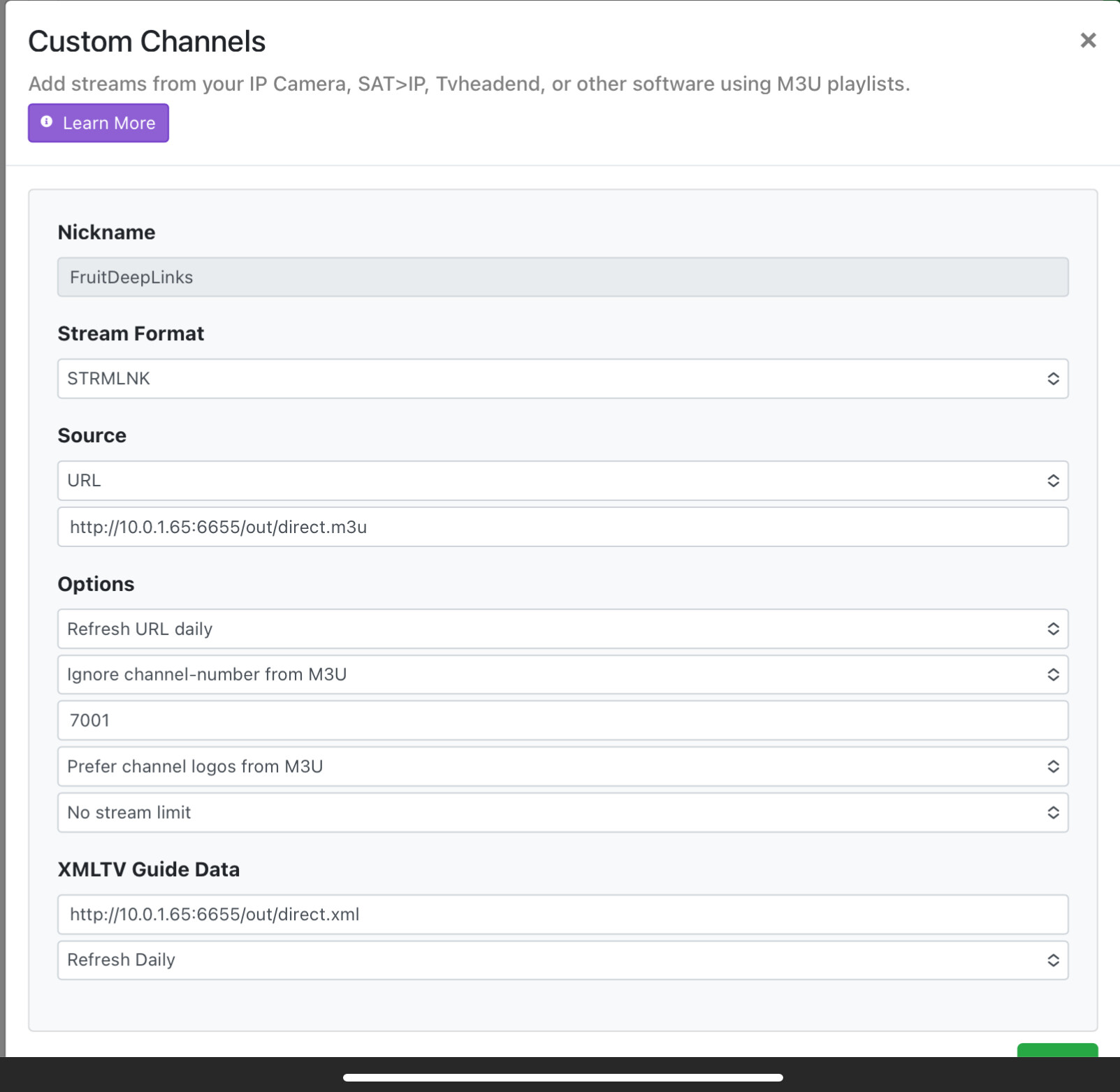
What's your CDVR client device? What does your CDVR Custom Source config look like?

Fire TV Cube (3rd Gen)
Fire OS 7.6.8.8 (PS7688/4591)

On the ones that didn't tune, any idea if they were marked as Live in the app? ESPN deeplinks don't work for Re-Airs on FireTV devices...

good point on re-airs... i'm not 100% sure if the apple scrape has that info like the direct ESPN API scraper did. if through this beta process we determine ReAirs are sneaking in, i'll of course dig in further to see if the fruit scrape has that info, but if it doesn't, i could in theory just change the scrape to use ESPN api for the DB (for ESPN events) and filter out those "re-airs". i tried to make this as modular as possible

All were live events. All 3 events that only opened the app were on the normal ESPN linear channels. I'll try and check some other games that are scheduled on both linear and FruitDeepLinks and see if that behavior is consistent.

I’d check now but I’m watching an ESPN+ event.

From the Apple (UMC) scrape, the ESPN/SportsCenter deep links consistently show up as sportscenter://x-callback-url/showWatchStream?...&x-source=AppleUMC, and they split into two distinct forms: asset-specific links with playID=<uuid> and linear-network links with playChannel=<network>. When we counted the Apple punchouts, ~75% were playID and ~25% were playChannel. The playChannel values were a small, consistent set that maps to ESPN’s linear brands (e.g., espn1, espn2, espnu, espnews, sec, acc, espndeportes). This suggests Apple is surfacing two different “play” concepts: open a specific stream vs tune a channel.

On the ESPN direct-API side that I used on ESPN4CC4C, the dataset shows a very similar divide in practice: the stuff that tends to be problematic for direct playback (“Re-Air”/replay-style items) overwhelmingly behaves like linear-network inventory rather than ESPN+ stream assets. In the DB extract, ~28% of events are flagged is_reair=1, and essentially all of those re-air events have no ESPN+ package attached (i.e., not ESPN_PLUS). That lines up with the Apple observation that playChannel is “network-like” content and may not reliably start playback depending on device/auth/provider context.

Putting both scrapes together: the working hypothesis is that Apple playID links correspond more often to stream-asset playback (higher success rate), while playChannel links correspond to linear tuning (more fragile / sometimes launch-only).

If folks have seen different behavior on Android/Fire vs iOS, I’d love to compare notes—especially whether playChannel ever reliably jumps straight into playback on non-iOS devices. I could add filtering to clearly note the playChannel vs playID (likely ESPN3 events). The playChannel events may not be appropriate for ADBTuner-- unless we figure out some specific keystroke to open the event as direct deeplink doesn't join the event live.

added API endpoint support (beta)

GET /api/adb/lanes/sportscenter/1/deeplink?format=text

1 Like

@KineticMan, nice work! I got this going and did my first full scrape, and it found so much stuff! Love the filters too, to get the list down a bit.

I setup some streamlinks, like, @jagrim, and every one I tried for the apps I have seemed to work. But I am also an Apple TV user, so I would hope they would. Looking forward to complete ADBTuner integration, so I can record stuff using Channels.

Also had to do something similar to @jagrim to get things installed, because my docker stuff runs on a Mac. Using "data" for a host directory doesn't work for me, like it does with windows or linux users. I created a file directory where I wanted to put the files for the app, and pre-created the expected sub directories you were looking for. Then I used normal Mac file location definitions for the host dir env var, and I was able to create the stack just fine.

Each time I pull down the latest docker image to keep up with updates, do I need to delete the data directory and start from scratch? Or will it suffice just to delete the local docker container/image and then start it up again?

So this is only 1 specific instance. We utilize a 3rd Gen Fire TV Cube for our prime viewing area. I also have an Apple TV 4K device that is also attached to that TV.

Comparison of Oklahoma Womens BB game that is playing on ESPNU but using FruitDeepLinks:

FireTV:
The Deeplink only opened the ESPN app. I had to select the game to view which gave me the option to view live or start from the beginning. In exiting, you have to use the Home button. If you attempt to just back out, it just loops in the ESPN app.

AppleTV4k:
The Deeplink opened the game at the Live Point. In exiting, the menu button brought me back to the channels guide. It's seamless.

As far as the linear stations, I have them available to view/record on regular TVE so they probably won’t get used as much as the non-linear events. The Apple TV works exactly how you would expect, seamlessly. The FireTV doesn’t respect the Deeplink on the linear stations but it adds the ability to go live or start from the beginning. In exiting from the non-linear events, it brings you back to the Fire Home Screen instead of inside the Channels App.

@KineticMan can you add HBO Max to your list of streaming services? They have live events, hosting NHL, NBA, and others through TNT channel. I clicked on a Prime Video link to a college basketball game that opened the Prime Video app, and was trying to get me to subscribe to HBO Max through Prime. I subscribe to it directly, instead.

Yes, this was my experience with TvOS too. I saw ESPN goes to live natively as well, which is different than AndroidTV, which usually goes to some buffered point to start.

If you install watchtower to your docker installation, you will have your docker containers self-update periodically.

Yes, thanks, I don’t mind updating manually. I was just wondering for this particular project if it is recommended to wipe the database file after every update or if it is ok to leave as is.

Although in beta, I'll do my best to not do anything "breaking" to the database. So should be safe to just update.

I'll give it a shot-- do you watch it through HBO App, or TNT app?

Just like this --> right now, all it does is force update your m3u/source on CDVR for direct links after a refresh. Eventually, it'll probably do more as we figure out how to do STRMLINKS on the "lanes" version (i hope).

Channels DVR Integration (optional)

CHANNELS_DVR_IP=192.168.86.72
CHANNELS_SOURCE_NAME=fruitdeeplinks