FruitDeepLinks — Universal Sports Aggregator for Channels DVR

Quick FruitDeepLinks update from tonight. Lots of small stuff, but a few big themes landed and it’s all working together way better now.

  1. Chrome Capture integration (main focus)
  • Added new env knobs for Chrome Capture: CC_SERVER + CC_PORT (wired into compose env).
  • fruit_export_lanes.py now generates Chrome Capture “stream proxy” URLs instead of pointing straight at an HTML deeplink page.
    • It URL-encodes the FruitDeepLinks deeplink API URL and emits something like:
      chrome://<CC_SERVER>:<CC_PORT>/stream?url=<encoded_deeplink_api_url>
  • Added a new “tune-style” endpoint: GET /api/lane//launch
    • Returns a 302 redirect to the resolved HTTP deeplink
    • Includes no-store / no-cache headers (Chrome Capture behaves better with this)
    • Tightened semantics after the initial version so it’s strict about “must be a real event” and doesn’t do sketchy fallbacks.
  1. Event Inspector + API helper improvements
  • Added new Event Inspector UI pages (templates + dashboard wiring).
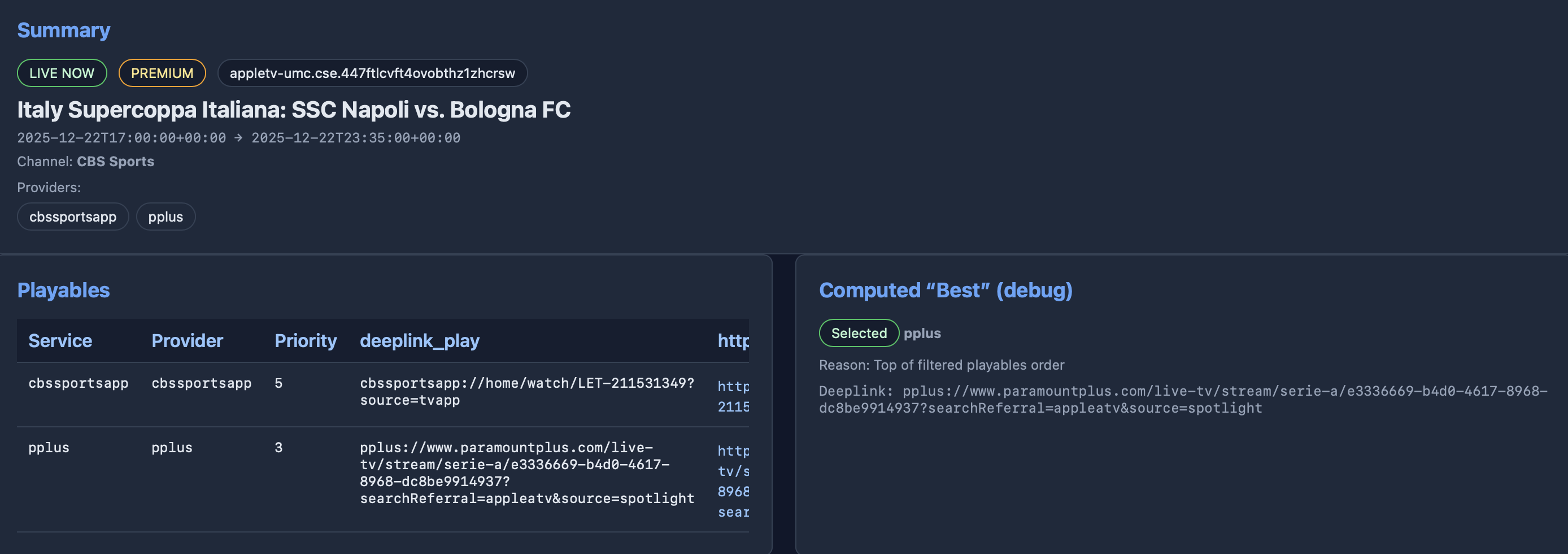
    • Makes it way easier to browse events, drill into an event, and see why the system picked a specific playable/link.
  • Updated the API helper page too so it’s easier to poke endpoints, flip filters, and verify lane + deeplink behavior without constantly rewriting curl/PowerShell.
  1. Filters + ADB lanes are now actually unified
  • ADB lane builder now respects user preferences:
    • enabled_services gates which ADB providers even build lanes
    • disabled sports/leagues are applied while generating adb_lanes
    • it clears + rebuilds adb_lanes each time so changes take effect immediately
  • ADB deeplink endpoint is provider-locked and enforces enabled_services at request time.
    • This prevents weird cross-provider results (like a sportscenter lane returning an aiv:// link).
  • /api/apply-filters is now the “one button” sync point: it rebuilds multisource lanes and ADB provider lanes so everything stays consistent.
  1. Live logs got more reliable (SSE change)
  • Log streaming switched from raw lines to JSON payloads like:
    {"seq": , "log": ""}
  • Having a sequence number makes incremental rendering, reconnects, and de-dupe behave a lot better (less “logs froze” vibes).
  1. Kayo scraping + ingestion hardening
  • Fixed Kayo fixtures scraping headers.
  • If Kayo returns 403, the scraper stops instead of hammering the endpoint.
  • Kayo import now carries cleaner metadata into DB rows:
    • channel_name becomes “Kayo Sports”
    • channel_provider_id uses Kayo’s linear provider/channel code when present (ex: fsa505)
    • classification_json includes sport + league so filtering/inspection works like the other providers
  1. Apple import: progress visibility + skip optimization
  • Apple import step is now more verbose / streamed so you see progress instead of “did it hang?”
  • Added an Apple import stamp file (data/.apple_import_stamp.json) so --skip-scrape can skip Apple import if apple_events.db hasn’t changed (mtime/size signature).

Bonus: we also chased a weird ADB lane timing bug (API saying “No event scheduled” while DB showed a live event) and fixed the time parsing/selection so live lane lookups actually return the right event consistently.

I'd recommand this update if you are an ADB tester!
2 Likes

That is very interesting. Is this code pretty common? Would be cool to use this with the gracenote guide data and provide rolling strmlnks for each of the linear live channels with a general fallback should no channel code be present.

Yes, and this is where I need assistance. I do have a few non-FireStick devices, but none are encoder connected currently.

I've added the package names you shared (thanks for that!), which will be pushed in an update shortly. I've also installed what I believe to be the equivalent apps on the FireStick I have with me, however checking for the registered schemes required for deeplinks, I have questions:

ESPN (which is a bit of a "control", since we've all had success with it):

karat:/ $ dumpsys package com.espn.gtv | grep -i "scheme"
  Schemes:
          Scheme: "sportscenter"

So far, so good.

Paramount+:

karat:/ $ dumpsys package com.cbs.ott | grep -i "scheme"
  Schemes:
          Scheme: "viacom"
          Scheme: "amzn"
          Scheme: "http"
          Scheme: "https"
          Scheme: "pplus"
          Scheme: "http"
          Scheme: "https"
          Scheme: "pplus"
          Scheme: "http"
          Scheme: "https"
          Scheme: "pplus"

I haven't had success with this on a FireStick yet, but the pplus scheme is listed.

Prime Video:

karat:/ $ dumpsys package com.amazon.firebat | grep -i "scheme"
  Schemes:
          Scheme: "firebat"
          Scheme: "firebat"
          Scheme: "firebat"
          Scheme: "firebat"
          Scheme: "firebat"
          Scheme: "firebat"
          Scheme: "firebat"
          Scheme: "firebat"
          Scheme: "firebat"
          Scheme: "firebat"
          Scheme: "firebat"
          Scheme: "firebat"
          Scheme: "firebat"
          Scheme: "amzn"
          Scheme: "amzn"
          Scheme: "amzn"
          Scheme: "amzn"
          Scheme: "https"
          Scheme: "https"

This one is working on my FireStick (at least as far as getting to the correct splash page for the event), using an https:// scheme with a specific activity:

      https:
        ede0a08 com.amazon.firebat/com.amazon.firebatcore.deeplink.DeepLinkRoutingActivity filter 64dbeb4

NFL:

karat:/ $ dumpsys package com.gotv.nflgamecenter.us.lite | grep -i "scheme"
  Schemes:
          Scheme: "nflctv"
          Scheme: "com.gotv.nflgamecenter.us.lite"
          Scheme: "com.gotv.nflgamecenter.us.lite.debug"
          Scheme: "amzn"
          Scheme: "nflctv"
          Scheme: "com.gotv.nflgamecenter.us.lite"
          Scheme: "com.gotv.nflgamecenter.us.lite.debug"
          Scheme: "com.gotv.nflgamecenter.us.lite"
          Scheme: "nflctv"
          Scheme: "com.gotv.nflgamecenter.us.lite"
          Scheme: "com.gotv.nflgamecenter.us.lite.debug"

nflctv is registered, so this one looks promising.

HBO Max:

karat:/ $ dumpsys package com.hbo.hbonow | grep -i "scheme"
  Schemes:
          Scheme: "https"

Some hope here, but not using the scraped max:// scheme. @KineticMan?:

      https:
        bed1e4a com.hbo.hbonow/com.wbd.beam.BeamActivity filter b2a06d8

@nateg If you could run similar dumpsys commands (using the appropriate package names), that could be helpful. Also, for anything where there's only an https:// scheme, knowing the package/activity needed could also be useful.

I'm a bit surprised to hear that, given this post about Peacock Deeplinks:

On the FireStick, there are no registered schemes for the Peacock package. I added it though, so hopefully the deeplinks will work as you describe. Let me know.

looks like HBO provides a pretty easy HTTP-style link in the scrape. i'll add it to the "html" style output for easier ADB integration (i think i have a bug in there where already https style links dont get added to best-guess-html for the api call). side note -- try the new version from last night. the event inspector makes debugging these much easier!

image

1 Like

@nateg

Paramount+ is working for me now, and here's the ADBTuner Custom Configuration I'm using:

{
    "name": "FruitDeepLinks - Paramount+",
    "author": "bnhf",
    "version": "2.0",
    "description": "Paramount+ for FruitDeepLinks with timing-based profile selection, and a Select for tuning to the Live feed.",
    "uuid": "62a01c95-94f8-41b7-b56b-4838859ab42d",
    "global_options": {
        "wait_for_video_playback_detection": false,
        "use_fixed_delay": true,
        "fixed_delay_seconds": 0,
        "check_for_and_clear_whos_watching_prompts": false,
        "wait_after_post_playback_start_commands_seconds": 0
    },
    "pre_tune_commands": [
        "input keyevent KEYCODE_MEDIA_STOP",
        "am force-stop ||TARGET_PACKAGE_NAME||"
    ],
    "tune_commands": [
        "am start -W -a android.intent.action.VIEW -d '||TARGET_URL_OR_IDENTIFIER||' '||TARGET_PACKAGE_NAME||'"
    ],
    "post_playback_start_commands": [
        "sleep 8",
        "input keyevent KEYCODE_DPAD_CENTER",
        "sleep 8",
        "input keyevent KEYCODE_DPAD_CENTER"
    ],
    "post_tune_commands": [
        "input keyevent KEYCODE_MEDIA_STOP",
        "input keyevent KEYCODE_MEDIA_PAUSE",
        "input keyevent KEYCODE_HOME",
        "am force-stop ||TARGET_PACKAGE_NAME||"
    ],
    "timed_keep_active_commands": []
}

Clearing the profile (who's watching?) prompts were not being handled reliably for me, so I changed that to sending a DPAD_CENTER after 8 seconds, and the same timing and command to select Live.

Let me know how/if this works for you, with the latest OliveTin and FruitDeepLinks pulled. You'll want to re-run the Action for creating P+ channels, with this new custom config.

1 Like

Update again-

Quick heads up — Max ADB lanes should be working now, including the HTTP deeplink output.

What was happening: Max events weren’t showing up when building ADB lanes, so the /api/adb/lanes/max/.../deeplink calls weren’t returning anything useful, even though Max events/playables were clearly in the DB.

Root cause is kinda dumb but makes sense once you see it: Max playables come in with provider='https' (because Apple is handing off web punchout URLs like https://play.hbomax.com/...), not provider='max'. The lane builder was filtering playables by provider code (WHERE provider='max') which meant it found zero rows.

Fix was to build lanes using the logical service mapping instead of raw provider matching. So now it pulls the playables, runs them through the logical mapper (URL-based), and if the logical service resolves to max it includes it. That’s why Max ADB lanes finally populate, and the deeplink endpoint can return real https://play.hbomax.com/... links for the “best guess” HTTP call.

I tested it a few ways (adb_lanes rows, the lane deeplink endpoint with an at= inside the window, and the event detail “best” output) and it’s returning legit Max URLs now.

I was really excited about the CC4C integration so I updated (via Portainer) this morning, but I didn't see either variable. So I tried to manually add them in both the stack editor and in the container, but they don't seem to be sticking.

Also, when they are available, what is the process for setting up the custom channel (if that is needed). Thanks.

Ahh I probably didn’t add to docker compose to pass along new vars. Will fix shortly.

FYI Chrome capture very beta. The redirect should work but it’s all educated guesses on the URL. Would be a big help if you take any notes on which urls work and don’t. Will take trial and error.

1 Like

@KineticMan, @bnhf, Can confirm that HBO Max and NFL+ are working! Nice work, gentleman! HBO Max is like Paramount+, where there is a "Watch Live" button that has to be pressed after hitting the splash screen, so I made the following custom configuration for it, and it now works.

{
    "name": "FruitDeepLinks - HBO Max",
    "author": "nateg",
    "version": "1.0",
    "description": "HBO Max for FruitDeepLinks with Select for tuning to the Live feed.",
    "uuid": "ca020242-3fc9-441f-952d-ed7f35f2d749",
    "global_options": {
        "wait_for_video_playback_detection": false,
        "use_fixed_delay": true,
        "fixed_delay_seconds": 10,
        "check_for_and_clear_whos_watching_prompts": true,
        "wait_after_post_playback_start_commands_seconds": 0
    },
    "pre_tune_commands": [
        "input keyevent KEYCODE_MEDIA_STOP"
    ],
    "tune_commands": [
        "am start -W -a android.intent.action.VIEW -d '||TARGET_URL_OR_IDENTIFIER||' '||TARGET_PACKAGE_NAME||'"
    ],
    "post_playback_start_commands": [
        "sleep 5",
        "input keyevent KEYCODE_DPAD_CENTER"
    ],
    "post_tune_commands": [
        "input keyevent KEYCODE_MEDIA_STOP",
        "input keyevent KEYCODE_MEDIA_PAUSE",
        "input keyevent KEYCODE_HOME"
    ],
    "timed_keep_active_commands": []
}

Paramount+ ADB lanes hasn't been working for me for a bit. I think that my memory is correct that I was able to get it to work a few days ago, and I wasn't confusing it with my tests of streamlinks, but not sure. But for sure, since yesterday, and today, not working. It doesn't show any attempt to try to pull a link in the fruit live logs with those channels, so something is squirrelly, for me at least. Interesting that @bnhf currently has functionality on that. I wonder if something has got corrupted on my end. I have just been pulling updates directly on top of previous versions, without a clean build.

2 Likes

I can do this when I find a little more time. Do you still need me to do this for the ones I have confirmed working? Can you help me with a command that will find the package/activity? Will that show up with the dumpsys command, or require a different one?

2 Likes

It'd still be helpful.

Here's one that should limit dumpsys output to just the schemes. Be sure to swap in your device's package name:

dumpsys package com.amazon.firebat 2>/dev/null | sed '/^$/q'

This way you'll see all the registered schemes, and their associated activities:

karat:/ $ dumpsys package com.amazon.firebat 2>/dev/null | sed '/^$/q'
Activity Resolver Table:
  Schemes:
      firebat:
        3621220 com.amazon.firebat/com.amazon.pyrocore.livingroom.purchase.PyroTvodPurchaseActivity filter 707a7d9
          Action: "android.intent.action.VIEW"
          Category: "android.intent.category.DEFAULT"
          Scheme: "firebat"
          Authority: "tvod-purchase": -1
        e3cc59e com.amazon.firebat/com.amazon.pyrocore.livingroom.purchase.PyroSvodPurchaseActivity filter a4a787f
          Action: "android.intent.action.VIEW"
          Category: "android.intent.category.DEFAULT"
          Scheme: "firebat"
          Authority: "svod-purchase": -1
        3a6304c com.amazon.firebat/com.amazon.firebatcore.playback.inappplayback.PlaybackActivity filter 741e895
          Action: "android.intent.action.VIEW"
          Category: "android.intent.category.DEFAULT"
          Scheme: "firebat"
          Authority: "playback": -1
        42b9daa com.amazon.firebat/.livingroom.landing.LandingActivity filter c181d9b
          Action: "android.intent.action.VIEW"
          Category: "android.intent.category.DEFAULT"
          Scheme: "firebat"
          Authority: "profiles": -1
          Authority: "landing-v2": -1
          Authority: "settings": -1
          Authority: "stationDetails": -1
          Authority: "collection-v2": -1
          Authority: "detail_v2": -1
          Authority: "detail-v2": -1
        2c0538 com.amazon.firebat/.livingroom.profiles.ProfilePinCheckActivity filter da57911
          Action: "android.intent.action.VIEW"
          Category: "android.intent.category.DEFAULT"
          Scheme: "firebat"
          Authority: "profile-pin-check": -1
        e7dea76 com.amazon.firebat/com.amazon.firebatcore.playsomething.PlaySomethingV2Activity filter 650f877
          Action: "android.intent.action.VIEW"
          Category: "android.intent.category.DEFAULT"
          Scheme: "firebat"
          Authority: "playsomething-v2": -1
        f383ce4 com.amazon.firebat/.livingroom.find.SearchResultsActivity filter 9d7954d
          Action: "android.intent.action.VIEW"
          Category: "android.intent.category.DEFAULT"
          Scheme: "firebat"
          Authority: "search_v2": -1
          Authority: "search-v2": -1
        6d63802 com.amazon.firebat/com.amazon.firebatcore.voiceenabledwebview.VoiceEnabledWebViewActivity filter 1d2a513
          Action: "android.intent.action.VIEW"
          Category: "android.intent.category.DEFAULT"
          Scheme: "firebat"
          Authority: "starlight": -1
        d3c447c com.amazon.firebat/com.amazon.firebatcore.detail.purchasing.webview.TvodPurchaseWebViewActivity filter 36f2105
          Action: "android.intent.action.VIEW"
          Category: "android.intent.category.DEFAULT"
          Scheme: "firebat"
          Authority: "transaction": -1
        13ec55a com.amazon.firebat/com.amazon.firebatplatformsupport.subscriptions.SubscriptionWebViewActivity filter 577a38b
          Action: "android.intent.action.VIEW"
          Category: "android.intent.category.DEFAULT"
          Scheme: "firebat"
          Authority: "subscription": -1
          Authority: "customerconsent": -1
        472c68 com.amazon.firebat/com.amazon.firebatplatformsupport.subscriptions.manage.ManageSubscriptionWebViewActivity filter e45c881
          Action: "android.intent.action.VIEW"
          Category: "android.intent.category.DEFAULT"
          Scheme: "firebat"
          Authority: "managesubscription": -1
        b93dd26 com.amazon.firebat/com.amazon.firebatplatformsupport.riskmessaging.RiskMessagingActivity filter cbaed67
          Action: "android.intent.action.VIEW"
          Category: "android.intent.category.DEFAULT"
          Scheme: "firebat"
          Authority: "riskmessaging": -1
        496a714 com.amazon.firebat/com.amazon.firebatplatformsupport.livingroom.webview.WebViewActivity filter 8856bbd
          Action: "android.intent.action.VIEW"
          Category: "android.intent.category.DEFAULT"
          Scheme: "firebat"
          Authority: "sunrise": -1
      amzn:
        ede0a08 com.amazon.firebat/com.amazon.firebatcore.deeplink.DeepLinkRoutingActivity filter f471f87
          Action: "android.intent.action.VIEW"
          Category: "android.intent.category.DEFAULT"
          Category: "android.intent.category.BROWSABLE"
          Scheme: "amzn"
          Authority: "pvde": -1
        ede0a08 com.amazon.firebat/com.amazon.firebatcore.deeplink.DeepLinkRoutingActivity filter 26d3add
          Action: "android.intent.action.VIEW"
          Category: "android.intent.category.DEFAULT"
          Category: "android.intent.category.BROWSABLE"
          Scheme: "amzn"
          Authority: "firebat": -1
        ede0a08 com.amazon.firebat/com.amazon.firebatcore.deeplink.DeepLinkRoutingActivity filter 45f9652
          Action: "android.intent.action.VIEW"
          Category: "android.intent.category.DEFAULT"
          Category: "android.intent.category.BROWSABLE"
          Scheme: "amzn"
          Authority: "avod": -1
        8d0a5b2 com.amazon.firebat/com.amazon.tv.activity.FontDemo filter cfef903
          Action: "android.intent.action.VIEW"
          Category: "android.intent.category.DEFAULT"
          Scheme: "amzn"
          Authority: "com.amazon": -1
          Path: "PatternMatcher{LITERAL: /fontDemo}"
      https:
        ede0a08 com.amazon.firebat/com.amazon.firebatcore.deeplink.DeepLinkRoutingActivity filter 64dbeb4
          Action: "android.intent.action.VIEW"
          Category: "android.intent.category.DEFAULT"
          Category: "android.intent.category.BROWSABLE"
          Scheme: "https"
          Authority: "watch.amazon.co.uk": -1
          Authority: "watch.amazon.co.de": -1
          Authority: "watch.amazon.co.jp": -1
          Authority: "app.primevideo.com": -1
          Authority: "watch.amazon.com": -1
          Path: "PatternMatcher{GLOB: /collections}"
          Path: "PatternMatcher{GLOB: /detail}"
          Path: "PatternMatcher{GLOB: /landing}"
          Path: "PatternMatcher{GLOB: /search}"
          Path: "PatternMatcher{GLOB: /settings}"
        ede0a08 com.amazon.firebat/com.amazon.firebatcore.deeplink.DeepLinkRoutingActivity filter 1ec2d23
          Action: "android.intent.action.VIEW"
          Category: "android.intent.category.DEFAULT"
          Category: "android.intent.category.BROWSABLE"
          Scheme: "https"
          Authority: "watch.amazon.co.uk": -1
          Authority: "watch.amazon.co.de": -1
          Authority: "watch.amazon.de": -1
          Authority: "watch.amazon.co.jp": -1
          Authority: "app.primevideo.com": -1
          Authority: "watch.amazon.com": -1
          Path: "PatternMatcher{GLOB: /collections}"
          Path: "PatternMatcher{GLOB: /detail}"
          Path: "PatternMatcher{GLOB: /landing}"
          Path: "PatternMatcher{GLOB: /search}"
          Path: "PatternMatcher{GLOB: /settings}"
          Path: "PatternMatcher{GLOB: /watch}"

I just did a complete wipe and redownload from fresh test box and it worked. You sure you are redownloading the stack and deleting? It might be using an old cached compose?

I'll give it another shot. FYI, I used Project One-Click to install it last time.

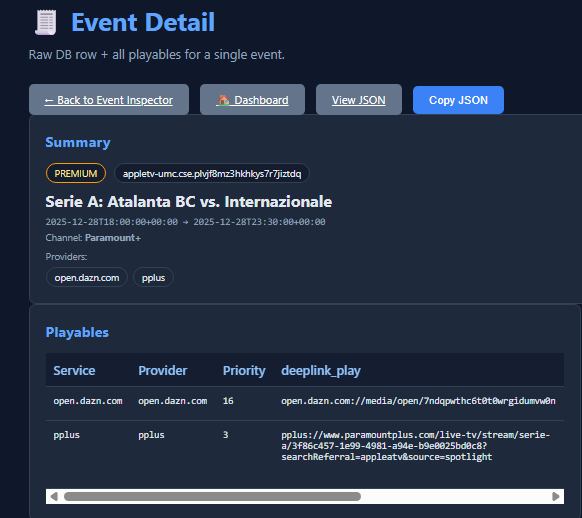
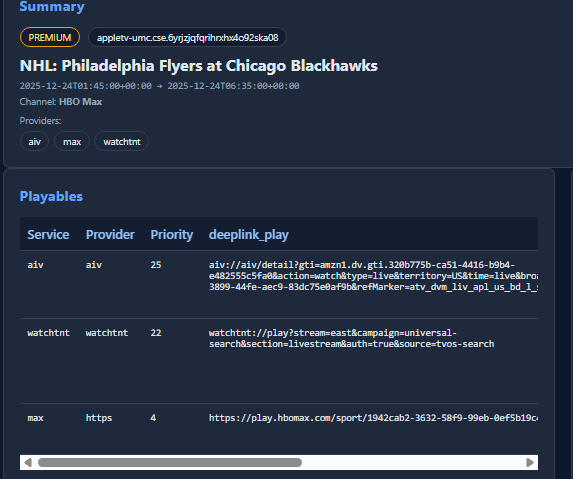
in regards to paramount plus-- if you wouldn't mind- next time you see a failed event (assuming you are on new version), go to Event Inspector and grab this screenshot. the deeplink_play comes straight from the scrape so interested to see what's failing. then we can debug if on FruitDeeplinks side, or the ADB config.

@KineticMan and @bnhf,

I tried installing with Project One-Click and it didn't install with those variables available. So I removed everything then reinstalled using the Repository method and it installed correctly with those variables for CC4C.

Alright, I've been testing the cc4c version for a little while this evening and good news, it works for the services that are available to me right now. In the windows executable cc4c, ESPN works (not in full screen though), Peacock works, and Amazon opens up (I'll have until tomorrow to see if the NBA game starts), and that's all the networks I can check right now.

In the Docker Desktop cc4c, the only problem is Peacock. I can only get the sad kitty face. :face_with_diagonal_mouth:

Great work!

New bnhf/olivetin:latest (aka bnhf/olivetin:205.12.22) pushed this morning with updated Project One-Click support for spinning-up FruitDeepLinks. This now includes the latest env vars needed for cc4c integration.

great feedback..

again the url's are educated guesses on my part -- if you all find good url combos that work (even experiment on your own directly on chrome on your pc), shoot me good URLs and we'll see if we can deduce the working URL schema to feed FruitDL!


Here you go. Tune through ADBTuner channel didn't work. Pasted deeplink found here in test channel I created in ADBTuner config, and that worked. So something not working in the request or something.