
Sorry to keep coming back to this; I found a solution. If you only want the free channels from FuboTV, sign up for a free trial. Add the container. Don't add the Fubo m3u's links from the admin page. Instead, download the txt files. Add the HLS and MPEG-TS as separate sources on your CDVR as text rather than URL. I copied the txt file for each and pasted it into each source. My two Fubo sources show 236 and 253 channels. The free channels will play! The paid channels (once your trial is over) will not. I hope this helps anyone who wants the free tier of Fubo channels. It still doesn't have ESPN 8, the Ocho. (It's now available through SamsungTV plus container, though.)
1 Like
Getting the following error both in docker and standalone
⇨ http server started on [::]:7777
[Errno 97] Address family not supported by protocol
I figured it out. the app needs ipv6 in order to work.
new bug. I get incorrect password unless I restart the docker 3 times or so. my password is correct though
Check the container environment variables to make sure the username and password are correct.
see Frndly TV for Channels - #1353 by chDVRuser
Of course, for Fubo they would be
[email protected]
FUBO_PASS=Monkey123!
And I'm sure the container works with IPv4 and not just IPv6
container also crashes on reboot but I found the following workaround
using:
sudo crontab -e
set the following script to run on reboot
#!/bin/sh
sudo docker kill vlc-bridge-fubo
sleep 5
sudo docker rm vlc-bridge-fubo
sleep 5
"insert docker run command here"
sleep 5
sudo docker restart vlc-bridge-fubo
sleep 5
sudo docker restart vlc-bridge-fubo
sleep 5
sudo docker restart vlc-bridge-fubo
sleep 5
sudo docker restart vlc-bridge-fubo
sleep 5
sudo docker restart vlc-bridge-fubo
sleep 5
curl -s http://localhost:8089/admin/settings/sources#
1 Like
Unusual problem.
What are you running the container on.
I have the same problem, it takes several restarts to get it going again...
I am running it on ubuntu 25.04 with docker 28.3.3 on a dell tower plus desktop (ebt2250) with a core ultra 7 265 cpu, 16gb ram, a nvidia rtx 2000 ada and an x550-t2 nic. I hope that is enough info 
I'll back out of the conversation since I no longer have a Fubo sub and don't even get the Free channels on their website. I ran the latest version of the container with no errors, but since I don't have a sub, I couldn't even get a playlist. I can login to their website, but am not offered a trial sub anymore. It was great back in the day when they had more channels, but their sub is too costly for my current needs, so I'll stick with YTTV for now 
2 Likes
I think this is happening everytime when I update to the latest pre-release, then the Fubo Docker stops working. At least that is what I am finding so far...Today (after doing the pre-release update) it took a couple of minutes and then it came back...
For me, this is a new issue, it only started happening in the past 2-3 weeks. I've tested a few scenarios to see what triggers it. It doesn't trigger when I update to the latest CDVR prerelease, but it seems most common after restarts to the vlc-bridge-fubo container, for whatever reason, be it a server restart, an update, etc.
At that point, even if I wait an hour, or wait a day, the first time I try to tune into a channel provided by this container, I have to click past this error on-screen a few times, in order to get the first stream to play:
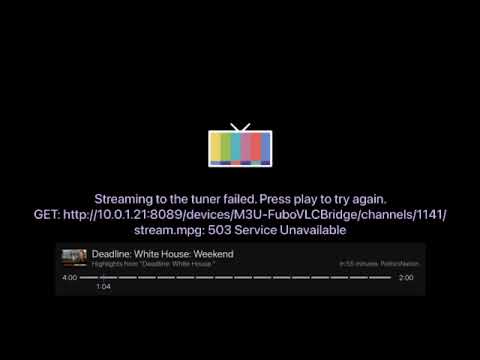
And then, it works fine. Channel surfing to more channels from the same container work fine too.
I think that's what @techpro2004's post above is meant to workaround as well? I'm not really sure.
@GenericChannelsUser, can this sort of fix be integrated into the container itself? I don't mind having to click a few times to get the fubo-vlc bridging working when channel surfing but I wouldn't want to miss scheduled recordings because of this issue, either.
I am not sure how I would implement something that would restart the docker several times in the compose or docker code itself like @techpro2004 is doing with the crontab. I do believe that their fix is a patch on a bigger issue, or set of issues that are currently occurring.
@Fofer: I noticed the same issue as you when tuning to a channel initially and have been looking for a fix for the last week. There currently appear to be two issues of which I am not sure if they are related:
- Something is going on with the login. It is unable to authorize users on the first go most of the time.
- There is an issue with a new line in the header values. This issue appears to be caused by flask based on the error logs and some searching.
I do not know if issue 1 stems from issue 2 or if it is wholly separate. I also am not sure how to fix either issue. If anyone here has any ideas on how to fix and wants to suggest fixes here or wants to post a pull request at gitlab it would be greatly appreciated.
I am getting the following error when clicking the url (http://xxx.xxx.x.x:7777/fubo/playlist-hls.m3u):
HTTP failure 401: {"error":{"code":"INVALID_USERNAME_PASSWORD","message":"The username and/or password used for authentication are invalid","lc_message":"The username and/or password used for authentication are invalid"}}
Password works perfectly fine on Fubo and is nothing unique. Eventually it will start working again...
0.0.10 is out now and should have fixed the errors that we were experiencing.
The update adds some logic to retry login attempts 10 times before it fails now. In the logs you will see the retry attempt number and the login error message each time it tries to login. This can take up to 20 seconds to tune to the first channel, but once it is logged in it should be good to go. This should solve the problem that we were facing but if anyone has issues with it please let me know.
I also updated the new line header value error.
1 Like
according to portainer, I am getting error 137 every time I reboot my server. the following script on reboot fixes it.
#!/bin/sh
sudo docker kill vlc-bridge-fubo
sleep 5
sudo docker rm vlc-bridge-fubo
sleep 5
"insert docker run command here"
sleep 20
curl -s http://localhost:8089/admin/settings/sources#
1 Like
I just rebooted my server and the container started right up no problem.
Error 137 appears to be a docker error that has to do with it being out of memory. Not sure why the commands that you are running would fix that error.
1 Like
I think my server has a timing issue as running the below also works. Please add a startup delay to the docker.
#!/bin/sh
sleep 5
sudo docker restart vlc-bridge-fubo
sleep 30
curl -s http://192.168.1.28:8089/admin/settings/sources#
Also, please have it have channels reload the m3u by the equivalent of the bottom line in the above code snippet.
Hmmm, I'm not getting error 137 either.
Why should the startup delay be added to the docker that everyone else uses as a workaround patch for an issue with your own server?
1 Like
because, if it affects me, it probably affects others with a similar config.