Generating Fingerprint

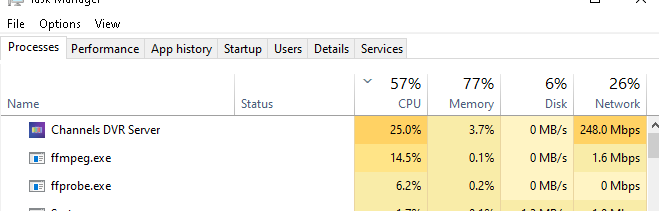
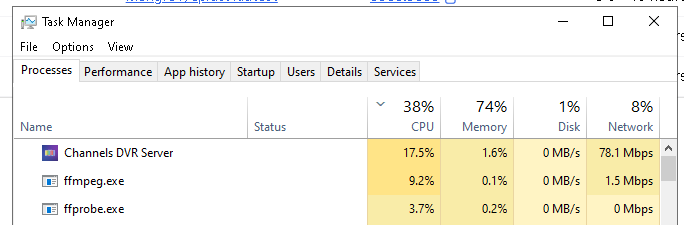
Can someone explain what is going in when I'm logging generating fingerprint for file xxxxxx in the log? I keep hearing my DVR (windows10) pc's fans spinning up when nobody is using it. When I look in the log i see the following in my log. Under activity I see video processing and the video name. In task manager channels is using substatial CPU and bandwidth. I guess I changed something because I don't remember those entries in the log before. Thanks

2025/12/22 09:57:18.623220 [DVR] Generating fingerprint for file-11390: The Blacklist S10E12 Dr Michael Abani 2023-05-14-2159.mpg
2025/12/22 09:59:18.333654 [DVR] Generated fingerprint for file-11390 in 2m0s
2025/12/22 09:59:18.371758 [DVR] Generating fingerprint for file-11394: Rio Bravo (1959) 2023-05-16-1959.mpg
2025/12/22 10:05:39.612720 [DVR] Generated fingerprint for file-11394 in 6m21s

image

Not you, Channels changed. However, this is in relation to the in-development Commercial Skip/Edits sharing feature:

You should probably get to the latest prerelease from last night because it specifically addresses the performance issues you are seeing.

Thanks. I had loaded a pre-release yesterday, but there was another one. I remember the request for commercial edits but I didn't enable that because I really don't edit commercials unless it is extremely bad. Loaded the new pre-release. Notice that the usage is lower but still there even with the submit disabled. But at least my fans aren't all running right now.
image

Fingerprinting has been enabled for all users to support current and future features (such as Intro/Credits detection). It is intended to run in the background (when no other activity is happening on your DVR) to not impact other playback.

Is there a way to opt-out of this new aggressive fingerprint generation? I would have thought the checkbox "Deep Video Processing" under Settings/General would control this behavior, but unchecked I'm still seeing the constant fingerprint generation. And while I agree it only runs as a background task, it still causes the PC to use a lot more power than it used to. I'm specifically using a power-efficient old Windows laptop (ThinkPad T410s) that idles under 10 watts, and now I'm seeing it consuming ~33 watts continuously due to all this new activity.

It appears to be walking my entire local content library of ~16TB (15,766 Recordings) generating a new fingerprint for each file. Per the log it appears to have started on 12/20 with an update I apparently took that day, and so far has processed 5,630 files. So that would mean I have about 2 more weeks of this heavy load before it hopefully settles down. But my fear is you'll change the fingerprint algorithm and it'll want to start all over again.

I'm all for continuous development and new features, but this seems like a really high price to pay for functionality I will likely never use, especially across my entire local library. Can you offer up some way to control this behavior, or perhaps selectively apply it?

Thx!

How do I disable this feature?

1 Like

This is fixed in the latest pre-release — previously already enqueued recordings would be processed if the setting was enabled at the time it was enqueued.

Yep, the latest update worked as expected. Thx for the quick response!

That change seemed to help at first, but I'm still seeing unexplained CPU and disk activity.

@eric Why is there is still constant disk write activity from Channels DVR (about 7 MB/s) when "Deep Video Processing" is disabled and the DVR status is "Idle" on the latest v2025.12.27.0547 pre-release? This has been happening for the last few hours at least, and continues as I post this. "Share Commercial Edits" is Off as well. Nothing is being watched or recorded, and the host is not doing anything else. This slows down the DVR Web UI noticeably on this older hardware.

The following screenshot is the Synology Task Manager on my DS1520+ NAS running the Channels DVR Synology package, while the DVR is supposedly "Idle":

I restarted the DVR via the unofficial API (curl -XPUT http://ip:8089/updater/force/restart) and the logs seem to indicate that it is still doing fingerprinting while "Deep Video Processing" is disabled, based on the "avprocessor-background work" log entries before and after a restart:

2025/12/27 19:32:20.418717 [ERR] Failed to pop queued avprocessor-background work: database not open
2025/12/27 19:32:20.443999 [DVR] Recording engine stopped.
2025/12/27 19:32:22.212545 [SYS] Starting Channels DVR v2025.12.27.0547 (linux-x86_64 pid:30563) in /var/packages/ChannelsDVR/target/channels-dvr/data
2025/12/27 19:32:22.990882 [SYS] Started HTTP Server on 8089
...
2025/12/27 19:32:39.402510 [WRN] Re-enqueuing interrupted avprocessor-background work #background.1765519323-20670
2025/12/27 19:32:41.692745 [DVR] Recording engine started in /volume1/DVR

There are also no log entries to indicate which file is (supposedly) being fingerprinted while "Deep Video Processing" is disabled (when enabled, the file-specific log entries return).

Logs have been submitted as 32ae5609-3e7a-4704-b295-b327968dcf6a.

The queue is recovering from an issue that was resolved in the last pre-release that just came out.

When there are no log entries and nothing in activity, it means that no files are being fingerprinted.

Just to clarify for everyone: turning off Deep Video Processing will make remote streaming worse, will make Intro/Credits Detection not work and will impact even more features in the future.

For the best experience, we suggest all users keep this turned on.

Will this queue recovery process take a while or should it finish within a few minutes after updating to v2025.12.28.0239? I ask because the CPU and disk activity continues after I've updated to v2025.12.28.0239. I tried toggling "Deep Video Processing" on and back off, but it's still going. Is this behavior expected?

Logs have been submitted as e195d18e-b108-4739-b283-624811075d3e.

Yes, it could take a while. It appears it's 1/3rd of the way through.

Is there any way to know how far through the process it is? Would be great to have some kind of UI that says 'completed XXXXX of YYYYY files'. It doesn't seem to be counting up sequentially so I can't calculate where it is at comparing current file number to total files.

1 Like

I'm seeing a problem where some files are not Generating fingerprint successfully. These seem to be either radio recordings (no video) which fail with No Keyframes were found in the stream error. Or video files imported from elsewhere which fail with more complex ffmpeg errors.

It would be helpful for Channels to handle these more gracefully / remember that these files don't work for this fingerprint feature.

The latest DVR pre-release should be handling situations like this better.