
I am trying to get ah4c running on my Mac-based Channels DVR server. I have gotten as far as running the OliveTin one-click action. And, I see it in Docker and Portainer. But, when I navigate to it, I can't seem to open all of the sidebar entries. For example, clicking "Edit ENV configuration & tuners" results in a "server unexpectedly dropped the connection" error. Clicking "Show ENV variables and currently loaded config" just loads a white page. I know enough about Docker to be dangerous, but I am stumped at this point. I am not as familiar with Portainer. I want to use ah4c because I am using an Osprey box.
Those couple of options you mentioned in the WebUI are only applicable for people that are using ah4c without Docker. Everything to do with env vars and tuners you've already done when you spun up the container through Project One-Click.
If you go into Portainer-Stacks, and then select ah4c followed by going into the Editor, scroll down the Environment variables section. Then in advanced mode, copy and paste the env var values shown into a post here. These are based on the values you used in Project One-Click. If you entered any of the e-mail alert info, you should redact that.
Here are mine as an example:
TAG=latest
DOMAIN=localdomain tailxxxxx.ts.net
ADBS_PORT=5037
HOST_PORT=7654
WSCR_PORT=7655
IPADDRESS=htpc6:7654
NUMBER_TUNERS=2
TUNER1_IP=firestick-rack1:5555
ENCODER1_URL=http://encoder_48007/0.ts
TUNER2_IP=firestick-rack2:5555
ENCODER2_URL=http://encoder_48007/4.ts
STREAMER_APP=scripts/firetv/channels
CHANNELSIP=media-server8
ALERT_SMTP_SERVER=smtp.gmail.com:587
ALERT_AUTH_SERVER=smtp.gmail.com
ALERT_EMAIL_FROM=[Redacted]
ALERT_EMAIL_PASS=[Redacted]
ALERT_EMAIL_TO=[Redacted]
UPDATE_SCRIPTS=false
UPDATE_M3US=false
TZ=US/Mountain
SPEED_MODE=true
KEEP_WATCHING=4h
HOST_DIR=/data2
This will give me an idea of where you're at so far...
Would you mind grabbing the list of env vars from the Portainer-Stacks Editor Environment variables section (use Advanced mode)?
I'm not sure where that list came from, but it's not from there.
Yeah, sorry, realized I had the wrong section.
TAG=latest
DOMAIN=localdomain
ADBS_PORT=5037
HOST_PORT=7654
SCRC_PORT=7655
IPADDRESS=htpc6:7654
NUMBER_TUNERS=1
TUNER1_IP=10.10.10.22:5555
ENCODER1_URL=http://encoder_48007/0.ts
TUNER2_IP=firestick-rack2:5555
ENCODER2_URL=http://encoder_48007/4.ts
STREAMER_APP=scripts/osprey/directv
CHANNELSIP=media-server6
ALERT_SMTP_SERVER=smtp.gmail.com:587
ALERT_AUTH_SERVER=smtp.gmail.com
[email protected]
ALERT_EMAIL_PASS=XXXXXXXX
[email protected]
LIVETV_ATTEMPTS=45
CREATE_M3US=false
UPDATE_SCRIPTS=true
UPDATE_M3US=true
TZ=US/Pacific
HOST_DIR=/Users/bmarks/Public/data
CDVR_M3U_NAME=dtvtream.m3u
Since my server is a Mac, I think I had to enter that directory paths manually like for "data"
A bunch of these values are wrong. You left the sample data in place, rather than entering the correct info for your setup. The items below marked by block quote, all need attention:
TAG=latest
DOMAIN=localdomain
ADBS_PORT=5037
HOST_PORT=7654
SCRC_PORT=7655
IPADDRESS=htpc6:7654
NUMBER_TUNERS=1
TUNER1_IP=10.10.10.22:5555
ENCODER1_URL=http://encoder_48007/0.ts
TUNER2_IP=firestick-rack2:5555
ENCODER2_URL=http://encoder_48007/4.ts
STREAMER_APP=scripts/osprey/directv
CHANNELSIP=media-server6
ALERT_SMTP_SERVER=smtp.gmail.com:587
ALERT_AUTH_SERVER=smtp.gmail.com
[email protected]
ALERT_EMAIL_PASS=XXXXXXXX
[email protected]
LIVETV_ATTEMPTS=45
CREATE_M3US=false
UPDATE_SCRIPTS=true
UPDATE_M3US=true
TZ=US/Pacific
HOST_DIR=/Users/bmarks/Public/data
CDVR_M3U_NAME=dtvtream.m3u
Find the appropriate values for those, and submit an updated list here, and I'll help you update your stack.
Ok thanks for the help. I think I overthought some of these and thought they were variables being pulled from one of the previous times I entered data. A few quick questions, though:
Is IPADDRESS the IP of the ah4c container, which if it's on the same server as Channels, would be the same IP? So, if my Channels server is 10.10.10.10, then I'd enter 10.10.10.10:7654 here?
If I set number of tuners to 1, I assume I can skip TUNER2_IP and ENCODER2_URL?
For CDVR_M3U_NAME, I think I just made a typo. The "dtvstream.m3u" entry should be correct for DirecTV streaming, right?
What's wrong with "localdomain" though? If everything is internal to my network, and even on the same physical server, I'm not sure what else I'd enter.
Thanks again.
Yes.
Yes, but leave them blank, rather than having incorrect data in your stack.
No, it's dtvosprey.m3u. Also, as of today we're switching the name of the STREAMER_APP value for Osprey's to STREAMER_APP=scripts/osprey/dtvosprey to keep it aligned with standards for ah4c. When you're ready I'll guide you through updating your stack, and pulling the latest version of ah4c.
Nothing if you're using IP addresses. It looked like you were wanting to use hostnames, based on your original env vars. Tailscale users (like me), often want to use MagicDNS hostnames, and for them both the local search domain and the Tailnet should be added.
Ok, I think I have everything configured correctly:
2025/09/10 11:38:57 [START] ah4c is ready
I don't see guide data even though it says it refreshed, but I haven't done any troubleshooting for that yet. I was also able to add the USA channel 9079 to my guide.
A couple quick questions, though. First, I set up the ENCODER_1 IP with what I know it will be, but the box itself hasn't arrived yet. If I try to record something on the USA channel after adding the channel to the Channels DVR guide, should I see the Osprey box change channels at the very least? Or, will even that not work until the HDMI box arrives? I know I obviously won't see anything, but I guess I thought I'd see it try to control the Osprey box.
Second, what are these IP's I see in the logs? I don't remember setting a private range anywhere:
2025/09/10 11:39:20 [GIN-debug] Request: 192.168.65.1 GET /, latency: 1.211911ms, status: 200
2025/09/10 11:39:27 [GIN-debug] Request: 192.168.65.1 GET /logs, latency: 682.752µs, status: 200
2025/09/10 11:39:53 Alert sent email successfully
2025/09/10 11:39:53 [GIN-debug] Request: 192.168.65.1 GET /test/email, latency: 868.491262ms, status: 200
2025/09/10 11:40:21 [GIN-debug] Request: 192.168.65.1 GET /logs, latency: 651.379µs, status:
Thanks again for the help. This is awesome.
Can you post what your CDVR ah4c Custom Channels source looks like? Go into Edit Settings and get a screenshot if you would please.
Not sure. This isn't something I really tested. Maybe?
Docker uses private ranges internally.
Did you Re-pull and redeploy when you updated those env vars in the Portainer-Stacks Editor? That's how you get the latest version of a container if a newer one is available...
In reverse... no, I didn't re-pull and redeploy, I left that slider disabled. Should I do that? It sounded like I might need to make other changes too when you mentioned it earlier.
Here are two screenshots. The first is the custom channel settings. The second I added just in case. The "DirecTV Numbered" was how I read to be able to set the DirecTV channel numbers manually so I could make them like the native DirecTV channels. My family has had DirecTV since 1994 so I have them memorized  But, I didn't know if that might conflict with anything related to ah4c:
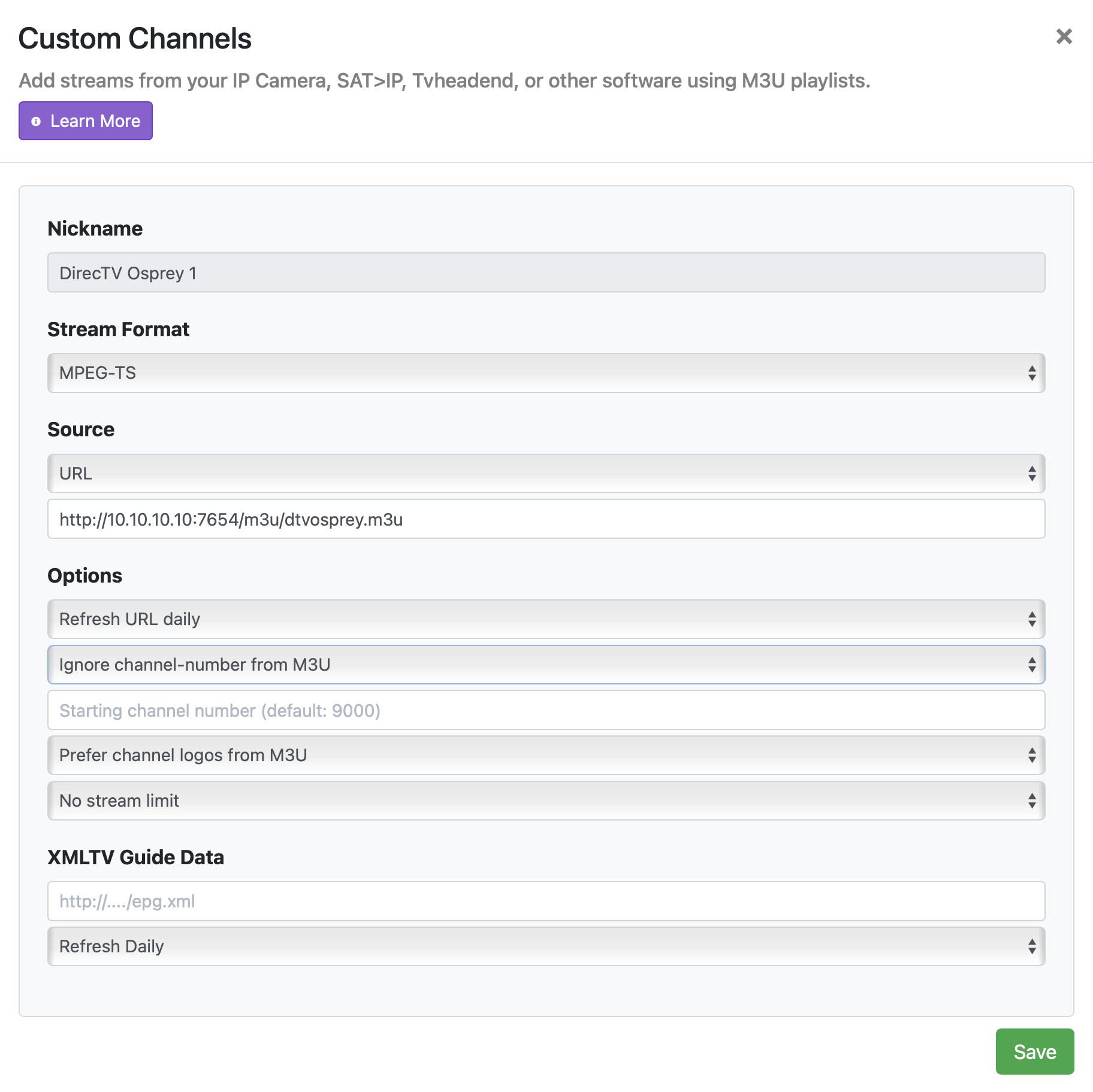
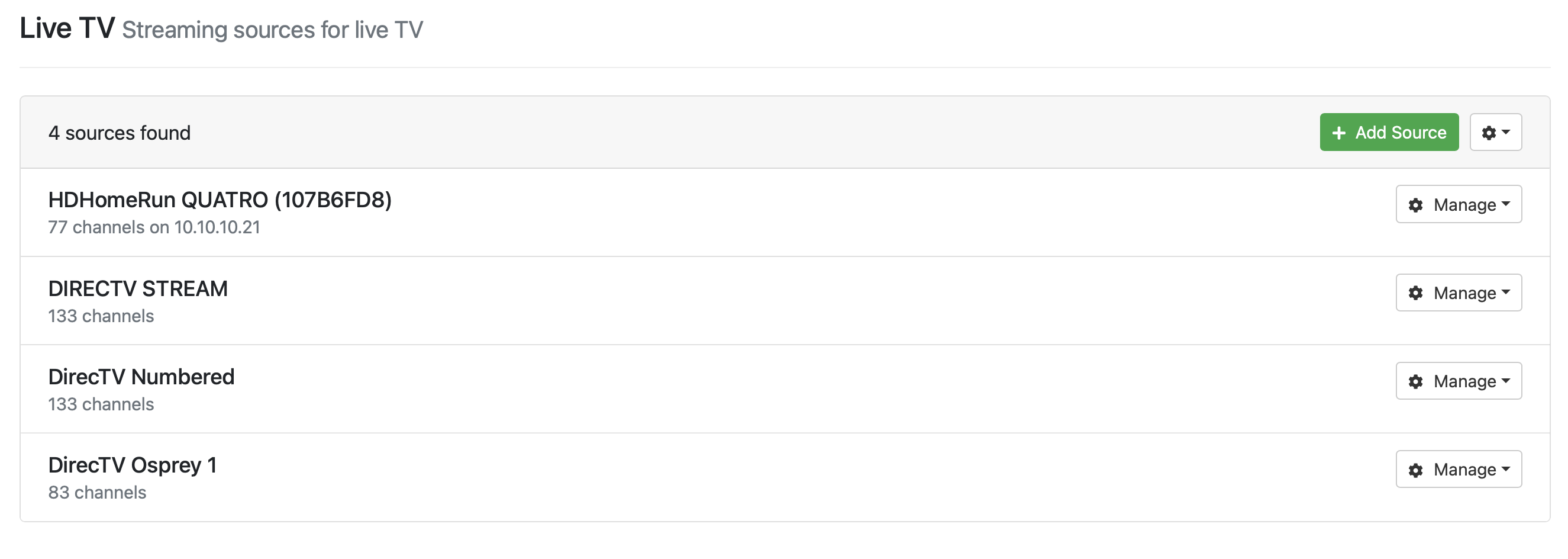
Also... does ah4c trigger a developer mode request to approve the access on the Osprey device? I haven't seen that today since I got this working. Over the weekend, I can't remember if I saw it for this, or when trying to set up ADBTuner. I am mixing up all the things I did over the weekend.
Yes. I updated ah4c today.
Yes, every time the container starts. Try looking in the Portainer-Log for ah4c, and you should see whether connections were made at startup. something like this:
127.0.0.1	localhost
::1	localhost ip6-localhost ip6-loopback
fe00::	ip6-localnet
ff00::	ip6-mcastprefix
ff02::1	ip6-allnodes
ff02::2	ip6-allrouters
172.20.0.2	ah4c
192.168.110.50 firestick-rack1
192.168.110.192 firestick-rack2
192.168.110.130 encoder_48007
* daemon not running; starting now at tcp:5037
* daemon started successfully
List of devices attached
connected to firestick-rack1:5555
connected to firestick-rack2:5555
Existing ./scripts/firetv/directv/prebmitune.sh found, and will be preserved
Existing ./scripts/firetv/channels/prebmitune.sh found, and will be preserved
Existing ./scripts/firetv/directv/bmitune.sh found, and will be preserved
Existing ./scripts/firetv/channels/bmitune.sh found, and will be preserved
Existing ./scripts/firetv/directv/stopbmitune.sh found, and will be preserved
Existing ./scripts/firetv/channels/stopbmitune.sh found, and will be preserved
Existing directv.m3u found, and will be preserved
Existing dtvdeeplinks.m3u found, and will be preserved
Existing dtvosprey.m3u found, and will be preserved
Existing dtvstream.m3u found, and will be preserved
Existing dtvstreamdeeplinks.m3u found, and will be preserved
Existing foo-fighters.m3u found, and will be preserved
Existing fubo.m3u found, and will be preserved
Existing hulu.m3u found, and will be preserved
Existing livetv.m3u found, and will be preserved
Existing nbc.m3u found, and will be preserved
Existing npo.m3u found, and will be preserved
Existing pbs-seatac.m3u found, and will be preserved
Existing pbs-worcester.m3u found, and will be preserved
Existing silicondust.m3u found, and will be preserved
Existing sling.m3u found, and will be preserved
Existing spectrum.m3u found, and will be preserved
Existing xfinity.m3u found, and will be preserved
Existing youtubetv_shield.m3u found, and will be preserved
Existing youtubetv.m3u found, and will be preserved
No user-defined custom script to run
[START] ah4c is starting
[ENV] Not loading env
[ENV] IPADDRESS                  htpc6:7654
[ENV] ALERT_SMTP_SERVER          smtp.gmail.com:587
[ENV] ALERT_AUTH_SERVER          smtp.gmail.com
[ENV] ALERT_EMAIL_FROM           [Redacted]
[ENV] ALERT_EMAIL_PASS           [Redacted]
[ENV] ALERT_EMAIL_TO             [Redacted]
[ENV] ALERT_WEBHOOK_URL
[ENV] ALLOW_DEBUG_VIDEO_PREVIEW
[ENV] Creating tuner             1
[ENV] ENCODER1_URL               http://encoder_48007/0.ts
[ENV] TUNER1_IP                  firestick-rack1:5555
[ENV] CMD1
[ENV] TEECMD1
[ENV] PRE SCRIPT                 ./scripts/firetv/channels/prebmitune.sh
[ENV] START SCRIPT               ./scripts/firetv/channels/bmitune.sh
[ENV] STOP SCRIPT                ./scripts/firetv/channels/stopbmitune.sh
[ENV] REBOOT SCRIPT              ./scripts/firetv/channels/reboot.sh
[ENV] Creating tuner             2
[ENV] ENCODER2_URL               http://encoder_48007/4.ts
[ENV] TUNER2_IP                  firestick-rack2:5555
[ENV] CMD2
[ENV] TEECMD2
[ENV] PRE SCRIPT                 ./scripts/firetv/channels/prebmitune.sh
[ENV] START SCRIPT               ./scripts/firetv/channels/bmitune.sh
[ENV] STOP SCRIPT                ./scripts/firetv/channels/stopbmitune.sh
[ENV] REBOOT SCRIPT              ./scripts/firetv/channels/reboot.sh
[GIN-debug] [WARNING] Running in "debug" mode. Switch to "release" mode in production.
 - using env:	export GIN_MODE=release
 - using code:	gin.SetMode(gin.ReleaseMode)
[GIN-debug] GET    /favicon.ico              --> main.run.(*RouterGroup).StaticFile.func24 (2 handlers)
[GIN-debug] HEAD   /favicon.ico              --> main.run.(*RouterGroup).StaticFile.func24 (2 handlers)
[GIN-debug] Loaded HTML Templates (11):
	-

	- edit.html
	- routes.html
	- status_and_logs.html
	- stream.html
	- config.html
	- editm3u.html
	- index.html

	- logs.html

	- m3us.html
	- status.html
[GIN-debug] GET    /static/*filepath         --> github.com/gin-gonic/gin.(*RouterGroup).createStaticHandler.func1 (2 handlers)
[GIN-debug] HEAD   /static/*filepath         --> github.com/gin-gonic/gin.(*RouterGroup).createStaticHandler.func1 (2 handlers)
[GIN-debug] GET    /                         --> main.run.func1 (2 handlers)
[GIN-debug] GET    /routes                   --> main.run.func2 (2 handlers)
[GIN-debug] GET    /play/tuner:tuner/:channel --> main.run.func3 (2 handlers)
[GIN-debug] GET    /m3u/:channel             --> main.run.func4 (2 handlers)
[GIN-debug] GET    /env                      --> main.run.func5 (2 handlers)
[GIN-debug] GET    /logs/text                --> main.run.func6 (2 handlers)
[GIN-debug] GET    /logs                     --> main.run.func7 (2 handlers)
[GIN-debug] GET    /status/andlogs           --> main.run.func8 (2 handlers)
[GIN-debug] GET    /logs/json                --> main.run.func9 (2 handlers)
[GIN-debug] GET    /video                    --> main.run.func10 (2 handlers)
[GIN-debug] GET    /status                   --> main.statusPageHandler (2 handlers)
[GIN-debug] GET    /api/status               --> main.apiStatusHandler (2 handlers)
[GIN-debug] GET    /stream                   --> main.run.func11 (2 handlers)
[GIN-debug] GET    /test/webhook             --> main.run.func12 (2 handlers)
[GIN-debug] GET    /test/email               --> main.run.func13 (2 handlers)
[GIN-debug] GET    /status/channelsactivity  --> main.run.func14 (2 handlers)
[GIN-debug] GET    /edit                     --> main.run.func15 (2 handlers)
[GIN-debug] POST   /save                     --> main.run.func16 (2 handlers)
[GIN-debug] POST   /m3usave/:file            --> main.run.func17 (2 handlers)
[GIN-debug] GET    /m3us                     --> main.run.func18 (2 handlers)
[GIN-debug] GET    /editm3u/:file            --> main.run.func19 (2 handlers)
[GIN-debug] GET    /config                   --> main.run.func20 (2 handlers)
[GIN-debug] POST   /configsave               --> main.run.func21 (2 handlers)
[START] ah4c is ready
[GIN-debug] Listening and serving HTTP on :7654
> [email protected] start
> node ./index.js
Listening on:
	http://ah4c:8000/ http://localhost:8000/
	http://127.0.0.1:8000/ http://172.20.0.2:8000/
	http://[::1]:8000/
Ok, it looks like it is connecting:
2025-09-10T18:38:57.419748595Z connected to 10.10.10.22:5555
I can update everything now, but when I do so, I will need to make this change, correct?
STREAMER_APP=scripts/osprey/dtvosprey
Are there any other changes to the config that I will need to make?
Yes.
Post it, and I'll look.
Ok, thanks.
I just want to be 100% sure... so I want to enable this when updating the config, right?
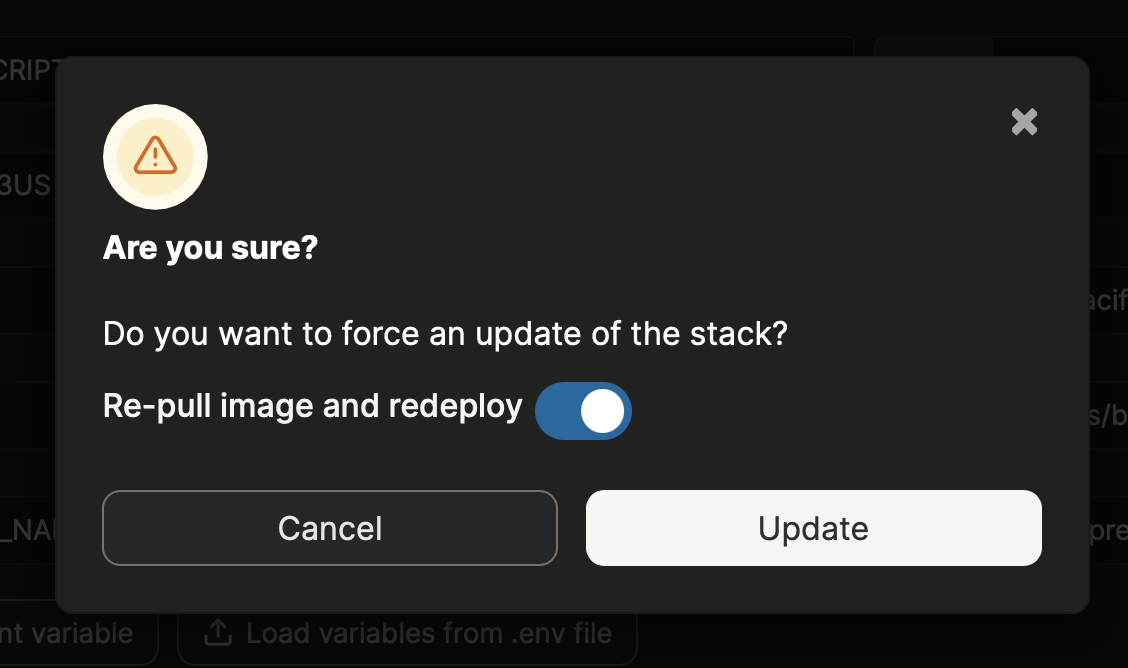
Yes, this is the easiest way both update and redeploy any stack.
Ok, thanks.
Here are the updated variables:
TAG=latest
DOMAIN=localdomain
ADBS_PORT=5037
HOST_PORT=7654
SCRC_PORT=7655
IPADDRESS=10.10.10.10:7654
NUMBER_TUNERS=1
TUNER1_IP=10.10.10.22:5555
ENCODER1_URL=http://10.10.10.23/0.ts
TUNER2_IP=
ENCODER2_URL=
STREAMER_APP=scripts/osprey/dtvosprey
CHANNELSIP=10.10.10.10
ALERT_SMTP_SERVER=smtp.gmail.com:587
ALERT_AUTH_SERVER=smtp.gmail.com
[email protected]
ALERT_EMAIL_PASS=XX
[email protected]
LIVETV_ATTEMPTS=45
CREATE_M3US=false
UPDATE_SCRIPTS=true
UPDATE_M3US=true
TZ=US/Pacific
HOST_DIR=/Users/bmarks/Public/data
CDVR_M3U_NAME=dtvosprey.m3u
Looks good. I'd maybe leave LIVETV_ATTEMPTS= blank, as that's not relevant to what you're doing. That way, later on you're not wondering what that's for...
Ok, awesome, thanks! I will probably stop here for now until the encoder arrives.
Anything I need to do about the guide data, though?

Should that channel number match the dtvosprey.m3u numbe of 242? I feel like I did something wrong.