GLIBC not found - Chrome installation corrupted

Hey all!

So some weird things are going on and I'm not sure where the problem exists. glibc? chrome? ubuntu os?

First, I've had an install of channels going for a long time. I've recently upgraded hardware and migrated channels to the new hardware. Things have been working fine. I moved the install to ~ and off the external storage and the dvr is located on usb attached disk array.

I ran into the snapd problem last month and disabled snapd and channels installed chrome and everything has been working fine. But for some reason, after moving the install off the usb storage to ~ I'm getting the "Chrome installation corrupted" in Troubleshooting. I can click to upgrade chrome and it says it works, but when I scan channels in TVE I get this message.

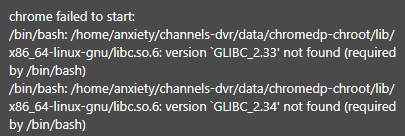
data/chromedp-chroot/lib/x86_64-linux-gnu/libc.so.6: version GLIBC_2.34' not found data/chromedp-chroot/lib/x86_64-linux-gnu/libc.so.6: version GLIBC_2.33' not found

I'm running pre-release 2023.11.06.2221

which ldd
/usr/bin/ldd

ldd --version
ldd (Ubuntu GLIBC 2.35-0ubuntu3.4) 2.35

I'm guessing my glibc is too new and channels is looking for an older version? Not real sure what I've managed to mess up, any guidance is appreciated :slight_smile:

Diagnostics submitted: 09fc53f1-4b32-45f9-a91a-772ab1f7a8da

Please update to the latest pre-release build and try it again.

thanks @eric

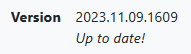
I've updated to the 2023.11.09.1609 release and I don't see a change. Must be something else with my system that may not be related to Channels. (as a side, looks like my ISP is having DNS woes currently so other things are happening that is keeping me from testing correctly)

image

This has now returned.

image

This is new however. Prior to 11.09 update, this would resolve.

The log output when trying to reinstall from Troubleshooting

You could install chrome via your OS package manager

That makes too much sense now doesn't it @tmm1

I was operating under the impression that I should let Channels use the package that it wanted since I've disabled Snap because of the issues that has caused.

I've installed Chrome (not Chromium) and now things are working. Thanks for the direction.

Please update to the latest pre-release and try it again. When you upgrade Chrome it should resolve your issue.

image

There's a newer version @eric ?

As I mentioned, things are working now that I've installed Chrome instead of chromium-browser (since I've disabled snapd).

I don't see diagnostics from you with that release version.

This topic was automatically closed 365 days after the last reply. New replies are no longer allowed.