
Still no action on this request from TMDB. Guess they aren't interested in fixing it
They probably don't know it's affecting you since the Channels DVR TMDB API relies on the movie collection data.
They probably think since you already know the movie is part of a collection(TMDB), franchise(CDVR) that you're just whining about their website 
Now that I replied to you, I took a last look at their website. Appears they fixed it.
I would guess if you update the metadata on that movie in CDVR it will now show correctly.
Well, if they fixed it, they haven't updated my ticket saying so, AND refreshing metadata doesn't yet add the 492492 Franchise tag info Channels looks at. Besides, I explained in the ticket that it was affecting my Channels DVR not placing it in a Franchise folder. So, I don't think that part of it is fixed as of yet.
You're correct. Appears they just fixed their website and the API Channels DVR uses didn't get updated.
Just did a quick test by doing an import of the movie (using a small video file) and the Franchise info for the movie is missing. Either Channels DVR doesn't pick up on their API changes fast enough, or it's still missing in the TMDB API info for the movie.

One would have to subscribe to their API to know for sure.
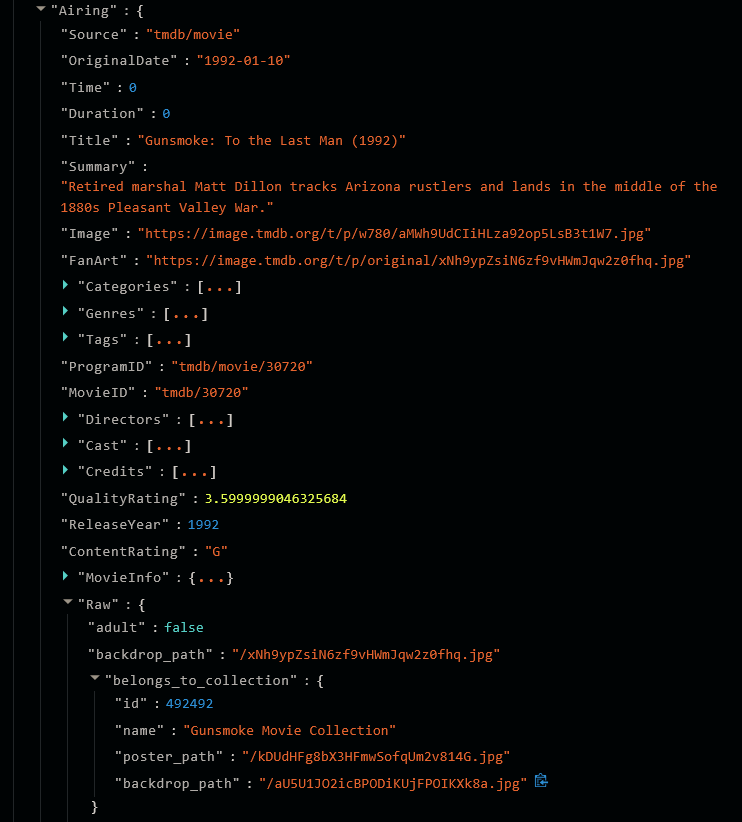
I don't have this tag area formatted and showing the franchise tag in ANY of the movies, and not in this specific movie, even after refreshing metadata. Not sure how you got that full screenprint to paste in there. In the other 4 movies files, there's a section 3/4's the way down which shows in the area just above the channel it recorded on, showing this:
Using the twisties  in my browser, I reduce (unexpand) the tags and use zoom to show the area I want to screen capture before I do it..
Beats me, I've never heard of this "Twistie" function.
I can show this from another one of the movies, "Return to Dodge"
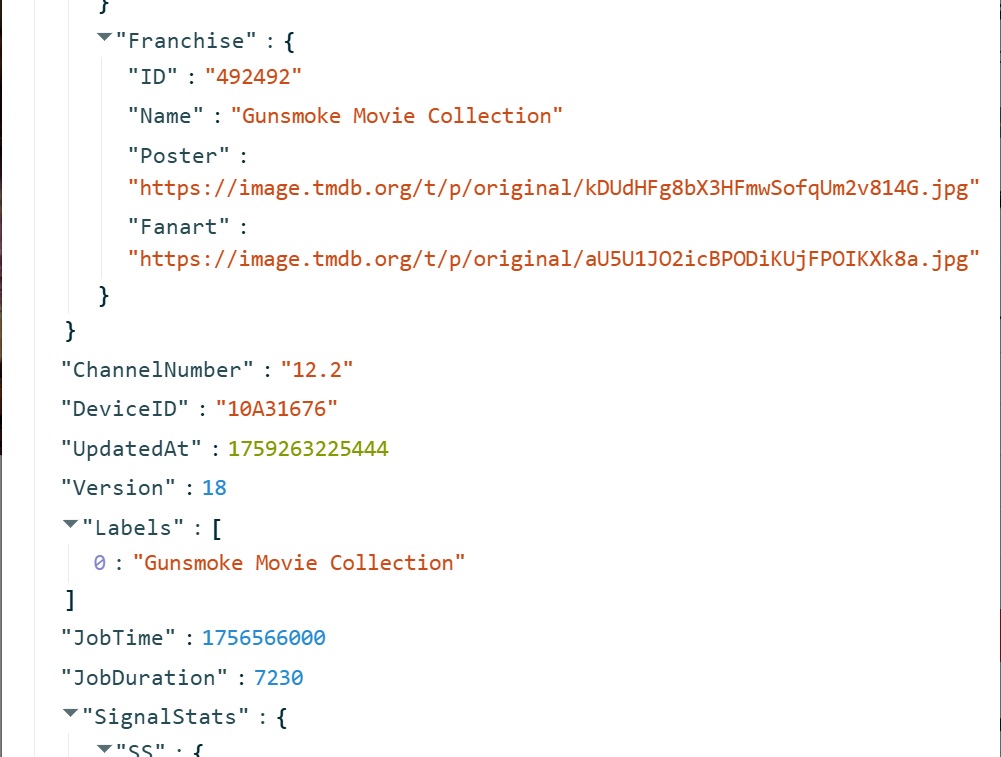
Yah, yours is a recording, mine is an import.
You need to look at what section in the json structure you're displaying.
I'm assuming it's Airing.MovieInfo.TMDB

Anyways, getting hungry and time for a break.
I'll let the devs answer.
@maddox @tmm1
How do you refresh the movie metadata in Channels DVR so it picks up the updated info from TMDB?
Doing a refresh metadata doesn't pick it up.
You can sign up for a free API key at TMDB and see the movie does have the franchise info in details.
curl --request GET \
     --url 'https://api.themoviedb.org/3/movie/30720?language=en-US' \
     --header 'Authorization: Bearer <REDACTED>' \
     --header 'accept: application/json'
{
  "adult": false,
  "backdrop_path": "/xNh9ypZsiN6zf9vHWmJqw2z0fhq.jpg",
  "belongs_to_collection": {
    "id": 492492,
    "name": "Gunsmoke Movie Collection",
    "poster_path": "/kDUdHFg8bX3HFmwSofqUm2v814G.jpg",
    "backdrop_path": "/aU5U1JO2icBPODiKUjFPOIKXk8a.jpg"
  },
  "budget": 0,
  "genres": [
    {
      "id": 10770,
      "name": "TV Movie"
    },
    {
      "id": 37,
      "name": "Western"
    }
  ],
  "homepage": "",
  "id": 30720,
  "imdb_id": "tt0104379",
  "origin_country": [
    "US"
  ],
  "original_language": "en",
  "original_title": "Gunsmoke: To the Last Man",
  "overview": "Retired marshal Matt Dillon tracks Arizona rustlers and lands in the middle of the 1880s Pleasant Valley War.",
  "popularity": 5.5931,
  "poster_path": "/aMWh9UdCIiHLza92op5LsB3t1W7.jpg",
  "production_companies": [
    {
      "id": 124448,
      "logo_path": null,
      "name": "CBS Entertainment Productions",
      "origin_country": "US"
    }
  ],
  "production_countries": [
    {
      "iso_3166_1": "US",
      "name": "United States of America"
    }
  ],
  "release_date": "1992-01-10",
  "revenue": 0,
  "runtime": 0,
  "spoken_languages": [
    {
      "english_name": "English",
      "iso_639_1": "en",
      "name": "English"
    }
  ],
  "status": "Released",
  "tagline": "",
  "title": "Gunsmoke: To the Last Man",
  "video": false,
  "vote_average": 7.2,
  "vote_count": 5
}
That belongs_to_collection appears in the Channels DVR files json for the movie in .Airing.Raw
    "Raw": {
      "adult": false,
      "backdrop_path": "/xNh9ypZsiN6zf9vHWmJqw2z0fhq.jpg",
      "belongs_to_collection": {
        "id": 492492,
        "name": "Gunsmoke Movie Collection",
        "poster_path": "/kDUdHFg8bX3HFmwSofqUm2v814G.jpg",
        "backdrop_path": "/aU5U1JO2icBPODiKUjFPOIKXk8a.jpg"
      },
But not in .Airing.Franchise or .Airing.MovieInfo.TMDB.Franchise like the other 4 movies
Easy enough to verify by importing these 5 videos

Try updating in your DVR now
I just updated to the latest prerelease, then did a refresh metadata on it.
Working now.
What was it?
So you updated your dvr to v2025.10.03.1742, and it fixed it?
I updated, but it's re-indexing everything right now.
Our metadata engine caches, for obvious reasons, and updates your metadata over time. We do this once we see changes in content. It would have updated eventually.
We forced the update on our end.
2 Likes