
You are not using the correct URL. You are using a ddns.net address. You need to use your unique channels alphanumeric url it forwards you to when you login to my.channelsdvr.net you also need to loose the format=ts. Change only the fxxxxx to yours and leave the rest alone.
The chrome cookie has always ended in ==
You are not trying to host your channels server in a cloud are you?
I have my own ddns.net dynamicdns tied into my router and 8089 port forwarded. It works well with my ThreadFin setup. But not with Channels; even when switching back to the channelsdvr.net URL, it still doesn't work in Plex. I am, however able to open a web browser while connected to my personal hotpsot and download the m3u file by pasting that address even though I have yet to authorize on this network and incognito window.
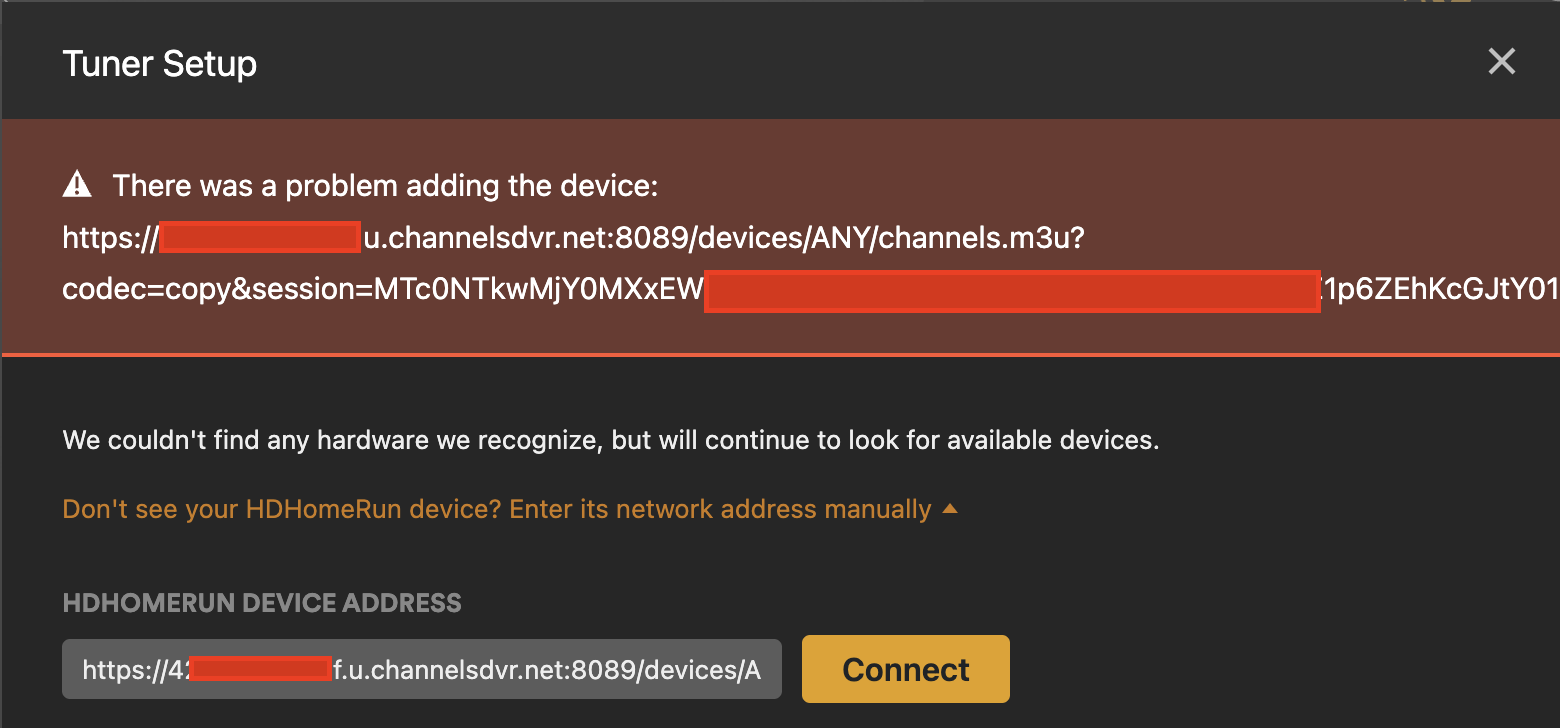
This will not work with channels and session id cookies. What is the exact channels url you are trying? Change your alphanumeric and shorten the cookie to 5 characters for privacy.
In cdvr settings remote needs to be enabled and 8089 forwarded. Can you reach your dvr from your phone app while on cellular data?
Did you see my last screenshot? I switched it to 4___f.u.channelsdvr.net (the URL directly copied from Sources > Copy M3U URL. and then added &session= with my cookie and removed format=ts. Still not working.
Yes. Remote is enabled, 8089 is forwarded and I can reach the DVR externally.
Edit: My full URL looks like this:
https://4REDACTED3f.u.channelsdvr.net:8089/devices/ANY/channels.m3u?codec=copy&session=MTc0NREDACTED
1 Like
Sorry your screenshot wasn’t up yet when I started to respond. Your URL looks good. If you follow the steps in post #1 with guide data and it still doesn’t work I guess session id won’t work with plex tuner.
https://xxx.u.channelsdvr.net:8089/devices/ANY/guide/xmltv?duration=604800&session=xxx
Session id works with dvr to another dvr so I figured it was possible with plex. It’s possible cdvr doesn’t have code built in to handle session id and plex as noted there is some background things going on.
(Note that Plex doesn't support M3U. We detect when Plex is accessing the M3U url and return data in a format that Plex can understand)
I seem to be encountering as issue with playback on plex desktop clients (not the web client). I have this in my logs: Error parsing AAC extradata, unable to determine samplerate.
This seems to be an issue that others have encountered with other m3u to HDMH solutions and they were able to get over it by forcing the audio codec in ffmpeg i.e. -c:a ac3
Is there anyway to make channels do this?
I was going to write a wrapper script around ffmpeg, but I saw that when I listed all processes with ps aux | grep ffmpeg that channels is not calling anything called ffmpeg for this.
Not sure if anyone else is having this issue, but live sports info in the Plex guide is different than in the Channels guide. For instance, tonight’s Phillies game on NBCSP shows the correct game info in Channels but shows Yankees vs CLE in Plex. Every live baseball game in the Plex guide shows the Yankees game info, no matter the channel. I refreshed the guide data in Channels and then Plex, but no change.
I haven’t used Plex for this purpose in a while, but several months ago I ran into the same thing with football and basketball.
Curious if anyone has has been succesful in using CDVR as a tuner for Plex accross Tailscale? I have a Synology at my mom's cabin in the mountains and I was trying to share the M3U from it to my local version of Plex at my house. I haven't been able to get the CDVR to be seen across Tailscale, even when adding the IP address manually (Plex does see my local server).
I've also tried using Threadfin at the cabing to supply the Channels M3U to m local Plex and I can get Plex to see that and download the guide and populate the grid, but when I click on any channel, it never plays except when I manually play the channel using the specific channel M3U on VLC, then that channel will play on Plex.
Thanks. I don't recall when I installed that script but I have it running on both of my Synology NAS boxes (both the local and remote).
I'm assuming that it's letting the traffic through as I can see the channel load in the originating CDVR server, but it only shows the connection for 5 seconds and then drops. And if I manually watch the channel through VLC and have an active stream going, then I can trigger through the CDVR->Threadfin->Tailscale->Plex connection and it will play, but id the VLC instance isn't working, then the Plex player won't initiate the channel.
I've checked CDVR and Threadfin logs, nothing useful is showing as far as I can tell. Will keep researching, but this is well above my technical knowledge, so not sure what else it may be.
Jay
You have to run the script manually after every Tailscale package update, since the Synology Task Scheduler only runs it at Synology bootup. Yes, a pita.
Upgrading the Tailscale package will require the above script to run again. When you upgrade Tailscale, run the above script as root, or reboot your Synology device.

1 Like
That did the trick, thanks. Never would have figured that out myself.
Because plex handles live television like an absolute tire fire i'm having issues with the one person that actually uses this on a roku - slightly at the edge of wifi (i know) and the transcode from mpeg2 to h264 is 20 mbps
is there anyway to pass this through to plex with http://10.1.2.239:8089/dvr/collections/channels/19/channels.m3u?format=hls&bitrate=8000&codec=h264 so channels gives a consistent clean source? it currently isn't working but i'm wondering if i made a small syntax error
EDIT: realizing that of course plex live doesn't accept hls - if i change to ts the stream just fails
It seems to fail everywhere though if you set a bitrate and ts
2 Likes
Seems plex needs format=ts and once you use that in the channels url it ignores all other options.
Would love to be able to pass on my hdhr streams already deinterlaced.
Hey everyone. I'm trying to set this up, and I keep getting the message in the red banner that says "There was a problem saving channel mappings. Please try again."
If it helps to troubleshoot, my Channels server is set up running with 6 tuners.
HD Home Run - 81 channels
Directv Stream - 109 Channels
Pluto - 416 Channels
Tubi - 168 Channels
Plex - 680 Channels
Samsung TV Plus - 481 Channels
Not all of these are exposed - have most of the duplicates across them hidden/not active in my list.
I'm running the most recent pre-release 2025.12.23.0250
I had this up and running for many years without issue, but nuked my plex set up about 8 months ago and am now just going to try setting it up again, and I'm hitting a wall.
Not running any special vpn's or anything else.
I think you're overloading the plex server with all those channels. Use something like SLM to get it down to about 450
Plex's channel limit are a bit liberal nowadays from memory but the fewer channels, the better
1 Like
What is SLM?
1 Like