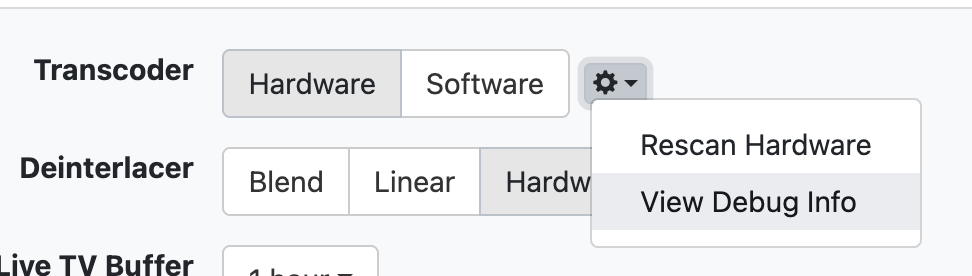
Does anyone know how to get Hardware transcoding working on a Synology DS425+ running DSM 7.4.1-90080?
I have driven myself mad following Gemini and ChatGPT on how to fix the issue so I thought I'd ask for some human help if it's out there.

Does anyone know how to get Hardware transcoding working on a Synology DS425+ running DSM 7.4.1-90080?
I have driven myself mad following Gemini and ChatGPT on how to fix the issue so I thought I'd ask for some human help if it's out there.
I don't have an answer, but I suggest you provide additional information such as how is it installed (natively through a package container or inside a docker). Those that can trouble shoot better will likely want to know.
And I see hardware transcoding in both my package install as well as in docker, so it should work in both.
If you installed via ssh into the synology, did you follow these instructions on the linxu page:
sudo chown $(id -u -n) channels-dvr
If you have an Intel processor, make sure you add your user to the video and render groups so the Channels DVR Server transcoder can use /dev/dri for hardware acceleration: sudo adduser $(id -u -n) video && sudo adduser $(id -u -n) render.
Don't think that's necessary for package install, and docker has it's own commands to enter the intel driver access with I believe.
Not sure what you tried but here's a possible solution. Looks like developer responds to issue posted on GitHub.
Thanks so much for the reply.
I originally installed through the package and then tried a docker install but neither worked.
What Synology model are you using? This seems to be an issue with the newer models where they have turned off access in the kernel.
Hi thanks for replying.
I installed this and it worked for plex and jellyfin but not channels I'm afraid
Is channels installed natively or in a docker?
I have tried both. Currently I am back at native
I would have thought that if it was working in Plex and others that it should work for Channels.
Maybe the order of installation matters. When installing Channels, are you just restoring or as a new install? I would try a new install versus a restore if you haven’t done that yet.
Other than that, I just don’t know. Let us know if you find a solution.
https://nascompares.com/2025/09/24/how-to-get-hardware-transcoding-back-on-your-synology-nas/
Precisely for this reason, the Channels devs have been recommending any N100-based PC or NAS over Synology products for quite some time. Synology simply stopped supporting transcoding, and their products are underpowered for this anyway. I'm happy with my 718+ but I don't need transcoding.
It's working for Plex so that might be the way forward for me as my TV streamer.
Pity as Channels is such an nice interface but I've invested in the Synology now so have to make it work as my PC died
What exactly do you need transcoding for? Maybe there's a user project that addresses it.
Watching away from home on fire stick and on my phone,
Debug log
Hardware Transcoder Probe
×Close
[Parsed_testsrc_0 @ 0x3cc9400] size:1280x720 rate:60/1 duration:-1.000000 sar:1/1 Input #0, lavfi, from 'testsrc=size=1280x720:rate=60': Duration: N/A, start: 0.000000, bitrate: N/A Stream #0:0: Video: wrapped_avframe, 1 reference frame, rgb24, 1280x720 [SAR 1:1 DAR 16:9], 60 fps, 60 tbr, 60 tbn Stream mapping: Stream #0:0 -> #0:0 (wrapped_avframe (native) -> h264 (h264_amf)) Press [q] to stop, [?] for help [graph 0 input from stream 0:0 @ 0x3cd2680] w:1280 h:720 pixfmt:rgb24 tb:1/60 fr:60/1 sar:1/1 [auto_scale_0 @ 0x3cd11c0] w:iw h:ih flags:'' interl:0 [format @ 0x3cd3e00] auto-inserting filter 'auto_scale_0' between the filter 'Parsed_null_0' and the filter 'format' [auto_scale_0 @ 0x3cd11c0] w:1280 h:720 fmt:rgb24 sar:1/1 -> w:1280 h:720 fmt:yuv420p sar:1/1 flags:0x00000004 [h264_amf @ 0x3cce880] DLL libamfrt64.so.1 failed to open [vost#0:0/h264_amf @ 0x3cce100] Error initializing output stream: Error while opening encoder for output stream #0:0 - maybe incorrect parameters such as bit_rate, rate, width or height Terminating demuxer thread 0 Conversion failed!
exit status 1
[Parsed_testsrc_0 @ 0x31a0400] size:1280x720 rate:60/1 duration:-1.000000 sar:1/1 Input #0, lavfi, from 'testsrc=size=1280x720:rate=60': Duration: N/A, start: 0.000000, bitrate: N/A Stream #0:0: Video: wrapped_avframe, 1 reference frame, rgb24, 1280x720 [SAR 1:1 DAR 16:9], 60 fps, 60 tbr, 60 tbn Stream mapping: Stream #0:0 -> #0:0 (wrapped_avframe (native) -> h264 (h264_nvenc)) Press [q] to stop, [?] for help [graph 0 input from stream 0:0 @ 0x31c43c0] w:1280 h:720 pixfmt:rgb24 tb:1/60 fr:60/1 sar:1/1 [auto_scale_0 @ 0x31c2f00] w:iw h:ih flags:'' interl:0 [format @ 0x31c5b40] auto-inserting filter 'auto_scale_0' between the filter 'Parsed_null_0' and the filter 'format' [auto_scale_0 @ 0x31c2f00] w:1280 h:720 fmt:rgb24 sar:1/1 -> w:1280 h:720 fmt:gbrp sar:1/1 flags:0x00000004 [h264_nvenc @ 0x31a5400] Cannot load libcuda.so.1 [h264_nvenc @ 0x31a5400] Nvenc unloaded [vost#0:0/h264_nvenc @ 0x31a5100] Error initializing output stream: Error while opening encoder for output stream #0:0 - maybe incorrect parameters such as bit_rate, rate, width or height Terminating demuxer thread 0 Conversion failed!
exit status 1
[Parsed_testsrc_0 @ 0x481c8c0] size:1280x720 rate:60/1 duration:-1.000000 sar:1/1 [auto_scale_0 @ 0x481cd40] w:iw h:ih flags:'' interl:0 [Parsed_tinterlace_1 @ 0x481d180] auto-inserting filter 'auto_scale_0' between the filter 'Parsed_testsrc_0' and the filter 'Parsed_tinterlace_1' [auto_scale_0 @ 0x481cd40] w:1280 h:720 fmt:rgb24 sar:1/1 -> w:1280 h:720 fmt:yuv444p sar:1/1 flags:0x00000004 [Parsed_tinterlace_1 @ 0x481d180] mode:1 filter:off h:720 -> h:720 Input #0, lavfi, from 'testsrc=size=1280x720:rate=60,tinterlace=mode=1': Duration: N/A, start: 0.000000, bitrate: N/A Stream #0:0: Video: wrapped_avframe, 1 reference frame, yuv444p, 1280x720 [SAR 1:1 DAR 16:9], 30 fps, 30 tbr, 30 tbn [AVHWDeviceContext @ 0x49ad3c0] Cannot load libcuda.so.1 [AVHWDeviceContext @ 0x49ad3c0] Could not dynamically load CUDA Device creation failed: -1. No device available for decoder: device type cuda needed for codec wrapped_avframe. Stream mapping: Stream #0:0 -> #0:0 (wrapped_avframe (native) -> h264 (h264_nvenc)) Device setup failed for decoder on input stream #0:0 : Operation not permitted
exit status 1
[Parsed_testsrc_0 @ 0x3e1a540] size:1280x720 rate:60/1 duration:-1.000000 sar:1/1 Input #0, lavfi, from 'testsrc=size=1280x720:rate=60': Duration: N/A, start: 0.000000, bitrate: N/A Stream #0:0: Video: wrapped_avframe, 1 reference frame, rgb24, 1280x720 [SAR 1:1 DAR 16:9], 60 fps, 60 tbr, 60 tbn [AVHWDeviceContext @ 0x3e3c440] Cannot load libcuda.so.1 [AVHWDeviceContext @ 0x3e3c440] Could not dynamically load CUDA Device creation failed: -1. No device available for decoder: device type cuda needed for codec wrapped_avframe. Stream mapping: Stream #0:0 -> #0:0 (wrapped_avframe (native) -> h264 (h264_nvenc)) Device setup failed for decoder on input stream #0:0 : Operation not permitted
exit status 1
[Parsed_testsrc_0 @ 0x39cc100] size:1280x720 rate:60/1 duration:-1.000000 sar:1/1 [auto_scale_0 @ 0x39cf540] w:iw h:ih flags:'' interl:0 [Parsed_format_1 @ 0x39cca40] auto-inserting filter 'auto_scale_0' between the filter 'Parsed_testsrc_0' and the filter 'Parsed_format_1' [auto_scale_1 @ 0x39ddb00] w:iw h:ih flags:'' interl:0 [Parsed_colorspace_2 @ 0x39ccf00] auto-inserting filter 'auto_scale_1' between the filter 'Parsed_format_1' and the filter 'Parsed_colorspace_2' [auto_scale_0 @ 0x39cf540] w:1280 h:720 fmt:rgb24 sar:1/1 -> w:1280 h:720 fmt:p010le sar:1/1 flags:0x00000004 [auto_scale_1 @ 0x39ddb00] w:1280 h:720 fmt:p010le sar:1/1 -> w:1280 h:720 fmt:yuv420p10le sar:1/1 flags:0x00000004 Last message repeated 3 times Input #0, lavfi, from 'testsrc=size=1280x720:rate=60,format=p010le,colorspace=all=bt2020:iall=bt2020:fast=0': Duration: N/A, start: 0.000000, bitrate: N/A Stream #0:0: Video: wrapped_avframe, 1 reference frame, yuv420p10le(bt2020nc/bt2020/smpte2084), 1280x720 [SAR 1:1 DAR 16:9], 60 fps, 60 tbr, 60 tbn [AVHWDeviceContext @ 0x3d263c0] Cannot load libcuda.so.1 [AVHWDeviceContext @ 0x3d263c0] Could not dynamically load CUDA Device creation failed: -1. No device available for decoder: device type cuda needed for codec wrapped_avframe. Stream mapping: Stream #0:0 -> #0:0 (wrapped_avframe (native) -> h264 (h264_nvenc)) Device setup failed for decoder on input stream #0:0 : Operation not permitted
exit status 1
[AVHWDeviceContext @ 0xbb8da00] libva: VA-API version 1.22.0 [AVHWDeviceContext @ 0xbb8da00] libva: va_openDriver() returns 0 [AVHWDeviceContext @ 0xbb8da00] Initialised VAAPI connection: version 1.22 [AVHWDeviceContext @ 0xbb8da00] VAAPI driver: Intel i965 driver for Intel(R) Gemini Lake - 2.4.0.pre1 (2.4.0.pre1). [AVHWDeviceContext @ 0xbb8da00] Driver not found in known nonstandard list, using standard behaviour. [Parsed_testsrc_0 @ 0xbba5ec0] size:1280x720 rate:60/1 duration:-1.000000 sar:1/1 [auto_scale_0 @ 0xbba7b00] w:iw h:ih flags:'' interl:0 [Parsed_format_1 @ 0xbba6780] auto-inserting filter 'auto_scale_0' between the filter 'Parsed_testsrc_0' and the filter 'Parsed_format_1' [auto_scale_1 @ 0xbbb5640] w:iw h:ih flags:'' interl:0 [Parsed_colorspace_2 @ 0xbba6c40] auto-inserting filter 'auto_scale_1' between the filter 'Parsed_format_1' and the filter 'Parsed_colorspace_2' [auto_scale_0 @ 0xbba7b00] w:1280 h:720 fmt:rgb24 sar:1/1 -> w:1280 h:720 fmt:p010le sar:1/1 flags:0x00000004 [auto_scale_1 @ 0xbbb5640] w:1280 h:720 fmt:p010le sar:1/1 -> w:1280 h:720 fmt:yuv420p10le sar:1/1 flags:0x00000004 Last message repeated 3 times Input #0, lavfi, from 'testsrc=size=1280x720:rate=60,format=p010le,colorspace=all=bt2020:iall=bt2020:fast=0': Duration: N/A, start: 0.000000, bitrate: N/A Stream #0:0: Video: wrapped_avframe, 1 reference frame, yuv420p10le(bt2020nc/bt2020/smpte2084), 1280x720 [SAR 1:1 DAR 16:9], 60 fps, 60 tbr, 60 tbn Stream mapping: Stream #0:0 -> #0:0 (wrapped_avframe (native) -> h264 (h264_vaapi)) Press [q] to stop, [?] for help [graph 0 input from stream 0:0 @ 0xbedf580] w:1280 h:720 pixfmt:yuv420p10le tb:1/60 fr:60/1 sar:1/1 [auto_scale_0 @ 0xbedf480] w:iw h:ih flags:'' interl:0 [trim_in_0_0 @ 0xbee0040] auto-inserting filter 'auto_scale_0' between the filter 'graph 0 input from stream 0:0' and the filter 'trim_in_0_0' [auto_scale_0 @ 0xbedf480] w:1280 h:720 fmt:yuv420p10le sar:1/1 -> w:1280 h:720 fmt:nv12 sar:1/1 flags:0x00000004 Last message repeated 3 times [h264_vaapi @ 0xbed8880] Using input frames context (format vaapi) with h264_vaapi encoder. [h264_vaapi @ 0xbed8880] Input surface format is nv12. [h264_vaapi @ 0xbed8880] Compatible profile VAProfileH264High (7) is not supported by driver. [h264_vaapi @ 0xbed8880] No usable encoding profile found. [vost#0:0/h264_vaapi @ 0xbed7800] Error initializing output stream: Error while opening encoder for output stream #0:0 - maybe incorrect parameters such as bit_rate, rate, width or height Terminating demuxer thread 0 Conversion failed!
exit status 1
[AVHWDeviceContext @ 0xb67fa00] libva: VA-API version 1.22.0 [AVHWDeviceContext @ 0xb67fa00] libva: va_openDriver() returns 0 [AVHWDeviceContext @ 0xb67fa00] Initialised VAAPI connection: version 1.22 [AVHWDeviceContext @ 0xb67fa00] VAAPI driver: Intel i965 driver for Intel(R) Gemini Lake - 2.4.0.pre1 (2.4.0.pre1). [AVHWDeviceContext @ 0xb67fa00] Driver not found in known nonstandard list, using standard behaviour. [Parsed_testsrc_0 @ 0xb697ec0] size:1280x720 rate:60/1 duration:-1.000000 sar:1/1 [auto_scale_0 @ 0xb699b00] w:iw h:ih flags:'' interl:0 [Parsed_format_1 @ 0xb698780] auto-inserting filter 'auto_scale_0' between the filter 'Parsed_testsrc_0' and the filter 'Parsed_format_1' [auto_scale_1 @ 0xb6a7640] w:iw h:ih flags:'' interl:0 [Parsed_colorspace_2 @ 0xb698c40] auto-inserting filter 'auto_scale_1' between the filter 'Parsed_format_1' and the filter 'Parsed_colorspace_2' [auto_scale_0 @ 0xb699b00] w:1280 h:720 fmt:rgb24 sar:1/1 -> w:1280 h:720 fmt:p010le sar:1/1 flags:0x00000004 [auto_scale_1 @ 0xb6a7640] w:1280 h:720 fmt:p010le sar:1/1 -> w:1280 h:720 fmt:yuv420p10le sar:1/1 flags:0x00000004 Last message repeated 3 times Input #0, lavfi, from 'testsrc=size=1280x720:rate=60,format=p010le,colorspace=all=bt2020:iall=bt2020:fast=0': Duration: N/A, start: 0.000000, bitrate: N/A Stream #0:0: Video: wrapped_avframe, 1 reference frame, yuv420p10le(bt2020nc/bt2020/smpte2084), 1280x720 [SAR 1:1 DAR 16:9], 60 fps, 60 tbr, 60 tbn Stream mapping: Stream #0:0 -> #0:0 (wrapped_avframe (native) -> h264 (h264_vaapi)) Press [q] to stop, [?] for help [graph 0 input from stream 0:0 @ 0xb9d1580] w:1280 h:720 pixfmt:yuv420p10le tb:1/60 fr:60/1 sar:1/1 [auto_scale_0 @ 0xb9d1480] w:iw h:ih flags:'' interl:0 [trim_in_0_0 @ 0xb9d2040] auto-inserting filter 'auto_scale_0' between the filter 'graph 0 input from stream 0:0' and the filter 'trim_in_0_0' [auto_scale_0 @ 0xb9d1480] w:1280 h:720 fmt:yuv420p10le sar:1/1 -> w:1280 h:720 fmt:nv12 sar:1/1 flags:0x00000004 Last message repeated 3 times [h264_vaapi @ 0xb9ca880] Using input frames context (format vaapi) with h264_vaapi encoder. [h264_vaapi @ 0xb9ca880] Input surface format is nv12. [h264_vaapi @ 0xb9ca880] Compatible profile VAProfileH264High (7) is not supported by driver. [h264_vaapi @ 0xb9ca880] No usable encoding profile found. [vost#0:0/h264_vaapi @ 0xb9c9800] Error initializing output stream: Error while opening encoder for output stream #0:0 - maybe incorrect parameters such as bit_rate, rate, width or height Terminating demuxer thread 0 Conversion failed!
exit status 1
no such file or directory
no such file or directory
There seems to be some issue with the driver. I haven't seen this error before so I'm not sure what would cause it.
Are you using the latest driver on the github page?
As noted, Synology does not officially support HW transcoding on these models.
Problem solved.
I had installed the github fix using the script method.
I removed that restarted my NAS and installed it again using the package centre install and it's working now.
This topic was automatically closed 30 days after the last reply. New replies are no longer allowed.