HDHomeRun Prime with 3 tuners still a good option?

I was waiting for the HDHomeRun Prime with 6 tuners, but we all know that is not going to happen. When I heard that was canceled I gave up the idea and lived with the TVE channels option and my current HDHomeRun for local channels. Now I am thinking again to try a cablecard solution mainly for surround sound and better picture quality for my local RSN (NESN and NBC Boston)

Is the HDHomeRun with 3 tuners still a good solution? Does SiliconDust still support them? I do see on their site that they do not even sell them anymore. But other retailers still sell them.

1 Like

Yes it works well as long as your provider doesn't use DRM

https://shop.silicondust.com/shop/product-category/hardware/#main

1 Like

I have the model you linked to. Was wonder if the prime version that uses a cable card that I will get from Verizon FIOS. HDHomeRun Prime

When I had Cable, I used 2 HRHomeRun Primes with cable-cards with Xfinity and they worked great with Channels. I only got rid of cable because of the ridiculous prices Xfinity was charging for their bundles. I had 220+ stations of which I watched less than a dozen.

Between OTA with HdHomeRun and 2 streaming services, I have more variety and stations than with cable at less than 1/2 the price. :heavy_dollar_sign:

They work great.

3 tuners is more than enough thanks to TVE -- Channels will just use TVE when you run out of tuners.

1 Like

Yes the FIOS cable card works with the HDHomeRun Prime. To enable it I had to contact FIOS support while I was in a web browser to the HDHomeRun Prime. The tech was great and worked with me till we got it going. This was over a year ago and there have been no issues since setup

2 Likes

IIRC, Verizon flags almost zero channels with DRM; you shouldn't have any problem receiving any channels.

(Also, FIOS also occasionally broadcasts some sports in 4K, which the Prime has no problem receiving.)

2 Likes

Verizon flags HBO as DRM and a few others. With Verizon FIOS, you get free access to HBO MAX so you have it as on demand via most streaming devices.

2 Likes

whats the solution if your provider DOES use DRM?

1 Like

Use TVE or use the HDHomeRun APP to only View DRM channels .. you cannot record them though. Playon is the only option to get DRM'd movies/shows.

2 Likes

The Prime is good to get your local channels when using TVE for the cable channels. Our local Spectrum DRMs everything but the locals, and not all the locals are on TVE, but with both TVE and Prime we get everything we want.

My situation is the same as @k2ue. I have Spectrum which has basically DRM'd the heck out of everything except locals. So I use the Prime as my main source for locals channels (TVE is backup, OTA for 2 locals that didn't even make it to cable rebroadcast.). This is great because there are a few locals not available via TVE. FOX is pretty much a nightmare on TVE, so the Prime saves the day there. Spectrum is pretty awesome at having TVE for almost all non-premium "cable" channels so I am fine there. Plus, since you are required to get equipment with Spectrum (even if you only plan on streaming), it is better to have the $2 monthly CableCard than the $9 monthly box.

1 Like

You can hope they provide TVE access for the networks you want; otherwise there isn't anything to be done.

i will add the second caveat (DRM being the first) that you need to make sure that the Prime is being forced into 100 Mbps mode. I don't know if SD ever resolved it in their units currently sold but on my Prime and the same for three other family members, if the Prime connects to a gigabit network it's nothing but problems.

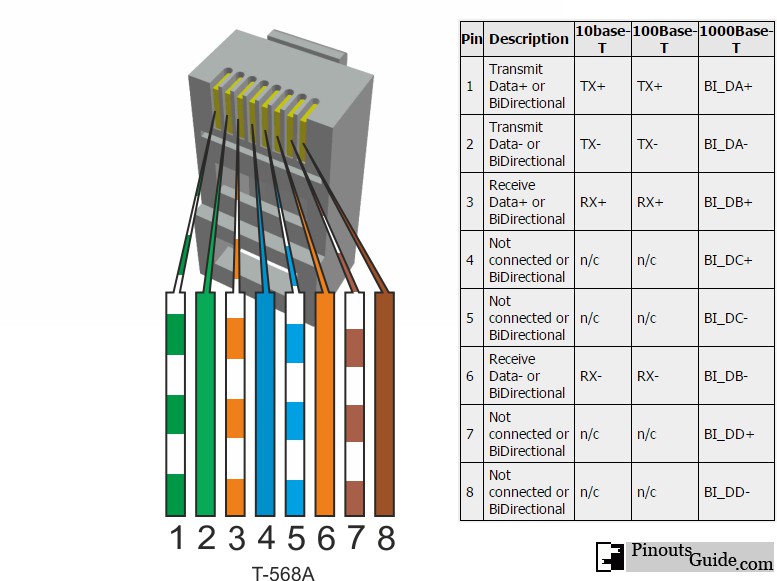
i have found the easiest way to resolve it is just to modify a ethernet cable by snipping the brown and blue pairs since those are necessary for gigabit speeds. my Prime has been no problems since doing that but a constant nightmare before it.

pins 1, 2, 3 and 6 (green and orange pairs) are the wires that need to be kept.

pins 4, 5, 7 and 8 (blue and brown pairs) are the wires that need to be cut.

https://pinoutguide.com/visual/ethernet1000baset.jpg

1 Like

I was one of the first to report this issue, and after nearly 2 years it was finally tracked down to a bug in their firmware. As far as I remember, it has been fixed.

(Unless you have tried recently and it still exhibits the problem ...)

2 Likes

My 2 Primes are connected to a gigabit switch. With cat6

1 Like

Must be an issue with your switch or cabling.
I have no problems with mine connected to a gigabit switch (Netgear ProSafe GS108).

1 Like

yep. even with the latest firmware on it and an upgraded power supply it still trips over itself unless i use that modified ethernet cable.

i also thank you for finding that out. you were a massive headache saver!

i have the same switch, even bought a new one just in case. i have a myriad of cables to use ranging in length from 6" through 50 feet. all cat 5e or cat 6. i have precisely one device on my network that gives me grief and it's the Prime, well, only gives me grief if i let it get a full gigabit connection. no problem whatsoever with 100BASE.

i never did understand why SD stuck a gigabit connection in the Prime. it's completely unnecessary.

But there are some sports shows that broadcast over Cable in 4K and I am sure there will be more, so I am glad they have a 1000base card in the Prime and it works on my 1000gb switch with no problems.

3 Likes