I just purchased an HDHomerun HDHR5-4K.
I have set it up and can view it but I don’t see any option to be able to record.
What am I doing wrong? Do I also need to purchase a DVR subscription from Homerun to make it work?

I just purchased an HDHomerun HDHR5-4K.
I have set it up and can view it but I don’t see any option to be able to record.
What am I doing wrong? Do I also need to purchase a DVR subscription from Homerun to make it work?
Channels requires its own Plus DVR subscription of $8 a month or $80 a year and a dedicated computer to install and run the Channels DVR server on.
The HDHR software is a separate thing and software not related to Channels DVR software.
Please read the FAQ and u will see link to the info.
If you have the Plus Subscription and a working Channels DVR setup already in use, and are trying to add the HDHR as a tuner source, it should just show up in the source list on the server, and you will then need to assign it a Guide data source.
(sometimes you may need to reboot the DVR server to get it to discover the new HDHR on your network, also be sure you set a static ip or dhcp reservation in your router so that the tuner does not change ips)
I have a trial plus subscription and can record from other sources.
It’s only the HomeRun I am having issue with. I can see it in the channels app and the guide, but the only option I have is to watch the current program or get info on upcoming ones. No option to record.
Have you assigned guide data to the HDHR tuner in the DVR web UI? You can’t record using the tuner until it has guide data associated with it.
I have EPG guide data assigned to my HDHOMERUN and can read it in the guide. But can't record from hdhomerun. Maybe the guide data is an echo of the streaming source, and not actually assigned to the hdhomerun?
is the program your trying to record currently showing? (current time slot) if so you need to long press select/ok to get a menu for record.
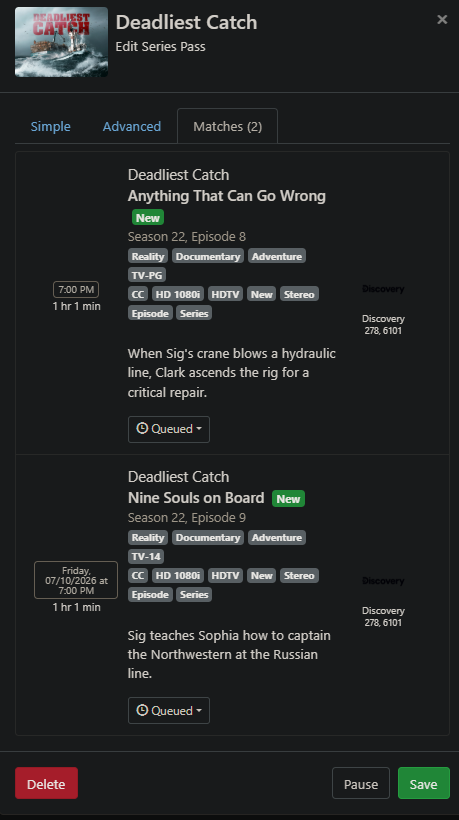
I get the menu. But the SEASON PASS only selects the stream source, and not my tuner.
correct, there is currently no way to specify a specific source/tuner for passes if you have multiple. the recording will follow the server source priorities, use the highest number channel first, and put favorited ones at the top.
you can view the pass matches and see which order it will attempt the recording
And it uses the source priority and favorites set in the DVR web UI sources, not the ones in the client.
I did put my HDHOMERUN selections first in CHANNELS. Eventually they are starting to be picked as primary first.