HDMI for Channels

@ChannelSam Here's the function for the startup script:

# List currently connected atv devices and then connect to each indivdually
atvConnections() {

  local atvs=($@)
  
  for atv in "${atvs[@]}"
    do
      if [[ -n $atv ]]; then
        atvremote --scan-hosts $atv scan
        atvremote -s $atv --protocol airplay pair
        atvremote -s $atv --protocol companion pair
        atvremote -s $atv --protocol raop pair
      fi
  done
}

That'll get called instead of adbConnections() if "atv" is found between two slashes in $STREAMER_APP

I really only need the first section that installs Python, Pip and Pyatv. The Pyatv also installs the atvremote command.

The 2nd part is only done one time for each ATV and stores a pairing key for each protocol. The command requires you to manually enter a code displayed on the ATV. If we could put these keys in a persistant location then this wouldn't need to run every startup either. I would be OK running it manually once from Docker Console if needed.

Yea the last 2 I was just using before exiting the Console to verify it was able to tune and shutdown the channel.

Here is the section talking about storage of settings for atvremote.

atvremote storage

I was able to find the creditials file at $HOME/.pyatv.conf inside the Console

I just compared the airplay creditials for the identical ATV that I paired in the container and on my windows pc and the creditial looks identical. So it looks like I could generate it on any computer and put it in the atv directory in the docker for reading.

1 Like

There is no reason why that wouldn't work. You could just set that up independently and configure the encoder url (ah4c) or streaming endpoint (adbtuner) to point to the stream provided by restreamer.

However, it's probably only a cheaper solution if you already have computer hardware that can comfortably transcode raw video (RV32) to h264. It's also worth considering that USB device passthrough to docker containers can be challenging or impossible on some platforms.

Good video, but pretty disingenuous in suggesting that HDMI streaming devices all cost $350+ and then using a $150 ATSC 3 tuner and a ~$400 mini pc to tune ONE channel lol. There is an android based ATSC 3 tuner with DRM support (ADTH). I wonder if anyone has looked into controlling it via ADB to change channels?

1 Like

I've built a test container under the :test.appletv tag. Normally, all of my builds are multi-arch, but for some reason trying to install pyatv causes the build to fail on both arm64 and arm/v7. Maybe because there's no arm version? Not sure at this point.

We still want this pairing process to be part of the startup script, so that it works for everyone, without requiring exec'ing into the container. So, I guess the question is what happens when these commands are invoked if a given device is already paired?

Since we already have a provision for persistent storage of the adb keys, I think we should use that same location for the atvremote keys. We'll need to execute the command to change the storage location in the startup script to /root/.android/.pyatv.conf I believe -- does that seem correct? That gets bound to ${HOST_DIR}/ah4c/adb in the docker-compose.

1 Like

I don't have a great understanding of the docker stuff but your build image: bnhf/ah4c:latest was what I used to build the container. I may try the console commands again just to verify I didn't write something down wrong when installing python3 and pyatv...Just checked and the python version installed was Python 3.9.17

Just reran atvremote -s 192.168.1.54 --protocol airplay pair in the console and it asks you to once again reenter the code it is displaying on the ATV even though it is already paired and in the .pyatv.conf file

I believe this should work great at that location

I have to run out for a while but I should be able to test the apple build later tonight.

Just pushed an update to this test build that removes the pairing, as it's interactive -- which doesn't work in a startup script. I left this though: atvremote --scan-hosts $atv scan to be able to confirm pairing for all defined AppleTVs in the log:

127.0.0.1	localhost
::1	localhost ip6-localhost ip6-loopback
fe00::0	ip6-localnet
ff00::0	ip6-mcastprefix
ff02::1	ip6-allnodes
ff02::2	ip6-allrouters
172.27.0.2	ah4c3
192.168.110.49 encoder_23393

Scan Results
========================================
       Name: Meadow Room
   Model/SW: Apple TV 4K (gen 3), tvOS 17.3
    Address: 192.168.110.181
        MAC: [redacted]
 Deep Sleep: False

Identifiers:
 - [redacted]
 - [redacted]
 - [redacted]

:
 - Protocol: Companion, Port: 49154, Credentials: None, Requires Password: False, Password: None, Pairing: Mandatory
 - Protocol: AirPlay, Port: 7000, Credentials: None, Requires Password: False, Password: None, Pairing: Mandatory
 - Protocol: RAOP, Port: 7000, Credentials: None, Requires Password: False, Password: None, Pairing: Mandatory
Existing ./scripts/firetv/directv/prebmitune.sh found, and will be preserved
Existing ./scripts/firetv/directv/bmitune.sh found, and will be preserved
Existing ./scripts/firetv/directv/stopbmitune.sh found, and will be preserved
Existing directv.m3u found, and will be preserved
Existing dtvosprey.m3u found, and will be preserved
Existing dtvstream.m3u found, and will be preserved
Existing foo-fighters.m3u found, and will be preserved
Existing fubo.m3u found, and will be preserved
Existing hulu.m3u found, and will be preserved
Existing livetv.m3u found, and will be preserved
Existing npo.m3u found, and will be preserved
Existing silicondust.m3u found, and will be preserved
Existing sling.m3u found, and will be preserved
Existing spectrum.m3u found, and will be preserved
Existing youtubetv_shield.m3u found, and will be preserved
Existing youtubetv.m3u found, and will be preserved
[START] ah4c is starting
[ENV] Not loading env
[ENV] IPADDRESS                  htpc6:7674
[ENV] ALERT_SMTP_SERVER          smtp.gmail.com:587
[ENV] ALERT_AUTH_SERVER          smtp.gmail.com
[ENV] ALERT_EMAIL_FROM           [redacted]
[ENV] ALERT_EMAIL_PASS           [redacted]
[ENV] ALERT_EMAIL_TO             [redacted]
[ENV] ALERT_WEBHOOK_URL          
[ENV] ALLOW_DEBUG_VIDEO_PREVIEW  
[ENV] Creating tuner             1
[ENV] ENCODER1_URL               http://encoder_23393/0.ts
[ENV] TUNER1_IP                  192.168.110.181
[ENV] CMD1                       
[ENV] TEECMD1                    
[ENV] PRE SCRIPT                 ./scripts/atv/spectrum/prebmitune.sh
[ENV] START SCRIPT               ./scripts/atv/spectrum/bmitune.sh
[ENV] STOP SCRIPT                ./scripts/atv/spectrum/stopbmitune.sh
[ENV] REBOOT SCRIPT              ./scripts/atv/spectrum/reboot.sh
[GIN-debug] [WARNING] Running in "debug" mode. Switch to "release" mode in production.
 - using env:	export GIN_MODE=release
 - using code:	gin.SetMode(gin.ReleaseMode)
[GIN-debug] GET    /favicon.ico              --> github.com/gin-gonic/gin.(*RouterGroup).StaticFile.func1 (2 handlers)
[GIN-debug] HEAD   /favicon.ico              --> github.com/gin-gonic/gin.(*RouterGroup).StaticFile.func1 (2 handlers)
[GIN-debug] Loaded HTML Templates (11): 

	- edit.html
	- index.html

	- logs.html

	- m3us.html
	- routes.html
	- stream.html
	- 
	- config.html
	- editm3u.html
	- status.html
	- status_and_logs.html
[GIN-debug] GET    /static/*filepath         --> github.com/gin-gonic/gin.(*RouterGroup).createStaticHandler.func1 (2 handlers)
[GIN-debug] HEAD   /static/*filepath         --> github.com/gin-gonic/gin.(*RouterGroup).createStaticHandler.func1 (2 handlers)
[GIN-debug] GET    /                         --> main.run.func1 (2 handlers)
[GIN-debug] GET    /routes                   --> main.run.func2 (2 handlers)
[GIN-debug] GET    /play/tuner:tuner/:channel --> main.run.func3 (2 handlers)
[GIN-debug] GET    /m3u/:channel             --> main.run.func4 (2 handlers)
[GIN-debug] GET    /env                      --> main.run.func5 (2 handlers)
[GIN-debug] GET    /logs/text                --> main.run.func6 (2 handlers)
[GIN-debug] GET    /logs                     --> main.run.func7 (2 handlers)
[GIN-debug] GET    /status/andlogs           --> main.run.func8 (2 handlers)
[GIN-debug] GET    /logs/json                --> main.run.func9 (2 handlers)
[GIN-debug] GET    /video                    --> main.run.func10 (2 handlers)
[GIN-debug] GET    /status                   --> main.statusPageHandler (2 handlers)
[GIN-debug] GET    /api/status               --> main.apiStatusHandler (2 handlers)
[GIN-debug] GET    /stream                   --> main.run.func11 (2 handlers)
[GIN-debug] GET    /test/webhook             --> main.run.func12 (2 handlers)
[GIN-debug] GET    /test/email               --> main.run.func13 (2 handlers)
[GIN-debug] GET    /status/channelsactivity  --> main.run.func14 (2 handlers)
[GIN-debug] GET    /edit                     --> main.run.func15 (2 handlers)
[GIN-debug] POST   /save                     --> main.run.func16 (2 handlers)
[GIN-debug] POST   /m3usave/:file            --> main.run.func17 (2 handlers)
[GIN-debug] GET    /m3us                     --> main.run.func18 (2 handlers)
[GIN-debug] GET    /editm3u/:file            --> main.run.func19 (2 handlers)
[GIN-debug] GET    /config                   --> main.run.func20 (2 handlers)
[GIN-debug] POST   /configsave               --> main.run.func21 (2 handlers)
[START] ah4c is ready
[GIN-debug] Listening and serving HTTP on :7654
> [email protected] start
> node ./index.js
Listening on:
	http://ah4c3:8000 http://localhost:8000
	http://127.0.0.1:8000 http://172.27.0.2:8000

If you could figure out how to make this file location change, I'd appreciate it. Does an alternate location need to be specified with every command, or is it a one-time thing?

@bnhf

I have not been able to find a way to make the file location persistant.
Here is my new pair command from inside docker console

atvremote --storage-filename /root/.android/test.conf -s 192.168.1.54 --protocol companion pair

This will store the pairing file in the same location as the adb keys with a file name of test.conf
I also realized for the commands in my scripts only the companion protocol is needed so the other pairings are not needed in my case but people may want to add them anyhow to future proof the scripts.

The script commands need to specify the file location like this:

Launch

atvremote --storage-filename /root/.android/test.conf -s 192.168.1.54 launch_app=spectrumTV://watch.spectrum.net/livetv/58780

Close

atvremote --storage-filename /root/.android/test.conf -s 192.168.1.54 menu delay=1000 menu delay=1000 menu

I lock the IP addresses for all the DVR stuff so I prefer to use them instead of other identifiers.
Also I reverified that the pair file can be made on different computers and then stored in the adb location or even with the m3u or scripts files if you prefer.
So everyone could make the pairing file on any computer with pyatv installed and with access to the ATV's if they don't what to use the docker console.

I will now try to create a docker with your
image: bnhf/ah4c:test.appletv

How are you defining the following, in the volumes section of Portainer-Stacks?

Here's mine as an example:

    volumes:
      - ${HOST_DIR}/ah4c/scripts:/opt/scripts # pre/stop/bmitune.sh scripts will be stored in this bound host directory under streamer/app
      - ${HOST_DIR}/ah4c/m3u:/opt/m3u # m3u files will be stored here and hosted at http://<hostname or ip>:7654/m3u for use in Channels DVR - Custom Channels settings
      - ${HOST_DIR}/ah4c/adb:/root/.android # Persistent data directory for adb keys

And, in the environment variable section:

HOST_DIR=/data2

And then looking at that bound directory on my Docker host:

@bnhf
Sorry for the confusion.
I meant I could not find a atvremote command that would "set" the file /location/name for the pairing file.
I have bound directories available like yours.

    volumes:
      - /srv/5ab84941-c842-42b9-9bce-80979edd927d/Pool/_AppData/ah4c/scripts:/opt/scripts # pre/stop/bmitune.sh scripts will be stored in this bound host directory under streamer/app
      - /srv/5ab84941-c842-42b9-9bce-80979edd927d/Pool/_AppData/ah4c/m3u:/opt/m3u # m3u files will be stored here and hosted at http://<hostname or ip>:7654/m3u for use in Channels DVR - Custom Channels settings
      - /srv/5ab84941-c842-42b9-9bce-80979edd927d/Pool/_AppData/ah4c/adb:/root/.android # Persistent data directory for adb keys

By default pyatv wants to put the .pyatv.conf pairing file at $HOME/.pyatv.conf so...
We will have to include the --storage-filename /root/.android/test.conf in each atvremote command in the script files so it knows where to look and what it is called.

Oh, I gotcha. That would have been nice, but for script file purposes, not that big of a deal.

I spun-up an ARM only container yesterday to see if I could figure out why pyatv won't install either arm64 or arm/v7 -- and the results were not encouraging. It just seemed to be continuously wanting another dependency to be installed.

It could be related to the slightly older version of Alpine I'm using for compatibility with ws-scrcpy, but why pyatv installs easily on the amd64 version of things, and fails on arm remains a mystery. I won't be able create an all-in-one container for adb and atvremote without multi-arch support.

For now, I'll create an :appletv tagged container that's just amd64, once we've moved out of the test phase. But hopefully it won't have to remain as an outlier build.

1 Like

I am running docker on AMD A8-7600 so that explains my success with pyatv install.

Ok...just did first test on bnhf/ah4c:test.appletv

Placed pairing file at /root/.android/.pyatv.conf and referred to it in scripts.

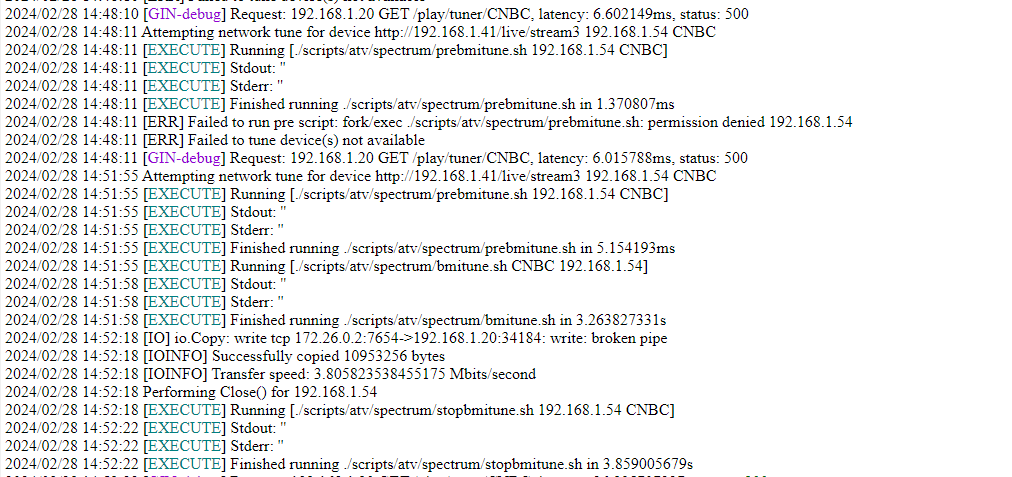
Initially failed to start channel because of a permission issue with scripts...
Don't remember having this issue with other builds...
ran chmod -R 777 /opt/scripts in the console to test...and it tuned and stopped the channel with no issues.

Here is the log of both:

Also restarted stack a few times and everything continued to work.

I will work on ordering 1-2 more ATV on ebay so I can do multi-tuner testing also

Hi, I have read this post but still not sure of all hardware that is needed. Can someone let me know exactly what hardware I need to purchase (HDMI IP encoder and what else)? I would like to give this a shot. I have YTTV, Chromecast with Google TV and Windows PC. TVE channels are getting smaller. Thanks in advance.

1 Like

Along with the HDMI encoder, you need a streaming stick per "virtual tuner" you'd like to setup. The encoder needs to have sufficient ports to match that desired number of tuners as well.

Thank you very much!

@bnhf

Update on bnhf/ah4c:test.appletv test docker

Just received 2nd Apple TV...Added 2nd ATV tuner to Docker Stack and changed tuning scripts to allow them to go to either tuner using variables instead of hardlinks.

Everything is working GREAT!

No issues at all. When changing channels it alternates between the 2 tuners...while stopping one it uses the next to tune next channel just as you would expect.

Really appreciate your work on this.

4 Likes

I've created a new all-in-one container that incorporates AppleTV (as a streaming device) support, and the Spectrum M3U. Both amd64 and arm64 are supported, but arm/v7 has been dropped.

This latest container is available as bnhf/ah4c:test for the moment, but will be rolled out as :latest once I get some confirmation from a few users that it's working as intended.

@ChannelSam Are you able to submit your appletv/spectrum scripts, so I can incorporate them into the next build?

1 Like

@bnhf
Here are my scripts...I don't have any extra delays in tuning or anything because I don't mind seeing the spectrum app starting first.

prebmitune.sh

#!/bin/bash

# Nothing Needed

bmitune.sh

#!/bin/bash

atvremote --storage-filename /root/.android/.pyatv.conf -s $2 launch_app=spectrumTV://watch.spectrum.net/livetv/$1

stopbmitune.sh

#!/bin/bash

atvremote --storage-filename /root/.android/.pyatv.conf -s $1 home

#Use this command if you have set  "ATV configuration settings->remotes and devices->TV Button to Home Screen" on the AppleTV
#Otherwise you may need to disable above command and enable one below but it is much slower to stop.

#atvremote --storage-filename /root/.android/.pyatv.conf -s $1 menu delay=1000 menu delay=1000 menu

Here is a sample of the first couple channels in my spectrum.m3u... I can post the whole thing if wanted but I only included the channels I wanted and gave them channel numbers for my use case. I used the m3u post by @chasut for the tuning numbers for the national channels.

spectrum.m3u

#EXTM3U

#EXTINF:-1 channel-id="35152" channel-number="1002" tvg-name="WDTNDT" tvc-guide-stationid="35152",NBC-DAYTON
http://{{ .IPADDRESS }}/play/tuner/35152

#EXTINF:-1 channel-id="54526" channel-number="1003" tvg-name="WHIODT2" tvc-guide-stationid="54526",MeTV
http://{{ .IPADDRESS }}/play/tuner/54526

#EXTINF:-1 channel-id="32771" channel-number="1004" tvg-name="WLIODT" tvc-guide-stationid="32771",NBC-LIMA
http://{{ .IPADDRESS }}/play/tuner/32771

I will change to bnhf/ah4c:test and make sure everything still works.

2 Likes