HDMI for Channels

Thanks for all the help. I terminated the app, and made the change with the port number:

prebmitune

I then rebuilt it, and ran it, and I still get the same "adb: command not found" error in several places (I think wherever I use the "add" command). I'm running this on a very old MacBook Air, running macOS Catalina.

Maybe I need to specify where ADB (platform-tools) is installed? I have them in separate locations. I vaguely recall when installing ADB, via some instructions I found online, there was talk about including the path, whatever that means, and the instructions I was using mentioned installing Android Studio to get the path, which I didn't do.
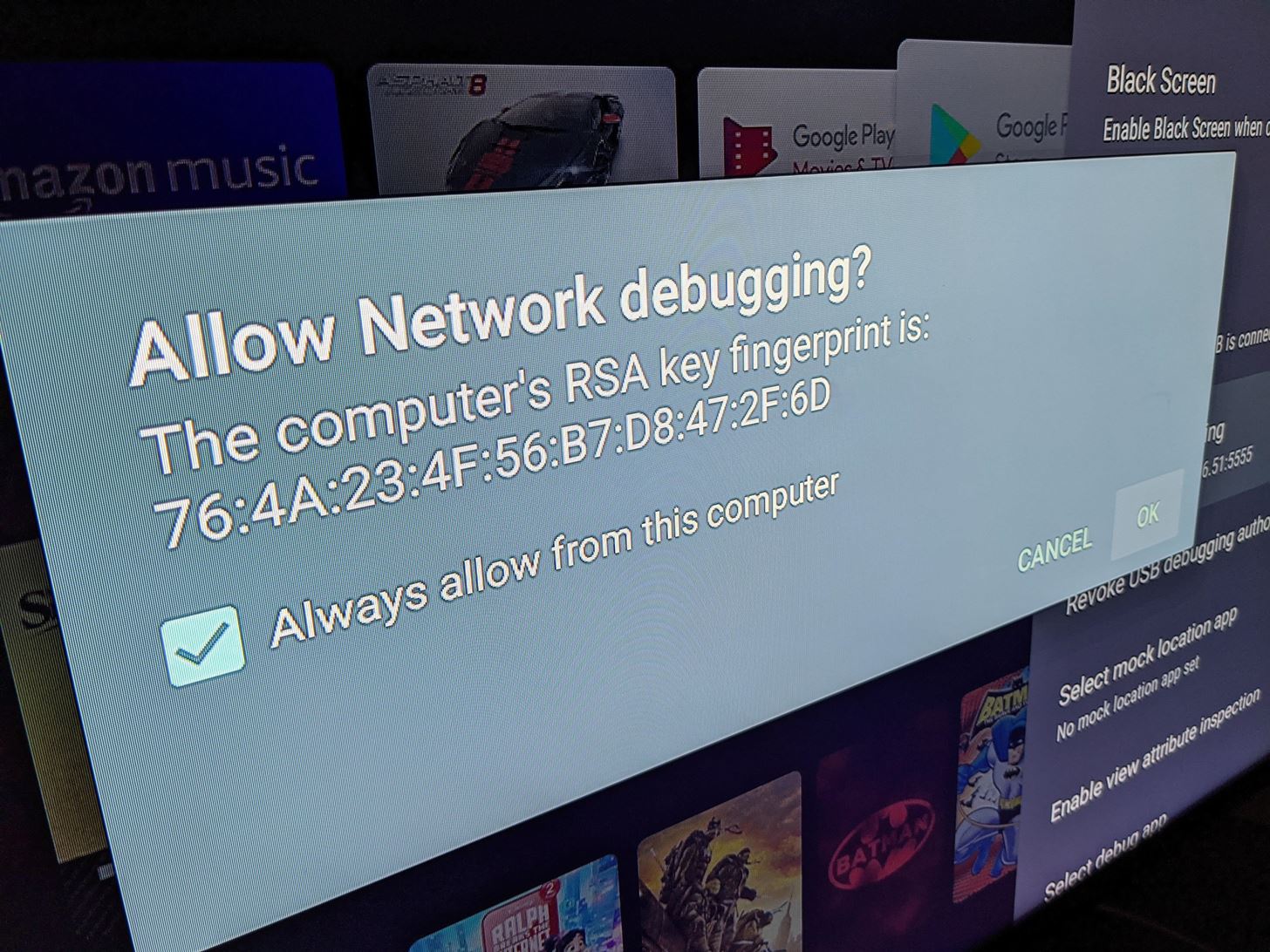
Here's some help:

What does Terminal.app say when you run the adb devices command?

The first time you run adb that way, on the CDVR server, keep an eye on the Android TV screen for the "authentication approval" checkbox that appears. Looks like this:

adb devices should confirm it's connected to that device by its IP address.

Oh -- and make sure you've turned Developer Mode on, for the Android TV dongle you're using.

I have ADB installed, and was able to send commands with it via Terminal, but I didn't go the Homebrew method to install it (I did it manually). I think my method didn't set a path, so I'm currently uninstalling it right now, and installing Homebrew, so I can set things up again that way. Might take a while.

So that was the issue. Installing ADB via Homebrew (as opposed to my manual install) took care of the "adb: command not found" errors. I'm down to one final error:

[ERR] Failed to run start script: fork/exec /Users/evankline/androidhdmi-for-channels-main/bmitune.sh: exec format error

Here is my bmitune file:

HOME="input keyevent KEYCODE_HOME; sleep 1"
PRIME1="input keyevent 19 19 19 19; sleep 1; input keyevent 21 21 21; sleep 1; input keyevent 22; sleep 1; input keyevent 23; sleep 1"
PRIME2="input keyevent 19; sleep 1"
PRIME3="input keyevent --longpress 67 67 67 67 67 67 67 67 67 67 67 67 67 67 67 67 67 67 67 67 67 67 67 67 67 67 67 67 67 67 67 67 67 67 67 67"
SEARCH1="input keyevent 66; sleep 2"
SEARCH2="input keyevent 66"

#NBC
if [ $1 = "101" ];then
HOME="input keyevent KEYCODE_HOME; sleep 1"
adb shell am start -a android.intent.action.VIEW -d https://tv.youtube.com/watch/cQDDAyx_fWM -n com.google.android.youtube.tvunplugged/com.google.android.apps.youtube.tvunplugged.activity.MainActivity
fi

I had the same error with quotes around the YouTube TV url.

(I'm just using one channel for now until I get this working)

Thanks for the help!!

Change "101" to "NBC" -- that should do it. To match the way you set up this Custom Channel in your M3U.

1 Like

Can you please share your working bmitune.sh? I just experienced that same black screen weirdness on a recording so now want to dial things in and prioritize reliability over speed.

Thanks for the suggestion, but same error after a rebuild. Dang.

1 Like

So I take that back — Success! I was using NBC instead of nbc (lowercase). Changing that, and it works!

Thank you so much for the help! Next step will be to see what others are using for their files to tweak this, and to add in additional channels.

1 Like

I ran into some strange issue where Amazon Fire device went to sleep and then adb said connected but when issuing commands errored out with not connected. I ended up turning off the screen saver in hopes that it no longer sleeps. I also added adb disconnect to the stop file. Fingers crossed its a bit more stable now.

At the moment I'm just force closing the YouTube TV app when stopbmitune.sh is executed. This seems to be sufficient so far.

Here is everything stripped down to the bare minimum. Most of the example code from the original post was related to using key commands or voice search to launch content which we have since replaced.

prebmitune.sh

#!/bin/bash
adb connect 192.168.x.x
adb shell input keyevent KEYCODE_WAKEUP

bmitune.sh

#!/bin/bash

if [ $1 = "espn" ];then
adb shell am start -a android.intent.action.VIEW -d "https://tv.youtube.com/watch/k-KlMzmHTAo"  -n com.google.android.youtube.tvunplugged/com.google.android.apps.youtube.tvunplugged.activity.MainActivity
fi

stopbmitune.sh

#!/bin/bash

# stop media playback
adb shell input keyevent 86

# force close YouTube TV app
adb shell am force-stop com.google.android.youtube.tvunplugged
1 Like

What bitrate and FPS, and I guess other settings, is everybody using on their encoder? I was going with 7000 bitrate (VBR) and I kept it at the default 30 FPS, but things looked… off. Can't quite explain it, but it didn't look entirely naturally. I've turned up the VBR to 8000, and it's helped some, I think. I'm curious if I can go higher, or set the FPS to either 60 or "Auto."

EDIT: one of the settings for FPS was to match the input, so I turned that on.

I find CBR with high bitrate gives better quality.

1 Like

Attached is my settings. Arguably overkill but looks great and haven't had any disconnects. Had loads of disconnects last night while testing H264 but H265 with this combo has been rock solid.

1 Like

Which HDMI-IPTV encoder is this? All of their web interfaces look so different. And I know some have different/better capabilities than others when it comes to codecs and bitrate...

1 Like

The whole market seems a little . . . sketchy, maybe? I bought the URayCoder H.264 Live HDMI Video Encoder, which was listed as H.264 only, but it has an option for H.265. ¯_(ツ)_/¯

1 Like

This is using the pretty cheap https://www.amazon.com/dp/B08FDZ2VNZ?psc=1&ref=ppx_yo2ov_dt_b_product_details

2 Likes

Worth giving H265 a shot. Working for me with Apple TV client.

1 Like

I started with H.265 but noticed later (and it was mentioned in this thread) that comskip took a whole lot longer for those recordings. And this was on an M1 Mac. They didn't look different to me, at least not enough to justify the extra time it took, so I switched mine back to H.264.

Thanks. You inspired me to try. It seems to be working well now. When I first switched to it, I did it in midstream (while watching a channel) and the audio was off. After a reboot, all seems to be working OK. I haven't tried comskip, though.

Oh thats gonna be a bummer if comskip doesn't work correctly. Guess I'll find out later this evening.