
Not yet. No one is broadcasting 4K OTA, so you're probably safe for at least another year. Also, the Apple TV can probably handle downscaling the higher resolution content without problem.
No, you don't need the 4k model, the channels aren't 4k. You're having a lot of issues, stuttering being the worst of them. Tackle one issue at a time. The atsc3 channels are higher bandwidth, and stuttering typically means the network is the problem. On the atv, go into settings, support, test speed to dvr server and post the results.
Have you tried the Channels app on your M1 mac? Does it play the HEVC channels there without stuttering?
For guide data, click the gear icon next to your HDHR and select Sync Station Mapping
1 Like
I think the file sizes will actually be smaller than the older Mpeg2 format. You have your client on the Apple TV set to original quality, I assume? If you have client, HDHR, and server hard wired to the same gigabit switch, I would think your network is fine… we need to dig in deeper to figure out what is going on here.
You can also try the official HDHR app to see if it plays those stations correctly. Could be an issue with the source feed if the ATSC3 broadcasts in your area just started.
@tmm1 I live in Scottsdale, AZ. I think the ATSC3 broadcasts have been going a while. But, I'll check those places
So I'm not sure if this might be part of the issue, but, I"m also running the HDHR into a Netgear 100/1000 switch. The switch also has my Mac Mini connected to it. The reason for this is because I'm renting my modem from Cox and the fiber modems only have 2 data ports on the back. Could this be causing the issue? Should I buy a compatible modem with enough ports to bypass the switch or is there a better switch I could get? I got the business-grade Netgear. What is leading me to believe it may be the switch is that I noticed on certain channels like PBS I keep getting a warning in the top right telling me there is a network issue (see pic). My channels also dropped from 117 to 110 after rescanning. But the signal strength and quality on the channels is great. I wonder if I have too much going on for the switch?

It's better to use a dedicated switch like you have. The router built-in to the modem is worse.
It is unlikely that you would be overloading the switch. Could be a bad cable or something else.
Try the official HDHR app.
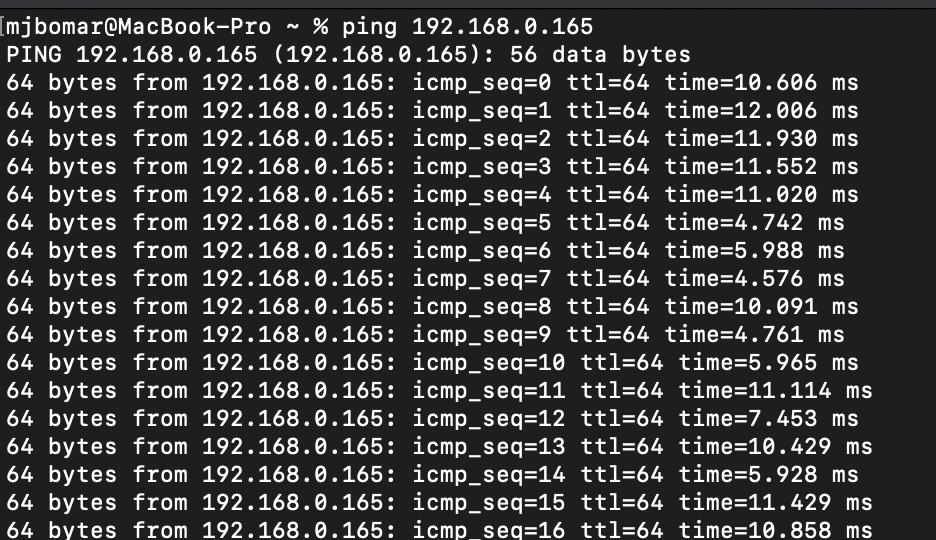
Huh that’s odd. Can you do a ping test from the Mac to the HDHR IP address and see if you’re seeing any packet loss or anything? Something odd definitely happening.
He said his atv is wireless
The only other change I made was after the guy that installed the antenna left I noticed he did something I didn't ask him to do. When he ran the coax into my house here removed the coax connector from the face plate and pulled the coax through and went directly to the HDHR. When I saw this I posted a comment on here and others confirmed that I could cut the coax and put an F connector on the end, attach it to the face plate and put it back on then run the coax from the face plate to the HDHR. I'm wondering if I should have left it all as one run and if I need to replace the whole coax now? But, 98% of all my channels still show great signal. But, now PBS is showing me the network issue and the local AZTV station on 7.1 is gone completely from my line up.
Yes my ATV is running on wifi. But, everyone else is hardwired from the switch to the modem. Here is the switch I'm using:

This looks like a MacBook Pro, not the mini. I was hoping to see the test from the server to the HDHR.

That looks good and what I would expect for a wired connection. You mentioned the HDHR app on the Apple TV shows no issues. Do other clients play the channels OK? You could install the app on the Macnbaish mini and test them there, for example. Just trying to narrow things down.
The channels are actually bad on the HDHR app. Same as the Channels app. That’s why I’m thinking bad cable.
I think I've figured out the issue. I believe it is my ATV. I have another ATV in my bedroom and I went and tested that and all the channels are working without any stuttering. I've had issues with the ATV in my living before and thought I resolved all of those.
1 Like
@tmm1 I tried watching the HEVC channels on my Mac Mini, MacBook Pro, and iPhone. They load a little slower than the HD channels but they do play without any stuttering. I'm starting to wonder if these channels are broadcasting in 1080p60? If that is the case I would need an ATV 4K as the standard model I have can only handle up to 1080p30.
1 Like