
I've been unable to get Channels to distinguish between Married at First Sight US and Married at First Sight Australia. It is able to distinguish between Married at First Sight US and Married at First Sight UK? I've got folders for all three (Australia, UK, and US) with Season 01, Season 02, etc., but Channels has no distinction between Australia and US.
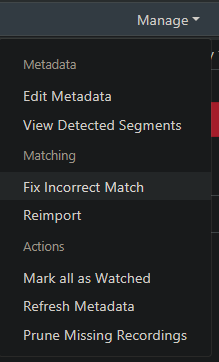
Seems like they are there if you go to Manage | Fix Incorrect Match and go looking for it:
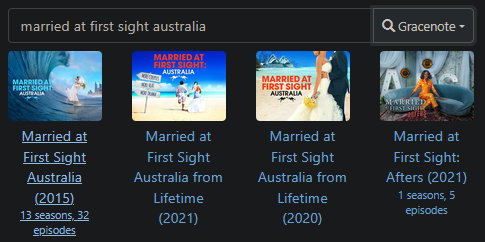
I think the TMDB side might be better for the episode metadata, but the program doesn't have "Australia" in the title. I'm judging by the image:
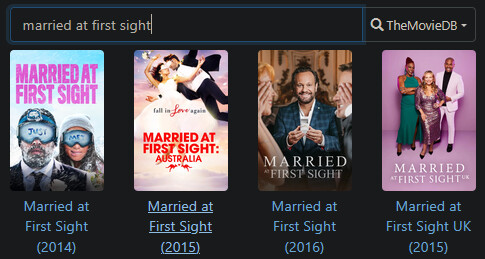
You'll probably have to edit the program metadata (Manage | Edit Metadata) to put the word "Australia" in there afterwards and maybe update the description, but otherwise should be fine!
3 Likes
I don't know how to describe my issue, but I'll try (I had an ischemic stroke about 6 months ago and still have some issues). I've imported most of these episodes. Originally, I had some Australian episodes to import and so I added Australia (2015) to the titles and they came in fine. When I added some US episodes I didn't add anything to those titles and saved them in folders named Married at First Sight (2014) and they began to appear under the Married at First Sight Australia (2015) folder in the library. So next, I added US (2014) to the folder and Fix Incorrect Match to them and they moved into their own folder, but they also pulled all the Australia (2015) episode over as well (despite leaving them un-renamed).
Does that make sense?
I can't Fix Incorrect Match the Australian episodes as separate files. Should I try deleting them and importing them again?
I brought one of the episodes (called Married at First Sight Australia (2015) - S06E07 - Episode 1 LIFEPHD1455..." back into a folder named "Married at First Sight Australia (2015) -> Season 06". Instead of creating a new group it was imported into the Married at First Sight group.
I'm not sure if I have to name it something different or what in order for it to be recognized as a Married at First Sight Australia (2015) episode.
How do I get the Married at First Sight Australia group to show up when I already have a couple hundred Married at First Sight episodes they're mixed in with? I see it as a choice for the whole group but then the whole group gets switched over to Married at First Sight Australia. What I need is for a separation - like the folders are named.
Okay, I've had a similar issue before.
Create a new folder that has some pure nonsense name (smash that keyboard!) and put the Australia episodes in there. I also recommend making sure the episode file names do not have the program name in there. The idea is to make Channels have no clue what these could possibly be. Run a Prune to clear out the Australia episodes from the US match. Then re-import and Channels should not be able to match and just give you the random name.
After that, you can get it correctly aligned with Find Match. I'd do Gracenote first to get the description and art, then immediately change it to TMDB to get better episode details. Or, if you don't really care about the episode metadata, just go ahead and edit the program metadata directly and leave it unmatched (I've had to do this, too, on occasion). With this solution, you can also upload your own poster art, which you can grab from anywhere, or search for it.
1 Like
Okay, let me get this straight. If I create a new folder that has a nonsense name, I can still keep them straight, but can I rename all the individual files to something like "MAFSA S0xE0x" so I don't lose all the information in them?
Well, I just checked and saw that the Channels Library had added the new group Married at First Sight Australia (2015) that I had put in a separate location last night.
Yes, that's all covered by the metadata editor. Channels has some pretty decent help documentation already:
1 Like
This topic was automatically closed 30 days after the last reply. New replies are no longer allowed.