How to account for difference in order of episodes?

I bought a box set of the 70's scifi TV show "UFO". After ripping, I named each file according to the recommended "SxxEyy.mkv" convention. However, when I import into Channels, the metadata is different, as if its database of episode order is different than the box set.

For example, the box set says Episode 9 is "Ordeal", but after importing, Channels says Episode 9 is "Square Triangle".

What is the preferred way to reconcile episode mismatches?

Old shows like that are a bit tough with Gracenote's data.

Try using Fix Match on the TV show, and use TheMovieDB result instead. It will cycle through all the episodes and adjust their metadata. It might give you better results.

Gracenote is usually using traditional TV airing data, where TheMovieDB will usually conform more to what is in box sets. Things tend to change when TV shows were produced for DVD box sets.

I see how to do that now, thank you for the pointer.

Unfortunately, that didn't work. I'm not surprised as different stations in the UK aired them all on different dates, and none matched the production order. Oh well.

What would be the best way to manually match the files to the metadata? I'd prefer not to have to manually add all the titles, cast, dates, descriptions, etc!

If the information on the TMDB website matches with your box set, renumber the file names to be in sync with TMDB.
When Channels rescans your local files, it will change the metadata accordingly.

You will probably have to prune in Channels after that to remove stale, incorrect entries from your library.

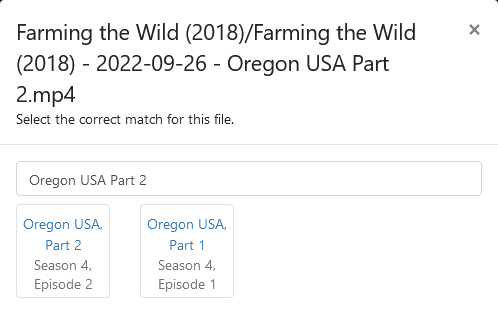
Or try Fix Incorrect Match and change the search to only the episode title
Screenshot 2024-06-04 at 16-52-47 Channels Manage Recordings
In this example: Oregon USA, Part 2
Screenshot 2024-06-04 at 16-53-46 Channels Manage Recordings

The challenge is the filenames are numbered appropriately. Is there a way to "force" an Channels entry to point to a specific filename? I'd prefer to keep the order proscribed by the box set.

2 Likes

The developers will correct me if I'm wrong but I don't think that's possible.

I've been in a similar situation before but with a smaller number of files. I ended up correcting the metadata manually. :cold_sweat:

What does that mean?
The Season and Episode numbers match what's on the boxed sets, or what's on TMDB that you're using to match them against?

When Channels DVR imports TV Shows, it automatically uses gracenote data.
You can fix match / fix incorrect match after importing using TMDB.

My filenames match the order in the box set. That order unfortunately doesn't match GraceNotes or TheMovieDB.

I'm using your method to repoint the files, which works fine (thank you!). Unfortunately, it just means my episode order will now be whast Gracenotes expects, not the box set.

Hopefully the devs understand and will eventually come up with something.
For now, after you match them all you can edit metadata on each episode and change the Season and Episode numbers to match what you want. A lot of work. That's why I don't import to Channels DVR yet.

Keep in mind also that after you do all that work, you don't want to move the files to a different directory, or you have to start again from scratch since you can't edit the path to the imported files in the Channels DVR database.

I appreciate your time.

1 Like

This topic was automatically closed 365 days after the last reply. New replies are no longer allowed.