
Do you mean the HDHR, or are we changing direction a bit here?
I think I tried that previously (using an m3u), but there were problems due to lack of tuner sharing, lack of HDHR specific handling by the DVR software and the channel id's in the m3u generated by Channels DVR weren't correct (channel number instead of callsign).
Trading one problem for others.
1 Like
There's no other solution other than not using HDHR (or use an older device). I have a HDHR Extend and that doesn't constantly rescan for channels in the background.
It is a first world problem 

Gotta keep shouting at the Silcondust devs and hope and pray enough people do and they listen
I setup one of my servers to use my HDHR Prime as an m3u source again (limit to 3 streams) and will try it out again.
As a backup, I have another server using the HDHR Prime directly as a source.
That is what I do I have 1 Channels DVR that serves the tuners to all my other DVR/EMBY/SAGETV .... I have collected many tuners through the years.
Sample
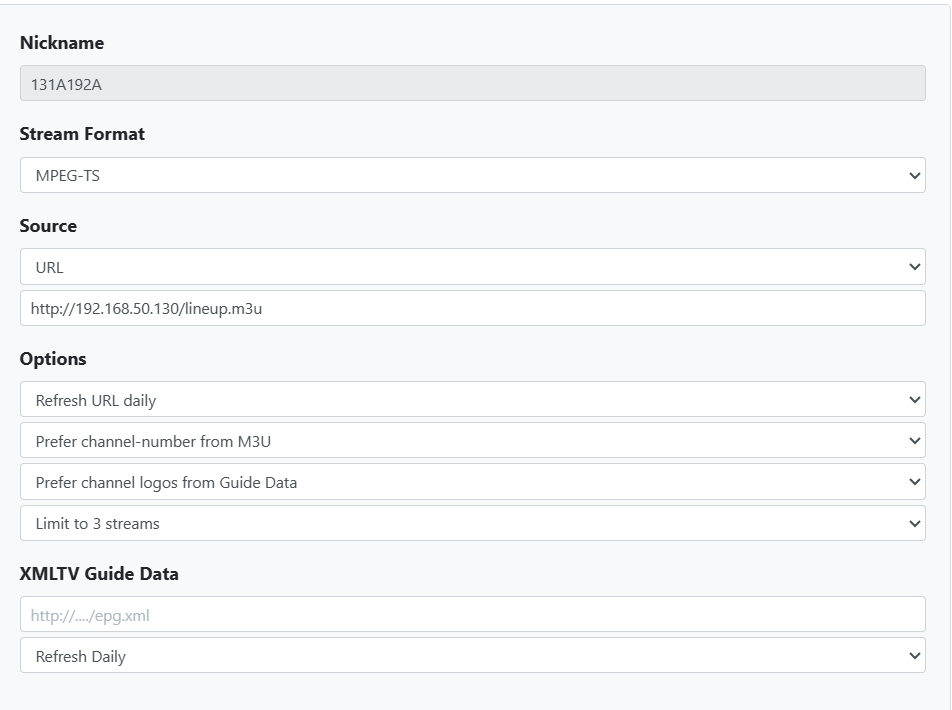
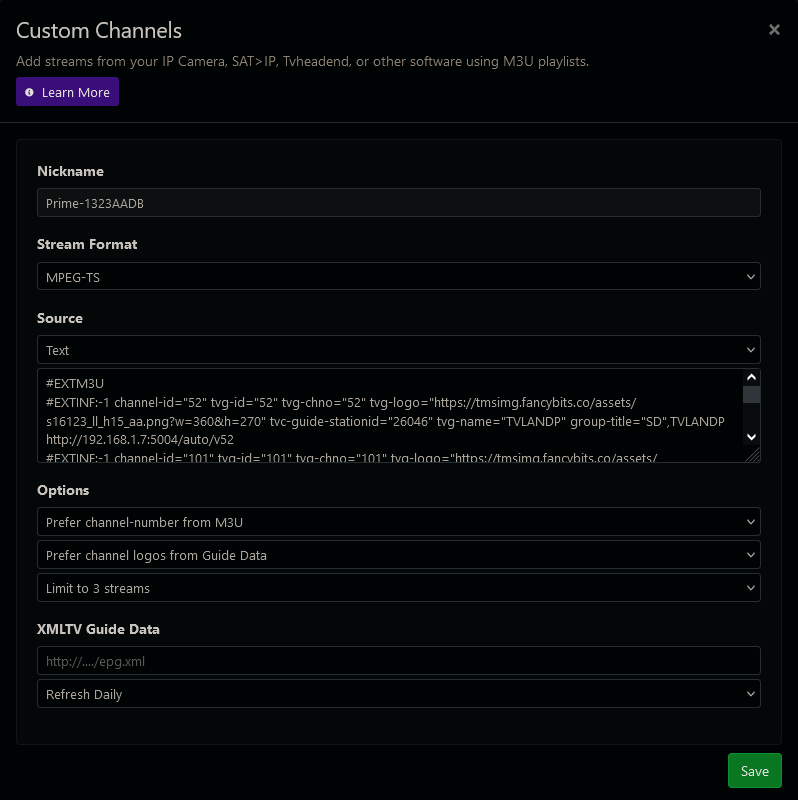
Let me try to be as clear as possible, for someone that's been using the HDHR tuners for OTA ever since their inception, the HDHR isn't having any problems with lineups or scanning or not scanning for channels. The HDHR does exactly what it was designed to do, and it does it fairly well.
To address the OP's original issue, users shouldn't have to disable HDHR scans - the HDHR should be scanning for channels every opportunity it gets. The DVR software is then responsible for taking whatever the HDHR gives it, and properly deal with. To take this one step further, the software must then be able to deal with a new channel when it shows up, and assist the user in making decisions about it (is it automatically added to the lineup, or not, is the reception good or not, etc.). That would require some kind of system where Channels DVR would tell users about things like new channels, failed recordings, why may have happened, and do so in a way that makes it obvious to the user (a popup window or an exclamation point or something).
If a developer would like a run-down on what other software does to handle these situations, please chime in, otherwise continue to ignore these issues that you could be solving for your customer. With Silicondust's hardware doing exactly what it was designed to do, with the customers here using it because it's the only option for OTA, then it's not up to Silicondust to try and alter something that isn't their problem to solve - it's up to the developers here. This is not that complicated to understand, unless you only have experience with Channels DVR and can't comprehend other software that's already dealt with it long ago.
Listen folks, this is a very basic DVR issue that gets raised over and over and over again, year after year in this forum. Either you solve it here and make it go away, or it will always be a problem for Channels DVR users. It's that simple.
Im not quite sure what all the fuss is about. I let the HDHR find whatever channels it likes. Then I built a channel collection called Local Channels and I put the channels I want in the order I want them. I don't include all of the home shopping crap or other channels I'm not interested in. Then in the guide, I just select Local Channels and I have exactly what I need.
If the HDHR picks up a fringe channel then oh well I could care less, it won't show up in my channel collection.
1 Like
The local affiliates make changes & additions to stations throughout the year, pretty much every year. If there's a new channel available, or a current broadcast is moving to a different channel, I'd like to know about it. Additionally, when a new/altered channel magically shows up on the server and it's a repeat of a channel that Channels DVR already has, only its coming from a region that I don't have the antenna specifically aimed at and the reception isn't the best, then some season pass starts trying to use the rogue channel and recordings are lost.
Again, solve it now or keep hearing about it for years.
Definitely understand about different markets etc. I only have 1 available to me so i dont have those challenges.
Re: a rogue station taking priority. Couldn't you favorite the channels that you want to have channels record passes from? That way if a translator or a channel from another region somewhow makes it in, it won't be used for recording.
1 Like
You mean something like this that software that is over a decade old has ... It is funny that SageTV which is over 15 years old took all this into account.
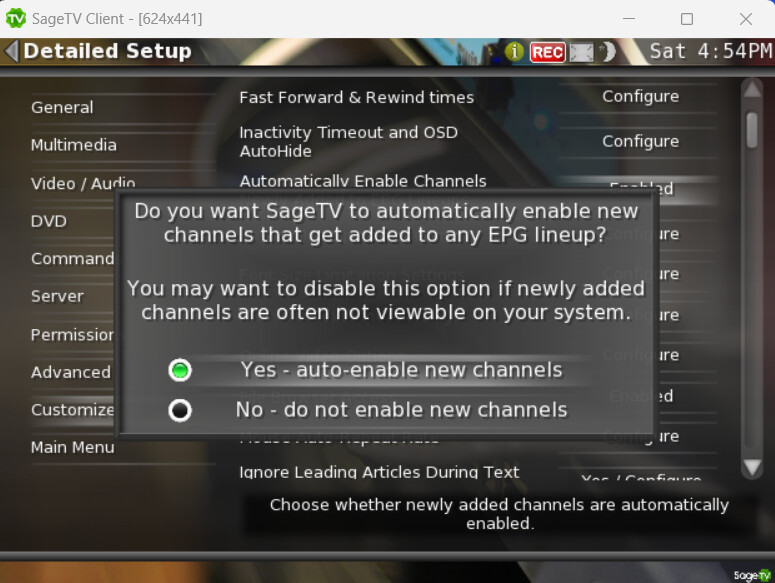
We have more than one person in my family, and as it turns out, the idea of assigning a specific channel to a season pass escapes them, and as an engineer, I just can't pass this issue on to an 85 year old (for example) when it could be fixed at the server end once and for all.
I'm not going to say "this must be easy" to a very small group of developers that started with a product that wasn't centrally server based, but it would be really great to have this put less burden on the user.
Yes, that's pretty much it, Edwin. But I still have to take into account the accidental success that Channels DVR has probably become, and it's probably not a multi-million dollar company where they can have a group of developers work 4 months to move the search field on the interface for no other good reason but to change something.
I have these challenges inside one market.
I didnt mean specifying a channel, what i meant was this. I have 10.1 NBC and 35.1 as a low power translator for NBC. Problem is that the tanslator has a very weak signal and i dont want it to be used for passes. If i favorite 10.1, that channel will be preferred for any pass that is recorded on nbc. I dont have to manually specify the channel in the pass. The nice thing is that if for some reason 10.1 wont tune, then 35.1 will be used.
3 Likes
Does anyone know if the firmware or an internet call triggers a rescan? If you were to block internet access to the hdhr via router settings would that stop the rescans? I’m pretty sure that an ota Hdhomerun will work with internet, I don’t know about the primes.
Baked in the firmware and the background scans are done every 3 days +/- 12hrs
Bummer, so much for that idea.
I even asked SD if I scripted doing manual scans every 48hrs, would it reset the timer for the auto background scans and was ignored by their support. Even if it worked, I would have to check scheduled recording times so the scripted channel scans wouldn't run during a scheduled recording and I would be increasing the channel scan frequency from once every 3 days to once every 2 days and that increases the odds it would happen during a cable outage. Then add Murhpy's Law.
1 Like