
I purchased a gteck windows 11 pro windows machine and now run channels on it. I’ve retired my pi to another use but impressed with the windows version of it. Ntsc3.0 runs so much smoother now and philo on tv everywhere is quicker at loading.
1 Like
You have the 8gb Ram, 256gb SSD version? Please bring up the Channels Web Admin screen. What percentage of RAM on average does it say it's using on your setup?
Thanks!
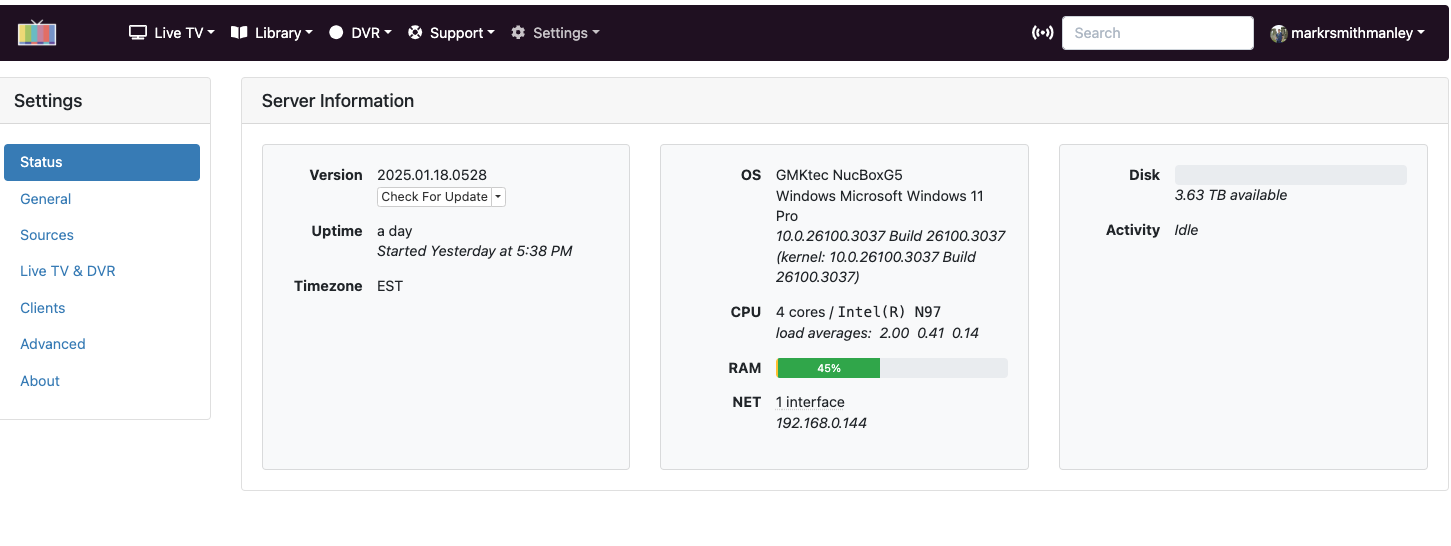
the verson i have is GMKtec Mini PC with Preinstalled Windows 11 Pro, G5 Micro Desktop Computer, 12th Gen Intel Alder Lake N97 (up to 3.60GHz) 12GB DDR5 256GB Hard Drive
Ok, that explains why yours shows about 45% Ram use, and mine shows 60%. I have the Beelink version with all the same stats, Windows 11 Pro EXCEPT, mine has only 8gb ram at present. I'm going to upgrade mine to 16gb ram. I want more overhead available.
1 Like

+1
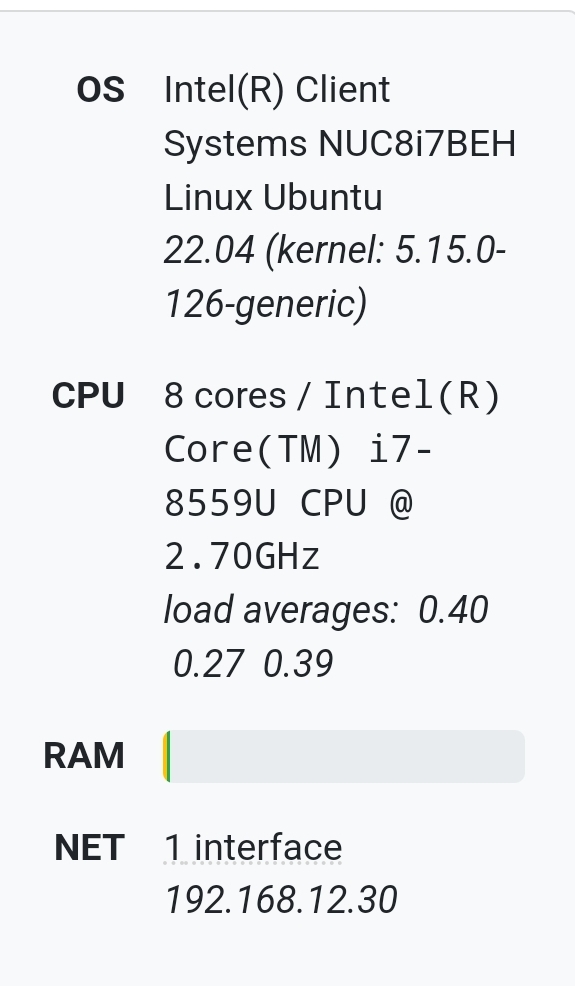
Here is an 8gb Beelink Ubuntu desktop, way better with ram though not as good as Ubuntu server compared to windows. Can’t imagine loosing 5gb to the OS.

Yeah I know. My first server was run on Linux, and then I switched to a RP 4b, and ran the built image for it. I just didn't at this time want to go through figuring out all the Linux stuff again. It's been too many years, and I've gotten rusty. Maybe one day I'll switch again.
If you stick with Win 11 please, please wipe the drive and load a fresh image on it. The hacked/cracked/malware ridden ones that ship with these boxes are highly untrustworthy.
I had a pi for plex and one for channels, so I combined the two into one now they both run headless of this machine I bought. runs great I have a few of these I use for ham radio. should serve its purpose apart from patch Tuesday.
That would narrow it down to pretty much every Win 11 installation currently on the planet. 
The advice is specifically related to the no-name mini-PCs available now. For example this video shows how the AceMagic units could be remote accessed because of a hidden exe in the recovery partition.
https://www.reddit.com/r/homelab/s/TEDuy0Y8fv
I think Beelink is a reputable brand but be careful with others. Safest to reinstall Windows from scratch.
First thing I do before I even connect them to the network/internet ... regardless of brand... delete all partitions and reinstall from a usb stick.
I have used a Beelink W11 pro with 8gb of ram for 3 years and I don't know of anytime it has maxed out the memory. I can max out the GPU and CPU if I run 4 remote transcoded streams. I run Plex and Channels servers and I have run an Emby server together with no problems. Channels server is very efficient with memory. My system uses about 40% of ram under normal use, but when I log in to the desktop remotely it uses about 60%. The only time I notice some sluggishness is when I am recording several shows and watch a recording at the same time. But I use HDDs (very slow) for my data storage, so it is probably expected.
I will continue to use W11 pro unless Channels or Plex stops supporting it. It is just so much easier for me and buying more memory is easier than me spending hours learning another OS. Linux has dozens of flavors, everyone has their preference, some hardware works great, some have problems. I will only use Linux as a last resort.
Why do people complain about Ram usage at 60% Ram is made to be used ... as long as you do not reach 100% and start paging what is the problem with 60% usage ?
I call this looking for problems that do not exist.
1 Like
I have a permanent mapped remote connection to the usb drive (was on my RP with the built image before this) hanging off the Beelink. So I can easily add shows and movies to the Imports\Tv (or Movies) folders from my regular laptop.
Maybe that's what's keeping ram usage around 55 - 60% at idle?
You do realize that some apps and files are kept in Ram even when Idle because they are used constantly to be more efficient and faster.
Example Superfetch....
superfetch windows 11
Superfetch, now known as SysMain in Windows 11, is a background service designed to preload frequently used apps into your computer's RAM to speed up their launch times
I also think that running YouTube TV in a Win 11 environment seems to install normally,
without some of the issues I read about here on this community.
I had installed YTTV a year or so ago with a free 3 week test of YTTV and it installed normally, no issues.
Have not tried recently. No 2FA or Family invites.
I figure a little more ram overhead can't hurt. I just installed a 16gb ram, replacing the original 8gb it came with. I went from an average 60% ram use, to 25%. I'm happy about it, just wish I had bought the 16gb ram, 500gb SSD version out of the gate, because that was only around $26 more on sale.
This is the Beelink Mini S Alder Lake version.
This topic was automatically closed 30 days after the last reply. New replies are no longer allowed.