Ideal Set Up - Configuration Xfinity CableCARD X2 HDHR3-CC

I have it running I believe on the ThinkPad but I struggled a bit. I could not get the Amazon app thing to work but I just used the Windows 64bit download, I configured I believe correctly my storage to D and it shows 2.7TB available. Using my ATV I downloaded the client app, I have the guide, can watch LIVE TV but for the life of me I can't figure out 'RECORD' - I've watched several videos and none of the options those videos display don't work for me. My ATV is the newer remote.

I can not figure out 'RECORD' !!!!

Guide data needs to be setup on the dvr web server first

http://192.168.132.78:8089

I have live TV and I have a correct guide displayed. I can choose channel, current show and watch but I can't figure out how to record either what I'm watching or anything into the future using the guide.

Scrolling down while watching I have Quick Guide/Options 'toggle'. Options I understand. I just don't see a way to to 'RECORD'! I've seen a video where someone scrolled down on the earlier remote chose record and the guide turned red I believe.

My server looks to be 127.0.0.1:8089

Do I just use that addy on the PC and redo everything?

No record option will appear until the server has been configured with guide data. In the settings area under sources, find the hdhomerun and enter your zipcode to add guide data.

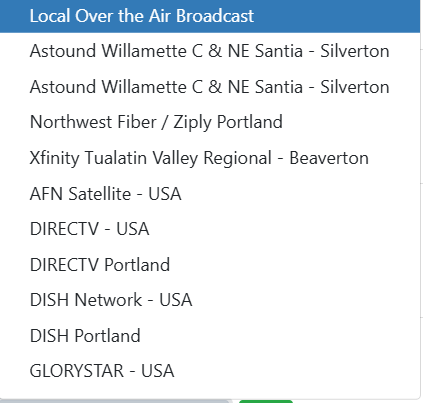
I've a CabbleCARD and scanned both of my HDHR3-CC and I have a correct guide already.

1 Like

Did you set guide data in Channels DVR web page ?

image

I had NOT done that. I had only scanned the CableCARD for channels and got 425 channels. I just went to the PC and did that guide search using zip & provider. Once that's done will I be fixed?

*** There's a manage tab there now, do I need to reload one and then sync the other?

Setup both the same way.

I deleted the app on the ATV, reinstalled, and now I have a record function. I had to delete the app and do the reinstall for things to change. I might have just did this! I believe I have the ThinkPad set to 'always on' and I believe I successfully blocked Win11 updates. Did I do it correctly? No idea!

reinstall is not necessary.

to restart the app, click the TV/Home button twice, then swipe up on the app to kill it. then when you launch it again it will start fresh.

2 Likes

I've had Channels DVR running for 6 days on my W11 T570 i7-7600U and I'm doing pretty well I believe. I saw notes mentioning to use the Amazon Store for W11 but I had serious issues trying to get there so I just used the Windows 'installer'. If I wanted to add 'PlayOn Cloud' do I need to add it to the W11 PC used as the server or just a PC that's on the same network. I've seen mentioned recently in another forum that there's maybe issues with 'PlayOn Cloud' video quality. Yes/NO or maybe?

W11 PC used as DVR server

Other posts about PlayOn Cloud
https://community.getchannels.com/search?q=PlayOn%20Cloud%20order:latest

To expand on the above answer: that Amazon App Store option was a Channels DVR client, not the server. If you do want to try that client, a workaround is now required. But your question is about the server and you've installed that correctly.

And to summarize what you'll find in the PlayOn thread:

There are two offerings from PlayOn: Cloud and Home.

Channels DVR supports PlayOn Cloud as a source. With PlayOn Cloud, you manage your recording schedule using a PlayOn app for iOS or Android, and when the recordings are done Channels DVR will automatically download them.

PlayOn Home is a different offering from PlayOn, in which you set up a local PlayOn Home server. You can point Channels DVR to the PlayOn directory as a media source.

In the end both are convenient. I use PlayOn Cloud and am very happy with it.

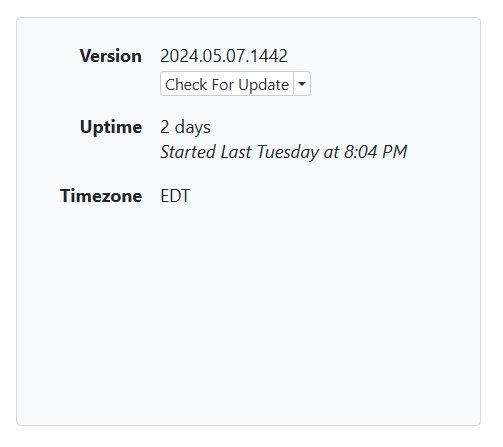
What determines 'uptime' in the 'Server/status' block of the settings page? I believe I've been up for likely 18 - 20 days.

2024-07-11 13.48.59 192.168.132.78 48e095c9b467

How long the server has been running. Since you updated to pre-release on 5/7 it's been running since then at the latest.

Thank you! Hmm, I didn't realize I did that. I thought I actually tried to avoid anything other than 'stable'.

Stable releases are done automatically ... prereleases are done by you.

1 Like

Your uptime is 2 days. This means your dvr machine restarted or the software was updated 2 days ago. Obviously the last software update was May 7th so this means the machine you run the dvr on was rebooted 2 days ago. Uptime is the last time the software runs the start process.

At 30 days my W11 T570 ThinkPad has quit. I've no idea what is up with that BUT I had added an 8G RAM Memory to my DS220+, ran a memory test, it passed and summary shows now 10G Memory. I've gotten it set up I believe correctly and it's been running most of today and functioning.

With my ThinkPad I had a 3TB External drive for the server. Is there an easy way to get the recordings from there to my DS220+ or maybe can I connect it to another PC and use it in some way as a source to view those recordings? There's nothing that I actually need but thought about.

This topic was automatically closed 365 days after the last reply. New replies are no longer allowed.