Import Personal Media From NAS

im running windows 10 channels dvr server 2024.09.05.0212 im trying to add personal media imports from my synology nas and i dont understand how to tell it what user and pass i need to give it somehow, ive messed around with permissions and smb settings on the nas dsm interface anyway to no avail. anyway this is the main error the log tells [ERR] Scanner error walking \NAS\MOVIE A: CreateFile .: The user name or password is incorrect.

i feel i should of figured this out by now but yeah,
any help would be amazing
You should just mount your NAS share to your Windows filesystem, then use that.

Map it to a to a drive letter, then your NAS share will be browsable. ie:

  • Z:\Media\Movies
  • Z:\Media\TV

Create a user on your NAS with the same name and password as your Windows user account.
Give that user (on the NAS) permissions to the shared folders on your NAS that you want to Import.
Be aware that Channels DVR will delete the files on your NAS if you Trash them in Channels DVR.
To avoid that, give the user (on the NAS) read only permission to the shared folders.

You can then access the files on your NAS from Windows with a UNC path
\\NAS\ (where NAS is the hostname of your Synology, you can also use it's IP address)

My mapped Network drives don't show up in the browser for some reason. And I tried creating a new account on my NAS the same as my Windows server account and it didn't work but there might be something I can try about that I may have used the wrong username will try stuff

Check Synology Control Panel
File Services > SMB > SMB Settings
Make sure Enable SMB service is checked
And the Workgroup: name is the same as your Windows PC Workgroup name

i have had that in place, but they dont show up under add folder, any ideas? i still havent gotten this going yet, still been trying stuff.

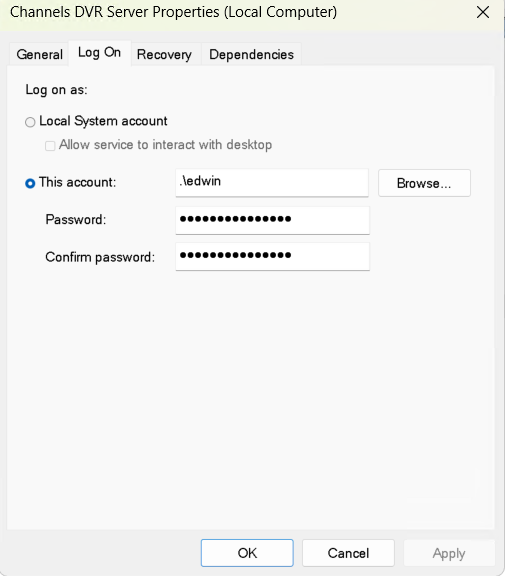
If you are running ChannelsDVR as a windows service make sure your service logs in as the user not the Local System Account.

Example ...

Can you see your Synology in Windows Explorer under Network?


Are both your Windows PC and Synology NAS set to the same workgroup name?

@EnergyWizard,

Glad you got it working the System Local Acct has no access to Shares ... that is the first thing people should look at is running the service as a user.
