Intermittent "bad" recordings recently

Have Quattro and Prime/Cablecard tuners and seeing this on some recordings recently - intermittent as most recordings are ok...

The bad recordings are slow to begin playback, and have no audio - also stutter at times - no comskipping, generally unwatchable. If I cancel and delete the recording, then play a live stream, playback is OK.

Logs during playback of these bad files contain many of the errors below:

2020/05/12 20:05:06.528415 [HLS] ffmpeg: file3101-ip192.168.86.1: [hls @ 0x3603800] Non-monotonous DTS in output stream 0:1; previous: 6082733, current: 6076800; changing to 6082734. This may result in incorrect timestamps in the output file.
2020/05/12 20:05:06.529023 [HLS] ffmpeg: file3101-ip192.168.86.1: [hls @ 0x3603800] Non-monotonous DTS in output stream 0:1; previous: 6082734, current: 6078720; changing to 6082735. This may result in incorrect timestamps in the output file.
2020/05/12 20:05:06.529692 [HLS] ffmpeg: file3101-ip192.168.86.1: [hls @ 0x3603800] Non-monotonous DTS in output stream 0:1; previous: 6082735, current: 6080640; changing to 6082736. This may result in incorrect timestamps in the output file.
2020/05/12 20:05:06.530159 [HLS] ffmpeg: file3101-ip192.168.86.1: [hls @ 0x3603800] Non-monotonous DTS in output stream 0:1; previous: 6082736, current: 6082560; changing to 6082737. This may result in incorrect timestamps in the output file.
2020/05/12 20:05:06.532892 [HLS] ffmpeg: file3101-ip192.168.86.1: [aac @ 0x3617980] Queue input is backward in time

The server is Linux, playback bad on either web, android tv shield, or firestick. Any ideas? Lates SD firmware, lates server and client versions. Maybe unrelated is the fact that my audio often drops out during commercials on live tv streams, on the shield connected to a home theater receiver...where the streams change formats from DD to stereo, etc I think. This seems a new issue. I can generally stop the live stream, resume, and audio returns. May be an audio decoding issue with Shield or the receiver.
Can you find the recording on the web UI and click View Details. If there were signal issues or network problems while recording, they will be shown there.

from the web UI recordings list? don't immediately see a "view details" there? will keep looking

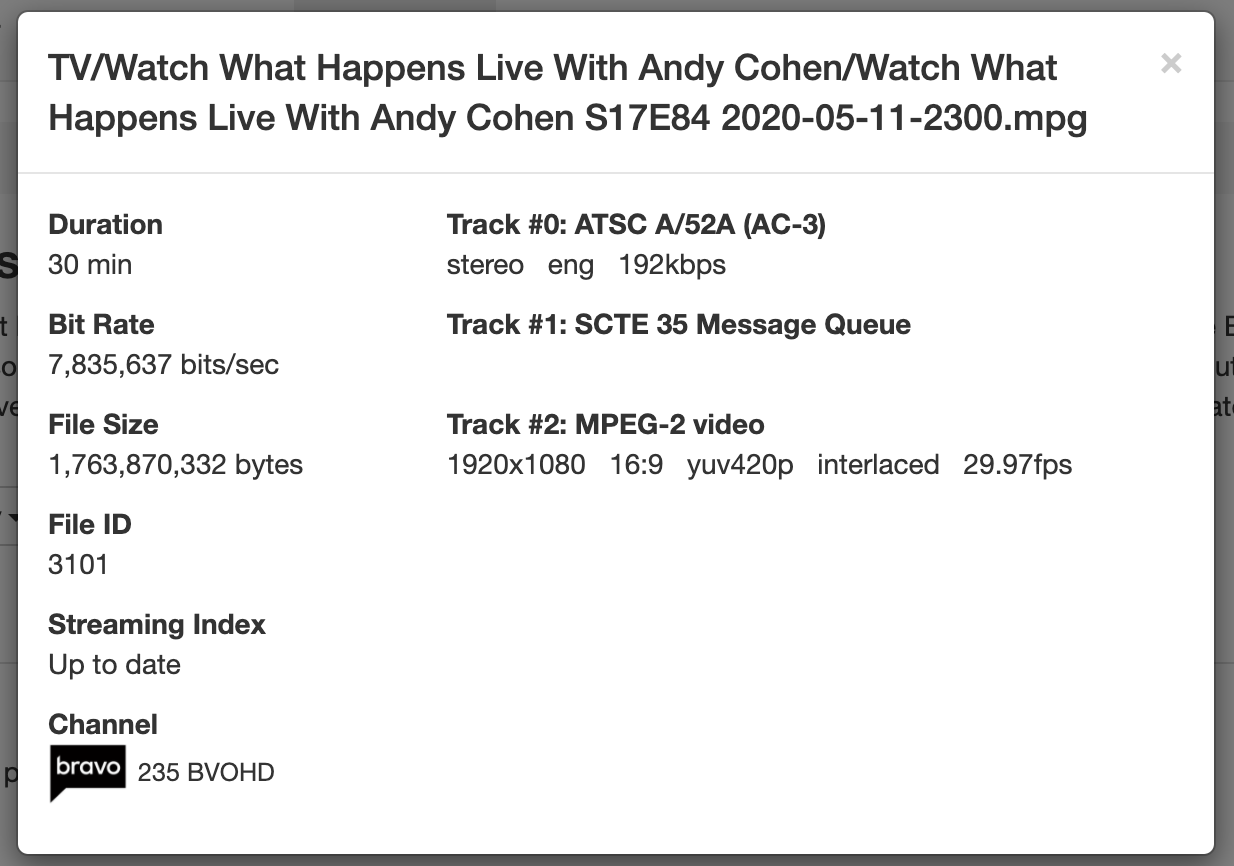
found it...the recordings actually do have very stuttery audio at times - sounds very bad - will play badly on computer/web but is silent on shield/receiver...here is the details screen of a bad recording:

Interesting, no errors detected by the DVR.

If you play the mpg file directly in VLC on a computer, does it have the same problems?

Is the DVR wired or wifi?

all wired gigabit.....will try vlc playback....the logs do show the ffmpeg dts errors on playback

the files played back in vlc OK...which surprised me. Then I played it on firestick - was OK. That is stereo no DD 5.1 or surround....not sure if that makes any difference. I am thinking this is a Shield playback issue...maybe audio related?

Does changing the app setting Surround Sound: Off does it make a difference?

It does not make any difference.

I do think the issues are actually in the recordings themselves, although the Shield/AVR will not play the audio, while other devices will - my laptop, using web client, can play the "bad" recordings but the audio is mangled - sounds like a helicopter is running over the track. The recordings are also slower to start playback on any device and seem to have poorer commercial skipping. Using the "Details" view in the web UI, I do notice the bad recording seem to have only one audio track, sometimes stereo and sometimes 5.1, while the good recordings tend to show both tracks, in addition to the video track. I was thinking my cable provider had changed something but I saw the issue on an ATSC recording from the Quattro also. The tuner devices are running the latest firmware, and have only started this issue maybe late last week. It happens "sometimes", not with all recordings, and is not isolated to a particular channel etc

Can you email one of the recordings to [email protected]

I will - not sure how big an attachment I could send - could try to trim using some tool

Sent you a Google Drive link to a recording that has issues.

Thanks for the recording. A fix is available in the latest DVR pre-release build. To update, click and hold the update button.

Great will try it out. So there was in fact an issue with the audio in the recording? Also is "Click and hold" the same as "Shift-click" for the update button behavior?

Not really, but the way the audio tracks were advertised in the stream was triggering a bug in an unrelated change made last week.

Yep same thing. No SHIFT on phones so we added the click-and-hold.