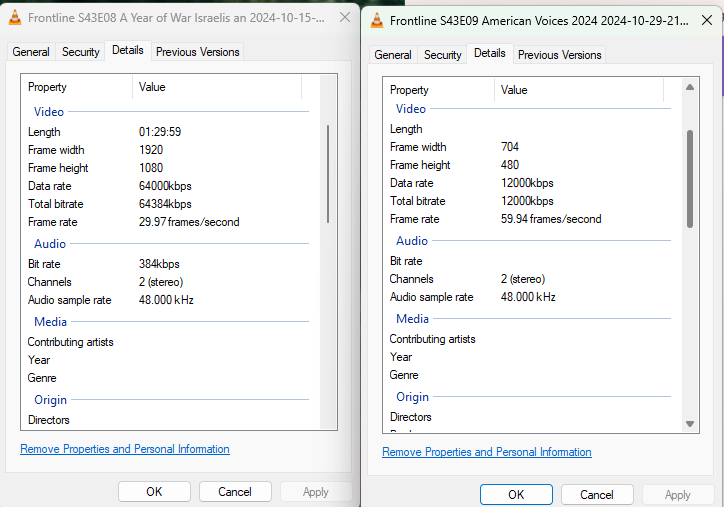
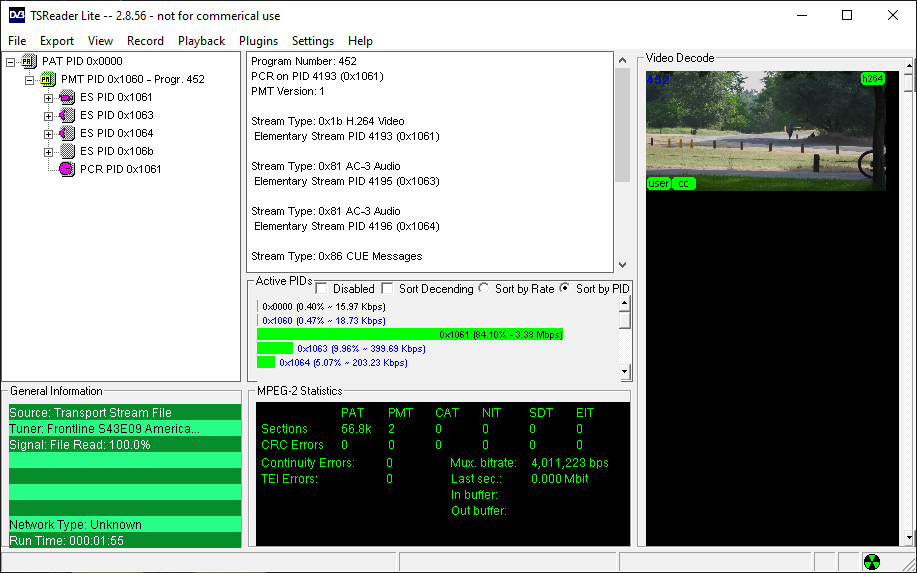
Every so often I get a recording that won't play back. Last night I tried to watch a show I recorded off of PBS and it wouldn't play. I let it sit for a bit just to see what happens and after a few minutes it started playing audio with no video. I copied the file from the DVR computer to my desktop and it wouldn't play back there either.
I'm running the Channels server on Windows 11 with a HDFX-4K as the tuner.
Here's the logs from the recording:
2024/10/29 21:00:00.014899 [DVR] Starting job 1730253600-2 Frontline on ch=[11.1]
2024/10/29 21:00:00.014899 [DVR] Waiting 9h59m59.985101s until next job 1730289600-ch11.2 Broadway's Brightest Lights
2024/10/29 21:00:00.014899 [DBG] Scheduling wake timer for scheduled recording in 9h58m29.985101s
2024/10/29 21:00:00.361771 [TNR] Opened connection to 10AA45AD/2 for ch11.1 WTTW HD
2024/10/29 21:00:00.362121 [DVR] Recording for job 1730253600-2 from 10AA45AD ch11.1 into "TV\Frontline\Frontline S43E09 American Voices 2024 2024-10-29-2100.mpg" for 1h29m59.985101s
2024/10/29 21:00:00.478144 [IDX] Generating video index for job 1730253600-2
2024/10/29 22:30:00.021800 [TNR] Closed connection to 10AA45AD/2 for ch11.1 WTTW HD
2024/10/29 22:30:00.042711 [SNR] Signal statistics for "TV\Frontline\Frontline S43E09 American Voices 2024 2024-10-29-2100.mpg": ss=99%,96%-100% snq=100% seq=100% bps=6653618,3758496-7960672 pps=569,323-683
2024/10/29 22:30:00.059348 [SNR] Buffer statistics for "TV\Frontline\Frontline S43E09 American Voices 2024 2024-10-29-2100.mpg": buf=0% drop=0%
2024/10/29 22:30:00.071511 [DVR] Finished job 1730253600-2 Frontline
2024/10/29 22:30:00.102795 [DVR] Processing file-873: TV\Frontline\Frontline S43E09 American Voices 2024 2024-10-29-2100.mpg
2024/10/29 22:30:00.103442 [DVR] Waiting 8h29m59.8965572s until next job 1730289600-ch11.2 Broadway's Brightest Lights
2024/10/29 22:30:00.103442 [DBG] Scheduling wake timer for scheduled recording in 8h28m29.8965572s
I didn't see any log message when I tried playing it back on my Firestick, but I did see log messages when I tried playing it back from admin website.
2024/10/30 18:58:43.936390 [ENC] Starting encoder for Frontline S43E09 American Voices 2024 2024-10-29-2100.mpg in D:\channels-data\Streaming\file873-ip192.168.0.93-2433726418\encoder-303-3978153632 at 303 (346.034633) (encoder=h264_mf, codec=h264, acodec=aac, resolution=0, deinterlacer=blend, bitrate=8720, segment_size=0.01)
2024/10/30 18:58:43.981239 [HLS] ffmpeg: file873-ip192.168.0.93:  [mpegts @ 00000000012bc140] start time for stream 0 is not set in estimate_timings_from_pts
2024/10/30 18:58:43.983144 [HLS] ffmpeg: file873-ip192.168.0.93:  [mpegts @ 00000000012bc140] start time for stream 1 is not set in estimate_timings_from_pts
2024/10/30 18:58:43.983144 [HLS] ffmpeg: file873-ip192.168.0.93:  [mpegts @ 00000000012bc140] start time for stream 2 is not set in estimate_timings_from_pts
2024/10/30 18:58:43.983144 [HLS] ffmpeg: file873-ip192.168.0.93:  [mpegts @ 00000000012bc140] Packet corrupt (stream = 4, dts = 1199827095), dropping it.
2024/10/30 18:58:43.983144 [HLS] ffmpeg: file873-ip192.168.0.93:  [mpegts @ 00000000012bc140] Packet corrupt (stream = 5, dts = 1199835388), dropping it.
2024/10/30 18:58:43.983144 [HLS] ffmpeg: file873-ip192.168.0.93:  [mpegts @ 00000000012bc140] Packet corrupt (stream = 6, dts = 1199835388), dropping it.
2024/10/30 18:58:43.983144 [HLS] ffmpeg: file873-ip192.168.0.93:  [mpegts @ 00000000012bc140] stream 0 : no TS found at start of file, duration not set
2024/10/30 18:58:43.983144 [HLS] ffmpeg: file873-ip192.168.0.93:  [mpegts @ 00000000012bc140] stream 1 : no TS found at start of file, duration not set
2024/10/30 18:58:43.983144 [HLS] ffmpeg: file873-ip192.168.0.93:  [mpegts @ 00000000012bc140] stream 2 : no TS found at start of file, duration not set
2024/10/30 18:58:43.983658 [HLS] ffmpeg: file873-ip192.168.0.93:  [mpegts @ 00000000012bc140] Could not find codec parameters for stream 0 (Video: mpeg2video ([2][0][0][0] / 0x0002), none(tv)): unspecified size
2024/10/30 18:58:43.983658 [HLS] ffmpeg: file873-ip192.168.0.93:  Consider increasing the value for the 'analyzeduration' (0) and 'probesize' (8000000) options
2024/10/30 18:58:43.983941 [HLS] ffmpeg: file873-ip192.168.0.93:  [mpegts @ 00000000012bc140] Could not find codec parameters for stream 1 (Audio: ac3 (AC-3 / 0x332D4341), 0 channels, fltp): unspecified sample rate
2024/10/30 18:58:43.983941 [HLS] ffmpeg: file873-ip192.168.0.93:  Consider increasing the value for the 'analyzeduration' (0) and 'probesize' (8000000) options
2024/10/30 18:58:43.983941 [HLS] ffmpeg: file873-ip192.168.0.93:  [mpegts @ 00000000012bc140] Could not find codec parameters for stream 2 (Audio: ac3 (AC-3 / 0x332D4341), 0 channels, fltp): unspecified sample rate
2024/10/30 18:58:43.983941 [HLS] ffmpeg: file873-ip192.168.0.93:  Consider increasing the value for the 'analyzeduration' (0) and 'probesize' (8000000) options
2024/10/30 18:58:43.985472 [HLS] ffmpeg: file873-ip192.168.0.93:  [mpegts @ 00000000012bc140] Packet corrupt (stream = 5, dts = 1199835388), dropping it.
2024/10/30 18:58:43.985472 [HLS] ffmpeg: file873-ip192.168.0.93:  [mpegts @ 00000000012bc140] Packet corrupt (stream = 6, dts = 1199835388), dropping it.
2024/10/30 18:58:43.985472 [HLS] ffmpeg: file873-ip192.168.0.93:  [mpegts @ 00000000012bc140] Packet corrupt (stream = 4, dts = 1199827095), dropping it.
2024/10/30 18:58:43.985472 [HLS] ffmpeg: file873-ip192.168.0.93:  [mpegts @ 00000000012bc140] Packet corrupt (stream = 5, dts = 1199835388), dropping it.
2024/10/30 18:58:43.985472 [HLS] ffmpeg: file873-ip192.168.0.93:  [mpegts @ 00000000012bc140] Packet corrupt (stream = 6, dts = 1199835388), dropping it.
2024/10/30 18:58:43.986562 [HLS] ffmpeg: file873-ip192.168.0.93:  [mpegts @ 00000000012bc140] Packet corrupt (stream = 4, dts = 1199827095), dropping it.
2024/10/30 18:58:43.986562 [HLS] ffmpeg: file873-ip192.168.0.93:  [mpegts @ 00000000012bc140] Packet corrupt (stream = 5, dts = 1199835388), dropping it.
2024/10/30 18:58:43.986562 [HLS] ffmpeg: file873-ip192.168.0.93:  [mpegts @ 00000000012bc140] Packet corrupt (stream = 6, dts = 1199835388), dropping it.
2024/10/30 18:59:10.844535 [ENC] Stopped encoder for Frontline S43E09 American Voices 2024 2024-10-29-2100.mpg in D:\channels-data\Streaming\file873-ip192.168.0.93-2433726418\encoder-303-3978153632 after starting from 303 without encoding any segments
Any ideas what's causing this? How to prevent it? How to fix a corrupted file?