Internet down detector (Free)

Is anyone using or can recommend a free Internet down detector?
I'm running a poor mans detector (created a shell script) on my NAS since it's running 7x24.
It just logs ping failures to various IP's I put in the script.
It works, but is crude and loops through pinging every 30 seconds.

ping-test.sh
#!/bin/sh
# ping loopback, router (lan gateway), comcast cable modem lan1, comcast internet gateway, quad eight dns and quad one dns
# every 30 seconds, logging ping failures until the file /volume1/arkives/ping-test.stop exists to stop the script
# 
# log start time of script in ISO 8601 format (to the second)
echo $(date -Iseconds) pingtest started >>/volume1/arkives/ping-test.log
# zero loop iteration counter
runnum=0
# loop until the file /volume1/arkives/ping-test.stop exists
until [ -a /volume1/arkives/ping-test.stop ]
do
# use ping options
#  -nq Numeric (not hostname) and Quiet output
#  -c1 Stop after sending 1 packet
#  -W1 Wait up to 1 second for response
# log ping failure (exit status NE 0) time in ISO 8601 format (to the second)
   ping -nq -c1 -W1 127.0.0.1; if [ $? -ne 0 ]; then echo $(date -Iseconds) pingfail 127.000.000.001 loopback >>/volume1/arkives/ping-test.log; fi
   ping -nq -c1 -W1 192.168.1.1; if [ $? -ne 0 ]; then echo $(date -Iseconds) pingfail 192.168.001.001 router >>/volume1/arkives/ping-test.log; fi
   ping -nq -c1 -W1 10.0.0.1; if [ $? -ne 0 ]; then echo $(date -Iseconds) pingfail 010.000.000.001 cable modem lan1 >>/volume1/arkives/ping-test.log; fi
   ping -nq -c1 -W1 x.x.x.x; if [ $? -ne 0 ]; then echo $(date -Iseconds) pingfail xxx.xxx.xxx.xxx comcast internet gateway >>/volume1/arkives/ping-test.log; fi
   ping -nq -c1 -W1 8.8.8.8; if [ $? -ne 0 ]; then echo $(date -Iseconds) pingfail 008.008.008.008 quad eight dns >>/volume1/arkives/ping-test.log; fi
   ping -nq -c1 -W1 1.1.1.1; if [ $? -ne 0 ]; then echo $(date -Iseconds) pingfail 001.001.001.001 quad one dns >>/volume1/arkives/ping-test.log; fi
# wait 30 seconds, then increment loop iteration counter
   sleep 30; ((runnum += 1))
# log a message it's still running about every hour (runnum == 120)
   if ((runnum == 120)); then runnum=0; echo $(date -Iseconds) pingtest running >>/volume1/arkives/ping-test.log; fi
done
# log stop time of script in ISO 8601 format (to the second)
echo $(date -Iseconds) pingtest stopped >>/volume1/arkives/ping-test.log
ping-test.log
ping lo, router (lan gateway), cable modem lan1, inet gateway, quad eight dns and quad one dns every 30 seconds
To stop ping-test, rename the file /volume1/arkives/ping-test.run to ping-test.stop

2023-09-23T10:20:35-07:00 pingtest started
2023-09-23T11:20:43-07:00 pingtest running
2023-09-23T12:20:50-07:00 pingtest running
2023-09-23T13:20:58-07:00 pingtest running
2023-09-23T14:21:06-07:00 pingtest running
2023-09-23T15:21:14-07:00 pingtest running
2023-09-23T16:21:22-07:00 pingtest running
2023-09-23T17:21:30-07:00 pingtest running
2023-09-23T18:21:38-07:00 pingtest running
2023-09-23T19:21:45-07:00 pingtest running
2023-09-23T20:21:53-07:00 pingtest running
2023-09-23T21:22:00-07:00 pingtest running
2023-09-23T22:22:08-07:00 pingtest running
2023-09-23T23:22:15-07:00 pingtest running
2023-09-24T00:22:23-07:00 pingtest running
2023-09-24T01:22:30-07:00 pingtest running
2023-09-24T02:22:38-07:00 pingtest running
2023-09-24T03:22:45-07:00 pingtest running
2023-09-24T04:22:51-07:00 pingtest running
2023-09-24T05:22:57-07:00 pingtest running
2023-09-24T06:23:03-07:00 pingtest running
2023-09-24T07:23:08-07:00 pingtest running
2023-09-24T08:23:14-07:00 pingtest running
2023-09-24T09:23:20-07:00 pingtest running
2023-09-24T10:23:26-07:00 pingtest running
2023-09-24T11:23:33-07:00 pingtest running
2023-09-24T12:23:39-07:00 pingtest running
2023-09-24T13:23:45-07:00 pingtest running
2023-09-24T14:23:51-07:00 pingtest running
2023-09-24T15:23:58-07:00 pingtest running
2023-09-24T16:24:05-07:00 pingtest running

I use a PING also with www.google.com. When recording from streaming services ... Ping works good I ping google to check if my router should switch to my failover.

Ah, yes that would be free because it's built into your Asus router.
I can fail over on my Synology router, but I only have 1 internet connection, so nothing to fail over to.

1 Like

I use Verizon Wireless Internet as my fail over. XFINITY 1 GIG is my main. I had an occasion where they cut my Cable by accident .. Everything stops lol Ring Wyze etc ..

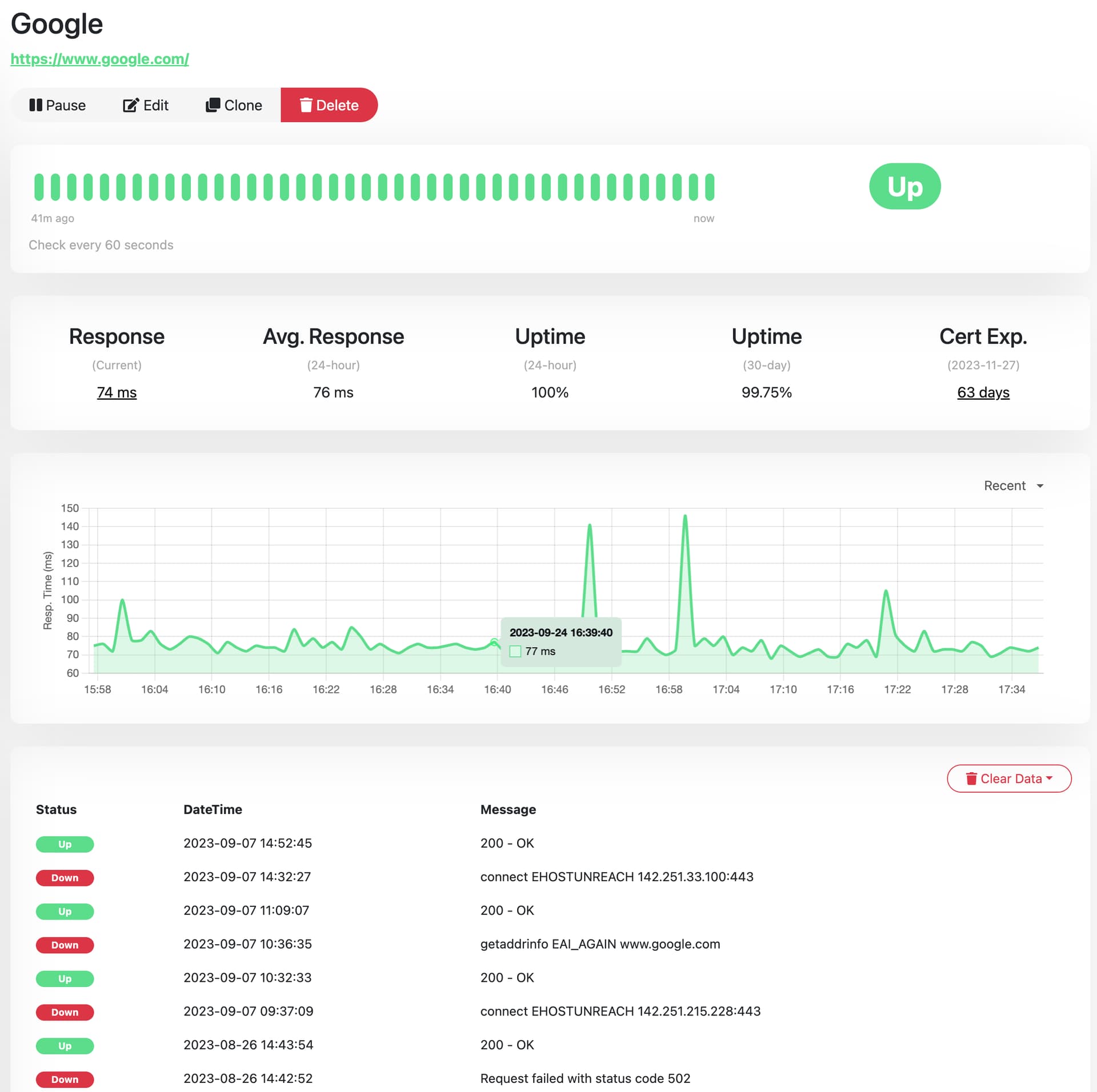
I use Uptime Kuma to monitor my internet connection as well as a bunch of devices on my local network as well as remote servers.

It runs great on my NAS in Portainer. If you want I can upload my compose file for Uptime Kuma.

That looks interesting.

I'm more about logging the down times so I can provide the logs to my provider.
Does that log them?

Here are examples of failures from my script

2023-09-23T00:55:31-07:00 pingfail xxx.xxx.xxx.xxx comcast internet gateway
2023-09-23T00:55:32-07:00 pingfail 008.008.008.008 quad eight dns
2023-09-23T00:55:33-07:00 pingfail 001.001.001.001 quad one dns
2023-09-23T00:56:04-07:00 pingfail xxx.xxx.xxx.xxx comcast internet gateway
2023-09-23T00:56:05-07:00 pingfail 008.008.008.008 quad eight dns
2023-09-23T00:56:06-07:00 pingfail 001.001.001.001 quad one dns

2023-09-23T10:02:15-07:00 pingfail xxx.xxx.xxx.xxx comcast internet gateway
2023-09-23T10:02:16-07:00 pingfail 008.008.008.008 quad eight dns
2023-09-23T10:02:17-07:00 pingfail 001.001.001.001 quad one dns
2023-09-23T10:02:48-07:00 pingfail xxx.xxx.xxx.xxx comcast internet gateway
2023-09-23T10:02:49-07:00 pingfail 008.008.008.008 quad eight dns
2023-09-23T10:02:50-07:00 pingfail 001.001.001.001 quad one dns
2023-09-23T10:03:21-07:00 pingfail xxx.xxx.xxx.xxx comcast internet gateway
2023-09-23T10:03:22-07:00 pingfail 008.008.008.008 quad eight dns
2023-09-23T10:03:23-07:00 pingfail 001.001.001.001 quad one dns
2023-09-23T10:03:54-07:00 pingfail xxx.xxx.xxx.xxx comcast internet gateway
2023-09-23T10:03:55-07:00 pingfail 008.008.008.008 quad eight dns
2023-09-23T10:03:56-07:00 pingfail 001.001.001.001 quad one dns
2023-09-23T10:04:27-07:00 pingfail xxx.xxx.xxx.xxx comcast internet gateway
2023-09-23T10:04:28-07:00 pingfail 008.008.008.008 quad eight dns
2023-09-23T10:04:29-07:00 pingfail 001.001.001.001 quad one dns
2023-09-23T10:05:00-07:00 pingfail xxx.xxx.xxx.xxx comcast internet gateway
2023-09-23T10:05:01-07:00 pingfail 008.008.008.008 quad eight dns
2023-09-23T10:05:02-07:00 pingfail 001.001.001.001 quad one dns
2023-09-23T10:05:33-07:00 pingfail xxx.xxx.xxx.xxx comcast internet gateway
2023-09-23T10:05:34-07:00 pingfail 008.008.008.008 quad eight dns
2023-09-23T10:05:35-07:00 pingfail 001.001.001.001 quad one dns
2023-09-23T10:06:06-07:00 pingfail xxx.xxx.xxx.xxx comcast internet gateway
2023-09-23T10:06:07-07:00 pingfail 008.008.008.008 quad eight dns
2023-09-23T10:06:08-07:00 pingfail 001.001.001.001 quad one dns
2023-09-23T10:06:39-07:00 pingfail xxx.xxx.xxx.xxx comcast internet gateway
2023-09-23T10:06:40-07:00 pingfail 008.008.008.008 quad eight dns
2023-09-23T10:06:41-07:00 pingfail 001.001.001.001 quad one dns
2023-09-23T10:07:12-07:00 pingfail xxx.xxx.xxx.xxx comcast internet gateway
2023-09-23T10:07:13-07:00 pingfail 008.008.008.008 quad eight dns
2023-09-23T10:07:14-07:00 pingfail 001.001.001.001 quad one dns
2023-09-23T10:07:45-07:00 pingfail xxx.xxx.xxx.xxx comcast internet gateway
2023-09-23T10:07:46-07:00 pingfail 008.008.008.008 quad eight dns
2023-09-23T10:07:47-07:00 pingfail 001.001.001.001 quad one dns
2023-09-23T10:08:18-07:00 pingfail xxx.xxx.xxx.xxx comcast internet gateway
2023-09-23T10:08:19-07:00 pingfail 008.008.008.008 quad eight dns
2023-09-23T10:08:20-07:00 pingfail 001.001.001.001 quad one dns
2023-09-23T10:08:51-07:00 pingfail xxx.xxx.xxx.xxx comcast internet gateway
2023-09-23T10:08:52-07:00 pingfail 008.008.008.008 quad eight dns
2023-09-23T10:08:53-07:00 pingfail 001.001.001.001 quad one dns
2023-09-23T10:09:24-07:00 pingfail xxx.xxx.xxx.xxx comcast internet gateway
2023-09-23T10:09:25-07:00 pingfail 008.008.008.008 quad eight dns
2023-09-23T10:09:26-07:00 pingfail 001.001.001.001 quad one dns
2023-09-23T10:09:57-07:00 pingfail xxx.xxx.xxx.xxx comcast internet gateway
2023-09-23T10:09:58-07:00 pingfail 008.008.008.008 quad eight dns
2023-09-23T10:09:59-07:00 pingfail 001.001.001.001 quad one dns
2023-09-23T10:10:30-07:00 pingfail xxx.xxx.xxx.xxx comcast internet gateway
2023-09-23T10:10:31-07:00 pingfail 008.008.008.008 quad eight dns
2023-09-23T10:10:32-07:00 pingfail 001.001.001.001 quad one dns
2023-09-23T10:11:03-07:00 pingfail xxx.xxx.xxx.xxx comcast internet gateway
2023-09-23T10:11:04-07:00 pingfail 008.008.008.008 quad eight dns
2023-09-23T10:11:05-07:00 pingfail 001.001.001.001 quad one dns
2023-09-23T10:11:36-07:00 pingfail xxx.xxx.xxx.xxx comcast internet gateway
2023-09-23T10:11:37-07:00 pingfail 008.008.008.008 quad eight dns
2023-09-23T10:11:38-07:00 pingfail 001.001.001.001 quad one dns
2023-09-23T10:12:09-07:00 pingfail xxx.xxx.xxx.xxx comcast internet gateway
2023-09-23T10:12:10-07:00 pingfail 008.008.008.008 quad eight dns
2023-09-23T10:12:11-07:00 pingfail 001.001.001.001 quad one dns
2023-09-23T10:12:42-07:00 pingfail xxx.xxx.xxx.xxx comcast internet gateway
2023-09-23T10:12:43-07:00 pingfail 008.008.008.008 quad eight dns
2023-09-23T10:12:44-07:00 pingfail 001.001.001.001 quad one dns
2023-09-23T10:13:15-07:00 pingfail xxx.xxx.xxx.xxx comcast internet gateway
2023-09-23T10:13:16-07:00 pingfail 008.008.008.008 quad eight dns
2023-09-23T10:13:17-07:00 pingfail 001.001.001.001 quad one dns
2023-09-23T10:13:48-07:00 pingfail 010.000.000.001 cable modem lan1
2023-09-23T10:13:49-07:00 pingfail xxx.xxx.xxx.xxx comcast internet gateway
2023-09-23T10:13:50-07:00 pingfail 008.008.008.008 quad eight dns
2023-09-23T10:13:51-07:00 pingfail 001.001.001.001 quad one dns
2023-09-23T10:14:22-07:00 pingfail 010.000.000.001 cable modem lan1
2023-09-23T10:14:23-07:00 pingfail xxx.xxx.xxx.xxx comcast internet gateway
2023-09-23T10:14:24-07:00 pingfail 008.008.008.008 quad eight dns
2023-09-23T10:14:25-07:00 pingfail 001.001.001.001 quad one dns
2023-09-23T10:14:56-07:00 pingfail xxx.xxx.xxx.xxx comcast internet gateway
2023-09-23T10:14:57-07:00 pingfail 008.008.008.008 quad eight dns
2023-09-23T10:14:58-07:00 pingfail 001.001.001.001 quad one dns
2023-09-23T10:15:29-07:00 pingfail xxx.xxx.xxx.xxx comcast internet gateway
2023-09-23T10:15:30-07:00 pingfail 008.008.008.008 quad eight dns
2023-09-23T10:15:31-07:00 pingfail 001.001.001.001 quad one dns
2023-09-23T10:16:02-07:00 pingfail 010.000.000.001 cable modem lan1
2023-09-23T10:16:03-07:00 pingfail xxx.xxx.xxx.xxx comcast internet gateway
2023-09-23T10:16:04-07:00 pingfail 008.008.008.008 quad eight dns
1 Like

Yes, it logs the pings.

1 Like

Thank you, I'll check it out.

After reading through its docs, it looks very nice, but overkill for what I need.
I would try it out, but am unsure why it needs an admin username & password. To login to what?

It uses a web based front-end. I believe that it wants you to create a username and password so that you can logout if you use it in a public setting. It does not need your system password.

1 Like

OK, thought maybe it had to login to some account associated with the developer.

Thanks for sharing it. I really like it so far and will let it run a few days to check it out.
It's definitely overkill for what I need, but I may take advantage of some of its other great features.

Healthchecks.io is simpler and may be adequate for you. It works on the principle of a heartbeat check-in from one or several of your local systems. If there is no check-in, it logs the alert.

Thanks, but I don't want to rely on a cloud service.

Do you use Home Assistant, by chance?
There is a local integration for this:

Thanks, but I don't.
Still waiting for a failure to see how it looks in Uptime Kuma.
Running that plus my original script.

I really only need logging, no notifications or anything fancy.
I've been think of modifying my script to send the log events to my syslog server.

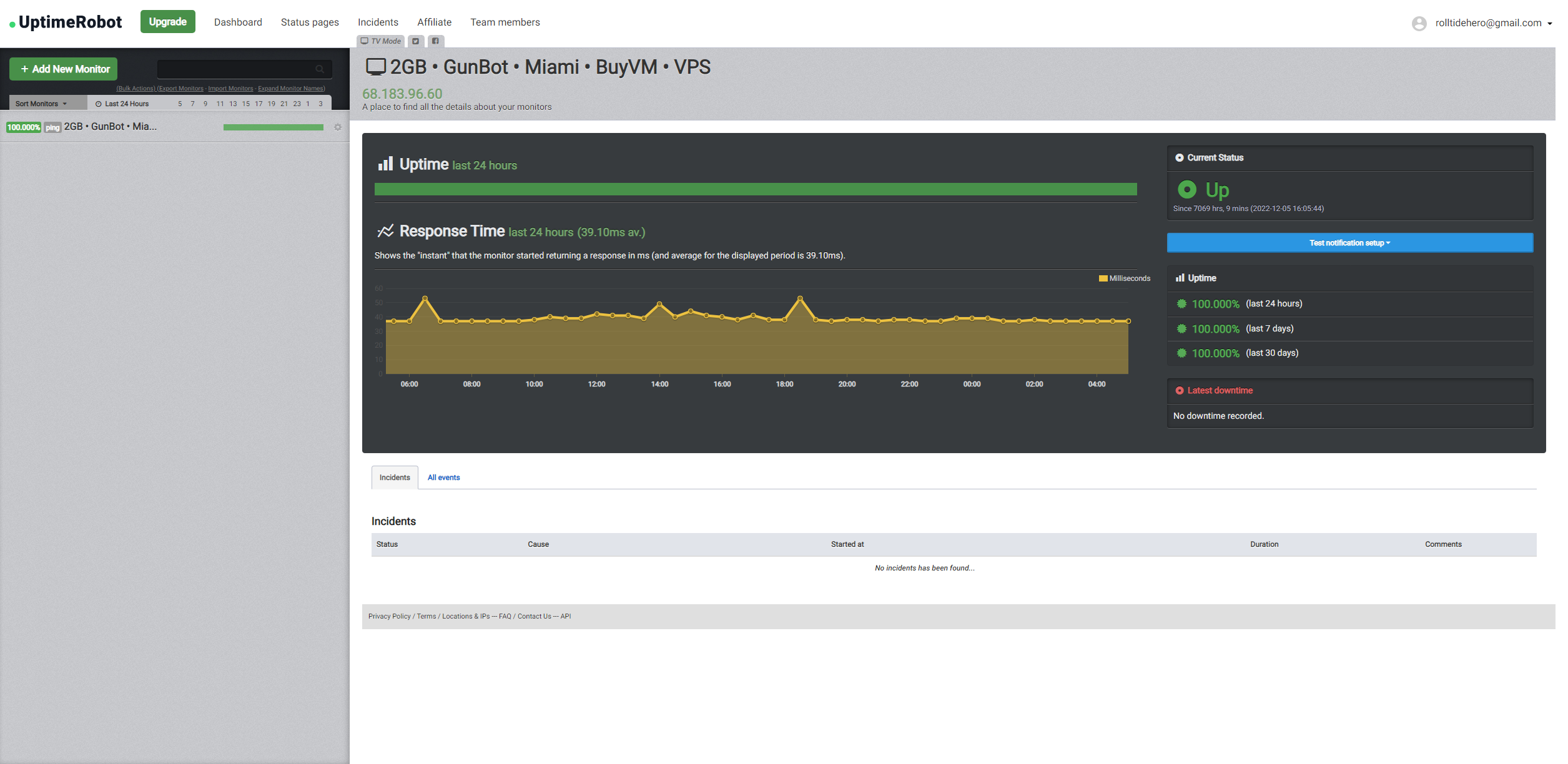
I have UptimeKuma installed for my Proxmox containers & VMs, but I use UptimeRobot to ping my home IP and also one of my VPS. Their free plan (50 monitors) is more than enough for what you are asking for.

EDIT: Here is a screenshot

Uptime Kuma is nice, but overkill. I can't even find out how to access plain old text file logs in it.

UptimeRobot looks like it's a cloud based solution (I want local) and can only check every 5 minutes for the free version.

I think I'll be staying with my shell script unless I can figure out how to access log files in Uptime Kuma.

1 Like

Since I couldn't figure out how to get a plain text log from Uptime Kuma, I just modified my shell script to only log ups and downs of the hosts monitored. Figured why run yet another docker container (although Uptime Kuma is nice looking and powerful).

ping-test.sh
#!/bin/sh
# ping loopback, router (lan gateway), comcast cable modem lan1, comcast internet gateway, quad eight dns and quad one dns
# every 30 seconds, logging ping failures until the file /volume1/arkives/ping-test.stop exists to stop the script
# 
# log start time of script in ISO 8601 format (to the second)
echo $(date -Iseconds) pingtest started >>/volume1/arkives/ping-test.log
# set host ping status to UNKNOWN
p0="UNKNOWN"; p1="UNKNOWN"; p2="UNKNOWN"; p3="UNKNOWN"; p4="UNKNOWN"; p5="UNKNOWN"; p6="UNKNOWN"
# zero loop iteration counter
runnum=0
# loop until the file /volume1/arkives/ping-test.stop exists
until [ -a /volume1/arkives/ping-test.stop ]
do
# use ping options
#  -nq Numeric (not hostname) and Quiet output
#  -c1 Stop after sending 1 packet
#  -W1 Wait up to 1 second for response
# log ping failure (exit status NE 0) and ping recovery (exit status EQ 0) time per host in ISO 8601 format (to the second)
   ping -nq -c1 -W1 192.168.1.254; if [ $? -ne 0 ]; then if [ $p0 != "DOWN" ]; then p0="DOWN"; echo $(date -Iseconds) hostDOWN 192.168.001.254 notahost >>/volume1/arkives/ping-test.log; fi; else if [ $p0 != "UP" ]; then p0="UP"; echo $(date -Iseconds) hostisUP 192.168.001.254 notahost >>/volume1/arkives/ping-test.log; fi; fi
   ping -nq -c1 -W1 127.0.0.1    ; if [ $? -ne 0 ]; then if [ $p1 != "DOWN" ]; then p1="DOWN"; echo $(date -Iseconds) hostDOWN 127.000.000.001 loopback >>/volume1/arkives/ping-test.log; fi; else if [ $p1 != "UP" ]; then p1="UP"; echo $(date -Iseconds) hostisUP 127.000.000.001 loopback >>/volume1/arkives/ping-test.log; fi; fi
   ping -nq -c1 -W1 192.168.1.1  ; if [ $? -ne 0 ]; then if [ $p2 != "DOWN" ]; then p2="DOWN"; echo $(date -Iseconds) hostDOWN 192.168.001.001 routergw >>/volume1/arkives/ping-test.log; fi; else if [ $p2 != "UP" ]; then p2="UP"; echo $(date -Iseconds) hostisUP 192.168.001.001 routergw >>/volume1/arkives/ping-test.log; fi; fi
   ping -nq -c1 -W1 10.0.0.1     ; if [ $? -ne 0 ]; then if [ $p3 != "DOWN" ]; then p3="DOWN"; echo $(date -Iseconds) hostDOWN 010.000.000.001 cmdmlan1 >>/volume1/arkives/ping-test.log; fi; else if [ $p3 != "UP" ]; then p3="UP"; echo $(date -Iseconds) hostisUP 010.000.000.001 cmdmlan1 >>/volume1/arkives/ping-test.log; fi; fi
   ping -nq -c1 -W1 x.x.x.x      ; if [ $? -ne 0 ]; then if [ $p4 != "DOWN" ]; then p4="DOWN"; echo $(date -Iseconds) hostDOWN xxx.xxx.xxx.xxx inetgway >>/volume1/arkives/ping-test.log; fi; else if [ $p4 != "UP" ]; then p4="UP"; echo $(date -Iseconds) hostisUP xxx.xxx.xxx.xxx inetgway >>/volume1/arkives/ping-test.log; fi; fi
   ping -nq -c1 -W1 8.8.8.8      ; if [ $? -ne 0 ]; then if [ $p5 != "DOWN" ]; then p5="DOWN"; echo $(date -Iseconds) hostDOWN 008.008.008.008 quad8dns >>/volume1/arkives/ping-test.log; fi; else if [ $p5 != "UP" ]; then p5="UP"; echo $(date -Iseconds) hostisUP 008.008.008.008 quad8dns >>/volume1/arkives/ping-test.log; fi; fi
   ping -nq -c1 -W1 1.1.1.1      ; if [ $? -ne 0 ]; then if [ $p6 != "DOWN" ]; then p6="DOWN"; echo $(date -Iseconds) hostDOWN 001.001.001.001 quad1dns >>/volume1/arkives/ping-test.log; fi; else if [ $p6 != "UP" ]; then p6="UP"; echo $(date -Iseconds) hostisUP 001.001.001.001 quad1dns >>/volume1/arkives/ping-test.log; fi; fi
# wait 30 seconds, then increment loop iteration counter
   sleep 30; ((runnum += 1))
# log a message it's still running about every hour (runnum == 120)
   if ((runnum == 120)); then runnum=0; echo $(date -Iseconds) pingtest running >>/volume1/arkives/ping-test.log; fi
done
# log stop time of script in ISO 8601 format (to the second)
echo $(date -Iseconds) pingtest stopped >>/volume1/arkives/ping-test.log
ping-test.log
ping lo, router (lan gateway), cable modem lan1, inet gateway, quad eight dns and quad one dns every 30 seconds
To stop ping-test, rename the file /volume1/arkives/ping-test.run to ping-test.stop

2023-09-28T14:57:07-07:00 pingtest started
2023-09-28T14:57:08-07:00 hostDOWN 192.168.001.254 notahost
2023-09-28T14:57:08-07:00 hostisUP 127.000.000.001 loopback
2023-09-28T14:57:08-07:00 hostisUP 192.168.001.001 routergw
2023-09-28T14:57:08-07:00 hostisUP 010.000.000.001 cmdmlan1
2023-09-28T14:57:08-07:00 hostisUP xxx.xxx.xxx.xxx inetgway
2023-09-28T14:57:08-07:00 hostisUP 008.008.008.008 quad8dns
2023-09-28T14:57:08-07:00 hostisUP 001.001.001.001 quad1dns

Edit: modified script to account for a host being unpingable when the script starts running