
Any chance we can get YES Network?
To be clear, you're able to record 4 streams/browser windows at once with PrismCast on a M2 Mac mini? If so and it works well, I'm coming very close to buying a Mac mini to replace our HDHR Prime when it stops being supported — definitely seems a lot easier to manage a single computer than an encoder and 4 streaming devices. We rarely if ever need more than 2 streams at once anyway.
Ive been trying to log in via website to find a link etc....but keep popping errors etc
To be clear, you're able to record 4 streams/browser windows at once with PrismCast on a M2 Mac mini? If so and it works well, I'm coming very close to buying a Mac mini to replace our HDHR Prime when it stops being supported — definitely seems a lot easier to manage a single computer than an encoder and 4 streaming devices. We rarely if ever need more than 2 streams at once anyway.
I’ve run 12 streams off my M4 Max Studio…the M2 Mini is more than capable enough of doing close to this, if not identical (just without the headroom I have).
PrismCast is developed on, and optimized for, macOS…it’s not macOS only, but it is macOS-first.
1 Like
Thank you for updating the Readme section of your GitHub to list all the ways to upgrade. I don't have PrismCast running as a service so I don't need to stop that, but should I close the PrismCast chrome window, and/or the terminal window, or do anything else before running the "npm install -g prismcast" command to upgrade to the latest version? I'm still on version 1.1 and it's been working great, so I've been hesitant to upgrade from fear of messing it all up.
@hjd PR #13 submitted adding yttv variant to 9 predefined channels also available on YouTube TV.
1 Like
Thank you for this. It literally took 10 minutes to install, setup and start streaming. Awesome.
Thanks @hjd for sharing this. Quick question which i can't find the answer to in this thread or the README on Github. I want to use prismcast only as a source for Channels - and I'd like to record all streams at the original resolution. I am running on a old MacBook Pro - and the Quality Preset won't let me use anything but 480p. Is there any way to configured prismcast to always use the native resolution of the stream, and not the resolution of the host display as a constraint?
1 Like
Any one else seeing that the capture bitrates are about exactly twice as large as the video bitrate settings? I discovered this because my playback device was struggling to keep up with a bitrate setting that I knew it could do in the past. Math error, possibly, someplace in the code?
See:
Okay, but def saw them change proportionally to changing bitrate settings. Wouldn't have fiddled with them other than my 1080p streams seemed a bit juddery, went to channels show stats, and bitrates were in the mid-40Mbps! Much higher than expected.
Thanks for explaining that bitrates are mostly under chrome’s control. My experience is that it likes to use much higher than suggested value. I have plenty of storage space so mostly just chasing if my playback device is struggling from high bitrates while trying to optimize my playback experience.
Thanks to the developer, know it is early days, but already this thing is awesome. Even happier to be a Mac user today because of this.
I noticed something similar with the bitrate, it does seem to be proportionally higher than the setting. I would have stuck with the default but it was producing giant files when compared to other sources like TVE or OTA recordings (and the quality was actually a bit worse than those sources with smaller files). So I reduced the bitrate and the file sizes are more manageable, though still quite a bit larger than other sources and the bitrate of the recording is proportionally higher than the setting.
I’m having a weird problem with prism whereby it will play for a while and then if we don’t watch any of the channels for a few hours, I can’t get it to open back up through Channels DVR. It takes a computer reboot to get it to work. Any ideas what might be going on? The computer is staying awake the whole time. Sorry if this was already answered somewhere else. Also, thank you so much for putting the service together.
v1.3.2 is out - notable addition - HBO Max, Sling TV, YouTube TV will all directly tune their guides to so-called "deep links" automatically. PrismCast ensures they all remain accurate and up-to-date on first tune. The first time you tune in these providers, PrismCast will grab everything it needs to directly navigate to those sites on subsequent visits (there's a minor caveat for Sling TV, but same applies). For those that have been trying to hardcode those links into PrismCast, my advice: revert to the defaults in PrismCast. It's going to keep links up-to-date on it's own, if/when they change.
The issue that was reported by @mike_here on settings not being saved is also fixed - sorry about that!
Enjoy!
To reiterate from prior release notes:
If you’ve created user-defined channels that are now covered by predefined options, I recommend deleting those overrides and using the defaults. Predefined channels are what I test and maintain; overrides are entirely optional, but they do create long-term configuration debt for you as PrismCast evolves.
I really appreciate the feedback, enthusiasm, and passion around PrismCast. Almost every feature added since 1.0.0 has come from thoughtful, respectful discussion with this community.
My only ask is simple: please be kind, not demanding. PrismCast started as a project for my own needs, and I share it because I enjoy this community and wanted to give something back. Respectful feedback is always welcome; entitlement is not.
Thank you to everyone who’s shared encouragement or joy in using PrismCast—it genuinely keeps this project fun to work on.
One more note for everyone’s benefit: please don’t repost the same questions in this thread. Many of them have already been asked and answered, and the forum’s topic-only search works well. Keeping discussions focused helps everyone. Please treat the thread and each other with the same consideration you’d expect in return.
1.3.2 (2026-02-15)
- Improvement: when possible, directly tune URLs for HBO Max, Sling TV, and YouTube TV to skip guide navigation on repeat tunes.
- Improvement: our stream health monitoring now regularly checks to ensure the stream remains fullscreened, and attempts to correct it if it's not.
- Improvement: improved MPEG-TS ATSC transport stream compatibility for Plex HDHomeRun integration.
- Improvement: webUI refinements.
- Fix: saving settings was wiping the disabled channel list, provider filter, and HDHomeRun device ID.
- Housekeeping.
1 Like
@bnhf Give the latest a twirl - native performance for YTTV and Sling TV. And stop "deep-linking" already.  The caveat with Sling TV is the way their API works...I prioritize responsiveness with PrismCast, the Sling TV API can be slow to return everything, and it does so in alphabetical order. If you want to "prime" the channels cache in PrismCast, tune whatever the alphabetically last channel it is that you care about in PrismCast for Sling TV. After that, every tune should be done directly. You don't have to do this, of course...PrismCast will progressively learn all the channels as you tune them, and remember. We always fall back to actually navigating the guide when needed as a failsafe.
For HBO Max and YouTube TV - first time you tune anything, PrismCast will learn all the channels and directly navigate to them on every subsequent tune.
Enjoy.
1 Like
Sorry for the dumb question here but I tried 1.3.1 and 1.3.2 (docker in Unraid) and the video is no longer smooth like with version 1.2.1 - I tried to go back to version 1.2.1 by changing the portainer stack line from "image: ghcr.io/hjdhjd/prismcast:${TAG:-latest}" to "image: ghcr.io/hjdhjd/prismcast:${TAG:-1.2.1}" and it sucessfully deploys the image but the docker doesn't work - Portainer indicates image is "unhealthy" and the webUI doesn't come up - how do I revert to version 1.2.1?
Actually, with the Docker Composes I've been publishing for a couple of years here, you shouldn't change the default in the compose -- but rather, use an override in the Environment variables section of the Portainer-Stacks editor that's specifically for this purpose.
Change the Docker Compose back to the way it was, and make your change here (red box):
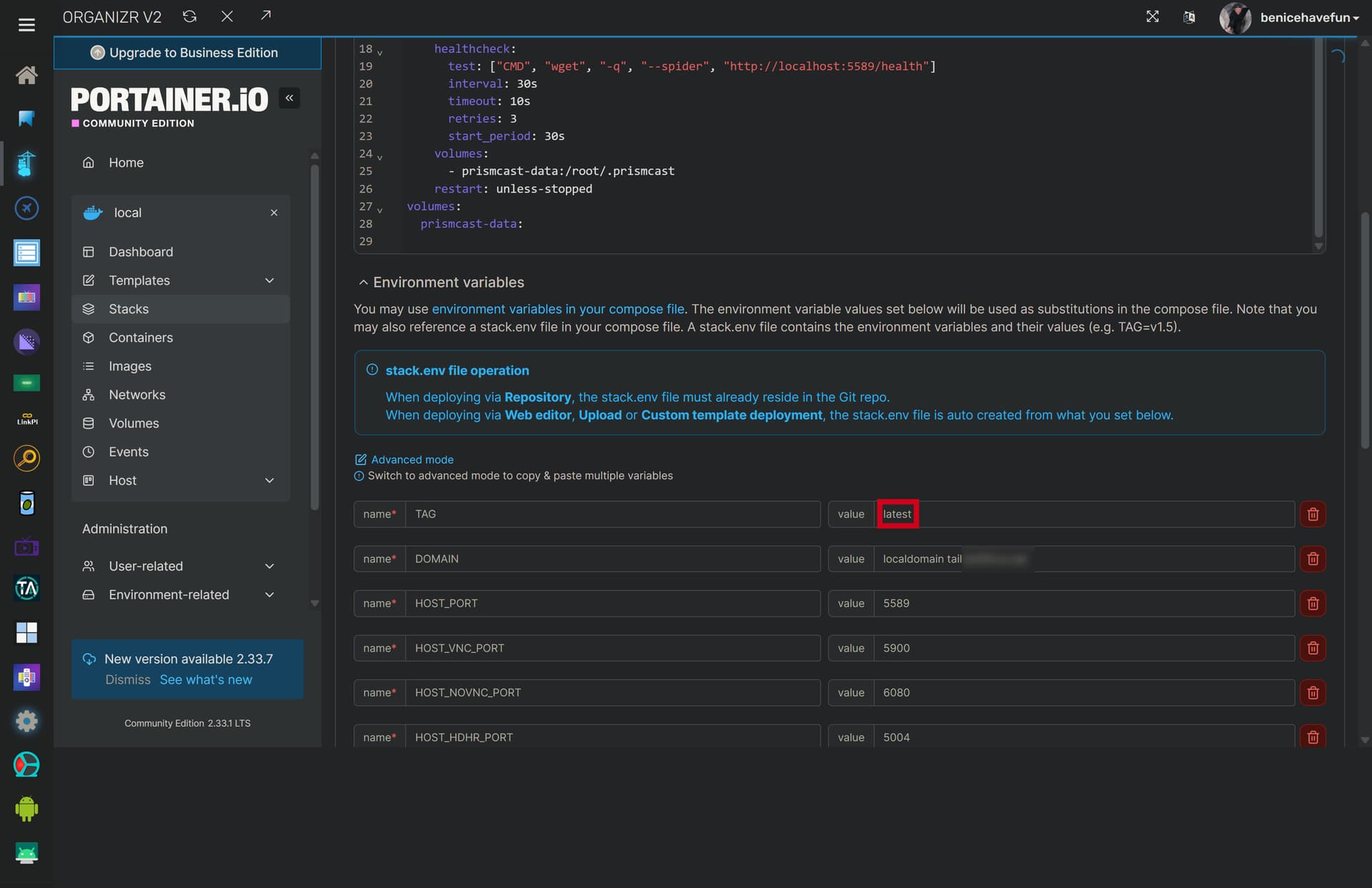
Thanks - I just tried your suggestion and got the same result (not working, no :5589 page) - for now , I can just go back to the latest, so the container is at least running and watch the ADBTuner version of each channel until Prismcast gets a bit more mature
The problem that I was seeing with 1.3.1 and 1.3.2 is that the video frequently stalls, A/V gets out of sync and then the video tries to catch up by playing back too fast - didn't see this with 1.2.1
The problem that I was seeing with 1.3.1 and 1.3.2 is that the video frequently stalls, A/V gets out of sync and then the video tries to catch up by playing back too fast - didn't see this with 1.2.1
I appreciate the data point. Out of curiosity, what're you running this on, hardware-wise? What you're describing sounds like a potentially underpowered environment in general.
First of all, thank you for doing all of this - I'm sure Prismcast is going to get there and it was working well for me until I taught myself how to update a docker via portainer
I'm running Unraid on an Intel core i7 12700K (also cDVR uses NVMes exclusively, except for recordings over 2 weeks old), so I should have plenty of CPU power - on the dashboard, when watching a channel under version 1.2.1, the CPU indicated something like 6% to 12% at most - I'm happy to help test future releases - I have multiple means of tuning channels in (ADBTuner+TVE+HDHR OTA), so Prismcast is not presently critical