
I needed to do a prismcast service restart after brew upgrade finished to get it to finish the upgrade, for anyone else out there that missed seeing that in the brew output.
Now that 1.5.0 provides an easy way to see the Gracenote station ID for all of the networks, I found an easy way to get Spectrum channels mapped, since I do not have HuluTV or YouTubeTV, which it seems many stations have those as the only two options. Perhaps this can be added as another provider. For a Spectrum link, it is formatted like this: https://watch.spectrum.net/livetv?tmsid=59186. Turns out that the tmsid number matches the Gracenote station ID. So by just changing the tmsid= to whatever station_id is shown in PrismCast, I can custom map the stations that are limited to providers I do not have. Hope this helps someone.
@scottuf
Now that 1.5.0 provides an easy way to see the Gracenote station ID for all of the networks, I found an easy way to get Spectrum channels mapped, since I do not have HuluTV or YouTubeTV, which it seems many stations have those as the only two options. Perhaps this can be added as another provider. For a Spectrum link, it is formatted like this:https://watch.spectrum.net/livetv?tmsid=59186. Turns out that the tmsid number matches the Gracenote station ID. So by just changing the tmsid= to whatever station_id is shown in PrismCast, I can custom map the stations that are limited to providers I do not have. Hope this helps someone.
Ideally, if I had access to a login for a little bit, I’d love to add native support for both Spectrum and Xfinity Stream. Sadly, I don’t have access to either…so if someone has a login they can create (I believe Xfinity allows you to create sub accounts/logins, at least they did as of a couple of years ago when I had them last) or is willing to share for a day or so…I can get these quickly up and running for the community.
1 Like
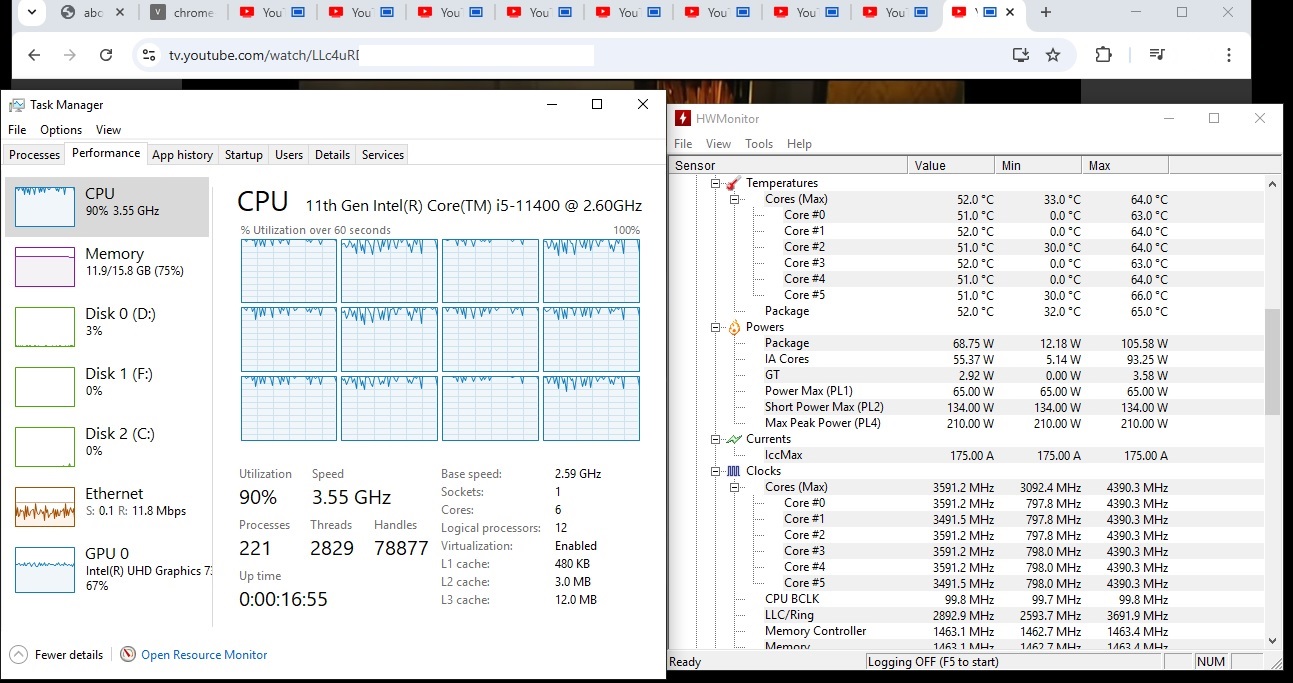
9 simultaneous recordings on PrismCast, and 3 instances of comskip running in the background. The 4.4 ghz CPU seems pretty well balanced at about 3.5ghz under the load (720p high setting). Absolutely stellar stuff, hjd.
- Canvas: Hardware accelerated
*** rect Rendering Display Compositor: Disabled
*** C**ompositing: Hardware accelerated - Multiple Raster Threads: Enabled
- OpenGL: Enabled
- Rasterization: Hardware accelerated
** Raw Draw: Disabled*
** Skia Graphite: Disabled*
** TreesInViz: Disabled* - Video Decode: Hardware accelerated
- Video Encode: Hardware accelerated
- WebGL: Hardware accelerated
- WebGPU: Hardware accelerated
- WebNN: Disabled
Any ideas if the few disable items matter?? This is on a Windows 11 via Node.exe Native on an I5 - 8500
The new update method is sweet ....took just a few min and a restart via task manger
What is your display scaling set to? Even if you have a 4k res if the scaling is too high it won't render at 1080p. The prism logs will tell you your max res allowed if it can't do 1080p.
oops this was checked via teamviewer at 3840x2160 Ill go login at the tv itself and recheck
Could the channel lineup precache also be enabled for multiple video providers like usanetwork.com? That might fix the random over 15 second timeouts on first tune for those.
So logging in at TV I set it to 720P High @ 12Mbts BUT need to reboot PC for it to stick So lesson learned The disabled items all remain disabled BUT the video out put looks much Better
Im stuck at 10 seconds to see a channel BUT other than a new high power PC ill leave it as is
There a way to get higher than 720p high in a Docker container.
You need to set your video resolution env vars to something higher than 1920x1080. Try a 2K resolution like 2560x1440.
Thank you so much, that worked.
For Windows users: pkill is not a command that native Windows recognizes, so I was not able to install the PrismCast service and as a result I always manually start it console. Is there a way to get the service running otherwise? Because Windows doesn't recognize pkill, there are frequently numerous errors in the console command window at the end of a day - are there any workarounds for this? Everything is working admirably otherwise.
I realize this wasn't specifically developed for Windows, so I'm probably grasping at straws here, but thought I'd at least ask. Thanks.
For Docker users, is there any way to pass Intel QuickSync through?
It's pointless, containerized Chrome doesn't use it, and ffmpeg (in this case) doesn't need it.
Good to know. I was just getting some stuttering and trying to figure out why.
Other Unraid Docker users have reported that as well.
That's really strange because I'm running it in Portainer.
I'm just using Portainer under Unraid.
How you spin-up and manage your Docker containers, wasn't my point. I was just trying to let you know that other people running this project with Unraid as the host OS have reported issues. It could be a coincidence or not -- it's just an observation.
2 Likes
This isn’t entirely true, it varies be region.
My guess is you are west coast as their URLs do seem to line up with Gracenote ids. For example for discovery channel, your url will probably be:
https://watch.spectrum.net/livetv?tmsid=80399
That link doesn’t work for me in the Midwest.
My url for discovery is:
https://watch.spectrum.net/livetv?tmsid=56905
Can an east coaster with Spectrum try these links and see which one works? It is unknown how many regions Spectrum has, it could be just east and west but it could be 20 different regions. If there is an east coast spectrum user please PM me and we can compare some URLs as I have a pretty extensive list. If it turns out just to be two regions we could probably get something together to submit to @hjd.