Introducing PrismCast: Browser-based Live TV Capture for Channels DVR and Plex

I've got a Ryzen 7 5800 with 16GB ram, it's plenty fast enough. Barely uses any CPU at all with a stream running.

Maybe it is Win11, who knows. Like I said I just find it odd that there's some sort of delay between video running in the browser and when channels gets it.

Hello,
I want to thank you for all of the work you put into making this. I set it up in Windows 11 and everything work great. I put a shortcut in Windows startup folder so that it loads when Windows boots.

I have PrismCast installed as a service on Windows 11 and set to automatically start when I log on. Using chatgpt, I was actually able to figure out how to get this all to run completely hidden with no chrome window pop-up either. I use Task Scheduler to have everything automatically start up at login.

Anyway, what I really wanted to ask here was how do I go about upgrading to the new version you just came out with? Love what you’ve done here so far! Thanks!

2 Likes

Fantastic, I can't wait to give it a whirl and update my container. Especially with the recent news on the Disney channels (and I have Disney bundle so this should work with it)

1 Like

There's only one channel on the list that no longer exists since like October 2024 I think this app was in development during the time it was available. I have to delete it the hard way as a result through the file or docker container.

NBC Sports Chicago

2 Likes

Looking forward to this. If you want testing done with my provider I’m happy to help.

EDIT: Actually I've just noticed, the api multi video very nearly works for me now!

It scrolls to load the correct API needed to load all the channels, loads the correct channel, but then resets (trying to load the video again).

If I then manually take over and click to load the video myself, it loads and the stream is sent.

Also another idea, I would love to be able to include '-ss 3' into the ffmpeg command and start the video say 3 seconds or however much time necessary in to avoid the tuning being sent for a cleaner look.

Logs are saying:

[2026/02/02 13:54:05.507] GET /stream/footy from 192.168.4.48 responded 500 in 47082.157 ms.

[2026/02/02 13:54:05.552] [WARN] [footy-halpva] Failed to select 5bcefacfe4b0a8faf3c14ae2 from channel guide: Play button did not appear after clicking channel tile.

[2026/02/02 13:54:05.552] [WARN] [footy-halpva] Channel selection may have failed: Play button did not appear after clicking channel tile..

[2026/02/02 13:54:12.073] [WARN] [footy-s5uwb8] Failed to select 5bcefacfe4b0a8faf3c14ae2 from channel guide: Channel tile not found in page images.

[2026/02/02 13:54:12.073] [WARN] [footy-s5uwb8] Channel selection may have failed: Channel tile not found in page images..

Despite the channel being selected and the video playback being started.

EDIT2:

Looked into this abit further, is it because it is expecting their to be some sort of play button to commence playback after the tile is clicked, and when it’s not found tries the process again?
Could there be a check to see if their is video playback if no button is found ?

In regards to streams not closing, this could just be a VLC testing issue, once I can load channels correctly I’ll troubleshoot closing the streams. :slight_smile:

1 Like

Very cool project here. I've been testing this on my M1 Mac and it's working pretty well. I'm trying to get it to work with Xfinity Stream and have run into an issue that I'm hoping there's a solution for. The only profile I could actually get to work with Xfinity is staticPage. The others all enter a cycle of reloads, probably because of the way Xfinity loads when you use a direct link to a channel (it loads the guide first, then the URL is changed into one that has the current show in the URL, and then the channel loads and plays).

It works fine though with the staticPage profile except after the player loads and starts showing video there is an overlay with the controls on it that will not dismiss without some kind of interaction. An automated click anywhere within the video player would probably work (it basically just needs to know the mouse was there and then was gone). I'm not sure if this is something that could be added to Prismcast or maybe there's a Chrome extension that could do it automatically. It would be something along the lines of X seconds after certain pages load click on the center of the video player. Any ideas on how to make this work would be great.

1 Like

I've pushed your latest version (v1.0.12) as bnhf/prismcast:latest (aka bnhf/prismcast:2026.02.02).

Tuned a couple of my Sling Premium test channels, and was seeing the channel's splash page at the ~10 second mark, with the movie streaming at the ~12 second mark.

I'm running this container on Docker in a Debian LXC on a Proxmox host, so nested virtualization. The host has a 12th Gen i3 -- i.e. nothing crazy under the hood. The LXC running Docker has 4 virtual CPUs and 4GB of RAM allocated.

Not the kind of container you want to run on a Synology NAS, N100 or N95 setup -- but on a decent host, it's not going to gobble up all the resources.

1 Like

I'm probably being very dumb BUT how do u install this on a Windows 11 machine without using Docker ...... I managed to get this running via Docker Desktop BUT its very slow And see a few mentions of running it as a windows service BUT I cant figure out how to actually in stall it as i dont see any .exe in the zip which makes sense since this is a native Mac thing

Pinged you back... HDHomeRun emulation support added to the container. :slight_smile:

1 Like

@hjd I'd like to create some OliveTin Actions to add (or remove) channels in bulk to PrismCast. I've done this for ADBTuner, and this works quite well as there's a "Provider" field for each virtual channel. This allows me to use the ADBTuner API to update/replace channels in provider groups.

This is handy for integrating with projects like FruitDeepLinks, or with streaming services like Sling or DirecTV -- where someone may want add 50-200+ virtual channels to ADBTuner. I see this as a need in the near future for PrismCast as well.

Failing having a dedicated "Provider" field, I could also make it work using a prefix on the "key" value like fruit-01, fruit-02 and so on. Or with Sling, keys like sling-stzhd or sling-stzhdp. What are your thoughts on this?

If you'd like for me to go the prefix route, we'd probably need to expand the key column to show as many keys as possible in full. Also, a wide mode generally in the WebUI would be great as well -- so values aren't truncated in the columns when there's potentially plenty of display space available to show more.

2 Likes

@bnhf

Have you been able to get any FruitDeepLinks channels to work or show any guide data? I've been able to use your conversion tool to create an m3u8 file to import into PrismCast (modifying the multisource_lanes_chrome.m3u8 from FruitDeepLinks). The channel will play in Chrome on my server, but it will not play in Channels nor show any guide data.

@hjd I'd like to create some OliveTin Actions to add (or remove) channels in bulk to PrismCast. I've done this for ADBTuner, and this works quite well as there's a "Provider" field for each virtual channel. This allows me to use the ADBTuner API to update/replace channels in provider groups.

Great questions and request: PrismCast already has the building blocks for this workflow. You don't need a Provider field or any schema changes. The prefix approach you suggested (fruit-01, sling-stzhd, etc.) works with the existing channel key system today, and the APIs support the bulk operations you're looking for. If you look at the API reference tab in the PrismCast webUI, you can find the complete list there.

Here's how your OliveTin actions might work:

Adding/Updating a Provider's Channels

The M3U import endpoint handles this cleanly. Generate an M3U with your provider's channels using prefixed keys, then POST it:

curl -X POST http://localhost:5589/config/channels/import-m3u \
  -d "conflictMode=replace" \
  --data-urlencode "[email protected]"

Where sling-channels.m3u looks like:

#EXTM3U
#EXTINF:-1 channel-id="sling-stzhd",Sling - Stadium
https://watch.sling.com/channel/stadium
#EXTINF:-1 channel-id="sling-espn",Sling - ESPN
https://watch.sling.com/channel/espn

With conflictMode=replace, existing channels with matching keys get updated, new ones get added, and everything else is left untouched. Import 200 Sling channels at once? No problem.

You can also use JSON import if you prefer more control over channel fields:

curl -X POST http://localhost:5589/config/channels/import \
  -H "Content-Type: application/json" \
  -d @sling-channels.json

Where the JSON follows the standard channel format:

{
  "sling-stzhd": { "name": "Sling - Stadium", "url": "https://watch.sling.com/channel/stadium" },
  "sling-espn": { "name": "Sling - ESPN", "url": "https://watch.sling.com/channel/espn" }
}

One caveat: the JSON import endpoint replaces all user channels, not just the ones in the payload. For a merge-style workflow, the M3U import is the better fit.

Removing a Provider's Channels

This is where it gets a bit less elegant, but it's still straightforward. Since your OliveTin action knows which keys it created, you can loop the individual delete endpoint:

for key in sling-stzhd sling-espn sling-tbs; do
  curl -X POST http://localhost:5589/config/channels \
    -d "action=delete&key=$key"
done

Or if you're generating the key list dynamically:

curl -s http://localhost:5589/config/channels/export | \
  jq -r 'keys[] | select(startswith("sling-"))' | \
  while read key; do
    curl -X POST http://localhost:5589/config/channels \
      -d "action=delete&key=$key"
  done

As to "why not just add a DELETE /config/channels?prefix=sling- endpoint?" I'm intentionally not adding that right now. A single API call that deletes dozens of channels based on a pattern match is one typo away from a very bad day. The current approach - where each deletion is explicit - acts as a natural guardrail. If your OliveTin action has a bug in its prefix logic, you lose one channel per iteration instead of everything matching s*. I'd rather the bulk delete workflow be a few extra HTTP calls than shooting yourself in the foot. For now.

If this turns out to be a real friction point in practice, I'm open to revisiting it - maybe with a dry-run mode or a confirmation step. But let's see how the current APIs work for you first. This project is in its infancy still...so keep bringing the use cases forward. It's been a fun side project.

Also, a wide mode generally in the WebUI would be great as well -- so values aren't truncated in the columns when there's potentially plenty of display space available to show more

Fair point about column truncation. I'll take a look at improving how the channel table handles wider displays.

1 Like

I wouldn't use the Xfinity Stream website with PrismCast directly would be my advice - I'd use the TVE login at the individual channel sites you're interested in and go from there.

Things may, or may not, work for sites like Xfinity Stream - I don't have Xfinity myself so can't test / tweak to make things work, but if someone wants to take that on, I'd be happy to accept the PR for it.

In general, but not always, the direct-from-the-station-site is going to be the best option, when it's available. Emphasis on the "when" of course.

I'm still working on getting PrismCast to stop resetting a perfectly good stream, but let's make sure we're on the same page about how this will work. It's very similar to ADBTuner:

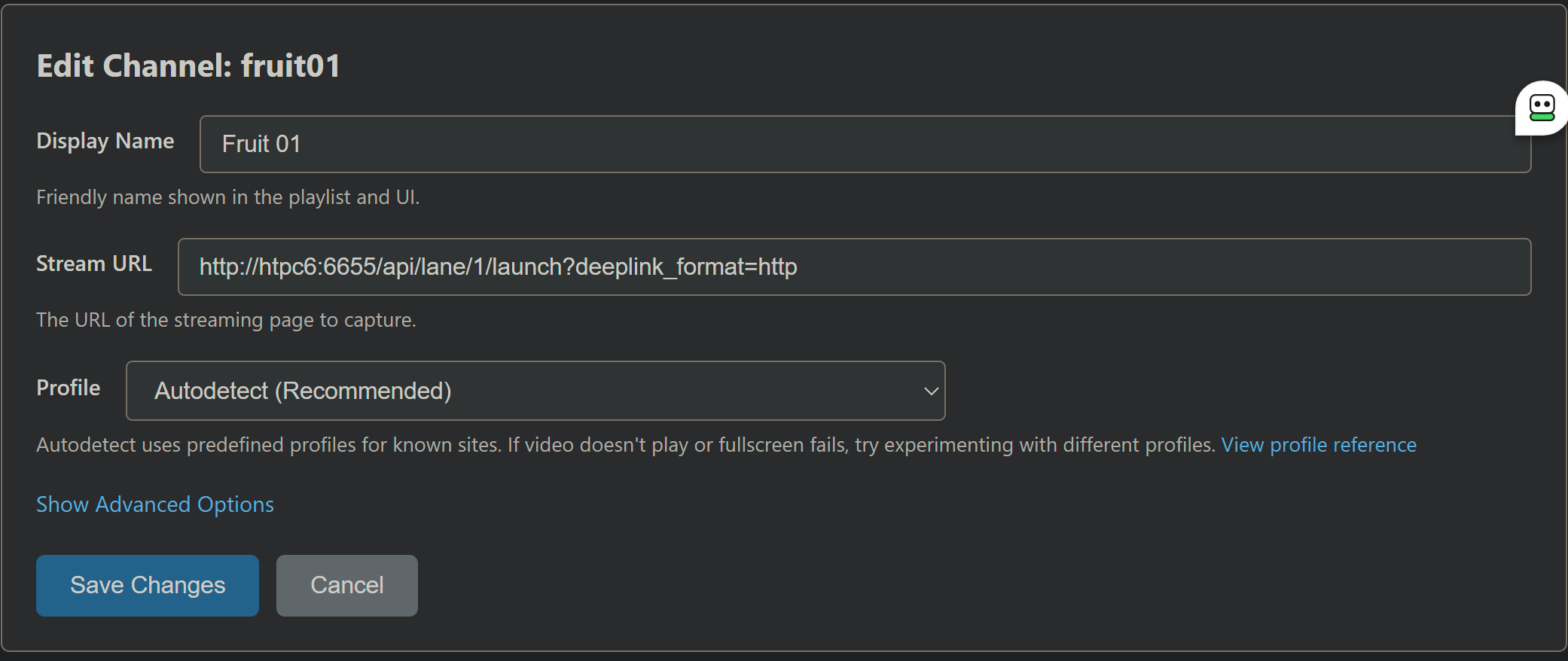
In PrismCast, set up however many lanes you need, in this manner:

You'd replace htpc6, of course, with your the correct hostname or IP for your FruitDeepLinks container.

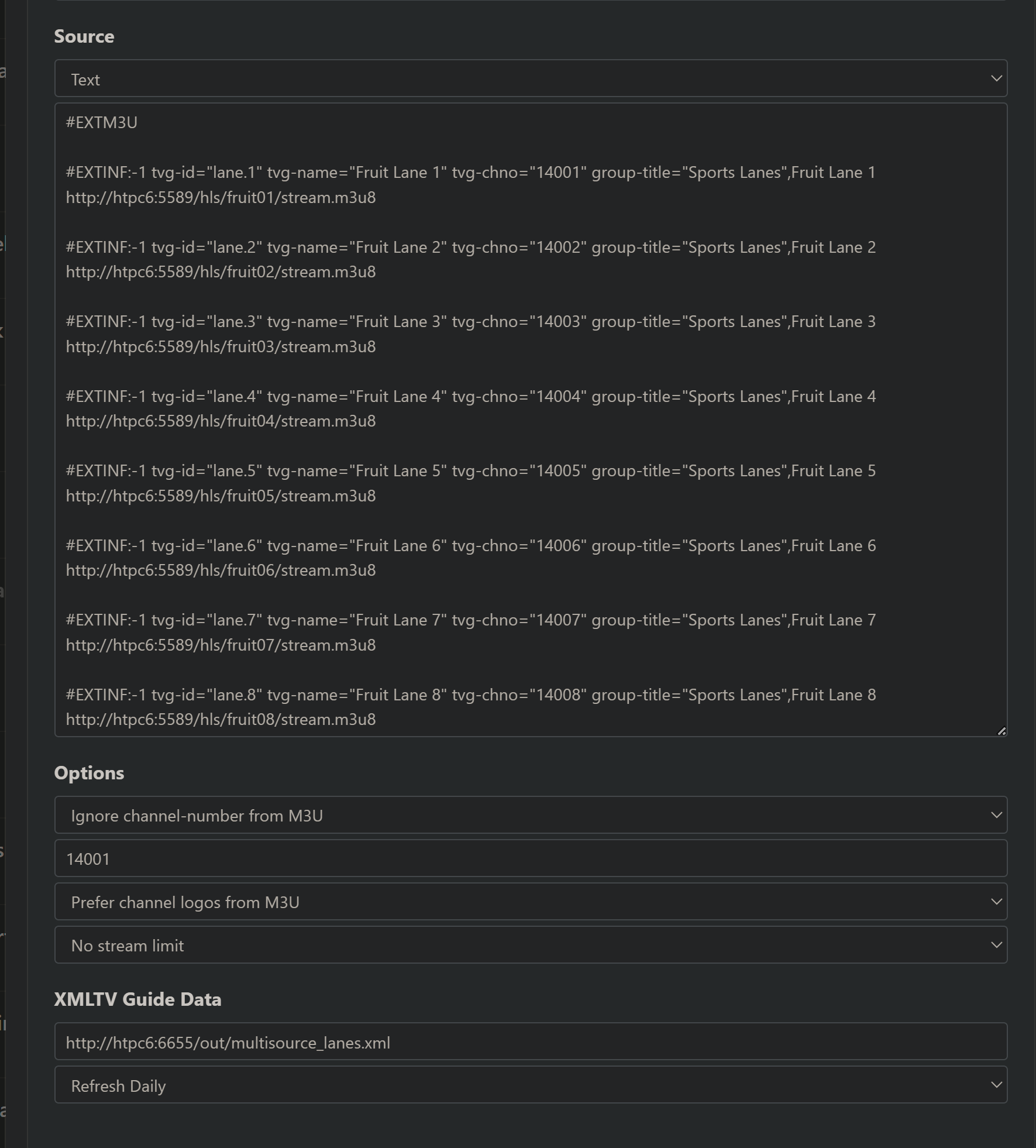
In CDVR, your custom channels source would look like this:

Here, you'd replace the htpc6 with the correct hostname or IP for your PrismCast installation (or container) in the Source Text area -- but as you can see, the XML guide data comes from FruitDeeplinks.

It's very cool when everything is clicking, like it does in ADBTuner. But, the main problem at the moment is getting PrismCast to recognize the stream is working (which I can see in noVNC) -- and pass it along to CDVR.

1 Like

Yup, I have everything setup as you do with the exception of the guide data info. I never thought about the obvious of using the FruitDeepLinks xml. Doh!

1 Like

@daldana7296

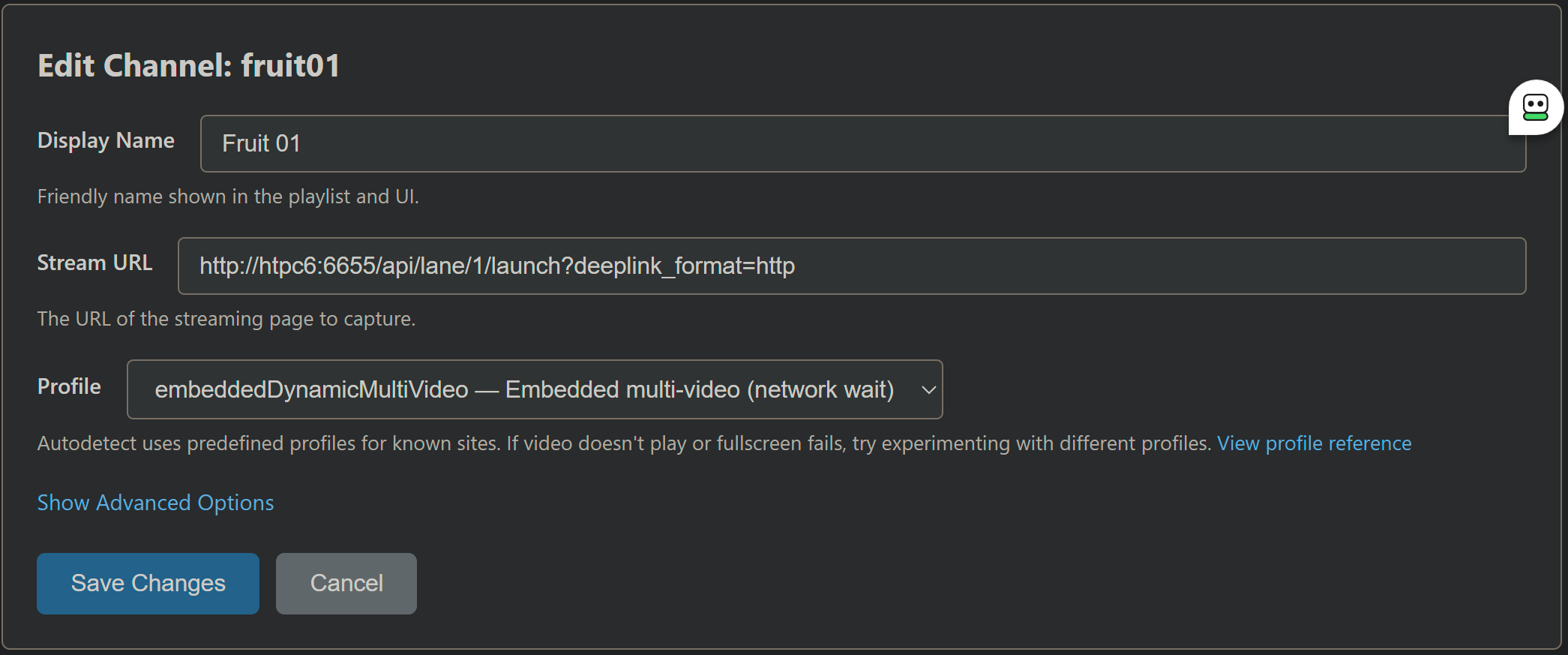
At least for ESPN+, it appears the correct Profile is embeddedDynamicMultiVideo:

If we end up needing different Profiles for the various websites that FruitDeepLinks will be redirecting PrismCast to, we'll need to use something similar to ADBTuner -- where the lanes are by app (or in this case by website).

The ESPN-related channels all work via the disneyplus.com site.I've only bothered to add in ESPN, ESPN2, and ESPNews, but can easily add the rest in the next release if it's of value - honestly didn't think most folks would care for more than what I put in (little did I know, apparently...). :smile:

Coming soon...

If you're not familiar with the FruitDeepLinks concept, think of the channels (or lanes as they're called in the project), as a sort of virtual channel for live events. In other words there is no ESPN channel to add to PrismCast, as there's no corresponding linear channel.

Each event on a given virtual channel (lane) has a unique deeplink, like this one for example:
https://www.espn.com/watch/player/_/id/654daad4-8102-4b4b-a6af-29002d9ddeca

The thing is that PrismCast can't use the URL it has in hand to determine the site, as that URL is a redirect, and that redirect is done by FruitDeepLinks. It's a very slick system when all the pieces are fit together correctly.

Is there an easy way for PrismCast to determine a redirect URL, and use that actual URL to determine the Profile to use?

EDIT: The way ADBTuner handles this is by getting a JSON response from FruitDeepLinks, and then using the URL contained in the JSON response rather than using a redirect. An example in ADBTuner looks like this:

http://htpc6:6655/api/adb/lanes/sportscenter/2/deeplink?format=json&dynamic_url_json_key=deeplink

This part of the query prarameters tells FruitDeepLinks to return a JSON reponse:

?format=json

And, this part is how ADBTuner knows to use it to get the real url from the value named "deeplink" in the JSON response:

&dynamic_url_json_key=deeplink

EDIT2: Here's an example JSON response from another type of query to FruitDeepLinks:

Query:

http://htpc6:6655/whatson/1?include=deeplink&deeplink_format=http

JSON repsonse:

{"at":"2026-02-02T22:39:20","deeplink_url":"https://www.espn.com/watch/player/_/id/975f9b42-a996-4d29-a299-560b60c7b1d6","deeplink_url_full":"https://www.espn.com/watch/player/_/id/975f9b42-a996-4d29-a299-560b60c7b1d6","event_uid":"umc.cse.621cu12ihxb9jc5zzl45o0yw9","lane":1,"ok":true,"title":"PGA Korn Ferry Tour: TGL: Atlanta Drive GC vs. Jupiter Links GC"}

Thanks for elaborating - I have no use/utility for FruitDeepLinks or similar solutions...so bear with me while I get my head around the ask. :smile:

What're you passing to PrismCast currently to try to get this to work? Is it a URL that hits FDL and then redirects to espn.com in your example?

Edit: it never fails to amaze me the lengths people go to for sports programming...color me amused, but I shouldn't really be surprised that FDL-type things exist. It's got to be a bear to maintain with how fragile scraping Apple's sites has to be. :smile: